
1. Introduction
Thank you for choosing the Xnbada WS2812B WS2811 LED Controller. This device is designed to provide versatile and dynamic lighting control for WS2811, WS2812, and SK6812 addressable LED strip lights. With Bluetooth connectivity, a dedicated mobile application, and a 28-key remote control, you can easily customize colors, brightness, and various dynamic lighting modes, including music synchronization. This manual will guide you through the setup, operation, and maintenance of your LED controller.

Figure 1: Xnbada WS2812B WS2811 LED Controller with remote control.
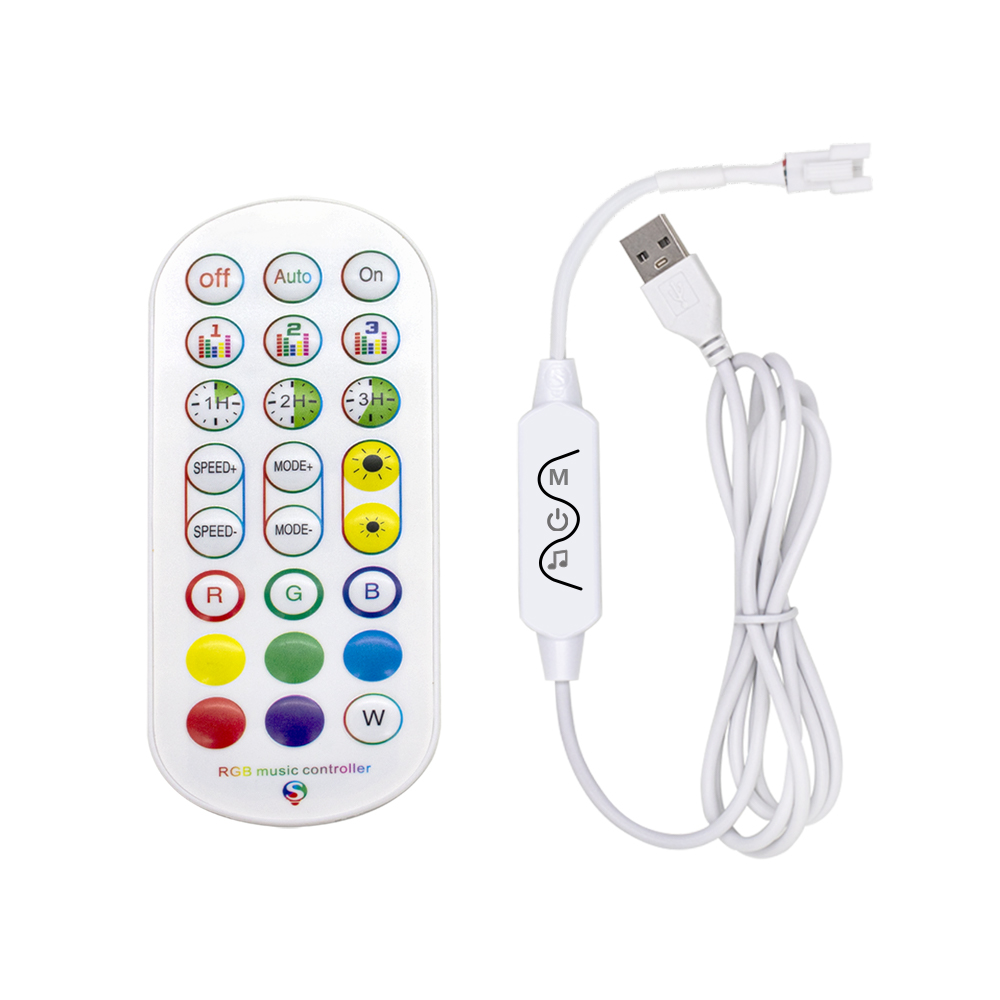
Figure 2: Example of LED strip lighting used for home decoration.
2. Safety Information
Please read all safety instructions carefully before using this product. Failure to follow these instructions may result in electric shock, fire, or other hazards.
- Voltage Compatibility: Ensure that the power supply voltage (DC12-24V) matches the requirements of both the controller and the LED strip lights. Using an incorrect voltage can damage the device and pose a safety risk.
- Proper Connections: Always connect the power adapter to the controller and the LED strip to the controller before plugging the power adapter into an electrical outlet. Ensure all connections are secure.
- Prevent Overheating: Always unroll LED strip lights completely before powering them on. Operating coiled LED strips can lead to excessive heat buildup and potential fire hazards.
- Indoor Use Only: This product is designed for indoor use. Avoid exposure to water, moisture, or extreme temperatures.
- Children and Pets: Keep the device and its components out of reach of children and pets.
- Professional Installation: If you are unsure about any installation steps, consult a qualified electrician.
3. Setup Guide
Follow these steps to set up your Xnbada LED Controller and strip lights.
3.1. Unboxing and Component Identification
Carefully unpack the contents of your package. You should find the following items:
- 1 x LED Strip Light Controller (DC interface)
- 1 x 28-keys Remote Control (with a built-in CR2025 battery)
- Power Adapter (not explicitly listed as included, but shown in videos and implied for DC interface)
- LED Strip Light (sold separately or as part of a kit)
3.2. Power Connection
- Connect the power cable to the power adapter brick.
- Plug the power adapter into a suitable AC outlet. A green indicator light on the power brick should illuminate, confirming power supply.
Video 1: Demonstrates connecting the power supply and LED strip. (Source: Light strip + controller mounting method by whool, Seller)
3.3. LED Strip Connection
- Important: Completely unroll your LED strip light from its reel before connecting it to power. This prevents overheating and potential damage.
- Connect the 3-pin connector of your LED strip light to the corresponding port on the LED controller. Ensure the pins are aligned correctly.
- Connect the DC plug from the power adapter to the DC input port on the LED controller.
3.4. App Installation (Optional)
For advanced control and features, download the companion mobile application:
- Search for "ZENGGE" or "SceneX" in your smartphone's app store (Google Play Store for Android or Apple App Store for iOS).
- Install the application and follow the in-app instructions to pair your controller via Bluetooth.

Figure 3: The mobile application interface for controlling the LED strip lights.
4. Operating Instructions
Control your LED strip lights using the included 28-key remote control or the mobile application.
4.1. Remote Control Functions
The 28-key remote control allows for quick and easy adjustments:

Figure 4: Layout of the 28-key remote control.
- ON/OFF: Power the lights on or off.
- Color Selection: Choose from various static colors (Red, Green, Blue, White, etc.).
- Brightness Adjustment: Increase (B/SPD+) or decrease (B/SPD-) the brightness level.
- Dynamic Modes: Select from 100 built-in jumping modes, rainbow flow, meteor mode, curtain switch mode, and more. Use M+ / M- to cycle through modes.
- Speed Adjustment: Adjust the speed of dynamic modes using the Speed/Brightness Increase (B/SPD+) or Decrease (B/SPD-) buttons.
- Scene Modes (S1-S4): Quickly switch between 4 pre-set scene modes.
- Music Modes (1-4): Activate music synchronization with 4 dedicated music modes.
- Timer: Set the lights to turn off after 30 minutes (30M) or 1 hour (1H).
Video 2: Demonstrates the functions of the RF 14 Keys Controller. (Source: RF 14 Keys Controller by BTF-Lighting, Seller)
4.2. Mobile Application Control
The mobile app offers a more intuitive and comprehensive control experience:
- Color Wheel: Select any color from a full spectrum.
- Brightness & Saturation: Fine-tune brightness and color saturation.
- Dynamic Effects: Access a wider range of dynamic modes (up to 180 effects) with customizable speed and effect length.
- Music Mode: Utilize the built-in microphone on the controller for music synchronization. The app allows adjustment of sensitivity.
- Timer Function: Set custom schedules for turning lights on/off.
- DIY Colors: Create and save your own custom color presets.

Figure 5: The LED controller features a built-in microphone for music sync, controllable via a smartphone app.
Video 3: Shows Bluetooth APP control and music sync features. (Source: ALITOVE WS2812B WS2811 Bluetooth APP Controller Music Sync by ALITOVE, Seller)
5. Maintenance
To ensure the longevity and optimal performance of your LED controller and strip lights, follow these maintenance guidelines:
- Cleaning: Gently wipe the controller and LED strips with a dry, soft cloth. Do not use liquid cleaners or abrasive materials.
- Storage: When not in use for extended periods, store the controller and LED strips in a cool, dry place away from direct sunlight and moisture.
- Connection Checks: Periodically inspect all connections to ensure they are secure and free from corrosion or damage.
- Remote Battery: Replace the CR2025 battery in the remote control when its performance degrades.
6. Troubleshooting
If you encounter issues with your LED controller, refer to the following common problems and solutions:
| Problem | Possible Cause | Solution |
|---|---|---|
| LEDs not turning on | No power to controller/strip; loose connection; incorrect voltage. | Check power adapter connection to outlet and controller. Ensure LED strip is securely connected to controller. Verify power supply voltage matches strip requirements. |
| Remote not working | Dead battery; remote out of range; IR sensor blocked. | Replace CR2025 battery. Ensure remote is pointed towards the controller's IR sensor (if applicable) and within range. |
| App not connecting | Bluetooth off; app not paired; interference. | Ensure Bluetooth is enabled on your smartphone. Re-pair the controller in the app settings. Move closer to the controller. |
| Lights are dim or inconsistent | Insufficient power supply; voltage drop over long strips. | Ensure your power supply provides adequate current (Amps) for the length of your LED strip. For very long strips, consider injecting power at multiple points. |
| Incorrect colors displayed | Color calibration needed. | Use the mobile application's color calibration feature to adjust the color output. |
7. Specifications
Key technical specifications for the Xnbada WS2812B WS2811 LED Controller:
- Rated Voltage: DC 12V-24V
- Connection Method: DC Interface
- Control Methods: Mobile Phone APP Remote Control, 28-keys Remote Control
- Control Range: 40M (Open Area)
- Special Features: Bluetooth controller, Timer, Color Changing
- Light Source Type: LED
- Power Source: DC
- Light Color: Multicolor
- Controller Type: App Control, Remote Control
- Connectivity Protocol: Bluetooth
- Connectivity Technology: Bluetooth
- Material Type: Plastic
- Item Weight: 0.05 Kilograms
8. Warranty & Support
8.1. Warranty Information
This product is covered by a standard 30-day refund/replacement policy. Please refer to your purchase platform for specific terms and conditions regarding returns and exchanges.
8.2. Customer Support
For further assistance, technical support, or inquiries about your Xnbada LED Controller, please contact the seller directly through the platform where you made your purchase or visit the official Xnbada brand store online.