
Introduction
The NEEWER DS007 Overhead Camera Stand Desk Mount Rig is a versatile solution designed for content creators, streamers, and professionals requiring flexible equipment positioning. This rig includes a central column with a desk clamp, three articulating arms, a microphone boom arm, a ball head mount, a laptop clamp, a tablet clamp, and a VESA mount adapter. It allows for the flexible mounting of DSLR cameras, compact cameras, tablets, monitors, ring lights, video light panels, or microphones at various angles and heights. This system is ideal for video recording, live streaming, Zoom calls, online conferences, teaching, and gaming, supporting a maximum load capacity of 17.6lb (8kg).
Setup Instructions
Follow these steps to correctly assemble and set up your NEEWER DS007 Overhead Camera Stand Desk Mount Rig.
Package Contents
Before beginning assembly, ensure all components are present:
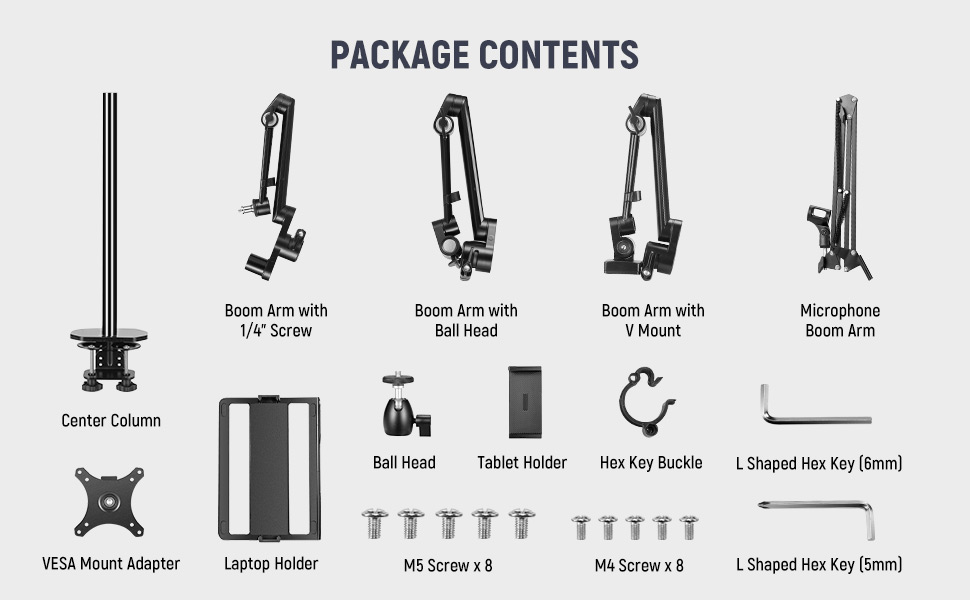
Image: All components included in the NEEWER DS007 package.
- Central Column with Desk Clamp
- Boom Arm with 1/4" Screw (x1)
- Boom Arm with Ball Head (x1)
- Boom Arm with V Mount (x1)
- Microphone Boom Arm (x1)
- Ball Head
- Tablet Holder
- Laptop Holder
- VESA Mount Adapter
- Hex Key Buckle
- L Shaped Hex Key (6mm)
- L Shaped Hex Key (5mm)
- M5 Screws (x8)
- M4 Screws (x8)
Assembly Steps
Refer to the following diagram for a visual guide to the installation process:
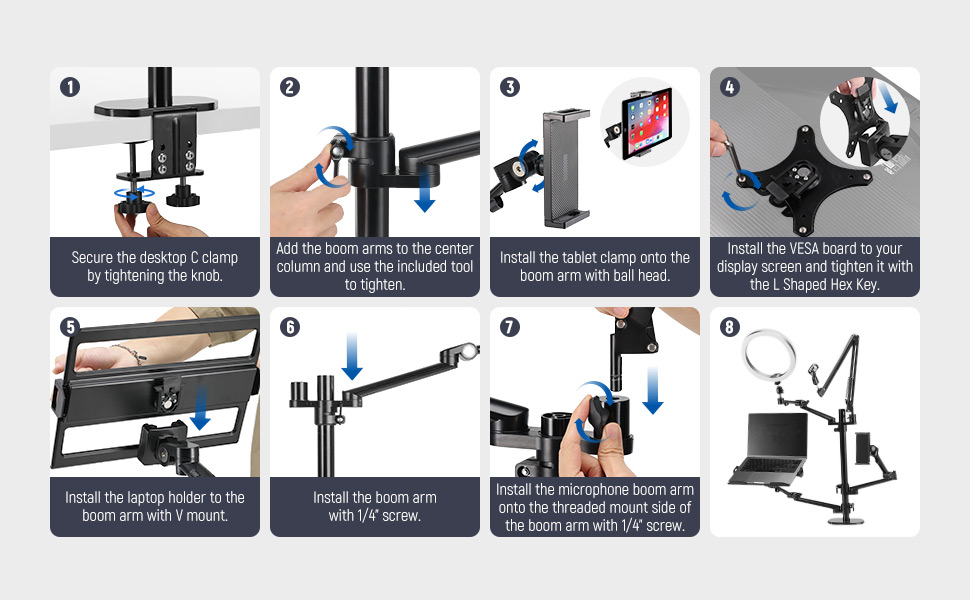
Image: Detailed installation steps for the NEEWER DS007 rig.
- Secure the Desk Clamp: Attach the central column to your desk using the robust desk clamp. Ensure your desk thickness is between 0.4"-2.4" (10-60mm). Tighten the dual screw knobs firmly for maximum stability.
- Attach Boom Arms: Slide the desired boom arms onto the central column. The arms can be secured at any position along the column. Use the included hex key to adjust and tighten the tension at the arm joints as needed.
- Install Mounts: Depending on your equipment, attach the ball head mount, laptop clamp, tablet clamp, or VESA mount adapter to the ends of the boom arms.
- For cameras: Use the ball head mount with a 1/4" screw.
- For tablets: Install the tablet clamp onto a boom arm with a ball head.
- For laptops: Install the laptop holder onto a boom arm with a V mount.
- For VESA monitors: Attach the VESA mount adapter to a boom arm and secure your display. The VESA mount adapter features a quick-release button for easy detachment.
- For microphones: The microphone boom arm has a dedicated mounting thread.
- Connect Devices: Mount your cameras, lights, microphones, laptops, or tablets to the respective holders. Ensure all connections are secure.

Image: The heavy-duty desk clamp securely attached to a desktop.

Image: Details of the tablet, VESA, and laptop mounting options.
Setup Video Guide
Video: An unboxing and setup guide for the NEEWER DS007, demonstrating the assembly process and showcasing its versatility for various devices.
Video: A detailed video demonstrating how to set up the NEEWER DS007 for a streaming studio desktop environment.
Operating Instructions
The NEEWER DS007 rig offers extensive flexibility for positioning your equipment. Understand how to adjust its components for optimal use.
Flexible Arm Positioning
The boom arms are designed for dynamic adjustments:

Image: Angles of rotation and tilt for the boom arms and joints.
- Lower Joints: Rotate booms by 180° around the central column.
- Upper Joints: Rotate booms by 360° around the central column.
- Articulating Arms: Swing 360° and tilt 270°.
- End Screws: Provide 180° tilt (135° tilt between microphone arm sections, and 270° tilt at the end).
- Tension Adjustment: The tension at the arm joints can be adjusted using the provided hex key to ensure stability for your mounted devices.
Cable Management
Maintain a tidy workspace with the integrated cable organizer on the microphone arm. This feature helps conceal tangled wires, allowing for a more focused content creation environment.

Image: The cable organizer in use, keeping cables neat.
Load Capacity
The rig is constructed from sturdy aluminum alloy with a 1.4" (35mm) thickened central column, ensuring durability and supporting a maximum load of 17.6lb (8kg) per crossarm.

Image: The rig demonstrating its high load capacity with a camera mounted.

Image: The NEEWER DS007 rig in action, supporting multiple devices for a versatile setup.
Maintenance
To ensure the longevity and optimal performance of your NEEWER DS007 rig, regular maintenance is recommended:
- Regular Inspection: Periodically check all joints, clamps, and screws for tightness. Over time, vibrations or frequent adjustments may cause components to loosen.
- Washer Check: Inspect plastic washers or spacers at the arm joints. If any show signs of cracking or wear, consider replacing them to maintain arm stability and prevent metal-on-metal friction. Compatible replacement washers can often be found at hardware stores (e.g., 1" OD x 3/4" ID Nylon Washer for flat washers, or beveled faucet washers for conical ones).
- Cleaning: Wipe down the metal surfaces with a soft, dry cloth to remove dust and debris. Avoid using harsh chemicals that could damage the finish.
- Lubrication: If arm movements become stiff, a small amount of silicone-based lubricant can be applied to the moving parts, avoiding contact with any plastic components.
Troubleshooting
If you encounter issues with your NEEWER DS007 rig, refer to the following common problems and solutions:
| Problem | Possible Cause | Solution |
|---|---|---|
| Rig feels wobbly or unstable. | Desk clamp not tightened sufficiently; desk surface is unstable or too thin; arm joints are loose. | Ensure the desk clamp is securely fastened to a sturdy desk within the specified thickness (0.4"-2.4" / 10-60mm). Tighten all arm joints using the hex key. Consider reinforcing thin desks with a wood block if necessary. |
| Boom arm does not hold position or sags. | Arm joint tension is too loose; equipment weight exceeds maximum load capacity; worn plastic washers. | Tighten the tension screws at the arm joints with the hex key. Verify that the total weight of the mounted equipment does not exceed 17.6lb (8kg) per arm. Inspect and replace any cracked or worn plastic washers. |
| Arm cannot be slid along the central column. | Obstruction or debris inside the column; manufacturing defect. | Check for any foreign objects or debris within the central column. If the issue persists and appears to be a manufacturing defect, contact NEEWER customer support. |
| Cables are messy despite using the organizer. | Cables are too long or not properly routed. | Ensure cables are neatly bundled and routed through the designated cable organizer channels. Use cable ties if necessary to manage excess length. |
Specifications
Detailed technical specifications for the NEEWER DS007 Overhead Camera Stand Desk Mount Rig:
| Feature | Detail |
|---|---|
| Brand | NEEWER |
| Model Name | DS007 |
| Model Number | 10102920 |
| Material | Aluminum Alloy |
| Maximum Weight Recommendation | 17.6 Pounds (8 kg) per crossarm |
| Desk Clamp Thickness Range | 0.4" - 2.4" (10mm - 60mm) |
| Central Column Diameter | 1.4" (35mm) |
| Folded Size (Height) | 21.7" (55cm) |
| Item Weight | 176.37 Ounces (approx. 5 kg) |
| Compatible Devices | NEEWER CM27 GL1 PRO, NEEWER 660 PRO II, NEEWER RGB1200, NEEWER A111, Canon cameras, Nikon cameras, Sony cameras, MacBook, iPad, Microsoft Snowball ICE, Blue Yeti, and similar devices. |
| Arm Articulation | Lower Joints: 180° rotation; Upper Joints: 360° rotation; Articulating Arms: 360° swing, 270° tilt; End Screws: 180° tilt (135° mic arm, 270° end) |
Warranty
This NEEWER DS007 Overhead Camera Stand Desk Mount Rig is covered by a 1 Year Manufacturer Warranty. Please retain your proof of purchase for any warranty claims. For specific terms and conditions, refer to the warranty information provided with your product packaging or contact NEEWER customer support.
Support
For further assistance, technical support, or inquiries regarding your NEEWER DS007 Overhead Camera Stand Desk Mount Rig, please visit the official NEEWER website or contact their customer service department. You can often find contact information and FAQs on the manufacturer's website or within the product packaging.
Online Resources:
- Visit the NEEWER Store on Amazon for product information and updates.
- Check the official NEEWER website for comprehensive support and product registration.