
Introduction
The VILTROX 15C RGB LED Panel Light is a versatile and portable lighting solution designed for photography and videography. It offers a wide range of color temperatures, full RGB color control, and various special effects, all controllable via an intuitive smartphone app. Its compact design and built-in rechargeable battery make it ideal for both indoor and outdoor use.
This manual provides detailed instructions on setting up, operating, and maintaining your VILTROX 15C RGB LED Panel Light to ensure optimal performance and longevity.
1. Setup
1.1. Unboxing and Package Contents
Upon opening the package, ensure all components are present:
- VILTROX 15C RGB LED Panel Light
- NP-F550 Battery
- USB Type-C Charging Cable
- Cold Shoe Adapter
- Mini Tripod (may vary by package)
- User Manual

The package includes the VILTROX 15C RGB LED Panel Light, an NP-F550 battery, a USB Type-C charging cable, and a cold shoe adapter for mounting. Some packages may also include a mini tripod.
1.2. Initial Charging
The VILTROX 15C features a built-in 2200mAh rechargeable lithium-ion battery. For first-time use, fully charge the device using the provided USB Type-C cable. A full charge typically takes approximately 2 hours. The light can be powered or charged via the USB Type-C port, making it suitable for both indoor and outdoor photography.
1.3. Mounting the Light
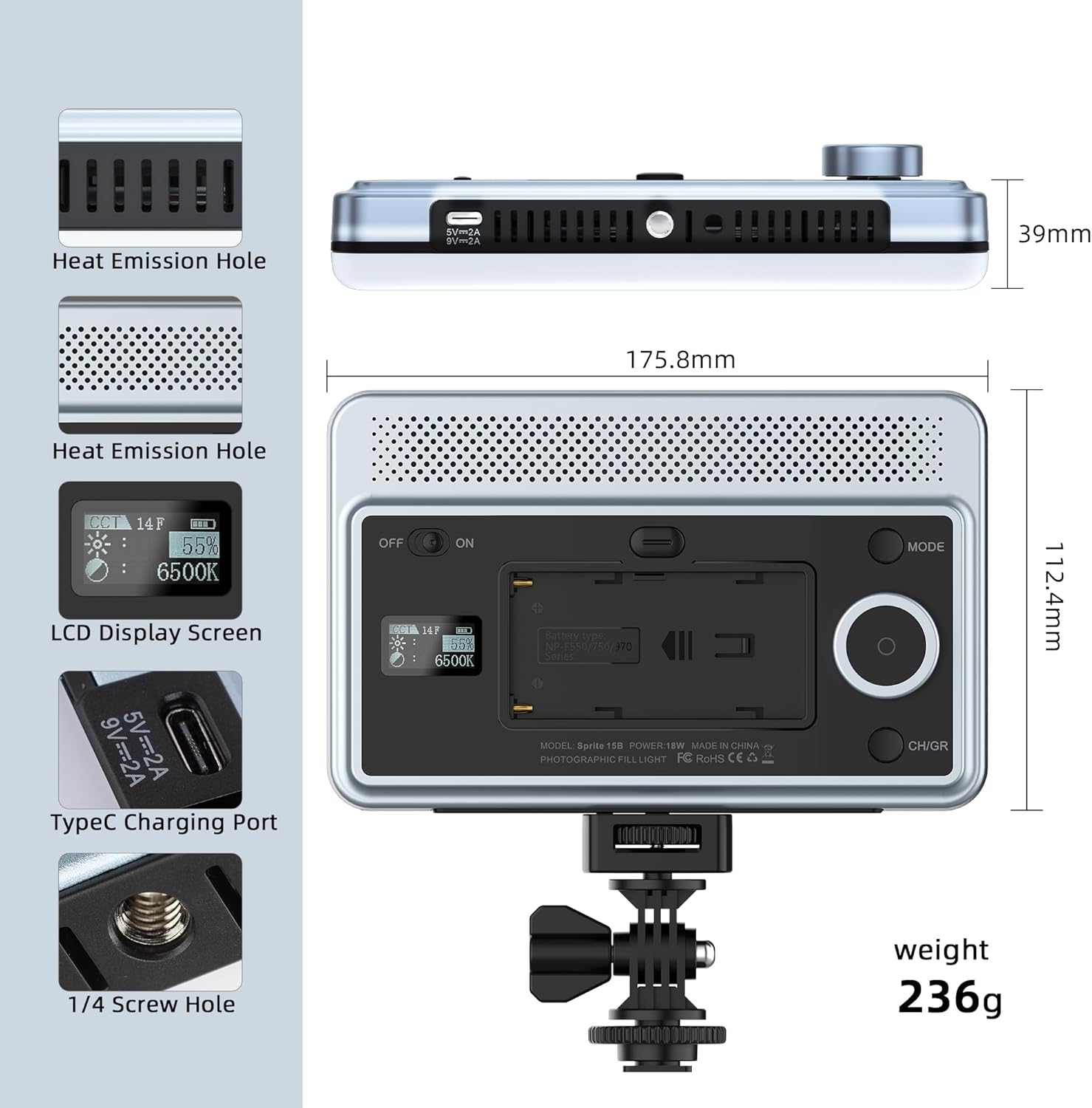
The light is equipped with a 1/4-inch screw hole and comes with a cold shoe adapter for versatile mounting options. This allows for compatibility with a wide range of cameras, tripods, and other photographic accessories.

To attach the cold shoe adapter, screw it into the 1/4-inch thread on the light. The 180° rotatable cold shoe adapter offers additional flexibility for positioning the light.
1.4. Smartphone App Installation
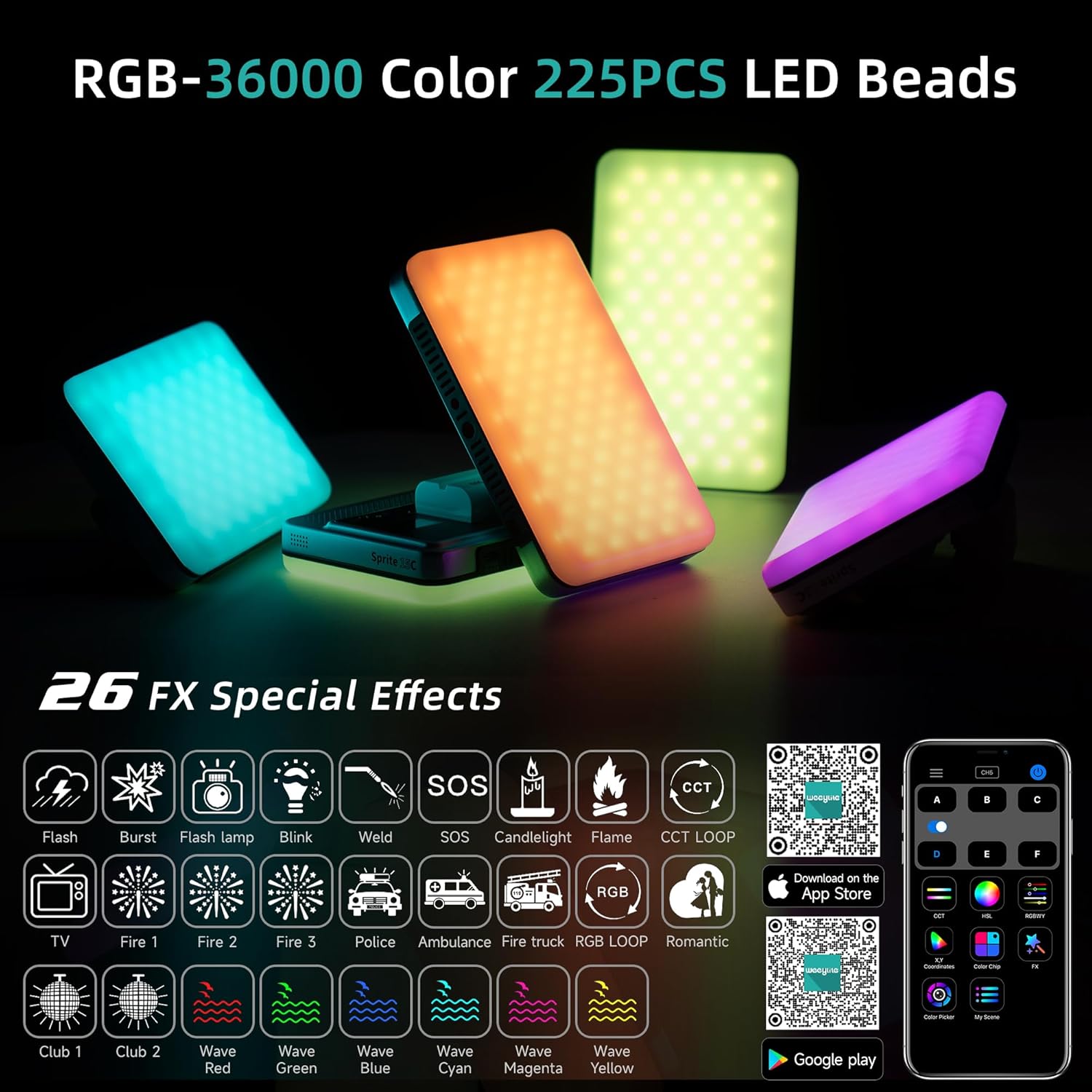
For enhanced control, download the "WeeylitePro" smartphone application. This app allows for easy adjustment of light settings and access to advanced features. The app is available on both the Apple App Store and Google Play Store.
Download the WeeylitePro app:
2. Operation
2.1. Power On/Off
Locate the power switch on the side of the light. Slide the switch to the "ON" position to power on the device. The built-in LCD screen will illuminate, displaying current settings. To power off, slide the switch to the "OFF" position.
2.2. Brightness and Color Temperature Adjustment
The VILTROX 15C offers a color temperature range of 2600K to 6800K and brightness adjustment from 0-100%. Use the control dial and buttons on the light to navigate through settings and make adjustments. The LCD screen provides real-time feedback on parameters.

The high Color Rendering Index (CRI) of 95+ ensures accurate and vivid color reproduction, providing optimal lighting conditions for professional results.

2.3. RGB Full Color and Special Effects
The light offers 360° full-color RGB control and 26 special lighting effects. These effects can be selected and adjusted to create dynamic and creative lighting scenarios for your photography and videography needs.
2.4. Smartphone App Control
The WeeylitePro app provides comprehensive control over the light. You can adjust brightness, color temperature, HSI (Hue, Saturation, Intensity) values, and select from various scene modes. The app also allows for color picking from your phone's camera to match existing light sources.


3. Maintenance
3.1. Cleaning
To clean the VILTROX 15C, use a soft, dry cloth. Avoid using abrasive cleaners or solvents, as these may damage the surface or internal components. Ensure the device is powered off before cleaning.
3.2. Storage
When not in use, store the LED panel light in a cool, dry place away from direct sunlight and extreme temperatures. The advanced heat dissipation design helps ensure a longer lifespan for the light, but proper storage further contributes to its durability.
4. Troubleshooting
If you encounter issues with your VILTROX 15C RGB LED Panel Light, please refer to the following common solutions:
- Light not turning on: Ensure the battery is fully charged. Check that the power switch is firmly in the "ON" position.
- App connectivity issues: Make sure Bluetooth is enabled on your smartphone. Ensure the light is powered on and within range. Restart both the app and the light if necessary.
- Inconsistent light output: Verify that the battery level is sufficient. If using external power, ensure the USB-C cable is securely connected and the power source meets the required specifications.
For more detailed troubleshooting or persistent issues, please contact VILTROX customer support.
5. Specifications
| Feature | Detail |
|---|---|
| Model Number | ZHJYC-03353 |
| Product Dimensions | 6.9 x 4.4 x 1.5 inches (17.5 × 11.2 × 3.9cm) |
| Item Weight | 1.3 pounds (263g) |
| Battery | 1 Lithium Ion battery (2200mAh) |
| Battery Life | Approx. 3 Hours |
| Color Temperature Range | 2600K - 6800K |
| LED Beads | 225 high-quality LED beads |
| Color Rendering Index (CRI) | 95+ |
| Special Lighting Effects | 26 effects |
| Connectivity | Bluetooth (for smartphone control) |
| Charging Port | USB Type-C |
6. Warranty & Support
6.1. Warranty Information
This product comes with a manufacturer's warranty. Please refer to the included warranty card in your package for specific terms and conditions regarding coverage and duration. Protection plans may also be available for extended coverage.
- 2-Year Protection Plan (Optional)
- 3-Year Protection Plan (Optional)
6.2. Customer Support
For any inquiries, technical assistance, or support related to your VILTROX 15C RGB LED Panel Light, please visit the official VILTROX website or contact their customer service department.
Official VILTROX Website: www.viltrox.com