
Philco 1012BT-GR
PHILCO Dual Clock User Manual
Model: 1012BT-GR
Introduction
This manual provides detailed instructions for the operation and maintenance of your PHILCO Dual Clock. Please read this manual thoroughly before using the device to ensure proper function and to prevent damage. Keep this manual for future reference.
Safety Information
- Do not expose the unit to extreme temperatures, direct sunlight, dust, or humidity.
- Do not place the unit on unstable surfaces.
- To reduce the risk of electric shock, do not open the casing. Refer servicing to qualified personnel only.
- Use only the specified power adapter.
- Keep away from water or other liquids.
Package Contents
Please check that all items are present and in good condition:
- PHILCO Dual Clock Unit
- Power Adapter
- User Manual (this document)
Product Overview
Familiarize yourself with the various parts and controls of your PHILCO Dual Clock.
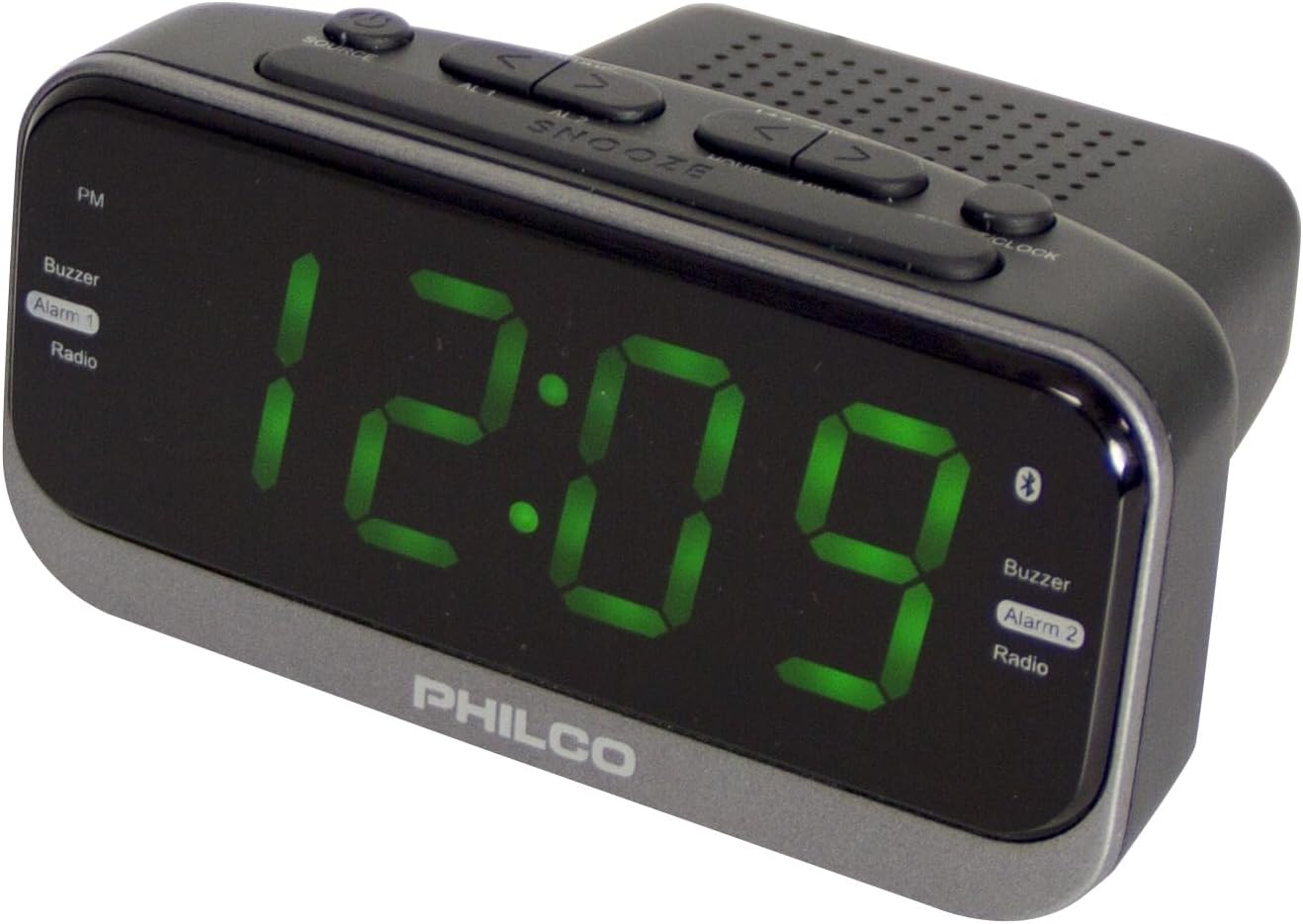
Figure 1: Front and Top View of the PHILCO Dual Clock. This image displays the large green LED time display, along with the various control buttons located on the top panel, including SOURCE, SNOOZE, and time/alarm setting buttons. The PHILCO logo is visible at the bottom front.
Controls and Features:
- 1.2" Green LED Display: Shows time, alarm status, and radio frequency.
- SOURCE Button: Toggles between FM Radio, Bluetooth, and AUX input modes.
- SNOOZE Button: Temporarily silences the alarm; also functions as a dimmer.
- TIME SET Button: Used to set the current time.
- ALARM 1/2 Buttons: Used to set and activate Alarm 1 and Alarm 2.
- TUNING/VOLUME Buttons (< / >): Adjusts radio frequency or volume.
- 2.1A USB Charging Port: For charging external devices.
- FM Antenna: For radio reception.
- Power Input: Connects to the AC power adapter.
- Battery Compartment: For backup batteries (not included).
Setup
1. Power Connection:
- Insert the small end of the power adapter into the DC IN jack on the back of the clock.
- Plug the other end of the power adapter into a standard AC wall outlet.
- The display will light up, indicating the unit is powered on.
2. Battery Backup Installation (Optional):
For backup power during outages, install 2 x AAA batteries (not included) into the battery compartment on the bottom of the unit. Ensure correct polarity (+/-).
3. Setting the Time:
- Press and hold the TIME SET button until the hour digits begin to flash.
- Use the < or > buttons to adjust the hour. Pay attention to the PM indicator if using 12-hour format.
- Press the TIME SET button again to confirm the hour and move to the minute setting. The minute digits will flash.
- Use the < or > buttons to adjust the minutes.
- Press the TIME SET button one more time to save the time and exit time setting mode.
Operating Instructions
Setting Alarms (Alarm 1 and Alarm 2):
The clock features two independent alarms.
- Press and hold the ALARM 1 or ALARM 2 button until the alarm hour digits flash.
- Use the < or > buttons to set the desired alarm hour.
- Press the ALARM 1 or ALARM 2 button again to confirm the hour and move to the minute setting.
- Use the < or > buttons to set the desired alarm minutes.
- Press the ALARM 1 or ALARM 2 button one more time to save the alarm setting and exit.
Activating/Deactivating Alarms:
Briefly press the ALARM 1 or ALARM 2 button to toggle the alarm on or off. The alarm indicator (Alarm 1 or Alarm 2) on the display will show its status.
Snooze Function:
When an alarm sounds, press the SNOOZE button to temporarily silence it for approximately 9 minutes. The alarm will sound again after the snooze period.
Stopping an Alarm:
To stop an alarm completely, press any button other than SNOOZE. The alarm will reset for the next day.
FM Radio Operation:
- Press the SOURCE button repeatedly until "FM" appears on the display.
- Auto Scan: Press and hold the < or > buttons to automatically scan for the next available station.
- Manual Tuning: Briefly press the < or > buttons to fine-tune the frequency step by step.
- Adjusting Volume: Use the < or > buttons when not in tuning mode to adjust the volume.
Saving FM Presets (Example Method):
- Tune to the desired FM station.
- Press and hold the TIME SET button (or a similar button not currently in use for other functions) until a preset number flashes.
- Use the < or > buttons to select the desired preset number (P01-P20).
- Press the TIME SET button again to save the station to the selected preset.
Recalling FM Presets:
Briefly press the TIME SET button (or similar) to cycle through saved presets.
Bluetooth Connectivity:
- Press the SOURCE button repeatedly until "BT" or "Bluetooth" appears on the display and the Bluetooth icon flashes, indicating pairing mode.
- On your mobile device, enable Bluetooth and search for available devices.
- Select "PHILCO Clock" (or similar name) from the list of devices.
- Once paired, the Bluetooth icon on the clock's display will stop flashing and remain solid.
- You can now play audio from your device through the clock's speaker. Use your device's controls for playback (play/pause, skip tracks) and the clock's < or > buttons for volume adjustment.
USB Charging:
Connect your USB charging cable (not included) to the 2.1A USB charging port on the back of the clock and the other end to your device. The clock will provide power to charge your device.
Maintenance
- Cleaning: Wipe the unit with a soft, dry cloth. Do not use abrasive cleaners or solvents.
- Storage: If storing the unit for an extended period, disconnect it from power and remove backup batteries.
Troubleshooting
| Problem | Possible Cause | Solution |
|---|---|---|
| No power/Display off | Power adapter not connected or faulty outlet. | Ensure power adapter is securely plugged into the clock and a working wall outlet. |
| Alarm does not sound | Alarm not activated or set incorrectly. | Verify alarm time is set correctly and the alarm is turned ON (indicator visible). Check alarm volume if set to radio. |
| Poor FM reception | Antenna not extended or interference. | Fully extend the FM wire antenna. Try repositioning the unit for better reception. |
| Bluetooth not pairing | Device too far, Bluetooth not enabled, or incorrect pairing mode. | Ensure the clock is in Bluetooth pairing mode. Keep devices within 10 meters. Disable and re-enable Bluetooth on your device. |
Specifications
- Brand: Philco
- Model Number: 1012BT-GR
- Display Type: 1.2" Green LED Digital
- Power Source: Corded Electric
- Backup Battery: 2 x AAA (not included)
- USB Charging Port: 2.1A
- Radio: Digital FM with 20 Presets
- Connectivity: Bluetooth
- Dimensions: 5.87"W x 2.87"H (approximate)
- Material: Plastic
- Color: Black
Warranty and Support
For warranty information or technical support, please refer to the warranty card included with your product or visit the official Philco website. Keep your purchase receipt as proof of purchase.
For further assistance, you may contact Philco customer service through their official channels. Visit the Philco Store on Amazon for more product information.
Related documents1012BT-GR


Ask a question about this manual
Ask about setup, troubleshooting, compatibility, parts, safety, or missing instructions. Manuals+ will review the question and use this page’s manual context to help answer it.