
Cuifati CUIFATIy2soe3bizm
Cuifati 360 Degree Panoramic Mini Security Camera User Manual
Model: CUIFATIy2soe3bizm
1. Introduction
Thank you for choosing the Cuifati 360 Degree Panoramic Mini Security Camera. This device is designed for indoor surveillance, offering a comprehensive view of your space with its 360-degree panoramic lens. Equipped with two-way intercom functionality, a built-in battery, and flexible mounting options, it provides reliable monitoring for your home, garage, or yard. This manual provides detailed instructions for setup, operation, and maintenance to ensure optimal performance.
2. Package Contents
Please verify that all items listed below are included in your package:
- 1 x Mini Security Camera
- 1 x Charging Cable
- 1 x Bracket
- 1 x Adhesive Tape
- 1 x Ejection Pin
- 3 x Expansion Screws
- 3 x Screws
- 1 x User Manual

Image: All components included in the Cuifati Mini Security Camera package.
3. Product Overview
The Cuifati Mini Security Camera features a flexible gooseneck design, allowing for versatile positioning and a 360-degree ultra-wide angle view. It captures video in 1080p HD resolution and supports two-way audio communication. The camera is powered by a built-in 2000mAh battery and offers local storage via a memory card (up to 256GB, not included) or cloud storage options.

Image: The camera's flexible design enables 360-degree monitoring without blind spots, controlled via a mobile application.

Image: Visual representation of the camera's core functionalities.
4. Setup Guide
4.1 Charging the Camera
Before initial use, fully charge the camera using the provided charging cable. Connect the cable to the camera's charging port and a standard USB power adapter (not included). The built-in 2000mAh lithium battery supports up to 6 hours of continuous recording on a full charge.
4.2 Mounting the Camera
The camera offers flexible mounting options:
- Adhesive Tape: For smooth, clean surfaces, attach the adhesive tape to the bracket and then secure the bracket to your desired location.
- Screws: For more permanent installation on walls or ceilings, use the provided screws and expansion screws with the bracket.
Ensure the camera is positioned to capture the desired area. The flexible gooseneck allows for precise angle adjustments after mounting.
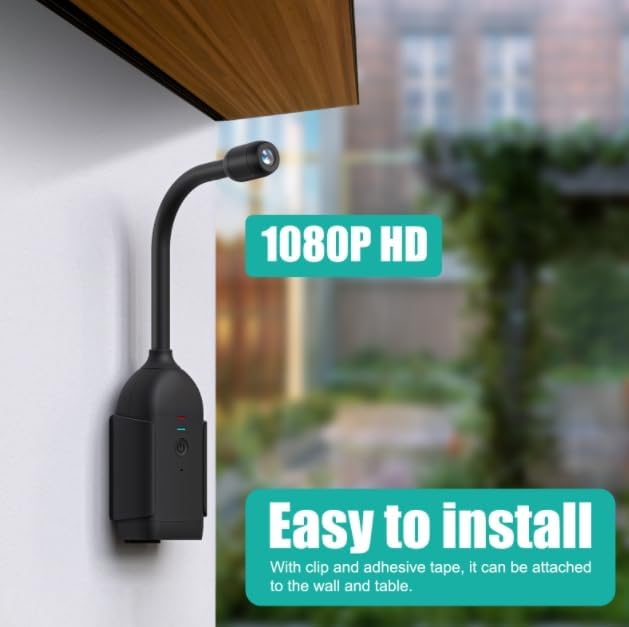
Image: The camera can be easily installed on a wall or table using the provided clip and adhesive tape.
4.3 App Installation and Network Connection
- Download App: Search for the designated security camera app (refer to the packaging or quick start guide for the specific app name) on your smartphone's app store (iOS or Android) and install it.
- Create Account: Open the app and follow the on-screen instructions to create a new user account or log in if you already have one.
- Add Device: Select the option to add a new device. The app will guide you through the process of connecting the camera to your Wi-Fi network. Note: The camera supports 2.4GHz Wi-Fi networks only. Ensure your smartphone is connected to a 2.4GHz network during setup.
- Pairing: Follow the app's instructions, which may involve scanning a QR code on the camera or listening for an audio prompt from the camera to complete the pairing process.
4.4 Memory Card Installation (Optional)
To enable local video storage, insert a microSD card (up to 256GB, not included) into the camera's memory card slot. Ensure the camera is powered off before inserting or removing the card. The ejection pin can be used to access the slot if necessary.
5. Operating Instructions
5.1 Power On/Off
Press and hold the power button on the camera to turn it on or off. An indicator light will confirm the power status.
5.2 Live View and 360-Degree Monitoring
Open the companion app on your smartphone. Select your camera from the device list to access the live video feed. You can digitally pan and tilt the view within the app to explore the entire 360-degree panoramic area. Additionally, the camera's flexible gooseneck allows for physical adjustment of the viewing angle.
5.3 Two-Way Intercom
The camera supports two-way audio communication. In the live view interface of the app, locate the microphone icon. Tap and hold this icon to speak through the camera's speaker. Release the icon to listen for responses. This feature is useful for communicating with family members or deterring intruders.

Image: The two-way intercom allows for real-time voice communication through the camera.
5.4 Recording and Playback
The camera can record video continuously or based on motion detection. Recorded footage can be stored on an inserted microSD card or uploaded to cloud storage (subscription may be required). To view recordings, access the playback section within the app and select the desired date and time.
5.5 Motion Detection and Alerts
Configure motion detection settings in the app. You can define specific monitoring zones within the camera's view to reduce false alarms. When motion is detected, the camera can send push notifications to your smartphone and trigger custom alarm sound alerts. You can also record custom voice messages to play when an alert is triggered.

Image: Customize monitoring areas and receive accurate alerts for specific zones.
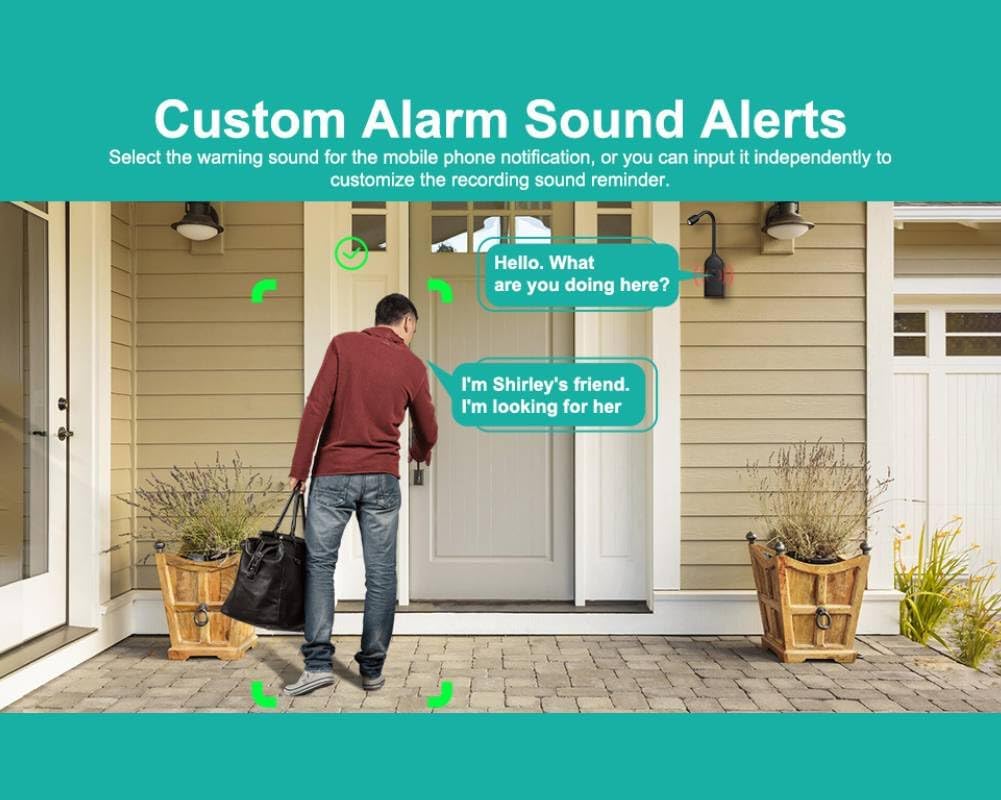
Image: Set custom alarm sounds or record voice reminders for notifications.
6. Maintenance
6.1 Cleaning the Camera
To maintain clear image quality, regularly clean the camera lens with a soft, dry, lint-free cloth. For the camera body, use a slightly damp cloth and avoid harsh chemicals or abrasive cleaners.
6.2 Battery Care
To prolong battery life, avoid exposing the camera to extreme temperatures. If the camera will not be used for an extended period, charge it to approximately 50% before storing.
6.3 Firmware Updates
Periodically check the companion app for available firmware updates. Keeping your camera's firmware up-to-date ensures optimal performance, security, and access to new features.
7. Troubleshooting
- Camera not powering on:
- Ensure the camera is fully charged. Connect it to the charging cable and a power source.
- Cannot connect to Wi-Fi:
- Verify your Wi-Fi network is 2.4GHz. Ensure your smartphone is connected to the same 2.4GHz network during setup. Check Wi-Fi signal strength. Restart your router and the camera.
- No video feed in the app:
- Check your internet connection. Ensure the camera is powered on and connected to Wi-Fi. Restart the app and the camera.
- Two-way intercom not working:
- Check microphone and speaker permissions for the app on your smartphone. Ensure the camera's microphone and speaker are not obstructed.
- Recording issues:
- If using a microSD card, ensure it is correctly inserted, formatted, and has sufficient free space. Check cloud storage subscription status if applicable.
8. Specifications
| Feature | Detail |
|---|---|
| Item Type | Mini Security Camera |
| Material | Plastic, Electronic Components |
| Video Resolution | 1920x1080 (1080p) |
| Video Format | MP4 |
| Recording Angle | 360 Degree Panoramic |
| Memory Card Storage | Up To 256GB (Card Not Included) |
| Battery Type | Inbuilt 2000mAh Lithium Battery |
| Power Source | Battery Powered |
| Connectivity Protocol | Wi-Fi (2.4GHz only) |
| Mounting Type | Wall Mount |
| Number of Channels | 2 (Two-way audio) |
| Form Factor | Dome (Flexible Gooseneck) |
| Frame Rate | 30 frames per second |
| Wattage | 5 watts |
| Water Resistance Level | Not Water Resistant |
| Focus Type | Manual Focus |
| Low Light Technology | Night Color |
| Zoom Type | Digital Zoom |
| Alert Type | Motion Only |
| Light Source Type | Infrared |
| Photo Sensor Technology | CMOS |
| International Protection Rating | IP54 |
| Control Method | App |
| Smart Home Compatibility | Smart Home Compatible |
| Item Weight | 10.2 ounces |
| Model Number | CUIFATIy2soe3bizm |
| Indoor/Outdoor Usage | Indoor |
9. Warranty and Support
9.1 Warranty Information
The Cuifati Mini Security Camera comes with a standard manufacturer's warranty. Please refer to the warranty card included in your package or the retailer's website for specific terms and conditions regarding warranty coverage and duration.
9.2 Customer Support
For technical assistance, troubleshooting, or any questions regarding your Cuifati Mini Security Camera, please contact our customer support. Refer to your purchase documentation or the manufacturer's official website for the most up-to-date contact information.
Ask a question about this manual
Ask about setup, troubleshooting, compatibility, parts, safety, or missing instructions. Manuals+ will review the question and use this page’s manual context to help answer it.