
1. Introduction
Thank you for choosing the Wonder WJ12600E Dishwasher. This manual provides essential information for the safe and efficient operation, installation, and maintenance of your appliance. Please read these instructions carefully before using the dishwasher and retain them for future reference.

Image 1.1: Wonder WJ12600E Dishwasher integrated into a kitchen.
2. Safety Information
Always follow basic safety precautions when using electrical appliances to reduce the risk of fire, electric shock, and injury to persons. This appliance is intended for household use only.
- Ensure the dishwasher is properly grounded.
- Do not operate the dishwasher if it is damaged. Contact authorized service personnel.
- Keep children away from the dishwasher, especially when the door is open.
- Use only detergents and rinse aids specifically designed for automatic dishwashers.
- Do not touch the heating element during or immediately after use.
- Sharp items should be loaded with points down to prevent injury.
- The anti-flood system helps prevent water leaks. Regularly check hoses for damage.
3. Product Overview
3.1. Main Components
The Wonder WJ12600E dishwasher is designed for efficient dish cleaning with a capacity for 12 place settings. Key components include:
- Upper Basket: For delicate items, glasses, and smaller plates.
- Lower Basket: For larger plates, pots, and pans.
- Cutlery Basket: For forks, knives, and spoons.
- Detergent Dispenser: For dishwasher detergent.
- Rinse Aid Dispenser: For rinse aid to improve drying and shine.
- Salt Container: For dishwasher salt to soften water.
- Filters: Located at the bottom of the wash tub to collect food particles.
- Spray Arms: Two spray arms (upper and lower) distribute water during the wash cycle.

Image 3.1: Interior layout of the dishwasher, showing baskets.
3.2. Control Panel
The electronic control panel allows for easy program selection and monitoring.
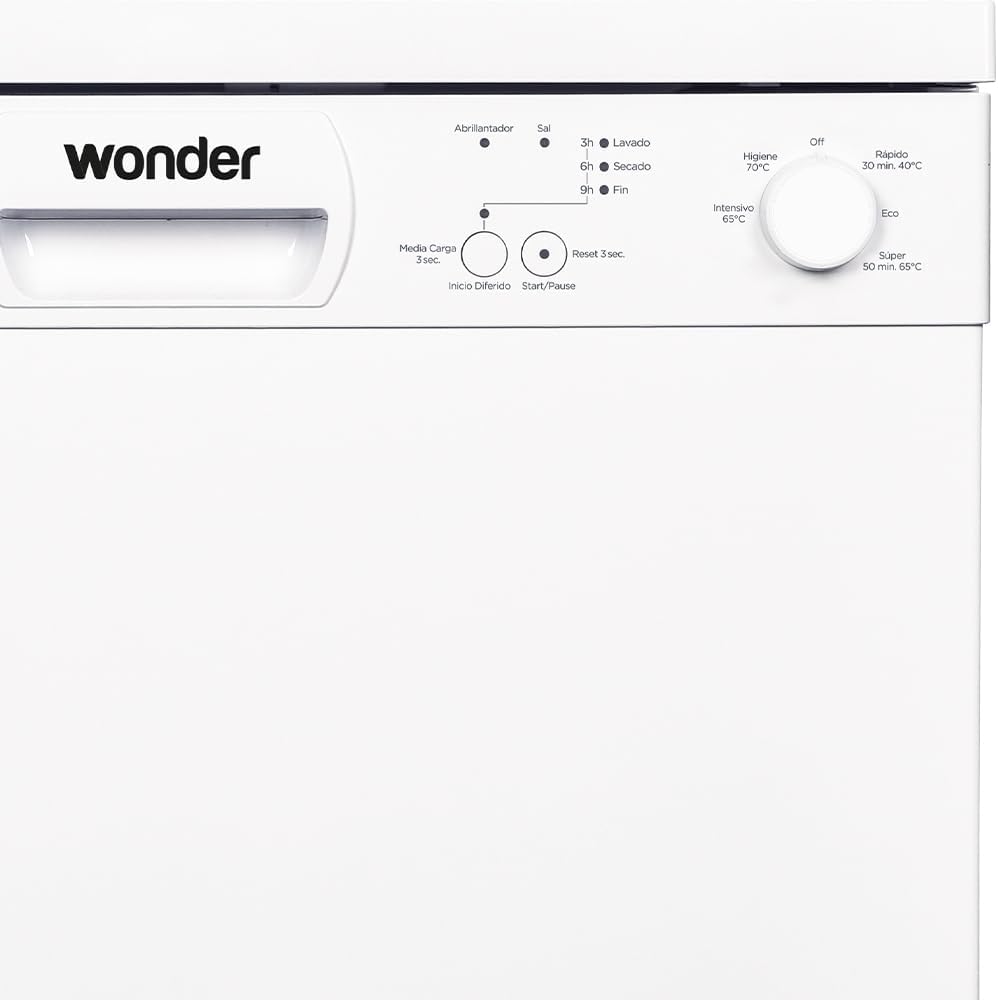
Image 3.2: Detailed view of the control panel.
- Program Selector Dial: Used to choose one of the 5 wash programs.
- Indicator Lights:
- Rinse Aid Indicator: Illuminates when rinse aid needs refilling.
- Salt Indicator: Illuminates when dishwasher salt needs refilling.
- Wash Indicator: Illuminates during the wash cycle.
- Drying Indicator: Illuminates during the drying phase.
- End Indicator: Illuminates when the program is complete.
- Start/Pause Button: To start or pause a wash cycle.
- Stop&Go Function: Allows pausing and resuming the cycle.
- Half Load (Media Carga) Button: For washing smaller loads.
- Delayed Start (Inicio Diferido) Button: To set a delayed start for the wash cycle.
- Reset Button (3 sec): To cancel a program.
4. Installation
Proper installation is crucial for the dishwasher's performance and safety. It is recommended that installation be performed by a qualified technician.
4.1. Positioning the Appliance
The dishwasher should be placed on a level, stable surface. Ensure there is adequate space for opening the door and for water and electrical connections.

Image 4.1: Dishwasher dimensions for installation planning.
4.2. Water Connection
- Connect the water inlet hose to a cold water supply tap.
- Ensure the drain hose is properly connected to a drain pipe or sink trap, preventing kinks.
- The anti-flood system requires correct water pressure.
4.3. Electrical Connection
- Connect the dishwasher to a grounded electrical outlet.
- Verify that the voltage and frequency match the specifications on the rating plate.
- Do not use extension cords or multiple adapters.
5. Setup and First Use
5.1. Filling the Salt Dispenser
The salt dispenser should be filled with special dishwasher salt to soften hard water, preventing limescale deposits on dishes and inside the appliance. The salt indicator light on the control panel will illuminate when refilling is needed.
- Unscrew the cap of the salt container located at the bottom of the wash tub.
- Pour approximately 1 liter of water into the container (only for the first use).
- Using a funnel, add dishwasher salt until the container is full.
- Screw the cap back on tightly.
5.2. Filling the Rinse Aid Dispenser
Rinse aid helps dishes dry faster and prevents water spots. The rinse aid indicator light will signal when it needs refilling.
- Open the rinse aid dispenser cover.
- Carefully pour rinse aid into the dispenser until it reaches the maximum level indicator.
- Close the cover securely.
5.3. Adding Detergent
Use only automatic dishwasher detergent. The amount of detergent depends on the program and soil level.
- Open the detergent dispenser cover.
- Add the recommended amount of detergent into the main wash compartment.
- Close the dispenser cover firmly until it clicks.
6. Operating Instructions
6.1. Loading the Dishwasher
Scrape off large food particles before loading. Do not pre-rinse dishes excessively, as this can affect detergent effectiveness.
- Place glasses, cups, and smaller items in the upper basket.
- Load larger items like plates, bowls, and pots in the lower basket.
- Place cutlery in the cutlery basket with handles down for forks and spoons, and handles up for knives (for safety).
- Ensure spray arms can rotate freely and are not blocked by dishes.
6.2. Program Selection
Turn the program selector dial to choose the desired wash program. The dishwasher offers 5 programs:
| Program | Description | Recommended Use |
|---|---|---|
| Intensive (Intensivo 65°C) | For heavily soiled dishes, pots, and pans. | Dried-on food, stubborn stains. |
| Eco (Económico) | Standard program for normally soiled daily dishes, most efficient in terms of energy and water consumption. | Normal daily use. |
| Rapid (Rápido 30 min, 40°C) | A shorter program for lightly soiled dishes that do not need drying. | Lightly soiled items, quick wash. |
| Super (Super 50 min, 65°C) | A faster program for normally soiled dishes with drying. | Normally soiled items, faster cycle. |
| Hygiene (Higiene 70°C) | High-temperature wash for maximum hygiene. | Baby bottles, cutting boards, heavily soiled items requiring sanitization. |
6.3. Starting a Wash Cycle
- Ensure the dishwasher door is securely closed.
- Select the desired program using the dial.
- Press the Start/Pause button. The wash indicator light will illuminate.
- To use the Stop&Go function, press the Start/Pause button during a cycle. The dishwasher will pause. Press again to resume.
- To cancel a program, press and hold the Reset button for 3 seconds.
7. Maintenance
Regular maintenance ensures optimal performance and extends the lifespan of your dishwasher.
7.1. Cleaning the Filters
The filter system (metal filter) should be cleaned regularly to prevent blockages and ensure effective washing.
- Turn off and unplug the dishwasher.
- Remove the lower basket.
- Twist and lift out the filter assembly from the bottom of the wash tub.
- Separate the coarse and fine filters.
- Rinse all filter components under running water to remove food particles. Use a brush if necessary.
- Reassemble the filters and place them back into the dishwasher, ensuring they are securely locked.
7.2. Cleaning the Spray Arms
Check the spray arm nozzles for blockages. If necessary, remove the spray arms and clean the holes with a thin object.
7.3. Exterior and Interior Cleaning
- Wipe the exterior with a damp cloth and mild detergent.
- Clean the door seal regularly to remove food residue.
- Run a dishwasher cleaning cycle periodically using a specialized dishwasher cleaner.
8. Troubleshooting
Before contacting service, refer to the following table for common issues and solutions.
| Problem | Possible Cause | Solution |
|---|---|---|
| Dishwasher does not start. | Power cord not plugged in; door not closed properly; program not selected. | Check power connection; ensure door is latched; select a program and press Start. |
| Dishes are not clean. | Filters clogged; spray arms blocked; insufficient detergent; incorrect program. | Clean filters; ensure spray arms rotate freely; add more detergent; select a more intensive program. |
| Water remains in the tub. | Drain hose kinked or blocked; filter clogged. | Check and clear drain hose; clean filters. |
| White spots on dishes. | Insufficient salt or rinse aid; water hardness setting incorrect. | Refill salt/rinse aid; adjust water hardness setting (refer to full manual for details). |
| Excessive noise. | Dishes rattling; foreign object in pump; improper installation. | Rearrange dishes; check for foreign objects; ensure dishwasher is level. |
9. Specifications
Key technical specifications for the Wonder WJ12600E Dishwasher:
- Model: WJ12600E
- Capacity: 12 Place Settings
- Dimensions (W x D x H): 59.8 x 59.8 x 85 cm
- Weight: 41 kg
- Power: 1900W
- Voltage: 220V
- Noise Level: 52 dB
- Energy Efficiency Class: E
- Water Consumption (Eco program): 12.0 liters/cycle
- Energy Consumption (Eco program): 0.923 kWh/cycle
- Number of Programs: 5 (Intensive, Eco, Rapid, Super, Hygiene)
- Special Functions: Stop&Go, Super Active Drying, Anti-flood system
- Material: Stainless Steel (interior), White finish (exterior)

Image 9.1: Summary of key dishwasher features.
9.1. Energy Label Information
For detailed energy information, refer to the official EU energy label and product information sheet.

Image 9.2: EU Energy Label for model WJ12600E.
Further details can be found on the EPREL database: https://eprel.ec.europa.eu/qr/1612216
10. Warranty and Support
Your Wonder WJ12600E Dishwasher comes with a manufacturer's warranty.
- Warranty Period: 36 months from the date of purchase.
- Customer Service Email: info@wonderelectro.com
- Customer Service Phone: 960 600 034
- Manufacturer: Wonder
- Manufacturer Address: Avd. del Este 34, 30100 Murcia, España
Please retain your proof of purchase for warranty claims. For technical assistance or spare parts, contact Wonder customer service.


