
Introduction
This manual provides instructions for the Fantovpha RC39105 RM-C3332 Remote Control. This remote is designed as a replacement or secondary control unit for various Smart TV models, including those from Bush, Telefunken, Finlux, Edenwood, Grandin, Hitachifor, Prosonic, and Vestel, specifically compatible with models like XF22G10. It features an ergonomic design and soft buttons for comfortable use. Please read this manual carefully before using the remote control.
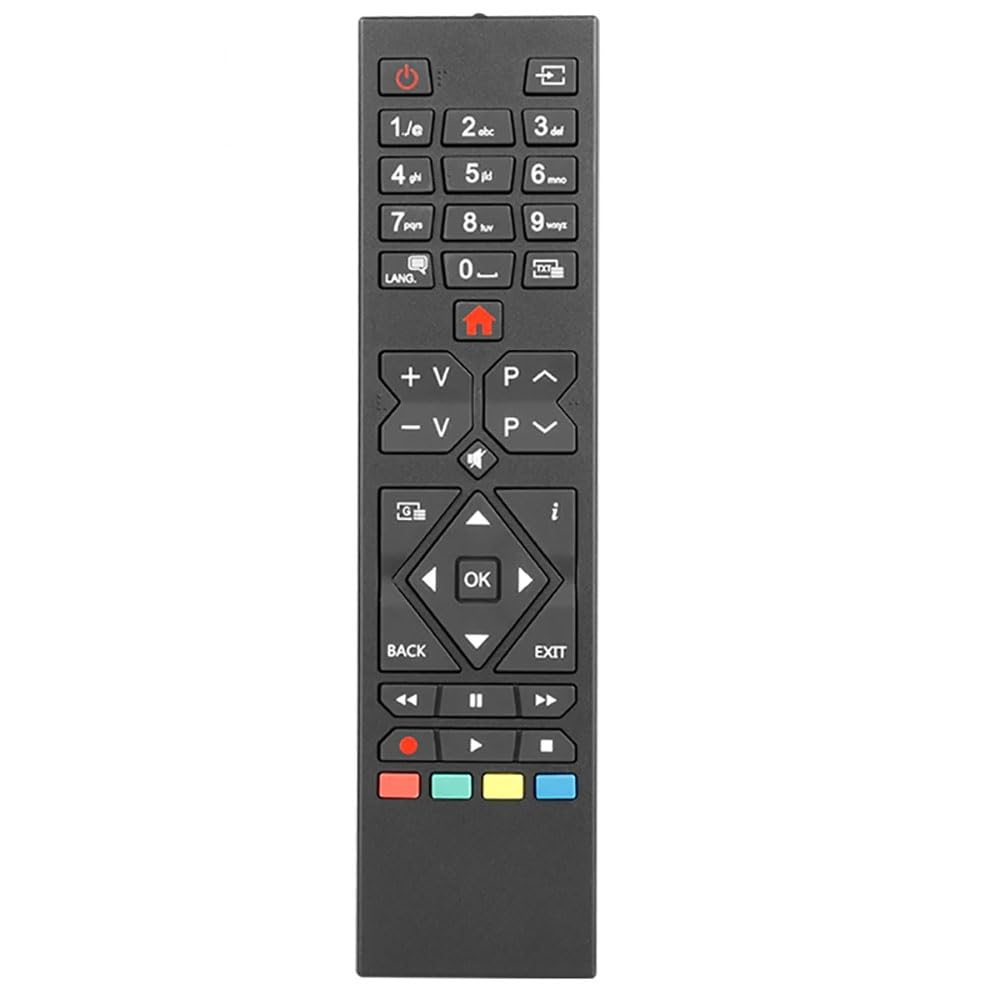
Image: Front view of the RC39105 remote control, showing its length of approximately 19 cm (7.48 inches) and width of 4.6 cm (1.81 inches).
Setup
Battery Installation
The RC39105 remote control requires two AAA batteries (not included) for operation. Follow these steps to install the batteries:
- Locate the battery compartment cover on the back of the remote control.
- Gently slide the cover downwards or press the latch (if present) to open the compartment.
- Insert two AAA batteries, ensuring that the positive (+) and negative (-) terminals align correctly with the markings inside the compartment. Incorrect insertion can prevent the remote from functioning.
- Slide the battery compartment cover back into place until it clicks securely.

Image: Rear view of the remote control with the battery cover removed, showing the two AAA battery slots.
Operating Instructions
The RC39105 remote control is designed for intuitive operation. Point the remote directly at your television's infrared receiver for optimal performance. The remote features a standard layout for TV functions.

Image: Detailed front view of the RC39105 remote control, highlighting the layout of all buttons.
Key Functions Overview:
- Power Button (⏻): Turns the TV on or off.
- Numeric Keypad (0-9): For direct channel input.
- Volume Up/Down (V+/V-): Adjusts the television volume.
- Channel Up/Down (P^/P<): Changes television channels.
- Mute Button (🔇): Mutes or unmutes the television audio.
- Navigation Buttons (Up, Down, Left, Right, OK): Used for menu navigation and selection.
- Back/Exit Buttons: Returns to the previous menu or exits the current menu.
- Colored Buttons (Red, Green, Yellow, Blue): These buttons typically correspond to specific functions within Smart TV applications or teletext, as indicated on your TV screen.
- Media Control Buttons (Play, Pause, Stop, Rewind, Fast Forward): For controlling media playback.
- Home Button (🏠): Accesses the Smart TV's home screen or main menu.

Image: Diagram illustrating key features of the RC39105 remote, including soft buttons for comfortable use and an ergonomic design for easy grip.
Maintenance
Cleaning
To maintain the remote control's appearance and functionality:
- Wipe the surface with a soft, dry cloth.
- For stubborn dirt, lightly dampen the cloth with water or a mild, non-abrasive cleaner.
- Do not use harsh chemicals, solvents, or abrasive cleaning pads, as these can damage the remote's finish or internal components.
Storage
When not in use for extended periods, remove the batteries to prevent leakage, which can damage the remote control. Store the remote in a cool, dry place away from direct sunlight and extreme temperatures.
Troubleshooting
If you experience issues with your RC39105 remote control, please refer to the following common problems and solutions:
- Remote not responding:
- Check if the batteries are inserted correctly with the correct polarity (+/-).
- Replace old batteries with new ones.
- Ensure there are no obstructions between the remote control and the TV's infrared sensor.
- Make sure you are within the effective operating range of the TV.
- Some buttons not working:
- This could indicate a specific button malfunction or a compatibility issue with a particular TV function. Verify if other buttons work.
- Clean the remote control, especially around the non-working buttons, to ensure no debris is interfering.
- Limited functionality with your TV:
- While this remote is broadly compatible, specific advanced functions of certain Smart TV models might not be fully supported. Refer to your TV's original manual for its specific remote control features.
Specifications
| Model Number | RC39105 |
| Material | ABS |
| Dimensions (Approx.) | 19 cm x 4.6 cm (7.48 inches x 1.81 inches) |
| Net Weight (Approx.) | 71g (1.6 ounces) |
| Power Source | 2 x AAA Batteries (Not Included) |
| Special Features | Ergonomic Design, Soft Buttons |
| Compatible Devices | Television (Various Smart TV models including Bush, Telefunken, Finlux, Edenwood, Grandin, Hitachifor, Prosonic, Vestel) |
| Controller Type | Button Control |
Warranty
Specific warranty information for this product may vary depending on the retailer and region of purchase. Please retain your proof of purchase and contact the seller or retailer directly for details regarding warranty coverage and claims.
Support
For further assistance or inquiries regarding your Fantovpha RC39105 RM-C3332 Remote Control, please contact the retailer or the point of purchase. They will be able to provide product support and guidance.