

1. Introduction
The IPOTOOLS FLUX-135 is a versatile 3-in-1 inverter welding machine designed for both hobbyists and professionals. It combines gasless flux-cored welding, MMA (Manual Metal Arc) electrode welding, and a synergic function in a compact and portable unit. Weighing only 3.9 kg, it offers maximum freedom of movement for use in workshops, garages, or outdoors.
This manual provides essential information for the safe and efficient operation, setup, and maintenance of your FLUX-135 welding machine. Please read it thoroughly before initial use.

Image: The IPOTOOLS FLUX-135 welding machine, a compact and portable unit.
2. Safety Instructions
Caution: Improper use of a welding machine can lead to injuries or death. Always adhere to safety guidelines.
- Connect the welding machine only to a reliable power source. Refer to the welding machine's nameplate for power specifications. When welding outdoors, use only an extension cord designed for outdoor use.
- Operate the device only on a dry, non-slip surface. Ensure the work area is clean, tidy, and free of flammable materials.
- Always wear clean work clothing, free of grease or oil stains, when operating the device.
- Ensure cables do not come into contact with oil or grease and are not wrapped around your shoulders.
- Do not overload the device. Safe operation requires understanding the machine's capabilities.
- The welding arc must never touch a pressurized gas cylinder.
- The uninsulated part of the electrode holder must never touch the ground during current flow.
- Always switch off the device and unplug all cables during repairs and adjustments. Check your device before each use. Use only original spare parts.
- Always follow the manufacturer's instructions for settings and modifications to the device.
- When working with the device, always wear non-flammable protective clothing and appropriate footwear to protect against heat and flames. Welding clothing should be made of high-performance fibers, dry, clean, not too loose, and without cutouts or pockets. Shoes should be closed and high.
- The use of non-flammable gloves, head coverings, protective masks, shields, and leather aprons is mandatory. Low boots and short gloves are not suitable for welding.
- Always wear a welding mask with appropriate eye protection during welding. Ensure adequate protection even under the welding mask, as sparks can occur.
- Pay attention to hot metal parts, especially when welding overhead. Always wear non-flammable head, hand, foot, and body protection.
- Always have a fire extinguisher readily available in the work area.
- Never exceed the device's duty cycle. The estimated welding cycle is a percentage of a ten-minute period, indicating how long the machine can operate at a given output power.
- Ensure no children, animals, or third parties are in the work area. Store all parts of the device out of reach of children.
- Protect yourself against electric shock. Do not work if you are tired or under the influence of medication, alcohol, or other prohibited substances. Do not allow your body to come into contact with grounded surfaces.

Image: General safety warnings for welding operations.
3. Product Overview and Components
The IPOTOOLS FLUX-135 features a clear digital display and intuitive controls for precise welding adjustments.
3.1 Front Panel Controls and Indicators
- Digital Display: Shows welding current (Amperage) and voltage.
- Current/Wire Feed Speed Knob: Continuously adjustable from 20-135 A.
- Voltage Adjustment Knob: Allows fine-tuning of voltage (deviation +/- 10V).
- Mode Selection Button: Switch between FLUX (0.8mm or 1.0mm wire) and E-Hand (MMA) welding modes.
- Overload Indicator: Illuminates if the machine is overloaded.
- Positive (+) and Negative (-) Terminals: For connecting welding cables.
- 2-Pin Connector: For the FLUX torch or negative connection.

Image: Front panel of the FLUX-135, highlighting key features like flux-cored welding, MMA, digital display, and inverter technology.

Image: Detailed view of the control panel, showing wire drive/amperage, voltage, mode selection, overload indicator, and digital display.
3.2 Included Components
The IPOTOOLS FLUX-135 typically includes:
- IPOTOOLS FLUX-135 Welding Machine
- Flux-Cored Welding Torch
- MMA Electrode Holder
- Ground Clamp
- User Manual
- Small spool of flux-cored wire (check packaging for exact contents)
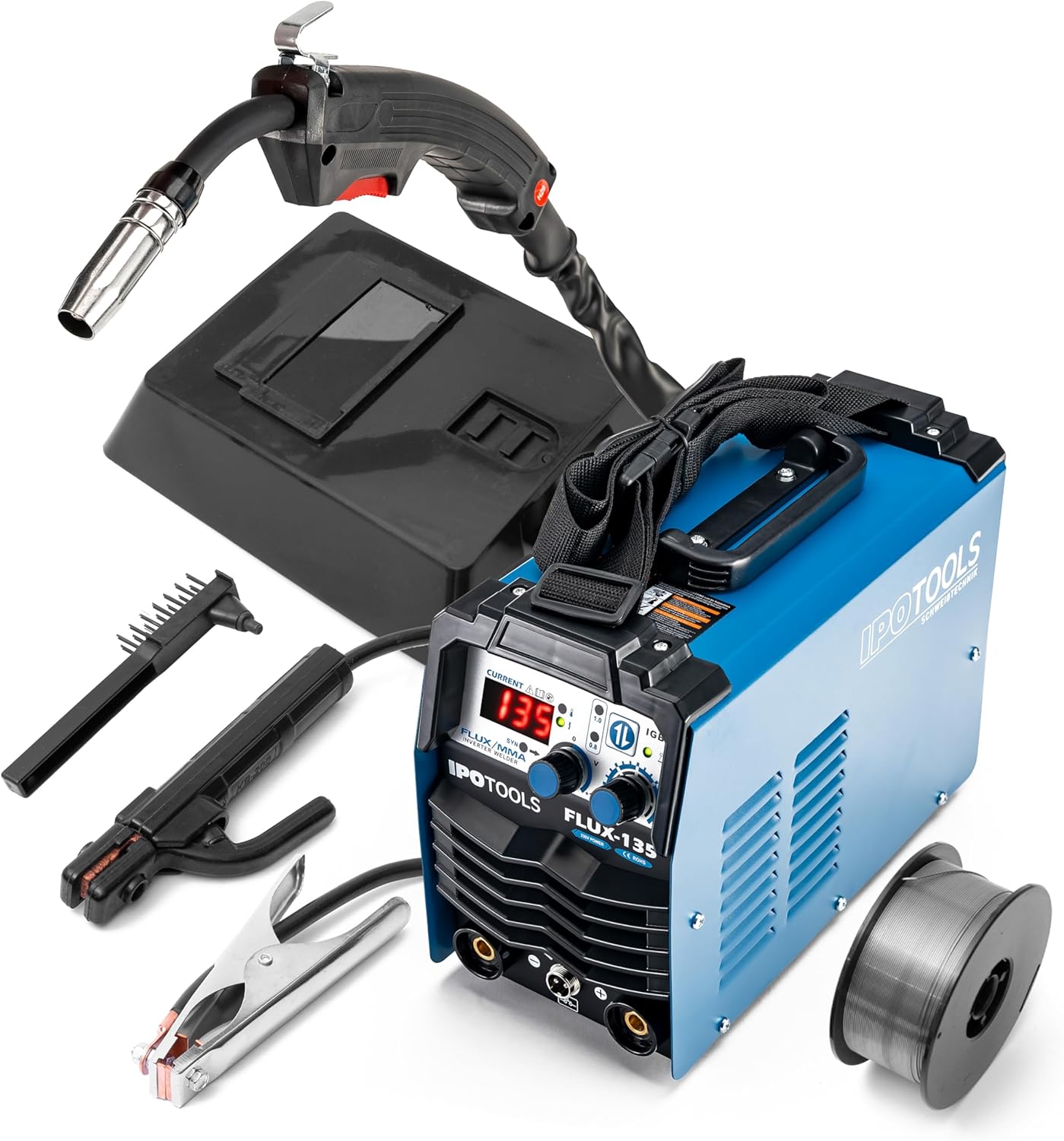
Image: The IPOTOOLS FLUX-135 welding machine shown with its standard accessories, including the torch, electrode holder, ground clamp, and a spool of wire.
4. Setup
4.1 Power Connection
- Ensure the welding machine is switched off.
- Connect the power cable to a suitable 230V mains power outlet. Ensure the outlet is properly grounded and can handle the machine's power requirements.
4.2 Flux-Cored Wire Installation
- Open the side compartment of the welding machine.
- Place a Ø 100 mm spool of 0.8 mm or 1.0 mm flux-cored wire onto the spindle.
- Thread the wire through the wire feed mechanism. Ensure the tension screw is adjusted correctly to allow smooth wire feeding without slippage or crushing.
- Close the compartment.
- Connect the flux-cored torch to the 2-pin connector on the front panel.
- Connect the ground clamp to the negative (-) terminal.

Image: Side view of the welding machine with the wire compartment open, showing the wire feed mechanism and spool holder.
4.3 MMA Electrode Setup
- Connect the electrode holder cable to the positive (+) terminal.
- Connect the ground clamp cable to the negative (-) terminal.
- Insert the appropriate MMA electrode (1-4mm) into the electrode holder.

Image: Close-up of the welding machine's front panel showing the positive, negative, and 2-pin connectors for welding cables.
5. Operating Instructions
5.1 General Operation
- Ensure all connections are secure and the work area is prepared according to safety instructions.
- Turn on the welding machine using the power switch. The digital display will illuminate.
- Select the desired welding mode (FLUX or MMA) using the mode selection button.
- Adjust the welding current (Amperage) and voltage using the respective knobs. The digital display provides precise readings.
- Begin welding, always wearing appropriate personal protective equipment (PPE).
5.2 Flux-Cored Welding (Gasless MIG)
This mode uses flux-cored wire, eliminating the need for external shielding gas. It is ideal for outdoor use and offers flexibility.
- Select FLUX mode.
- Choose the correct wire diameter (0.8mm or 1.0mm) if applicable.
- Adjust the current and voltage based on the material thickness and wire type. Start with recommended settings and fine-tune as needed.
- Ensure the ground clamp is securely attached to the workpiece.
- Position the torch and initiate the arc.

Image: Icon representing flux-cored welding.
5.3 MMA Welding (E-Hand)
This mode uses coated electrodes for welding various metals.
- Select E-Hand (MMA) mode.
- Adjust the current based on the electrode diameter and material thickness. The FLUX-135 supports electrodes from 1mm to 4mm.
- The machine features IGBT Inverter technology, Hot-Start, Arc-Force, and Anti-Stick functions for improved arc stability and easier welding.
- Ensure the ground clamp is securely attached to the workpiece.
- Strike the arc with the electrode and maintain a consistent arc length.

Image: Icon representing MMA (electrode) welding.
5.4 Synergic Function
The synergic function simplifies welding by automatically adjusting parameters based on the selected wire type and material, providing optimal settings for consistent weld quality.

Image: Icon representing the synergic function.
6. Maintenance
Regular maintenance ensures the longevity and optimal performance of your IPOTOOLS FLUX-135 welding machine.
- Cleaning: Periodically clean the machine's exterior with a dry, soft cloth. Ensure ventilation openings are free from dust and debris.
- Wire Feed Mechanism: Inspect the wire feed rollers and liner regularly for wear. Clean any metal dust or debris that may accumulate.
- Cables and Connections: Check all welding cables, torch, electrode holder, and ground clamp for damage, fraying, or loose connections before each use. Replace damaged components immediately.
- Storage: Store the welding machine in a dry, clean environment, away from moisture and extreme temperatures.
- Professional Service: For any internal repairs or complex issues, contact qualified service personnel. Do not attempt to open the machine yourself unless you are a trained professional.
7. Troubleshooting
This section addresses common issues you might encounter with your FLUX-135 welding machine.
| Problem | Possible Cause | Solution |
|---|---|---|
| Machine does not power on | No power supply; Faulty power cable; Internal fault | Check power outlet and cable; Ensure power switch is ON; Contact support if issue persists. |
| No welding arc | Poor ground connection; Incorrect settings; Damaged torch/electrode holder; Wire feed issue (FLUX mode) | Ensure ground clamp is on clean metal; Adjust current/voltage; Check torch/holder for damage; Verify wire feed. |
| Overload indicator illuminated | Exceeded duty cycle; Insufficient ventilation | Allow machine to cool down; Ensure proper airflow around the machine; Reduce welding current. |
| Poor weld quality | Incorrect settings; Improper technique; Contaminated workpiece; Wrong wire/electrode | Adjust current/voltage; Practice welding technique; Clean workpiece thoroughly; Use correct consumables. |
8. Specifications
| Feature | Specification |
|---|---|
| Model | FLUX-135 |
| Manufacturer | IPOTOOLS |
| Power Type | Mains Power |
| Voltage | 230 Volts |
| Welding Current Range | 20-135 A (Continuously adjustable) |
| Flux-Cored Wire Diameter | 0.8 mm or 1.0 mm (Ø 100 mm spools) |
| MMA Electrode Diameter | 1-4 mm |
| Technology | IGBT Inverter, Hot-Start, Arc-Force, Anti-Stick |
| Product Dimensions (L x W x H) | 41 x 29 x 32 cm |
| Weight | 7.62 kg |
| Country of Origin | China |
9. Warranty and Support
IPOTOOLS offers a 7-year warranty for the FLUX-135 welding machine, ensuring reliable performance and peace of mind. The warranty terms and conditions are available through the seller's information page on the purchase platform.
For technical support, warranty claims, or spare parts inquiries, please contact IPOTOOLS customer service through the retailer where the product was purchased or visit the official IPOTOOLS website for contact information.

Image: Visual representation of the 7-year IPOTOOLS warranty.
