
PINDOWS PDS-615new
PINDOWS PDS-615new Digital Sports Watch User Manual
Model: PDS-615new
1. Introduction
Welcome to your new PINDOWS PDS-615new Digital Sports Watch. This manual provides detailed instructions for the setup, operation, and maintenance of your watch. Please read it carefully to ensure proper use and to fully utilize all its features.
Package Contents:
- 1 x PINDOWS PDS-615new Digital Sports Watch
- 1 x User Manual

A PINDOWS PDS-615new digital sports watch with a camouflage strap, showcasing its design on a wrist.
2. Product Overview
Familiarize yourself with the buttons and display components of your PINDOWS PDS-615new watch:
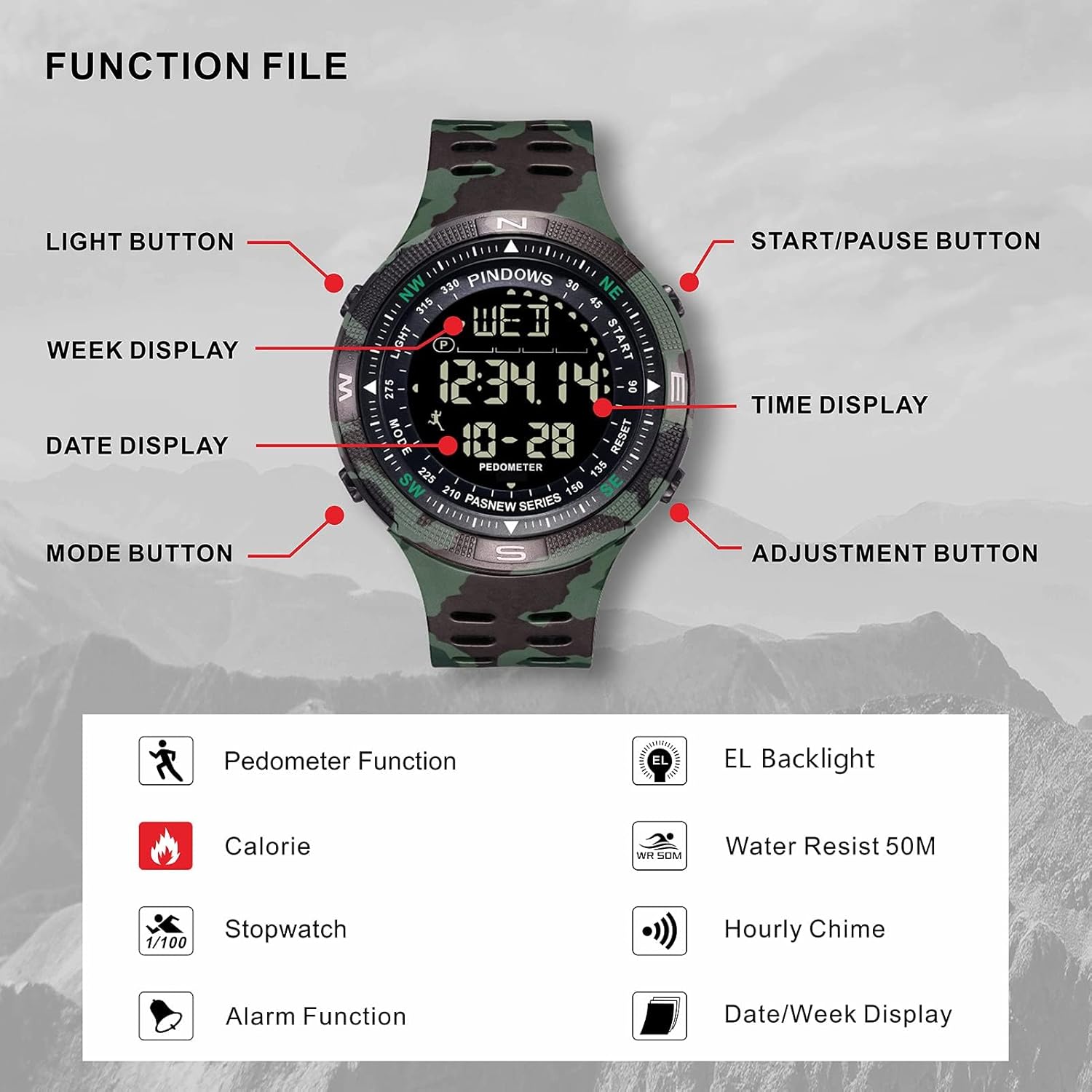
This diagram illustrates the various buttons and display areas on your PINDOWS PDS-615new digital sports watch. Familiarize yourself with these controls for optimal use.
- LIGHT Button: Activates the LED backlight.
- START/PAUSE Button: Used for starting/pausing stopwatch, changing values during setting.
- ADJUSTMENT Button: Used for selecting digits or options during setting.
- MODE Button: Cycles through different watch modes (Time, Alarm, Stopwatch, Pedometer).
3. Initial Setup
Setting Time and Date:
- From the normal time display, press the MODE button repeatedly until the time setting mode is activated (usually indicated by flashing digits).
- Press the ADJUSTMENT button to cycle through the settings for seconds, hours, minutes, year, month, and day.
- While a digit is flashing, use the START/PAUSE button to increase or decrease the value.
- Once all settings are correct, press the MODE button again to exit the setting mode and save your changes.
12/24 Hour Format:
In time setting mode, when the hour digits are flashing, pressing the START/PAUSE button may toggle between 12-hour (with 'AM'/'PM' indicator) and 24-hour formats. Confirm your selection before exiting the setting mode.
4. Operating Modes
Time Display:
This is the default mode, showing the current time (hours, minutes, seconds), date, and day of the week.
Alarm Function:
- Press the MODE button until you reach the Alarm mode (usually indicated by 'AL' or an alarm icon).
- Press the ADJUSTMENT button to select the hour or minute digits.
- Use the START/PAUSE button to set the desired alarm time.
- Press MODE to confirm and exit. To activate/deactivate the alarm, typically a short press of the START/PAUSE button in alarm mode will toggle it on/off.
Stopwatch:
- Press the MODE button until you reach the Stopwatch mode (usually indicated by 'ST' or 'STOP').
- Press the START/PAUSE button to start the stopwatch.
- Press START/PAUSE again to pause it.
- Press the ADJUSTMENT button to reset the stopwatch to zero.
Pedometer & Calorie Counter:
Your watch features an integrated pedometer and calorie counter. These functions automatically track your steps and estimated calories burned during activity.
- Press the MODE button until you reach the Pedometer mode (usually indicated by 'STEP' or a foot icon).
- The display will show your current step count and estimated calories.
- To reset the pedometer, typically a long press of the ADJUSTMENT button in pedometer mode will clear the count.

The watch display showing the 'STEP' indicator and a numerical value, representing the pedometer function in action.
LED Backlight:
Press the LIGHT button (top-left) to illuminate the display for clear visibility in low-light conditions. The backlight will remain on for a few seconds.

The LED backlight feature provides clear visibility of the watch display in low-light conditions. Press the 'LIGHT' button to activate it.
5. Water Resistance
The PINDOWS PDS-615new watch is designed with 50M (5ATM) precision water resistance. This means it is suitable for:
- Hand washing
- Face washing
- Rain exposure
- Swimming in shallow water
Important Precautions:
- DO NOT press any buttons while the watch is submerged in water.
- AVOID wearing the watch in hot baths, hot showers, or steam environments, as steam can penetrate the seals and cause damage.
- Ensure the watch is completely dry before operating buttons if it has been exposed to water.

This image demonstrates the 50-meter water resistance of the PINDOWS PDS-615new watch, making it suitable for various water activities like swimming. Remember not to operate buttons while submerged.
6. Maintenance
Cleaning:
To keep your watch clean, wipe it regularly with a soft, dry cloth. For stubborn dirt, use a slightly damp cloth with a mild soap solution, then dry thoroughly with a clean, soft cloth.
Battery:
The watch is powered by a high-quality Japanese imported battery, providing an approximate service life of up to two years. When the display becomes dim or functions become erratic, it may be time for a battery replacement. Battery replacement should be performed by a qualified technician to maintain water resistance.
Strap Care:
The durable PU strap is designed for comfort and longevity. Avoid prolonged exposure to direct sunlight or extreme temperatures, which can degrade the material over time.
Anti-Corrosion Backcover:
The watch features a stainless steel anti-corrosion backcover, designed to protect the internal components from moisture and sweat, ensuring the watch's longevity.

The watch features a durable stainless steel anti-corrosion backcover, designed to protect the internal movement and ensure longevity.
7. Troubleshooting
If you encounter any issues with your PINDOWS PDS-615new watch, please refer to the following common problems and solutions:
- Display is blank or dim: This usually indicates a low or depleted battery. Please arrange for battery replacement by a qualified technician.
- Time is incorrect: Follow the instructions in the "Setting Time and Date" section to reset the time. Ensure you are in the correct 12/24 hour format.
- Buttons are unresponsive: Ensure the watch is not in a specific mode that locks button functionality. If the issue persists after trying to cycle through modes, the watch may require servicing.
- Water inside the display: If moisture appears inside the watch, stop using it immediately and seek professional repair to prevent further damage.
For issues not covered here, please contact customer support.
8. Specifications
| Brand | PINDOWS |
| Model Number | PDS-615new |
| Item Type | Electronic Sports Watch |
| Waterproof Level | 50M (5ATM) |
| Dial Diameter | 50mm |
| Case Thickness | 14mm |
| Strap Material | PU |
| Case Material | PU |
| Dial Window Material | PMMA |
| Movement | Digital Electronic |
| Functions | 12/24 hours, Automatic Calendar, Alarm, Stopwatch, LED Backlight, Pedometer, Calorie Counter |
| Product Dimensions | 5 x 1.4 x 24 cm |
| Weight | 120 g |
9. Warranty & Support
Warranty Information:
Your PINDOWS PDS-615new watch comes with a 12-month warranty from the date of purchase. This warranty covers manufacturing defects under normal use. It does not cover damage caused by misuse, accidents, unauthorized repairs, or normal wear and tear.
Customer Support:
For any questions, technical assistance, or warranty claims, please contact your retailer or the PINDOWS customer service department. Please have your purchase receipt and watch model number (PDS-615new) available when contacting support.
Related Documents - PDS-615new
 |
PINDOWS Instruction Manual (A) - Watch Operation Guide Comprehensive guide to operating your PINDOWS watch, covering button functions, time setting, alarm, stopwatch, backlight, and after-sales service. |
 |
Kidde P4010ACSCO-WF Smoke + Carbon Monoxide Alarm with Smart Features Product data sheet for the Kidde P4010ACSCO-WF, a 2-in-1 Wi-Fi enabled Smoke and Carbon Monoxide alarm with smart features, remote notifications, and 10-year battery backup. Includes technical specifications, features, and important safety information. |
 |
EZGO Electric Golf Cars & Personal Vehicles Owner's Manual & Service Guide Comprehensive owner's manual and service guide for EZGO electric golf cars and personal vehicles, covering operation, maintenance, safety, and specifications. Includes models like Fleet, Freedom, and Shuttle. |
 |
EZGO Electric Powered Fleet Golf Cars & Personal Vehicles Owner's Manual & Service Guide Comprehensive owner's manual and service guide for EZGO electric-powered fleet golf cars and personal vehicles. Covers operation, safety, maintenance, and specifications for models like Freedom, Shuttle, and Fleet. Published by EZGO, a Textron Company. |
 |
Philia PDS-100 Smart Door Lock Installation Guide Step-by-step instructions for installing the Philia PDS-100 Smart Door Lock, including required tools, package contents, and compatibility checks. |