
Introduction
Thank you for choosing the MEKO 3-in-1 Stylus Pens. This manual provides essential information for the proper use, maintenance, and troubleshooting of your new stylus pens. Designed for high sensitivity and precision, these capacitive stylus pencils are compatible with a wide range of universal touchscreen devices, including Apple iPad, iPhone, tablets, Samsung Galaxy devices, and more.
Package Contents
Your MEKO 3-in-1 Stylus Pen package includes:
- 2 x MEKO 3-in-1 Stylus Pens (Black/Blue)
- 4 x 0.18'' Replacement Rubber Tips
- 4 x 0.27'' Replaceable Rubber Tips
- 2 x Disc Tips

Image: Package contents including two styluses and various replacement tips.
Product Features
- 2023 Upgraded 3-in-1 Design: This stylus features a precise and sensitive transparent disc tip, along with dual rubber tips (0.18'' & 0.27''). It comes with a protective cap for the disc tip, offering versatility for various tasks like clicking icons, writing, drawing, and gaming.
- Highly Sensitive and Accurate: The transparent disc tip allows for an unobstructed view of the contact point, ensuring high accuracy and responsiveness. Its 180° flexible writing angle provides a comfortable experience, enabling smooth writing and drawing without lag, interruption, or screen scratching.
- Dual-sized Rubber Tips: The two different-sized rubber tips are crafted from high-quality silicone, offering smoothness, responsiveness, and excellent resistance to wear and aging. These soft tips prevent screen scratches and reduce fingerprints, making them ideal for users with long nails or larger fingers for browsing, writing, note-taking, and gaming.

Image: The transparent disc tip with 180-degree flexibility for precise interaction.

Image: The two different sizes of rubber tips for varied use.
Setup and Use
The MEKO 3-in-1 Stylus Pens are designed for immediate use without the need for batteries or Bluetooth pairing. Simply select the desired tip for your task.
Using the Tips:
- Disc Tip: Unscrew the metal cap to reveal the transparent disc tip. This tip is ideal for precise tasks like drawing, detailed writing, or selecting small icons.
- Rubber Tips: The dual rubber tips (0.18'' and 0.27'') can be used directly for general navigation, browsing, note-taking, and gaming.
Replacing Tips:
All three tips are replaceable, extending the lifetime of your stylus. Follow these steps to replace a tip:
- For Rubber Tips: Unscrew the stylus tip counter-clockwise. Take off the old rubber tip and replace it with a new one from the small copper screw. Screw the tip back on clockwise.
- For Disc Tip: Remove the metal cap. Use tweezers or your fingers to gently pull out the old disc tip and insert a new one.
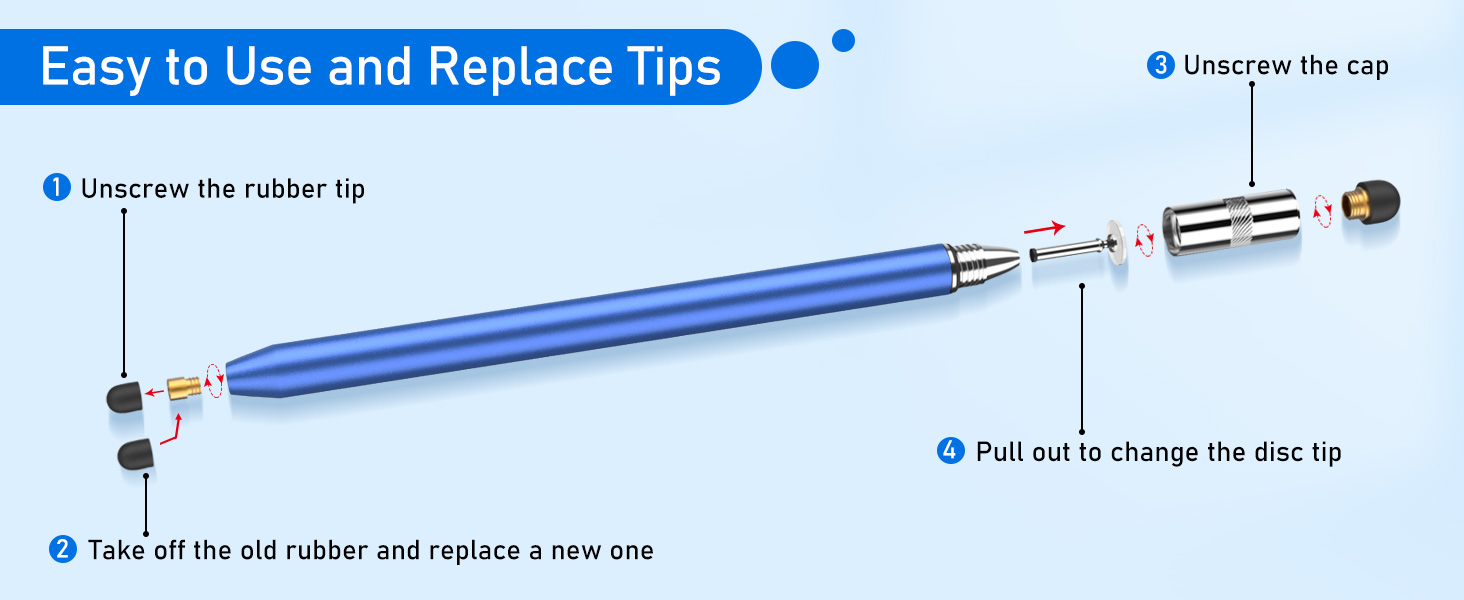
Image: Visual guide for replacing stylus tips.
Video: Demonstration of the MEKO stylus in use, highlighting its smooth and precise functionality across various tasks.
Compatibility
MEKO styluses are universally compatible with all capacitive touchscreen devices. This includes, but is not limited to:
- Apple iPad (all models including iPad Pro, iPad Mini, iPad Air)
- Apple iPhone (all models)
- Samsung Galaxy cellphones and tablets
- Other Android tablets and smartphones
- Touchscreen laptops and PCs
- E-readers (e.g., Kindle)
- Chromebooks

Image: The stylus demonstrating compatibility with multiple touchscreen devices.
Maintenance
To ensure the longevity and optimal performance of your MEKO stylus pens, follow these simple maintenance guidelines:
- Keep the stylus tips clean. Gently wipe them with a soft, dry cloth to remove dust or smudges.
- Store the stylus with the protective cap on the disc tip to prevent damage.
- Avoid applying excessive pressure when using the stylus, as this can wear down the tips prematurely.
- Replace tips as needed to maintain precision and responsiveness. Replacement tips can be found by searching ASIN: B016X4QJWE on Amazon.
Specifications
| Brand | MEKO |
| Model Number | MK-CXB-2P-JP |
| Color | Black/Blue |
| Material | Aluminum |
| Item Weight | 0.66 Ounces |
| Item Dimensions (L x W x H) | 5.9 x 0.35 x 0.35 inches |
| Batteries Required | No |
| Unit Count | 2.0 Count |

Image: Stylus dimensions and component breakdown.
Troubleshooting
If you experience any issues with your MEKO stylus pens, consider the following:
- Lack of Responsiveness: Ensure the tip is clean and free of debris. If the tip is worn, replace it with a new one.
- Inaccurate Input: For the disc tip, ensure the transparent disc is flat against the screen. For rubber tips, ensure they are securely attached.
- Screen Protection: Some thick screen protectors may reduce stylus sensitivity. Test the stylus directly on the screen if possible.
For further assistance, please refer to the warranty and support section.
Warranty and Support
Your MEKO 3-in-1 Stylus Pens come with a 1-year warranty. For any product-related inquiries, technical support, or warranty claims, please contact MEKO customer service through the Amazon platform or visit the official MEKO Store.
You can visit the MEKO Store for more information and support: MEKO Store on Amazon