
SenhE zhangying
SENHE RF Wireless 11-Key Single Color LED Dimmer User Manual
Model: zhangying | Brand: SenhE
1. Introduction
This manual provides comprehensive instructions for the installation, operation, and maintenance of the SENHE RF Wireless 11-Key Single Color LED Dimmer. This device is designed to control the brightness of single-color LED strip lights operating within a DC 12-24V range, offering precise dimming capabilities via an 11-key RF wireless remote control.
2. Product Features
- RF Wireless Control: Operates with an 11-key radio frequency remote for convenient control without direct line-of-sight.
- Wide Voltage Compatibility: Supports DC 12V to 24V input voltage, suitable for various LED strip applications.
- High Output Capacity: Capable of handling up to 30A output current, with a maximum power output of 360W.
- PWM Digital Dimming: Utilizes Pulse Width Modulation for smooth, flicker-free dimming from 0% to 100% brightness, protecting LED lights from rush current.
- Durable Construction: Features a high-quality aluminum housing for excellent corrosion resistance and efficient heat dissipation, ensuring long-term performance.
- Compact Design: Dimensions of L80 × W64 × H24 mm for easy integration into various setups.
3. Specifications
| Parameter | Value |
|---|---|
| Supply Voltage | DC 12-24V |
| Output Channel | 1 Channel |
| Output Current | 0-30A (Max) |
| Max Power Output | 360W |
| Dimming Range | 0-100% Brightness |
| Dimming Method | PWM Digital Dimming |
| Dimensions (L×W×H) | 80 × 64 × 24 mm |
| Item Weight | 1.76 ounces (approx. 50g) |
| Housing Material | Aluminum |
4. Setup and Installation
Before installation, ensure all power is disconnected to prevent electrical shock. This dimmer is designed for low-voltage DC LED lighting systems.
4.1 Wiring Diagram
Refer to the diagram below for proper wiring connections. Ensure correct polarity (+ and -) for both input power and LED strip output.

Image 1: SENHE RF Wireless LED Dimmer and Remote Control. This image displays the dimmer unit with its input/output terminals clearly labeled, alongside the 11-key RF wireless remote control.
- Power Input: Connect your DC 12-24V power supply to the "Input" terminals on the dimmer unit. Ensure the positive (+) wire from the power supply connects to the dimmer's (+) input, and the negative (-) wire connects to the dimmer's (-) input.
- LED Strip Output: Connect your single-color LED strip to the "Output" terminals on the dimmer unit. Ensure the positive (+) wire from the LED strip connects to the dimmer's (+) output, and the negative (-) wire connects to the dimmer's (-) output.
- Secure Connections: Tighten all screw terminals securely to prevent loose connections, which can cause flickering or malfunction.
- Mounting: The dimmer unit features mounting tabs for easy installation. Secure the unit in a suitable location, ensuring adequate ventilation.

Image 2: SENHE RF Wireless LED Dimmer Dimensions. This image illustrates the physical dimensions of the dimmer unit, showing its length (80mm), width (64mm), and height (24mm) for installation planning.
5. Operating Instructions
The SENHE RF Wireless LED Dimmer is controlled by an 11-key remote. Ensure the remote has a working battery (typically CR2025 or similar, not always included).
5.1 Remote Control Functions
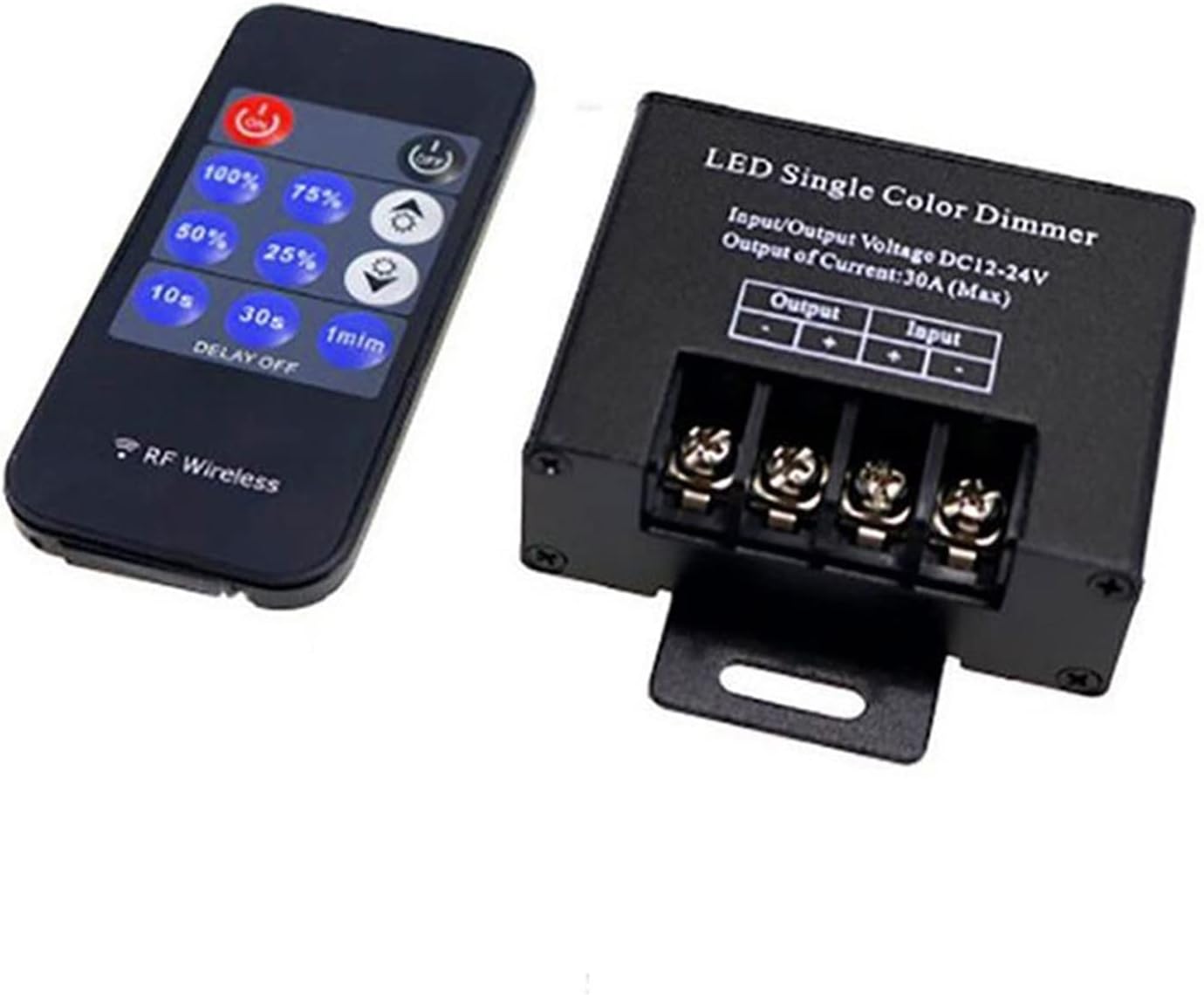
Image 3: SENHE RF Wireless LED Dimmer Remote Control Layout. This image provides a clear view of the 11-key remote control, highlighting the various buttons for power, brightness levels, and delay off functions.
- ON / OFF: Power on/off the LED lights.
- 100% / 75% / 50% / 25%: Direct brightness level selection.
- Brightness Up (sun with plus) / Brightness Down (sun with minus): Gradually increase or decrease brightness.
- 10s / 30s / 1min (DELAY OFF): Set a timer for the lights to turn off after 10 seconds, 30 seconds, or 1 minute.
6. Maintenance
The SENHE LED Dimmer is designed for low maintenance. Follow these guidelines to ensure optimal performance and longevity:
- Cleaning: Use a soft, dry cloth to clean the dimmer unit and remote control. Do not use abrasive cleaners or solvents.
- Environment: Ensure the dimmer is installed in a dry environment, away from direct moisture, excessive heat, or corrosive substances.
- Connections: Periodically check wiring connections to ensure they remain secure. Loose connections can lead to intermittent operation or damage.
- Battery Replacement: If the remote control's range or responsiveness decreases, replace the battery (e.g., CR2025 coin cell).
7. Troubleshooting
| Problem | Possible Cause | Solution |
|---|---|---|
| LEDs do not turn on. | No power supply; incorrect wiring; faulty LED strip; remote battery dead. | Check power supply connection and voltage. Verify wiring polarity. Test LED strip directly. Replace remote battery. |
| LEDs flicker or dim inconsistently. | Loose wiring connections; power supply insufficient; dimmer overloaded. | Secure all wiring connections. Ensure power supply meets LED strip requirements. Verify total wattage does not exceed 360W. |
| Remote control not responding. | Remote battery dead; remote out of range; interference. | Replace remote battery. Move closer to the dimmer unit. Reduce potential RF interference sources. |
| Dimmer unit is hot. | Overloaded; insufficient ventilation. | Reduce load on the dimmer (check total LED wattage). Ensure proper airflow around the unit. |
8. Warranty and Support
This product is covered by a standard manufacturer's warranty against defects in materials and workmanship. For specific warranty details, please refer to the product packaging or contact your retailer.
For technical support or inquiries, please contact SenhE customer service through the retailer's platform where the product was purchased. Please have your model number (zhangying) and purchase date available when contacting support.
Ask a question about this manual
Ask about setup, troubleshooting, compatibility, parts, safety, or missing instructions. Manuals+ will review the question and use this page’s manual context to help answer it.