
1. Introduction
This manual provides essential information for the safe and effective use of your APC Back-UPS BE1050G3 Uninterruptible Power Supply (UPS). The BE1050G3 is designed to provide backup power and surge protection for electronic devices in home and small business environments. It ensures continued operation of critical equipment during power outages and protects against power fluctuations.
The APC Back-UPS BE1050G3 offers additional battery backup outlets and USB charging ports, allowing you to power more of your essential devices when the main electricity supply is interrupted. This unit is optimized to maximize battery backup runtime for both high-power consuming electronics and low-power devices like home networking equipment, maintaining internet access through extended blackouts.
2. Important Safety Instructions
Please read and follow all instructions carefully before installing or operating the UPS. Save this manual for future reference.
- This UPS is intended for indoor use only.
- Do not operate this UPS in direct sunlight, in contact with fluids, or where there is excessive dust or humidity.
- Connect the UPS power cable directly to a wall outlet. Do not use extension cords or surge protectors with the UPS.
- Ensure the UPS is placed on a stable surface.
- The battery is user-replaceable. Refer to the maintenance section for proper battery replacement procedures.
- In case of an emergency, press the power button to turn off the UPS and disconnect it from the AC power supply.
3. Product Features
The APC Back-UPS BE1050G3 provides reliable power protection and convenience:
- 1050VA / 600W Capacity: Provides ample power for multiple devices.
- 8 NEMA 5-15R Outlets:
- 6 outlets offer battery backup and surge protection.
- 2 outlets provide surge protection only.
- 2 USB Charging Ports (5V/3A Shared): Includes one USB-C and one USB-A port for convenient device charging.
- User Replaceable Battery: Allows for easy battery replacement with APC model APCRBC164 (sold separately).
- PowerChute UPS Management: Dedicated data port for UPS management software (compatible with Windows 10, 22H2 Pro, 11 Pro; Mac OS uses native "Energy Saver" settings).
- Quick Mute Feature: Temporarily silence audible alarms with a short press of the mute button.

Image: APC Back-UPS BE1050G3 1050VA banner.
4. Product Components and Indicators
Familiarize yourself with the various ports, outlets, and indicators on your UPS unit.

Image: Front and side view of the APC Back-UPS BE1050G3, showing the power button, USB ports, and some outlets.

Image: Rear view of the APC Back-UPS BE1050G3, displaying the 8 NEMA 5-15R outlets.
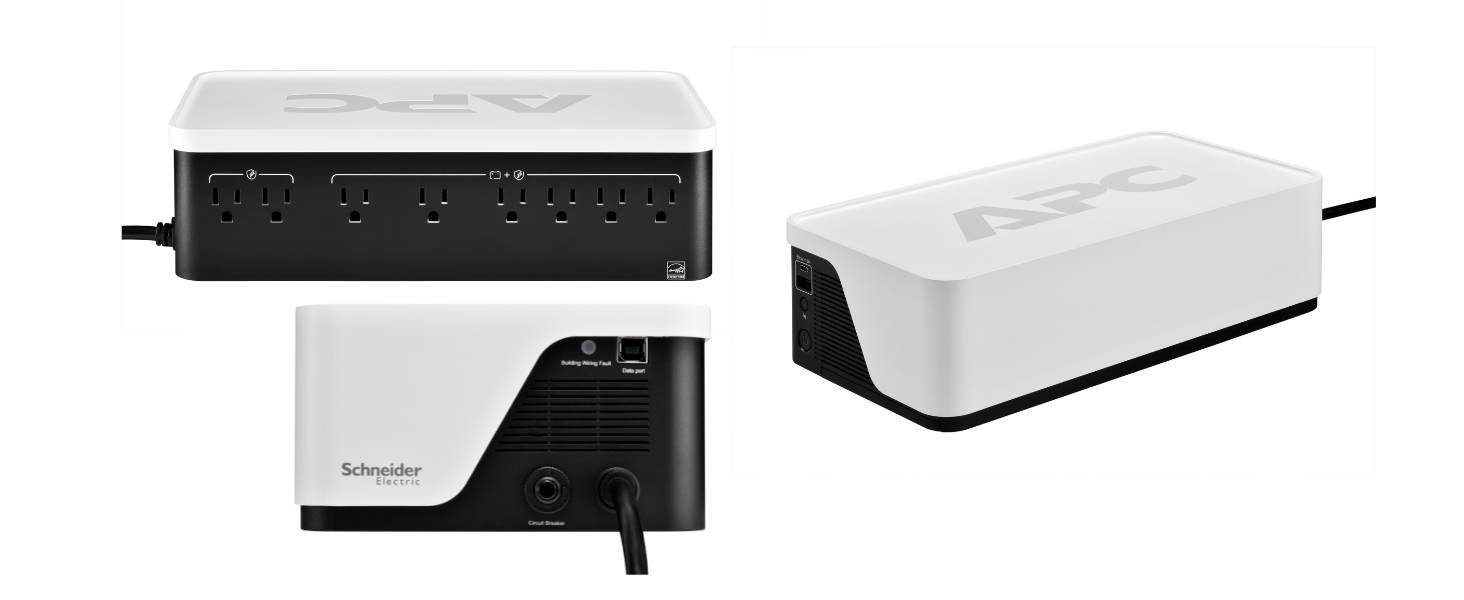
Image: Diagram illustrating the output connection specifications, showing 6 battery backup & surge protected outlets, 2 surge protection only outlets, and Type A/C USB ports.

Image: Visual guide to the UPS status indicator lights: Green for normal operation, Yellow for attention, Red for overload or battery issue.
5. Setup and Installation
- Unpack and Inspect: Carefully unpack the UPS and inspect it for any shipping damage.
- Connect the Battery: The UPS is shipped with the battery disconnected for safety. Locate the battery compartment (usually on the bottom or side), open it, and connect the internal battery cable. Ensure a secure connection. A small spark may occur during connection, which is normal.
- Placement: Place the UPS on a flat, stable surface away from direct sunlight, heat sources, and excessive moisture. Ensure adequate ventilation around the unit.
- Initial Charging: Plug the UPS power cord directly into a grounded wall outlet. Allow the unit to charge for at least 24 hours before connecting any devices to ensure full battery capacity.
- Connect Devices:
- Plug critical devices (computer, monitor, modem, router) into the 6 battery backup and surge protected outlets.
- Plug non-critical devices (printers, scanners) into the 2 surge protection only outlets.
- Use the USB-A and USB-C ports to charge compatible mobile devices.
- Software Installation (Optional): For advanced management and automatic shutdown features, download and install the PowerChute software from the APC website. Connect the UPS to your computer using the dedicated data port.

Image: The APC Back-UPS BE1050G3 integrated into a desk setup, providing power to headphones and a microphone.
6. Operation
6.1 Powering On/Off
- To Power On: Press the power button located on the front of the unit. The status indicator will illuminate.
- To Power Off: Press and hold the power button until the unit powers down.
6.2 Status Indicators
The LED indicator on the front panel provides information about the UPS status:
- Green: UPS is operating normally.
- Yellow: UPS operation needs attention (e.g., battery charging, minor fault).
- Red: UPS is overloaded, battery must be replaced, or battery is not working. Refer to the troubleshooting section.
6.3 Quick Mute Feature
During a power event, the UPS may emit audible alarms. To temporarily silence these alarms, briefly press the mute button. A short double beep sound indicates that the quick mute feature is activated.

Image: Illustration of the quick mute button and its function on the APC Back-UPS.
7. Typical Applications
The APC Back-UPS BE1050G3 is versatile and can protect a variety of devices:
- Home Office: Computers, monitors, Wi-Fi routers, modems, network-attached storage (NAS).
- Entertainment: Laptops, tablets, mobile devices, gaming consoles.
- Smart Home: Wi-Fi routers, security cameras, smart home assistants, baby monitors, pet feeders.
- Hobby Devices: Cricut machines, sewing machines, podcast equipment.

Image: A diagram illustrating various devices in a home that can be protected by the UPS, including Wi-Fi routers, laptops, security cameras, and pet feeders.

Image: The APC Back-UPS BE1050G3 providing power to an automatic pet feeder, ensuring continuous operation.
8. Maintenance
8.1 Battery Replacement
The battery in your APC Back-UPS BE1050G3 is user-replaceable. The typical lifespan of a UPS battery is approximately 3-5 years, depending on usage and environmental conditions. When the battery needs replacement, the UPS will indicate this via its status light and/or audible alarms.
- Replacement Battery Model: Use only genuine APC replacement battery model APCRBC164.
- Procedure: Refer to the detailed instructions provided with the replacement battery kit for safe and proper installation. Always power off the UPS and disconnect it from the wall outlet before attempting battery replacement.
- Disposal: Dispose of old batteries properly. Contact your local recycling center for information on battery recycling.
9. Troubleshooting
This section addresses common issues you might encounter with your APC Back-UPS BE1050G3.
| Problem | Possible Cause | Solution |
|---|---|---|
| UPS does not turn on | Battery not connected or discharged. | Ensure battery is properly connected. Plug UPS into wall outlet and charge for 24 hours. |
| UPS emits a continuous alarm tone | Battery fault or end-of-life. | Replace the battery with APC model APCRBC164. Note: Some older models may not allow silencing of this alarm until battery is replaced. |
| "Building Wiring Fault" indicator is lit | Wiring problem in the wall outlet. | Consult a qualified electrician to inspect the building wiring. Do not use the UPS with faulty wiring. |
| UPS is overloaded (Red status light) | Too many devices connected or devices drawing too much power. | Disconnect non-essential devices from the battery backup outlets. Ensure total wattage does not exceed 600W. |
| Short battery runtime | Battery is old or not fully charged. | Ensure battery is fully charged. If battery is old (3-5 years), consider replacement. |
10. Technical Specifications
| Feature | Specification |
|---|---|
| Model Number | BE1050G3 |
| Capacity | 1050VA / 600W |
| Input Voltage | 120 Volts |
| Output Outlets | 8 x NEMA 5-15R (6 Battery Backup & Surge, 2 Surge Only) |
| USB Charging Ports | 1 x USB-C, 1 x USB-A (5V/3A Shared) |
| Battery Type | Sealed Lead Acid |
| Replacement Battery | APCRBC164 |
| Dimensions (H x W x D) | 6.57 x 3.54 x 12.51 inches (167 x 90 x 318 mm) |
| Weight | 9.55 pounds (4.33 kg) |
| Color | Black, White |

Image: Diagram showing the physical dimensions of the APC Back-UPS BE1050G3.
11. Warranty and Support
11.1 Product Warranty
The APC Back-UPS BE1050G3 comes with a 3-Year Warranty. This warranty covers defects in materials and workmanship under normal use. Additionally, the product includes a $75,000 Equipment Protection Policy, which provides coverage for connected equipment damaged by power surges while properly connected to the UPS.
For detailed terms and conditions of the warranty and equipment protection policy, please refer to the documentation included with your product or visit the official APC website.
11.2 Customer Support
For technical assistance, troubleshooting, or warranty claims, please contact APC customer support. You can find contact information on the official APC website or in the product packaging.
When contacting support, please have your product model number (BE1050G3) and serial number readily available. The serial number is typically located on a label on the bottom or back of the UPS unit.


