
Introduction
Thank you for choosing the SGNICS TWS Earbuds Rhymbo Series. This manual provides essential information for the proper setup, operation, and maintenance of your new wireless headphones. Please read this manual thoroughly before use to ensure optimal performance and longevity of your device.
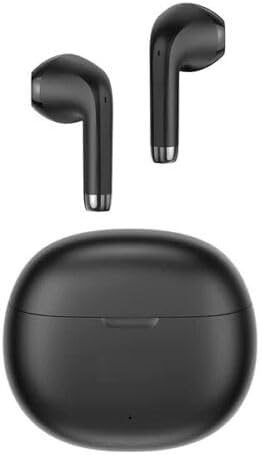
Image: The SGNICS TWS Earbuds and their charging case, presented in black.
Setup
1. Initial Charging
Before first use, fully charge the earbuds and the charging case. Connect the provided Type-C charging cable to the charging port on the case and a suitable power source. The battery indicator on the case will provide charging status.

Image: A close-up of the charging case, highlighting the Type-C charging port and the battery indicator light.
2. Pairing with a Device
- Open the charging case. The earbuds will automatically power on and enter pairing mode.
- On your device (e.g., smartphone, tablet), navigate to the Bluetooth settings.
- Search for available Bluetooth devices and select "TWS Earbuds -- Rhymbo Series" (or similar name) from the list.
- Once connected, a confirmation sound may play, and the earbuds will be ready for use.
For subsequent uses, simply open the charging case, and the earbuds will automatically reconnect to the last paired device.

Image: The SGNICS TWS Earbuds resting inside their open charging case, ready for use or pairing.
Operating Instructions
Power On/Off
- Power On: Open the charging case, and the earbuds will automatically power on.
- Power Off: Place the earbuds back into the charging case and close the lid. They will automatically power off and begin charging.
Touch Controls
The SGNICS TWS Earbuds feature intelligent touch controls for easy management of calls and music playback.
- Play/Pause Music: Single tap on either earbud.
- Next Track: Double tap on the right earbud.
- Previous Track: Double tap on the left earbud.
- Answer/End Call: Single tap on either earbud during an incoming call.
- Reject Call: Press and hold either earbud for 2 seconds during an incoming call.
- Activate Voice Assistant (Siri, Google Assistant): Triple tap on either earbud.
Maintenance
Cleaning
Regular cleaning helps maintain sound quality and hygiene.
- Gently wipe the earbuds and charging case with a soft, dry, lint-free cloth.
- Do not use abrasive cleaners, alcohol, or chemical solvents.
- Ensure charging contacts on both earbuds and case are clean and dry.
Water Resistance
The earbuds are rated IPX4 water-resistant, meaning they are protected against splashing water from any direction. This makes them suitable for exercise and light rain. However, they are not designed for swimming or submersion in water. Do not expose them to pressurized water or high-velocity water.
Storage
When not in use, store the earbuds in their charging case to protect them and keep them charged. Store in a cool, dry place away from extreme temperatures.
Troubleshooting
If you encounter issues with your SGNICS TWS Earbuds, please refer to the following common solutions:
- Earbuds not pairing: Ensure both earbuds are charged. Place them back in the case, close the lid, then open it again to re-enter pairing mode. On your device, forget the previous Bluetooth connection and try pairing again.
- Only one earbud working: Place both earbuds back in the charging case, close the lid, and then open it again. This often resynchronizes them. Check if both earbuds have sufficient charge.
- No sound or low volume: Check the volume level on your connected device. Ensure the earbuds are properly seated in your ears. Reconnect the earbuds to your device.
- Charging issues: Ensure the charging cable is securely connected to both the case and the power source. Check if the charging contacts on the earbuds and inside the case are clean and free of debris.
- Intermittent connection: Ensure you are within the 12-meter Bluetooth range of your device. Avoid obstacles between the earbuds and your device.
Specifications
Detailed technical specifications for the SGNICS TWS Earbuds Rhymbo Series:
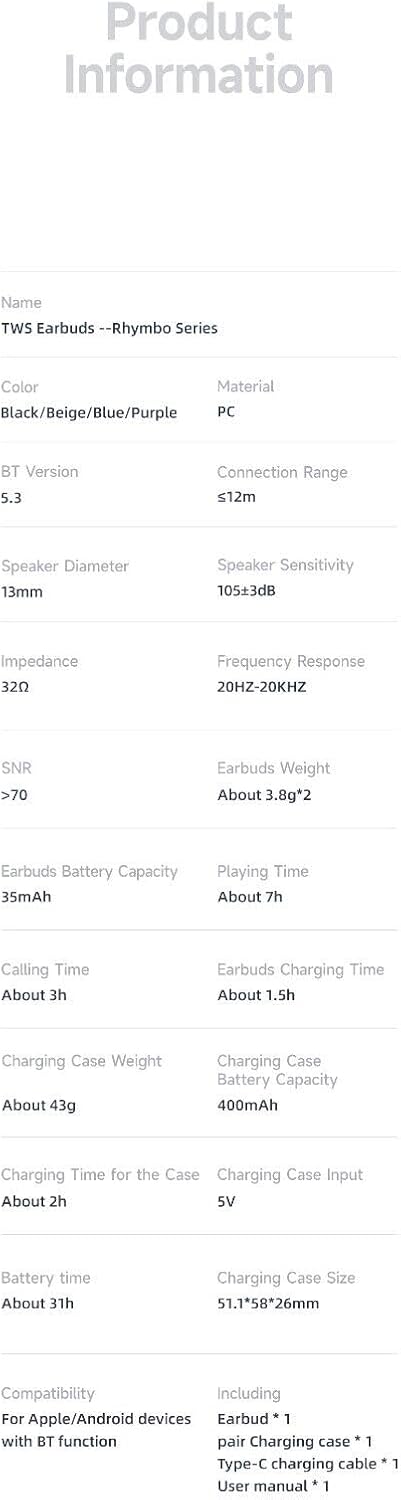
Image: A table detailing the product information and specifications for the TWS Earbuds Rhymbo Series.
| Feature | Detail |
|---|---|
| Model Name | TWS Earbuds -- Rhymbo Series |
| Brand | SGNICS |
| Connectivity Technology | Wireless (Bluetooth 5.3) |
| Wireless Communication Technology | Bluetooth |
| Ear Placement | In Ear |
| Form Factor | In Ear |
| Control Method | Touch |
| Control Type | Media Control |
| Special Features | Lightweight, Microphone Included, Noise Cancellation, Sports & Exercise, Water Resistant (IPX4) |
| Driver Size | 13mm Dynamic Drivers |
| Earbuds Weight | Approx. 3.8g per earbud |
| Earbuds Battery Capacity | 35mAh |
| Charging Case Battery Capacity | 400mAh |
| Total Battery Life | Up to 31 hours (with charging case) |
| Earbuds Play Time | Approx. 7 hours (single charge) |
| Charging Time for Case | Approx. 2 hours |
| Bluetooth Range | Up to 12 meters |
| Material | ABS+PC |
| Included Components | Earbuds, Charging Case, USB-C Cable, Ear Cushions, User Manual |
Warranty and Support
SGNICS products are manufactured with high standards of quality. For information regarding warranty coverage, technical support, or service inquiries, please refer to the contact information provided with your purchase documentation or visit the official SGNICS website.
Safety Information
- Do not disassemble or modify the product.
- Keep away from extreme temperatures, direct sunlight, and open flames.
- Avoid exposing the product to strong magnetic fields.
- Do not use the earbuds at excessively high volumes for prolonged periods to prevent hearing damage.
- Use only the provided charging cable or a certified equivalent.