
Introduction
Thank you for choosing the SGNICS TWS Earbuds. These wireless earbuds are designed to provide a high-quality audio experience with advanced features such as Bluetooth 5.3 connectivity, 13mm dynamic drivers, and a comfortable in-ear design. This manual will guide you through the setup, operation, and maintenance of your new earbuds.
What's in the Box
Please check the package contents to ensure all items are present:
- SGNICS TWS Earbuds (1 pair)
- Charging Case (1)
- Type-C Charging Cable (1)
- User Manual (1)
Product Overview
Familiarize yourself with the components and key features of your SGNICS TWS Earbuds.
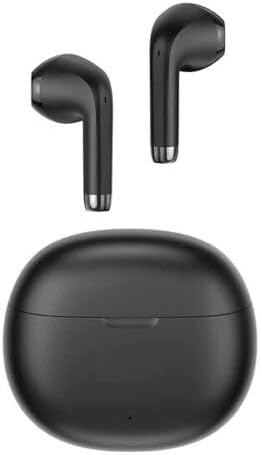
Image: The SGNICS TWS Earbuds and their charging case, both presented in black. The earbuds are shown outside the case, positioned above it.
Key Features:
- Bluetooth 5.3: Equipped with an upgraded BT 5.3 chip for lower power consumption, stronger, and more stable signal, allowing good sound quality within 12 meters.
- 13mm Dynamic Drivers: Features a 13mm compound diaphragm large dynamic speaker for full and rich audio details.
- Lightweight Design: Each earbud weighs approximately 3.8g, ensuring comfortable wear.
- Extended Battery Life: Up to 7 hours of playback on a single charge, with the charging case providing an additional 3-4 charges for a total of approximately 31 hours.
- IPX4 Waterproof: Designed to withstand splashes and sweat, making them suitable for everyday use and workouts.
- Smart Touch Control: Intuitive touch controls for managing music playback, calls, and activating voice assistants.

Image: Composite image illustrating key earbud features including 13mm dynamic drivers, 3.8g lightweight design, 31 hours total battery life, and the Bluetooth 5.3 chip.
Charging Case Features:
- Magnetic Absorption: Earbuds are securely held in place within the charging case.
- Type-C Charging Port: Modern and convenient charging interface.
- Battery Indicator: Provides visual feedback on the charging status.

Image: This image details the charging case features, including magnetic absorption for the earbuds, a Type-C charging port, and a visible battery indicator light.
Setup
1. Charging the Earbuds and Case
- Initial Charge: Before first use, fully charge the earbuds and the charging case. Place the earbuds into the charging case.
- Connect Charger: Connect the provided Type-C charging cable to the charging port on the case and plug the other end into a USB power adapter (not included).
- Charging Indicator: The battery indicator light on the case will show the charging status. A full charge for the case takes approximately 2 hours, and earbuds take about 1.5 hours.

Image: The black SGNICS TWS Earbuds are shown securely placed inside their open charging case, ready for charging or pairing.
2. First-Time Pairing
- Power On: Open the charging case. The earbuds will automatically power on and enter pairing mode.
- Activate Bluetooth: On your device (smartphone, tablet, etc.), enable Bluetooth.
- Select Device: Search for available Bluetooth devices and select "TWS Earbuds -- Rhymbo Series" (or similar name) from the list.
- Confirmation: Once connected, you will hear an audio prompt, and the earbuds' indicator lights will change.
3. Automatic Reconnection
After the first successful pairing, the earbuds will automatically reconnect to the last connected device when you open the charging case, provided Bluetooth is enabled on your device and it is within range.
Operating
Touch Controls
The SGNICS TWS Earbuds feature intelligent touch controls on each earbud. The specific functions may vary slightly, but common operations include:
- Play/Pause Music: Single tap on either earbud.
- Answer/End Call: Single tap on either earbud.
- Reject Call: Press and hold on either earbud.
- Next Track: Double tap on the right earbud.
- Previous Track: Double tap on the left earbud.
- Activate Voice Assistant (Siri/Google Assistant): Triple tap on either earbud.
- Volume Control: (If supported) Long press on left for volume down, long press on right for volume up. Refer to specific product documentation if available for exact mapping.
Note: For precise touch control mapping, please refer to the quick start guide included in your package.
Maintenance
Cleaning
- Gently wipe the earbuds and charging case with a soft, dry, lint-free cloth.
- Do not use abrasive cleaners, alcohol, or chemical solvents.
- Ensure charging contacts on both earbuds and case are clean and dry.
Storage
- Store the earbuds in their charging case when not in use to protect them and keep them charged.
- Avoid storing in extreme temperatures or high humidity.
Water Resistance (IPX4)
The earbuds are rated IPX4, meaning they are resistant to splashing water from any direction. They are not designed for submersion in water. Avoid exposing them to heavy rain, showering, or swimming.
Troubleshooting
If you encounter issues with your earbuds, try the following solutions:
- Earbuds not pairing:
- Ensure both earbuds are charged.
- Turn off Bluetooth on your device and turn it back on.
- Forget the device from your phone's Bluetooth list and try pairing again.
- Place earbuds back in the case, close the lid, wait a few seconds, then open to re-enter pairing mode.
- No sound or low volume:
- Check the volume level on both your device and the earbuds.
- Ensure earbuds are properly connected to your device.
- Clean any debris from the earbud speaker mesh.
- Charging issues:
- Ensure the charging cable is securely connected to both the case and the power source.
- Check if the charging port is clean and free of obstructions.
- Try a different charging cable or power adapter.
- One earbud not working:
- Place both earbuds back into the charging case, close the lid, and then take them out again.
- Ensure both earbuds are charged.
- Perform a factory reset if available (refer to specific product documentation for instructions).
Specifications
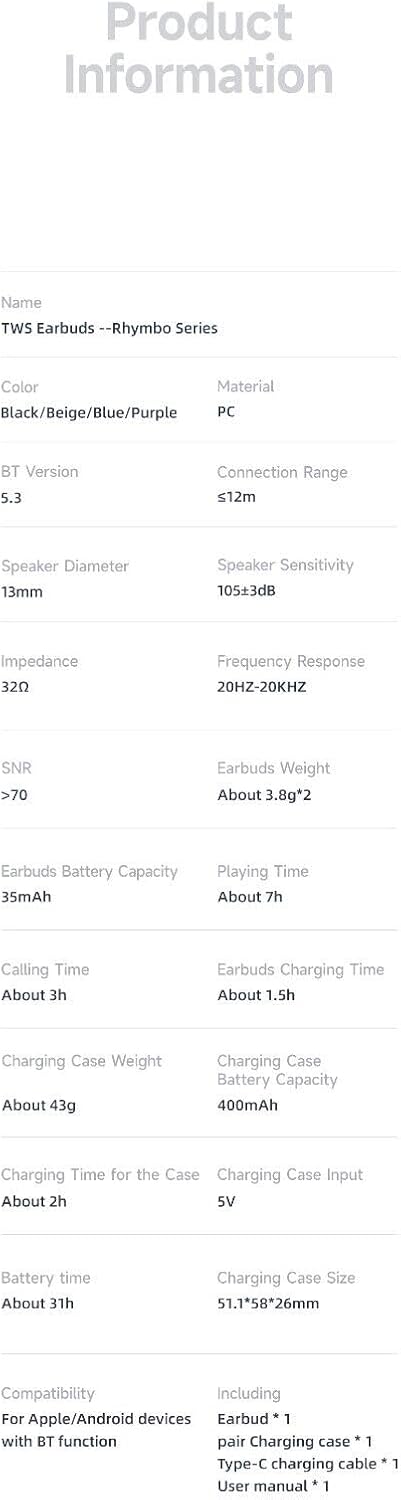
Image: A detailed table outlining the technical specifications and product information for the TWS Earbuds.
| Parameter | Detail |
|---|---|
| Model Name | TWS Earbuds -- Rhymbo Series |
| Brand | SGNICS |
| Color | Black |
| Material | ABS+PC |
| Connectivity Technology | Wireless (Bluetooth 5.3) |
| Bluetooth Range | Up to 12 meters |
| Speaker Diameter | 13mm |
| Speaker Sensitivity | 105±3dB |
| Impedance | 32Ω |
| Frequency Response | 20Hz - 20KHz |
| SNR | >70 |
| Earbuds Weight | Approx. 3.8g per earbud |
| Earbuds Battery Capacity | 35mAh |
| Earbuds Playing Time | Approx. 7 hours |
| Earbuds Calling Time | Approx. 3 hours |
| Earbuds Charging Time | Approx. 1.5 hours |
| Charging Case Battery Capacity | 400mAh |
| Charging Case Charging Time | Approx. 2 hours |
| Total Battery Life (with case) | Approx. 31 hours |
| Charging Case Input | 5V |
| Charging Case Size | 51.1 x 58 x 26mm |
| Water Resistance Level | IPX4 (Splash-proof) |
| Control Method | Touch Control |
| Compatible Devices | Devices with Bluetooth function (e.g., Samsung Galaxy S23 series, Google Pixel series, iPad Pro, iPad Air) |
| Manufacturer | Shenzhen USAMS Technology Co., Ltd. |
| Date First Available | November 14, 2023 |
Warranty and Support
For warranty information or technical support, please refer to the documentation included with your purchase or contact the manufacturer directly. Keep your proof of purchase for any warranty claims.
Manufacturer: Shenzhen USAMS Technology Co., Ltd.