
1. Introduction and Overview
The xTool F1 is a versatile 2-in-1 dual laser engraver designed for high-speed and precise engraving and cutting across a wide range of materials. Featuring both a 2W infrared laser and a 10W diode laser, it offers exceptional flexibility for various creative and professional projects. This manual provides essential information for setting up, operating, maintaining, and troubleshooting your xTool F1 device.

Figure 1: The xTool F1 2-in-1 Dual Laser Engraver with Slide Extension.
2. Key Features
- Highest Speed & Efficiency: Achieves engraving speeds of up to 4000mm/s, ideal for rapid batch processing.
- Dual Laser System: Integrates a 2W infrared laser for all metal materials and a 10W diode laser for wood, acrylic, and other organic materials.
- Wide Material Compatibility: Engraves and cuts over 300 types of materials, including metal, wood, leather, plastic, acrylic, and jewelry.
- 4X Larger Working Area: Utilizes the xTool F1 Slide Extension to expand the working area to 115x400mm, accommodating larger projects and batch processing.
- Smoke and Odor-Free Operation: Features a pre-assembled fully enclosed cover that blocks smoke and filters the laser. Includes a built-in fan and is compatible with an air purifier (sold separately).
- Portable Design: Weighs only 4.6kg, making it easy to transport for craft shows, markets, or various workspaces.
- High Engraving Accuracy: Achieves 0.00199mm motion accuracy for detailed and precise results.

Figure 2: Key features of the xTool F1 laser engraver.
3. Setup
The xTool F1 comes pre-assembled for quick setup. Follow these general steps to begin your engraving projects.
- Software Installation: Download and install the xTool Creative Space software or Lightburn for common laser cutters.
- Connect Device: Connect your xTool F1 to your computer via USB.
- Place Material: Position your material on the engraving base. For larger projects, attach the Slide Extension.
- Focus the Laser: Use the auto-focus feature by entering material thickness in the software, or manually adjust the knob until the two red dots overlap.
- Preview the Work: Utilize the live preview function to ensure correct positioning and framing of your design.
- Start Engraving: Close the safety cover and press the start button to begin the engraving process.

Figure 3: Easy customization steps with xTool F1.

Figure 4: Auto and Manual Focusing methods.
4. Operation
The xTool F1 offers both engraving and cutting capabilities with its dual laser system. Ensure proper material selection and laser type for optimal results.
4.1 Engraving Process
The F1's high speed allows for quick engraving of intricate designs. For photo engraving, the device utilizes advanced rasterization algorithms for 100% HD reprint quality.

Figure 5: High-definition photo engraving capabilities.
Video 1: Demonstrates the process of photo engraving using the xTool F1.
4.2 Batch Processing
The Slide Extension allows for batch processing of multiple items simultaneously, significantly increasing productivity. Simply arrange your items on the extended working area and initiate the engraving.

Figure 6: Batch processing multiple items with the Slide Extension.
5. Materials & Capabilities
The xTool F1's dual laser system provides extensive compatibility with various materials.
- 2W Infrared Laser: Ideal for engraving all metal materials, including stainless steel, aluminum, copper, and jewelry.
- 10W Diode Laser: Suitable for cutting and engraving wood (up to 10mm), acrylic (up to 6mm), leather, plastic, slate, and more.

Figure 7: Examples of materials compatible with xTool F1.
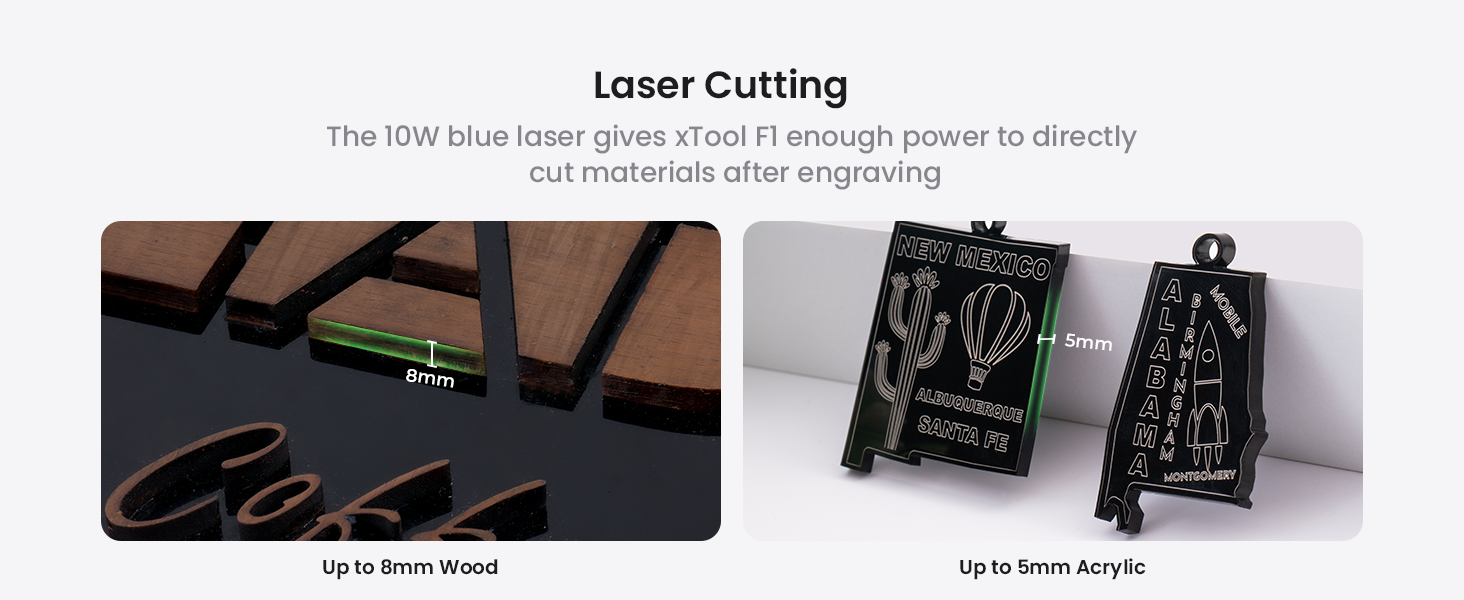
Figure 8: Laser cutting capabilities on wood and acrylic.
Video 2: Demonstrates high-speed engraving on various materials.
6. Safety Information
The xTool F1 is a Class 4 laser engraver. Always prioritize safety during operation.
- Enclosed Design: The fully enclosed cover protects users from direct laser exposure and contains smoke.
- Ventilation: The built-in fan and optional air purifier effectively remove smoke and odors. Ensure proper ventilation in your workspace.
- Emergency Stop: Familiarize yourself with the emergency stop button for immediate shutdown if needed.
- Eye Protection: Although the cover filters laser light, always exercise caution. If operating with the cover open, wear appropriate laser safety goggles.

Figure 9: Fully enclosed design for enhanced safety.
7. Specifications
| Specification | Value |
|---|---|
| Brand | xTool |
| Model | F1 |
| Material Compatibility | Acrylic, Metal, Plastic, Wood |
| Item Weight | 4.6 Kilograms (10.12 pounds) |
| Operation Mode | Manual |
| Diode Laser Output Power | 10000mW (10W) |
| Infrared Laser Output Power | 2000mW (2W) |
| Engraving Speed | Up to 4000mm/s |
| Working Area (with Slide Extension) | 115x400mm |
8. Support
For any inquiries or assistance, xTool offers multi-channel support and a dedicated technical service team.
- Multi-Channel Service: Contact via Email, Live Chat, Phone Call, or Facebook Group.
- Technical Service Team: Dedicated team available for prompt replies to technical questions.

Figure 10: xTool Multi-Channel Service options.

Figure 11: xTool Technical Service Team availability.