
Irfora B0CN9HTTGZ
Irfora WiFi Curtain Blinds Module Switch User Manual
Model: B0CN9HTTGZ
1. Introduction
This intelligent DIY curtain module is designed to integrate with your existing roller blinds shutter switch, transforming traditional window treatments into smart, controllable systems. It allows for remote control via a smartphone application and voice commands when connected with compatible intelligent voice assistants. This manual provides detailed instructions for setup, operation, and maintenance to ensure optimal performance and user experience.
2. Product Overview
Key Features
- APP Remote Control: Control curtains anytime and anywhere using the "Smart Life" or "Tuya Smart" application. Verify curtain status remotely.
- Convenient Integration: Works seamlessly with traditional roller blinds shutter switches for easy smart home integration.
- Hands-free Voice Control: Compatible with Amazon Alexa and Google Home for convenient voice operation.
- Multi-scenario Matching: Adaptable for various curtain types including window blinds, roller blinds, and Venetian blinds.
- Schedules & Countdown Timer: Program custom schedules to open/close roller blinds and set countdown timers from 1 minute to 6 hours.
Visual Overview

Image: The Irfora WiFi Curtain Module, highlighting its compatibility with Tuya, Smart Life, Amazon Alexa, Google Assistant, and standard WiFi connectivity.

Image: Demonstrates the module's versatility in matching different types of curtains, including window blinds, roller blinds, and Venetian blinds.
Package Contents
- 1 x Irfora WiFi Curtain Module
- 1 x User Manual (English)
3. Specifications
| Attribute | Value |
|---|---|
| Material | ABS Plastic |
| Color | White |
| Input Voltage | AC 100-240V, 50/60Hz |
| Output Voltage | AC 100-240V, 50/60Hz |
| WiFi Standard | IEEE 802.11b/g/n 2.4Ghz |
| Maximum Current | 10A |
| Item Dimensions (L x W x H) | 46 x 46 x 18 mm (1.81 x 1.81 x 0.71 inches) |
| Control Method | App, Remote, Voice |
| Mounting Type | Wall Mount |
4. Setup and Installation
4.1 Wiring Diagram
Before installation, ensure the main power supply is turned off to prevent electric shock. Connect the module according to the following diagram. This module is designed to work with your existing traditional roller blinds shutter switch or directly with the motor.
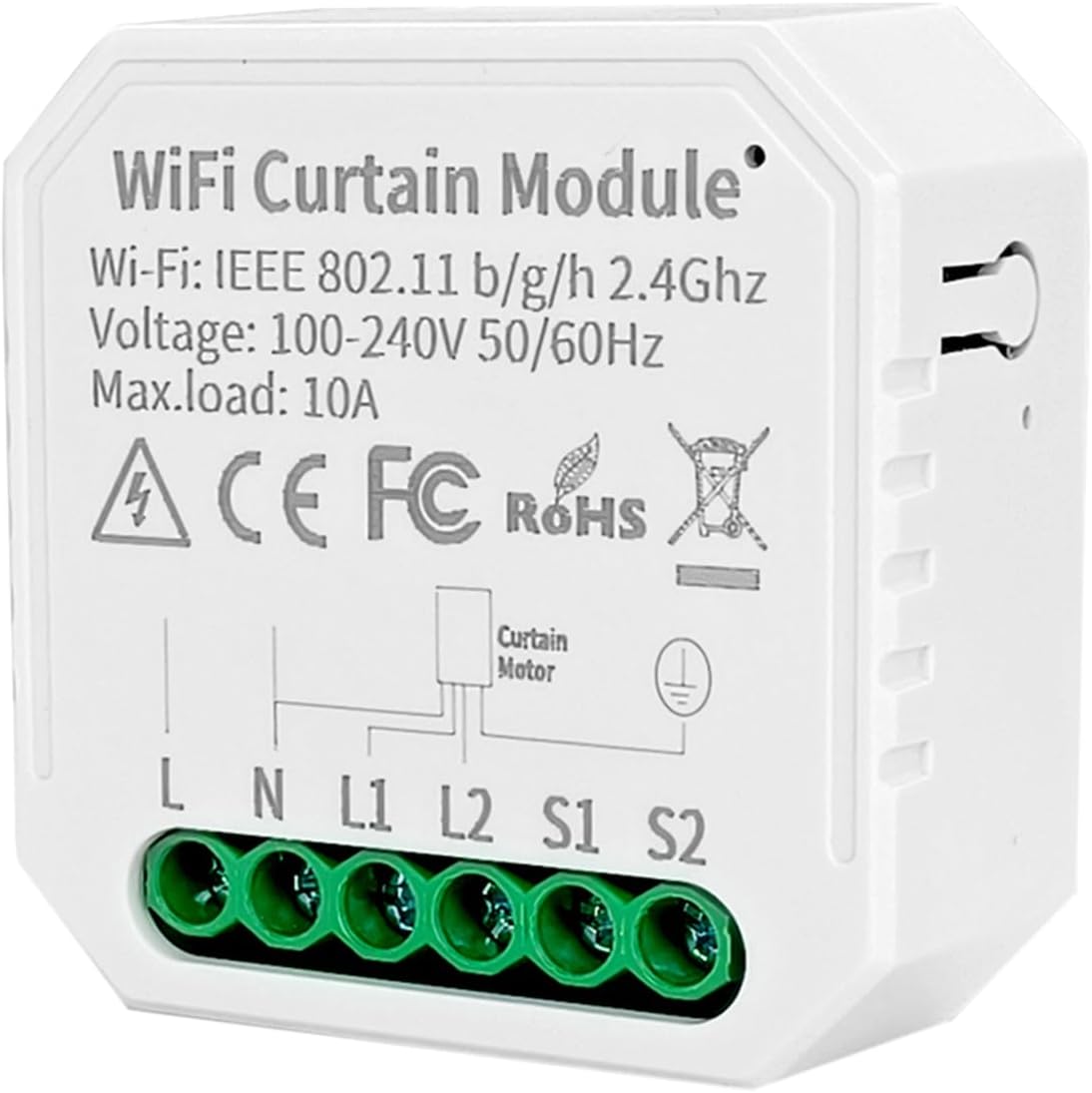
Image: Detailed wiring diagram showing connections for Line (L), Neutral (N), Motor Output (L1, L2), and Switch Inputs (S1, S2) for the WiFi Curtain Module.

Image: Illustrates two primary wiring configurations: one where the module works solely with the roller blinds shutter motor, and another where it integrates with both the motor and a traditional curtain switch.
4.2 App Pairing (Smart Life / Tuya Smart)
To control the module via your smartphone, you need to pair it with the "Smart Life" or "Tuya Smart" application. Follow these general steps:
- Download the "Smart Life" or "Tuya Smart" app from your device's app store (iOS or Android).
- Register or log in to your account.
- Ensure your WiFi Curtain Module is powered on and in pairing mode (usually indicated by a blinking light). Refer to the module's specific pairing instructions if available.
- In the app, tap "+" to add a new device. Select "Curtain Switch" or "Curtain Module" from the device list.
- Follow the on-screen prompts to connect the module to your 2.4GHz WiFi network.

Image: The WiFi Curtain Module, indicating its compatibility and integration with the Tuya and Smart Life smart home platforms.
5. Operating Instructions
5.1 App Control
Once paired, you can control your curtains directly from the Smart Life or Tuya Smart app:
- Open/Close: Use the virtual buttons in the app to fully open or close your curtains.
- Pause: Stop the curtain movement at any desired position.
- Status Check: View the current open/closed status of your curtains remotely.

Image: A smartphone screen showing the Smart Life application interface, demonstrating remote control capabilities for curtain operation.
5.2 Voice Control
Integrate your module with Amazon Alexa or Google Home for hands-free control:
- Link your Smart Life/Tuya Smart account to your Amazon Alexa or Google Home app.
- Discover devices in your voice assistant app.
- Use commands such as:
- "Alexa, open the living room curtains."
- "Hey Google, close the bedroom blinds."
- "Alexa, stop the kitchen roller."

Image: A user interacting with Amazon Alexa and Google Home devices, demonstrating the hands-free voice control functionality for the curtain module.
5.3 Schedules and Countdown Timer
Automate your curtain movements using the scheduling features in the app:
- Schedules: Set specific times for your curtains to open or close daily or on selected days of the week.
- Countdown Timer: Program a countdown for the curtains to open or close after a set duration (e.g., close in 30 minutes).

Image: A smartphone screen showing the scheduling interface within the smart home app, allowing users to set specific times for curtains to open or close.
6. Maintenance
The Irfora WiFi Curtain Blinds Module Switch requires minimal maintenance. Follow these guidelines:
- Cleaning: Ensure the module is clean and free from dust. Use a dry, soft cloth for cleaning. Do not use liquid cleaners or immerse the device in water.
- Firmware Updates: Periodically check the Smart Life/Tuya Smart app for available firmware updates. Keeping the firmware updated ensures optimal performance and security.
- Environmental Conditions: Operate the module within its specified temperature and humidity ranges to prevent damage.
7. Troubleshooting
If you encounter issues with your WiFi Curtain Module, refer to the following common problems and solutions:
- Module Not Responding:
- Check if the module is properly powered and wired according to the diagram.
- Ensure your home WiFi network is active and the module is within range.
- Restart the module by cycling its power.
- App Connectivity Issues:
- Verify your smartphone is connected to the internet.
- Ensure the Smart Life/Tuya Smart app is updated to the latest version.
- If the module disconnects frequently, try moving your WiFi router closer or using a WiFi extender.
- Confirm your WiFi network is 2.4GHz, as the module does not support 5GHz networks.
- Voice Control Not Working:
- Ensure your Smart Life/Tuya Smart account is correctly linked to your Amazon Alexa or Google Home app.
- Check if the device is discovered and named appropriately in your voice assistant app.
- Speak clearly and use the correct commands.
- Curtain Movement Issues:
- Verify the motor wiring (L1, L2) is correct.
- Ensure the curtain motor itself is functioning correctly.
For persistent issues, consider resetting the module (refer to specific reset instructions if provided with the product) and attempting the pairing process again.
8. Warranty and Support
Information regarding product warranty and customer support is typically provided with your purchase documentation or on the manufacturer's official website. Please retain your proof of purchase for warranty claims.
- Warranty Period: Refer to your product packaging or purchase receipt for specific warranty duration.
- Technical Support: For technical assistance, troubleshooting beyond this manual, or warranty inquiries, please contact Irfora customer support through the channels provided at the point of purchase or on their official website.
Ask a question about this manual
Ask about setup, troubleshooting, compatibility, parts, safety, or missing instructions. Manuals+ will review the question and use this page’s manual context to help answer it.