
1. Introduction
The WANLUTECH X9-MOVTADHS Pro is a versatile IP camera tester designed for professional CCTV installation and maintenance. It integrates multiple functions including IP camera testing, analog camera testing (AHD, CVI, TVI, SDI, CVBS), Power over Ethernet (PoE) testing and output, various cable tests (TDR, UTP, tracer), network tools, digital multimeter (DMM), optical power meter (OPM), visual fault locator (VFL), and Wi-Fi analysis. This manual provides detailed instructions for the safe and efficient operation of the device.
2. Safety Information
- Read all instructions carefully before operating the device.
- Do not expose the device to moisture, rain, or extreme temperatures.
- Use only the provided charger and accessories.
- Ensure proper ventilation during operation and charging.
- Avoid direct eye exposure to the Visual Fault Locator (VFL) laser output.
- Before using the tester, open the battery cover and remove the paper piece isolating the battery.
3. Package Contents
Verify that all items listed below are included in your package:
- WANLUTECH X9-MOVTADHS Pro Tester Unit
- Tool Bag
- Lithium Battery (pre-installed)
- Accessories Box
- Safety Cord
- Digital Multi-meter Pen
- Charger
- RS485 Control Cable
- BNC Cable
- Fiber Test Head
- Power Output Cable
- Audio Test Cable
- Cable Tracer
- TDR Cable Clip

4. Device Layout
Familiarize yourself with the ports and controls of the X9-MOVTADHS Pro tester:

Top Panel Ports:
- DC12V/3A Power Output: Provides 12V DC power at 3A.
- PoE Power Output / Network Testing Port: Supports up to 90W PoE power output and network testing.
- PSE/PoE Voltage Measurement: For measuring Power Sourcing Equipment (PSE) and PoE voltages.
- Visual Fault Locator (VFL): For fiber optic cable fault detection.
- Optical Power Meter (OPM): For measuring optical power levels.
- AHD CVI TVI CVBS In: Input for analog camera signals.
- Video Out: Video output port.
- HDMI In: HDMI input port.
- EX-SDI/HD-SDI In: Input for SDI camera signals.
- TDR 3.0 Cable Test: Port for Time Domain Reflectometry cable testing.
- RS 485 Port: For PTZ control and other serial communications.
Bottom Panel Ports:
- DC5V/2A Power Output: Provides 5V DC power at 2A.
- DC24V/2A Power Output: Provides 24V DC power at 2A.
- DC15V Power Input: Power input for charging the device.
- Audio In/Out: Audio input and output ports.
- UTP / Cable Tracer Port: For UTP cable testing and cable tracing.
- Micro SD Card Slot: For expandable storage.
- HDMI Out: HDMI output port.
5. Setup
5.1 Initial Battery Preparation
- Locate the battery cover on the back of the tester.
- Open the battery cover.
- Remove the protective paper piece isolating the battery terminals.
- Close the battery cover securely.
5.2 Charging the Device
Connect the provided charger to the DC15V Power Input port on the bottom panel of the tester and plug it into a power outlet. The charging indicator will illuminate. Allow the device to fully charge before first use.
5.3 Powering On/Off
- To Power On: Press and hold the power button located on the side of the device until the screen illuminates.
- To Power Off: Press and hold the power button until a power-off menu appears on the screen. Select 'Power Off' to shut down the device.
6. Operating Instructions
6.1 IP Camera Testing
The X9-MOVTADHS Pro supports testing of IP cameras up to 8K 32MP resolution. Key functions include:
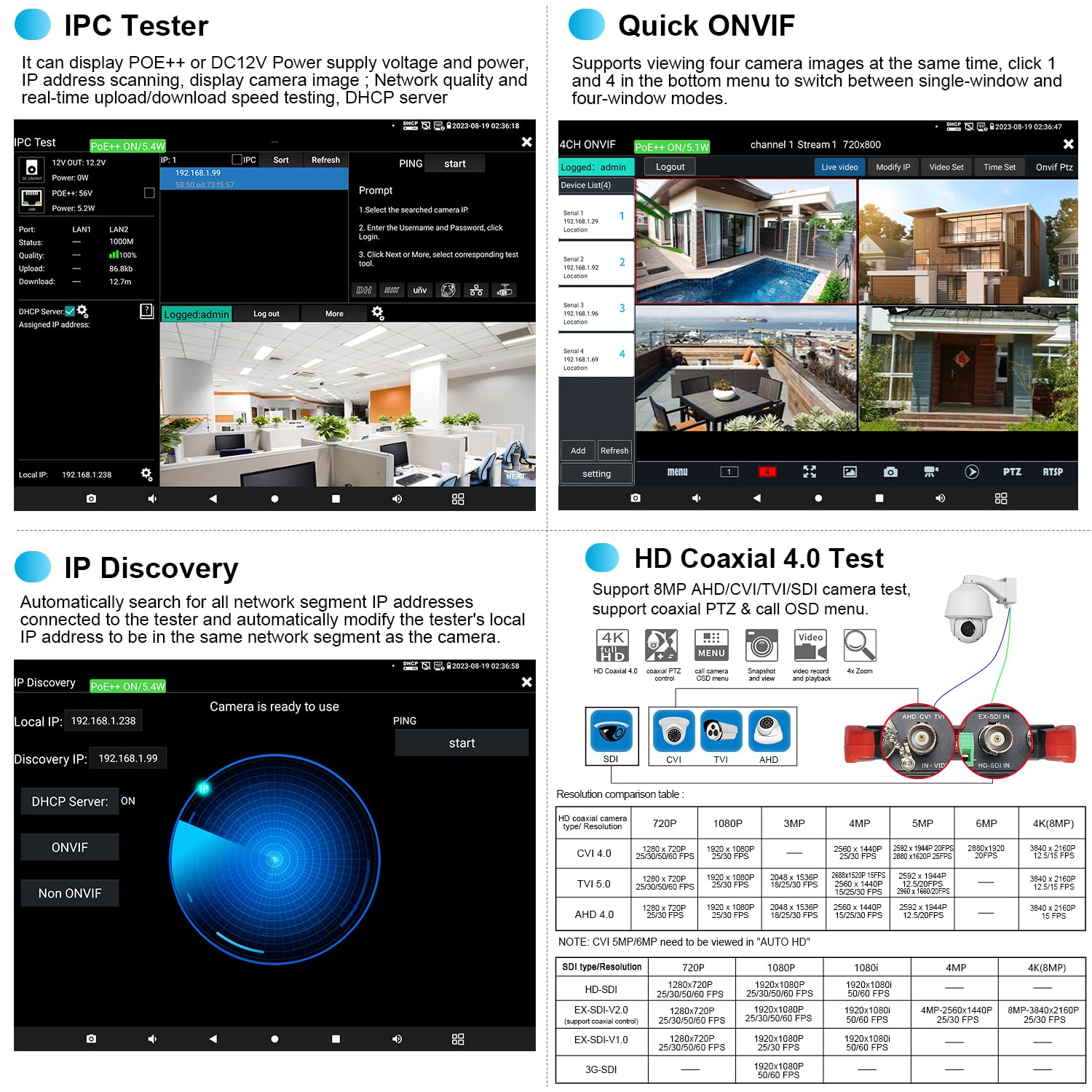
- IPC Test: Integrated IP camera test, PoE and camera test tool functions. View network information, PoE and DC 12V power/voltage. Access ONVIF and other test tools.
- IP Discovery: Automatically searches for all network segment IP addresses connected to the tester. It can modify the tester's local IP address to match the camera's network segment.
- Rapid Video: Quickly displays video streams.
- RTSP Play: Plays RTSP streams directly.
- 4CH ONVIF: Supports viewing up to four camera images simultaneously. Switch between single-window and four-window display modes.
- Hik/DH Test Tool: Supports batch activation of Dahua (DH) and Hikvision (Hik) cameras, and modification of IP addresses, passwords, etc.


6.2 AHD/CVI/TVI/SDI/CVBS Camera Testing
The tester supports analog cameras up to 8MP AHD/TVI/CVI/SDI. Use the "AUTO HD" app to automatically recognize camera types and display resolution/frame rate. Functions include UTC control, OSD menu access, video signal level measurement, and color bar generation.


6.3 Cable Testing
The tester offers comprehensive cable testing capabilities:
- Cable Tracer: Search for BNC, network, telephone, and shielded cables from cluttered bundles.
- RJ45 Cable TDR Test: Tests cable pair status, length (up to 180m), attenuation, reflectivity, impedance, and skew.
- TDR Cable Breakpoint Short Circuit Test: Measures length (up to 1.2 KM) and detects short circuits in BNC, network, telephone, RVV, TVVB elevator, and Cat 5/6 cables.
- UTP Cable Tester: Detects near-end, mid-end, and far-end fault points of RJ45 cable plugs.

Video 6.3.1: TDR Cable Breakpoint Test demonstration.

Video 6.3.2: UTP Cable Test & Cable Tracer demonstration.
Video 6.3.3: RJ45 Cable TDR Test demonstration.

6.4 PoE Functions
- PoE++ Power Output: Supports IEEE 802.3af/at/bt standards, providing up to 90W power output to temporarily power high-power PTZ cameras or other PoE devices. Ensure the network cable connected to the PoE power output port (LAN port) is a straight-through cable and not short-circuited.
- PoE Detection: Measures PoE switch or PSE power supply voltage and cable connection status. The power supply equipment must be connected to the PSE IN port.
- Power Management V2.0: Checks real-time voltage, power, and status of PoE++, DC12V, DC24V power output, and DC15V power input.

Video 6.4.1: PoE++ power output demonstration.

6.5 Network Tools
The tester includes professional network testing tools:
- IP Scan
- PING Test
- PPPOE
- Trace Route
- Link Monitor
- DHCP Server
- Port Flashing

Video 6.5.1: Network Testing Tools demonstration.
6.6 Other Functions
- Digital Multi-meter (DMM): Measures DC/AC voltage, DC/AC current, resistance, continuity, diode, and capacitance.
- Optical Power Meter (OPM): Connect to the OPM port to measure optical power linearly or non-linearly, and for relative measurement of fiber link loss. Supports wavelengths: 850nm, 1300nm, 1310nm, 1490nm, 1550nm, 1625nm.
- Visual Fault Locator (VFL): Detects fiber breakage, cracking, bending, and other faults.
- WiFi Analyzer: Analyzes Wi-Fi signal strength, channel, and other parameters. Can also create a Wi-Fi hotspot.
- HDMI Input & Output: Supports HDMI input (max 4K 30 FPS) for displaying video from DVR/NVR, and HDMI output (max 4K 60 FPS) to an external display.
- Application Update: Allows for local and online updates of applications and firmware.


7. Maintenance
- Cleaning: Use a soft, dry cloth to clean the device. Do not use abrasive cleaners or solvents.
- Storage: Store the device in a cool, dry place away from direct sunlight and extreme temperatures.
- Battery Care: For prolonged storage, charge the battery to approximately 50-60% every three months to maintain battery health.
- Software Updates: Regularly check for and install application updates to ensure optimal performance and access to new features.
8. Troubleshooting
| Problem | Possible Cause | Solution |
|---|---|---|
| Device does not power on | Battery is depleted or protective paper not removed. | Charge the device. Ensure the battery isolation paper is removed. |
| No video display from camera | Incorrect cable connection, incompatible camera type, or camera not powered. | Verify cable connections. Check camera compatibility and power supply. Use the correct test mode (IP, AHD, etc.). |
| PoE output not working | Cable fault, device not requesting PoE, or tester's PoE output disabled. | Check network cable for faults. Ensure the connected device supports PoE. Verify PoE output is enabled in the tester's settings. |
| Inaccurate cable test results | Cable not properly terminated, external interference, or incorrect cable type selected. | Ensure cable ends are correctly terminated. Test in an environment free from strong electromagnetic interference. Select the appropriate cable type in the test menu. |
| Touchscreen unresponsive | Temporary software glitch or screen protector interference. | Restart the device. If a screen protector is installed, ensure it is applied correctly and not causing issues. |
9. Specifications
| Feature | Specification |
|---|---|
| Brand | WANLUTECH |
| Model | X9-MOVTADHS Pro |
| Display | 8-inch IPS Touch Screen |
| IP Camera Test | Up to 8K 32MP, H.265/H.264, ONVIF, IPC Test, IP Discovery, Rapid Video, RTSP Play, Hik/DH Test Tool |
| Analog Camera Test | Up to 8MP TVI/AHD/CVI/SDI/CVBS, AUTO HD app, UTC control, OSD menu, video signal level, color bar generator |
| PoE Power Output | Max 90W (IEEE 802.3af/at/bt standard) |
| Power Output | DC12V/3A, DC24V/2A, DC5V/2A |
| Power Input | DC15V |
| Cable Testing | TDR Cable Breakpoint (up to 1.2KM), RJ45 Cable TDR (up to 180m), Cable Tracer, UTP Cable Test |
| Network Tools | IP Scan, PING Test, PPPOE, Trace Route, Link Monitor, DHCP Server, Port Flashing |
| Other Functions | Digital Multi-meter (DMM), Optical Power Meter (OPM), Visual Fault Locator (VFL), WiFi Analyzer, HDMI In/Out |
| Battery | Built-in 3350mAh Lithium Battery |
| Operating Voltage | 15 Volts (DC) |
| Certifications | CE, CSA |
10. Warranty and Support
WANLUTECH provides customer support for its products. For any questions or technical assistance, please contact the manufacturer directly. You can typically find support options through your purchase platform or the official WANLUTECH website.
How to Contact Support:
- Via Amazon: Find your order on your Amazon account, view order details, and click 'Get Product Support' to message the seller.
- Directly: Visit the 'WANLUTECH official store' page on Amazon and use the messaging feature.
Please refer to your purchase documentation for specific warranty terms and conditions.


