
HyperGear 15861
HyperGear Wireless Audio Essentials Duo User Manual
Model: 15861 | Brand: HyperGear
1. Introduction
Welcome to the user manual for your HyperGear Wireless Audio Essentials Duo. This innovative product combines the functionality of over-ear Bluetooth headphones with a portable HD stereo sound speaker, featuring vibrant LED lighting. Designed for versatility and superior audio quality, it allows you to enjoy your music privately or share it with others.
What's Included:
- Wireless Headphones
- Micro USB Charging Cables
- 3.5mm Aux Cord with In-Line Microphone

Image: The HyperGear Wireless Audio Essentials Duo headphones in beige, showcasing their sleek design and integrated LED lighting on the earcups.

Image: An overview of the Wireless Audio Essentials Duo, highlighting both the headphones and the portable speaker, emphasizing their HD sound, dynamic bass, and colorful LED lighting.
2. Setup
2.1 Charging the Device
Before first use, fully charge your HyperGear Wireless Audio Essentials Duo. Use the provided Micro USB Charging Cables to connect the headphones and speaker to a compatible USB power source.
- Headphones: Up to 10 hours of playtime on a full charge.
- Speaker: Up to 2 hours of playtime on a full charge.
- Rapid Recharge: Approximately 1.5 hours for a full charge.

Image: Visual representation of the battery life for both headphone and speaker modes, along with the rapid recharge time.
2.2 Bluetooth Pairing
To connect your device wirelessly:
- Ensure the headphones/speaker are powered off.
- Press and hold the Power button until the LED indicator flashes, indicating pairing mode.
- On your device (smartphone, tablet, computer), enable Bluetooth and search for "HyperGear Audio Duo" (or similar name).
- Select the device to pair. Once connected, the LED indicator will show a solid light.
- The device will automatically reconnect to the last paired device when powered on, if within range (up to 33 feet).

Image: Diagram illustrating the wireless Bluetooth connectivity, showing the headphones, speaker, and a smartphone with a 33ft range and universal compatibility.
3. Operating Instructions
3.1 Headphone Controls
All physical buttons for controlling the headphones are conveniently located on the right ear cup.
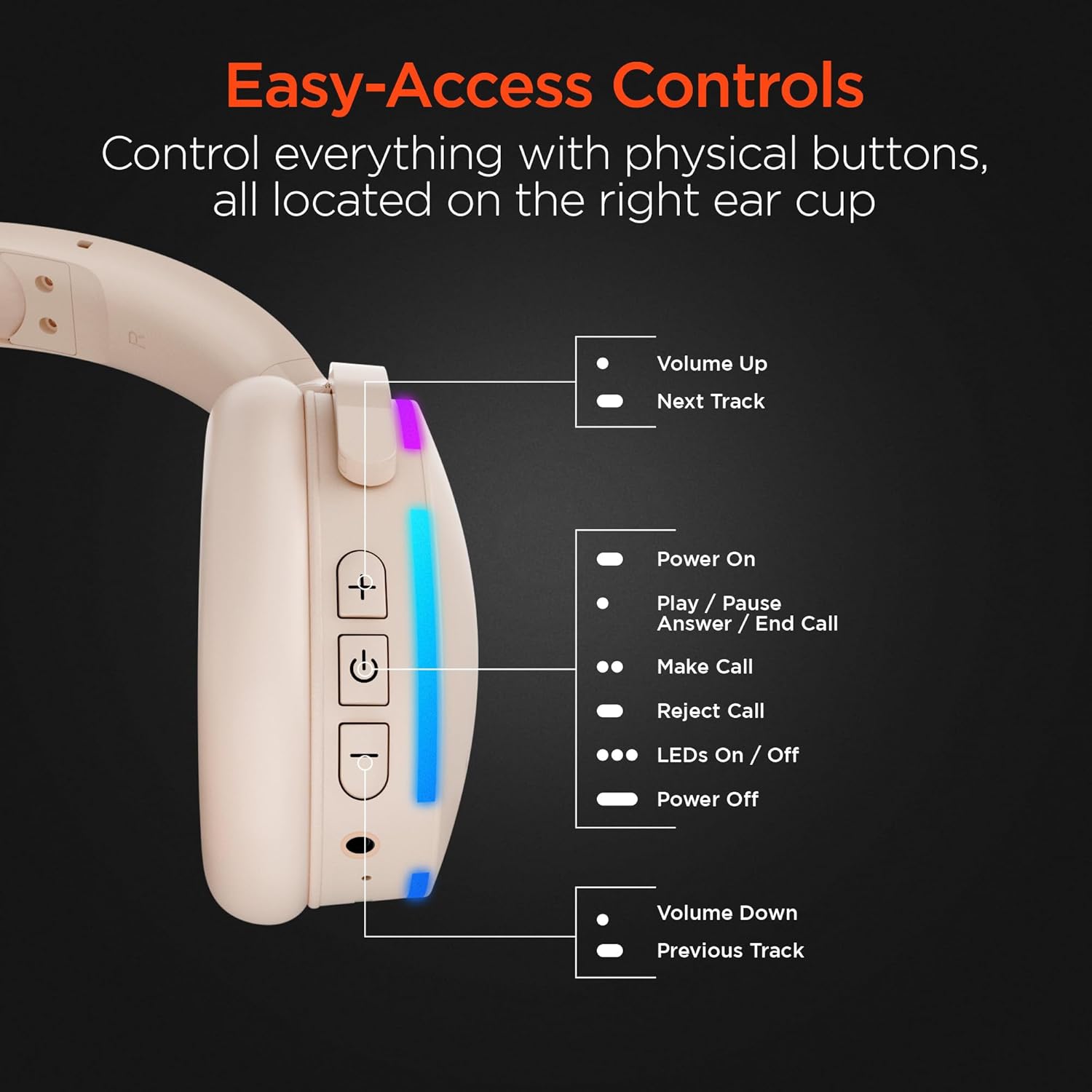
Image: A detailed view of the right earcup, pointing out the functions of each button for easy access and control.
| Button/Action | Function |
|---|---|
| + Button | Volume Up / Next Track (Long Press) |
| Power Button | Power On / Play / Pause / Answer / End Call |
| LEDs On/Off Button | Toggle LED lights on/off |
| - Button | Volume Down / Previous Track (Long Press) |
| Built-in Mic | For hands-free calls and voice commands. |
3.2 Speaker Mode
The headphones can transform into a portable speaker for shared listening. Simply fold the earcups inwards to activate the speaker mode. The speaker features a full-range dynamic driver and 5W powerful audio, making it suitable for indoor and outdoor use. It also has a durable fabric carrying strap and is splashproof (IPX4).

Image: The ultra-compact and portable wireless speaker, shown with its durable fabric carrying strap, highlighting its 5W powerful audio, 52mm full-range dynamic driver, wireless control, and IPX4 splashproof rating.
3.3 Making and Receiving Calls
With the built-in microphone, you can easily manage calls:
- Answer/End Call: Press the Power button once.
- Reject Call: Long press the Power button.
- Make Call: Use your connected device to dial, and the audio will route through the headphones/speaker.
4. Maintenance
To ensure the longevity and optimal performance of your HyperGear Wireless Audio Essentials Duo, follow these maintenance guidelines:
- Cleaning: Use a soft, dry cloth to clean the surfaces of the headphones and speaker. Do not use abrasive cleaners or solvents.
- Storage: Store the device in a cool, dry place away from direct sunlight and extreme temperatures.
- Water Exposure: While the speaker is splashproof (IPX4), avoid submerging it in water. Keep both the headphones and speaker away from excessive moisture.
- Charging: Always use the provided charging cables. Do not attempt to charge the device with damaged cables or chargers.
- Handling: Avoid dropping or subjecting the device to strong impacts, as this can damage internal components.
5. Troubleshooting
If you encounter any issues with your HyperGear Wireless Audio Essentials Duo, please refer to the following common solutions:
| Problem | Possible Solution |
|---|---|
| Device won't power on. | Ensure the device is fully charged. Connect to a power source and try again. |
| Cannot pair via Bluetooth. |
|
| No sound or low volume. |
|
| Microphone not working. |
|
| LED lights not working. | Press the dedicated LED On/Off button on the right earcup. |
6. Specifications
| Feature | Detail |
|---|---|
| Model Name | Wireless Audio Essentials Duo |
| Item Model Number | 15861 |
| Brand | HyperGear |
| Color | Beige |
| Material | Plastic |
| Connectivity Technology | Wireless (Bluetooth) |
| Bluetooth Version | 4.0 |
| Wireless Range | Up to 33 feet (10 meters) |
| Headphones Jack | 3.5 mm Jack |
| Earpiece Shape | Over Ear |
| Form Factor | Over Ear |
| Noise Control | Sound Isolation |
| Audio Driver Type | Dynamic Driver |
| Frequency Range | 20 Hz - 20,000 Hz |
| Control Type | Media Control (Touch) |
| Headphone Playtime | Up to 10 hours |
| Speaker Playtime | Up to 2 hours |
| Recharge Time | Approx. 1.5 hours |
| Speaker Power Output | 5W |
| Speaker Driver Size | 52mm |
| Speaker Water Resistance | IPX4 Splashproof |
| Included Components | Wireless Headphones, Micro USB Charging Cables, 3.5mm Aux Cord with In-Line Microphone |
| Compatible Devices | Laptops, Desktops, Gaming Consoles, Tablets, Telephones, Smart Speakers, Televisions, Cellphones |
| Age Range | Teen to Adult |
| UPC | 633755158629 |
7. Warranty & Support
For warranty information, technical support, or any inquiries regarding your HyperGear Wireless Audio Essentials Duo, please visit the official HyperGear website or contact their customer service. Details regarding product registration and warranty claims can typically be found on the manufacturer's support page.
You can also refer to the product's detail page on Amazon for additional information and potential protection plan options.
Official Product Video:
Video: An official product video titled "HyperGear Wireless Audio Essentials Duo" from Amazon Videos, showcasing the key features and design of the headphones and speaker. This video provides a visual overview of the product's capabilities and versatility.
Related documents15861


Ask a question about this manual
Ask about setup, troubleshooting, compatibility, parts, safety, or missing instructions. Manuals+ will review the question and use this page’s manual context to help answer it.