
1. Introduction
This manual provides essential information for the safe and effective operation of the Pro'sKit MT-3209 3-5/6 AC/DC Digital Clamp Meter. Please read this manual thoroughly before using the device to ensure proper function and to prevent potential hazards. The MT-3209 is a versatile tool designed for electrical measurements, offering features such as True RMS, VFC detection, LoZ measurement, and NCV detection.
2. Safety Information
Always adhere to the following safety precautions to prevent personal injury or damage to the meter:
- Electrical Shock Hazard: Exercise extreme caution when working with live circuits. Voltages above 30V AC RMS, 42V peak, or 60V DC pose a shock hazard.
- Proper Use: Use the meter only as specified in this manual. Failure to do so may impair the protection provided by the equipment.
- Inspection: Before each use, inspect the meter and test leads for any damage. Do not use if damaged.
- Measurement Category: Ensure the meter's measurement category (CAT rating) is appropriate for the circuit being tested. The MT-3209 is rated for CAT III 600V.
- Fuse Replacement: Replace fuses only with the specified type and rating.
- Battery Replacement: Replace batteries when the low battery indicator appears to ensure accurate readings.
- Environmental Conditions: Do not operate the meter in explosive gas, vapor, or dusty environments.
3. Product Features
The Pro'sKit MT-3209 Digital Clamp Meter offers a range of advanced features for accurate and reliable electrical measurements:
- 3-5/6 Digit Display: Provides precise readings with a maximum count of 6000.
- True RMS Measurement: Accurately measures AC voltage and current for non-sinusoidal waveforms.
- AC/DC Voltage and Current: Capable of measuring both alternating and direct current/voltage.
- VFC Detection (Variable Frequency Current): Filters interferential signals to elevate measured accuracy in variable frequency drive systems.
- LoZ Measurement (Low Impedance): Helps to filter induced or false voltages, providing real voltage test results.
- NCV Detection (Non-Contact Voltage): Safely detects the presence of AC voltage without physical contact.
- Overload Protection: Designed to prevent misuse and protect the user and the device.
- Auto Range: Automatically detects and selects the appropriate measurement range.
- Data Hold: Freezes the displayed reading for convenient recording.
- Backlight & LED Light: Improves visibility in dimly lit environments.
- Large Jaw Opening: 30mm jaw opening fits most cables.

Image: Overview of the Pro'sKit MT-3209 Digital Clamp Meter, highlighting its 3-5/6 digit display, True RMS, LoZ Detection, V.F.C Test, and Overload Protection capabilities.

Image: Detailed view of the MT-3209, labeling key components such as the LED Light, Clamp Trigger, Backlight/LED Switch, Hz Select, NCV Indication, Switch Knob, Function Select, Data Hold, LCD Display, and Socket.
4. Setup
4.1. Battery Installation
- Ensure the meter is powered off.
- Locate the battery compartment cover on the back of the meter.
- Use a screwdriver to loosen the screw(s) securing the battery cover.
- Remove the cover and insert the required batteries (typically AAA or AA, refer to the compartment label) observing correct polarity.
- Replace the battery cover and tighten the screw(s).
4.2. Test Lead Connection
For voltage, resistance, capacitance, diode, and continuity measurements, connect the test leads:
- Insert the black test lead into the 'COM' (Common) input jack.
- Insert the red test lead into the 'V/Ω/C/†+' input jack.
5. Operating Instructions
5.1. Power On/Off
Rotate the function knob from 'OFF' to any desired measurement function to power on the meter. To power off, rotate the function knob back to 'OFF'.
5.2. Function Selection
The rotary switch allows selection of various measurement functions. Press the 'FUNC' button to cycle through sub-functions within a main setting (e.g., ACV/DCV, Resistance/Continuity/Diode/Capacitance).
5.3. AC/DC Current Measurement (ACA/DCA)
To measure AC or DC current:
- Rotate the function knob to the 'ACA' or 'DCA' position.
- Open the clamp jaws by pressing the clamp trigger.
- Enclose only one conductor with the clamp jaws. Ensure the jaws are fully closed.
- Read the current value on the LCD display.

Image: The MT-3209 clamp meter measuring AC current (ACA) on a cable and DC current (DCA) on a battery terminal, demonstrating its versatility.
5.4. AC/DC Voltage Measurement (ACV/DCV)
To measure AC or DC voltage:
- Connect the test leads as described in Section 4.2.
- Rotate the function knob to the 'V~' (ACV) or 'V=' (DCV) position. Use the 'FUNC' button to switch between AC and DC if combined.
- Connect the test probes in parallel to the circuit or component under test.
- Read the voltage value on the LCD display.
Image: The MT-3209 measuring AC voltage (ACV) from a wall outlet and DC voltage (DCV) from a 9V battery, illustrating its capability for both types of voltage measurements.
5.5. VFC Measurement (Variable Frequency Current)
The VFC function is designed for accurate measurements in circuits with variable frequency drives.
- Rotate the function knob to the 'VFC' position.
- Connect the test leads or clamp the conductor as appropriate for the measurement (voltage or current).
- The meter will filter out high-frequency noise to provide a stable reading.

Image: The MT-3209 performing a V.F.C measurement on the wiring of an air conditioning unit, demonstrating its ability to filter interferential signals for improved accuracy.
5.6. LoZ Measurement (Low Impedance)
The LoZ function helps to eliminate ghost voltages by providing a low impedance path.
- Rotate the function knob to the 'LoZ' position.
- Connect the test leads to the circuit.
- The meter will display the true voltage by dissipating any induced voltages.
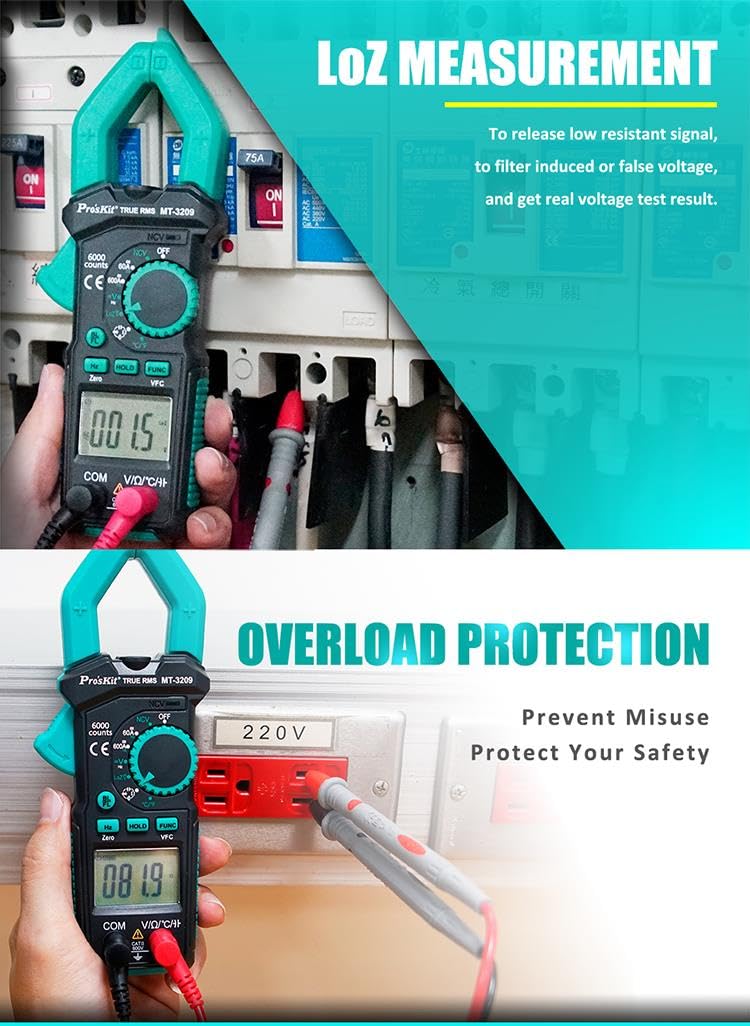
Image: The MT-3209 performing a LoZ measurement on a circuit breaker panel, illustrating its capability to filter induced or false voltages for accurate readings.
5.7. NCV Detection (Non-Contact Voltage)
For detecting AC voltage without direct contact:
- Rotate the function knob to the 'NCV' position.
- Move the top part of the meter (NCV sensor) close to the conductor or outlet.
- The meter will emit an audible beep and/or flash an LED indicator when AC voltage is detected.
5.8. Resistance, Continuity, Diode, Capacitance, Frequency, Temperature
These functions are typically grouped on the rotary switch. Use the 'FUNC' button to cycle through them.
- Resistance (Ω): Connect test leads across the component.
- Continuity: Connect test leads across the circuit. An audible beep indicates continuity.
- Diode (†): Connect test leads across the diode. Displays forward voltage drop.
- Capacitance (C): Connect test leads across the capacitor.
- Frequency (Hz): Connect test leads to the signal source.
- Temperature (℃/℉): Use the included temperature probe and connect it to the input jacks.
Image: The MT-3209 measuring frequency from an output source and resistance of a component, showcasing its multi-functionality.
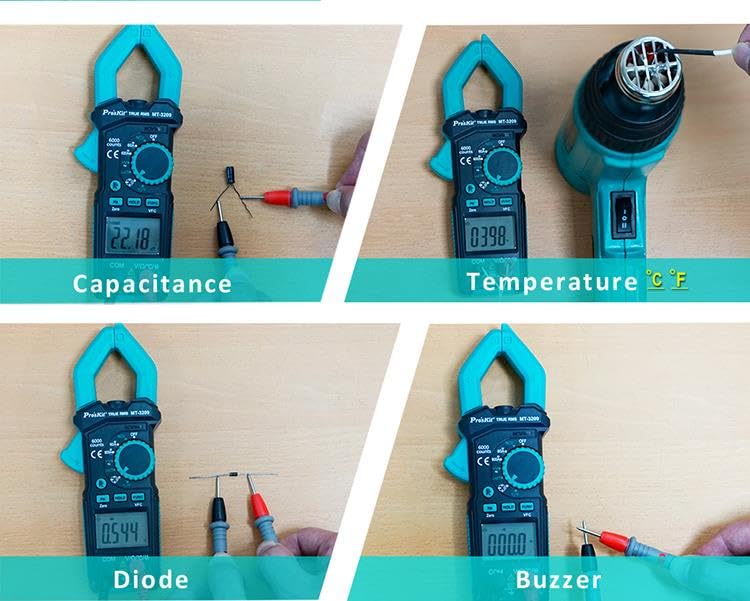
Image: The MT-3209 performing various measurements including capacitance of a capacitor, temperature with a probe, diode test, and continuity (buzzer) test, demonstrating its comprehensive testing capabilities.
5.9. Data Hold
Press the 'HOLD' button to freeze the current reading on the display. Press it again to release the hold function.
5.10. Backlight / LED Light
Press the backlight/LED button to illuminate the display or activate the integrated LED light for working in dark areas.

Image: A close-up view of the MT-3209's large jaw, indicating a 30mm opening suitable for most cables.
6. Maintenance
6.1. Cleaning
Wipe the meter's casing with a damp cloth and a mild detergent. Do not use abrasives or solvents. Ensure the meter is completely dry before use.
6.2. Battery Replacement
When the low battery indicator appears on the display, replace the batteries as described in Section 4.1. Prompt battery replacement ensures continued accuracy and proper operation.
6.3. Fuse Replacement
If the fuse needs replacement (e.g., after an overload in current measurement), refer to the meter's internal diagram or specifications for the correct fuse type and rating. Always disconnect test leads and power off the meter before opening the casing for fuse replacement.
7. Troubleshooting
If the meter does not function correctly, check the following common issues:
- No Display: Check if the meter is powered on. Verify battery installation and charge level. Replace batteries if necessary.
- Incorrect Readings: Ensure the correct function is selected for the measurement. Check test lead connections. Verify that the clamp jaws are fully closed for current measurements.
- 'OL' or Overload Indication: The measured value exceeds the selected range. Switch to a higher range if available, or ensure the input is within the meter's maximum specifications.
- No Continuity Beep: Check if the continuity function is selected. Ensure test leads are making good contact.
- NCV Not Detecting: Ensure the NCV function is selected. The sensor needs to be close to a live AC voltage source.
If problems persist, contact customer support or a qualified technician.
8. Specifications
| Parameter | Value |
|---|---|
| Brand | Pro'sKit |
| Model | MT-3209 (GT-MT-3209-C) |
| Display | 3-5/6 Digits, 6000 Counts |
| Measurement Type | AC/DC Digital Clamp Meter |
| True RMS | Yes |
| VFC Detection | Yes |
| LoZ Measurement | Yes |
| NCV Detection | Yes |
| Jaw Opening | 30mm |
| Item Weight | 0.5 Kilograms |
| Item Dimensions (L x W x H) | 22 x 12 x 15 centimetres |
| Manufacturer | Prokit's Industries Co.,LTD |
| Country Of Origin | Taiwan |
9. Warranty & Support
Pro'sKit products are manufactured to high-quality standards. For warranty information, please refer to the warranty card included with your product or visit the official Pro'sKit website. For technical support, service, or replacement parts, please contact your local Pro'sKit distributor or authorized service center. Keep your purchase receipt as proof of purchase for warranty claims.
