
Introduction
Thank you for choosing the JOYROOM JR-T03S Wireless Bluetooth Earbuds. This manual provides detailed instructions for setting up, operating, and maintaining your new earbuds. Please read this manual carefully before use and keep it for future reference.
Package Contents
- JOYROOM JR-T03S Wireless Bluetooth Earbuds (Left & Right)
- Charging Case (400 mAh with lithium protection board)
- Silicone Protective Case (Pink)
- Metal Hanger
- USB Charging Cable
- User Manual
Safety Information
- Do not expose the earbuds or charging case to extreme temperatures, humidity, or liquids.
- Avoid dropping, impacting, or disassembling the device.
- Keep out of reach of children.
- Use only the provided charging cable or a certified equivalent.
- Do not use the earbuds at high volume for extended periods to prevent hearing damage.
Product Overview
Familiarize yourself with the components of your JR-T03S earbuds and charging case.
Earbuds
Each earbud features a touch control area, microphone, and charging contacts.
Charging Case
The charging case has a charging port, LED indicator, and slots for the earbuds. It also comes with a pink silicone protective case and a metal hanger for portability.
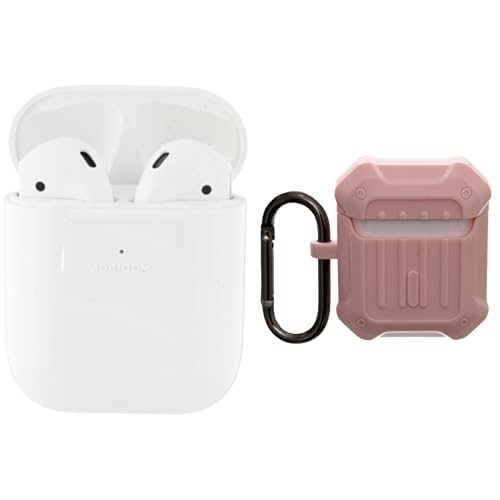
Image: The JOYROOM JR-T03S wireless earbuds are shown inside their charging case, which is protected by a pink silicone cover. A metal hanger is attached to the case.
Setup
1. Charging the Earbuds and Case
- Place the earbuds into the charging case. Ensure the charging contacts align.
- Connect the USB charging cable to the charging port on the case and to a power source.
- The LED indicator on the case will show charging status. A full charge typically takes approximately 1-2 hours.
- The charging case has a 400 mAh battery with built-in lithium protection for safe charging.
2. Pairing with a Bluetooth Device
- Open the charging case. The earbuds will automatically enter pairing mode.
- On your device (smartphone, tablet, etc.), enable Bluetooth.
- Search for "JR-T03S" in the list of available Bluetooth devices.
- Select "JR-T03S" to connect. Once connected, a voice prompt will confirm successful pairing.
- The earbuds will automatically reconnect to the last paired device when taken out of the case, if Bluetooth is enabled on the device.
Operating Instructions
Power On/Off
- Power On: Open the charging case, or long-press the touch control area on both earbuds for 3 seconds.
- Power Off: Place the earbuds back into the charging case and close the lid, or long-press the touch control area on both earbuds for 5 seconds.
Music Playback
- Play/Pause: Tap the touch control area on either earbud once.
- Next Track: Double-tap the touch control area on the right earbud.
- Previous Track: Double-tap the touch control area on the left earbud.
Call Management
- Answer/End Call: Tap the touch control area on either earbud once.
- Reject Call: Long-press the touch control area on either earbud for 2 seconds.
Voice Assistant
- Activate Voice Assistant: Triple-tap the touch control area on either earbud.
Maintenance
- Cleaning: Use a soft, dry cloth to clean the earbuds and charging case. Do not use harsh chemicals or abrasive materials.
- Storage: When not in use, store the earbuds in their charging case to protect them and keep them charged. Store in a cool, dry place.
- Battery Care: To prolong battery life, charge the earbuds and case regularly, even if not used frequently. Avoid fully discharging the battery for extended periods.
Troubleshooting
Earbuds not pairing or connecting
- Ensure both earbuds are charged.
- Turn off and on Bluetooth on your device.
- Try forgetting "JR-T03S" from your device's Bluetooth settings and re-pairing.
- Ensure the earbuds are within the Bluetooth range of your device.
Only one earbud working
- Place both earbuds back into the charging case, close the lid, and then open it again.
- Ensure both earbuds are charged.
- Try resetting the earbuds by forgetting the device and re-pairing.
Low volume or poor sound quality
- Adjust the volume on your connected device.
- Clean any debris from the earbud speakers.
- Ensure the earbuds are properly seated in your ears.
Specifications
| Feature | Detail |
|---|---|
| Model | JR-T03S |
| Brand | JOYROOM |
| Charging Case Battery Capacity | 400 mAh (with lithium protection board) |
| Color | Pink |
| Materials | Metal, Silicone (for case/hanger) |
| Compatible Devices | Bluetooth-enabled smartphones, tablets, and other audio devices. |
Warranty and Support
JOYROOM products come with a standard manufacturer's warranty. For detailed warranty information, product support, or technical assistance, please visit the official JOYROOM website or contact their customer service. Keep your purchase receipt as proof of purchase.
Official JOYROOM Store: Visit JOYROOM Store on Amazon


