
NETUM NT-1900
NETUM NT-1900 Rugged Wireless QR Code Scanner User Manual
Brand: NETUM | Model: NT-1900
1. Introduction
The NETUM NT-1900 is a high-performance, rugged wireless barcode scanner designed for demanding environments. Equipped with Honeywell's advanced Area-Imaging Scan Engine, it provides superior scanning capabilities for both 1D and 2D barcodes. Its robust construction ensures durability against drops, dust, and water, making it an ideal solution for various industrial and commercial applications.

Image: The NETUM NT-1900 scanner resting in its charging cradle, showcasing its robust design.
2. Key Features
- Superior Scanning Performance: Features Honeywell's HS7DB Area-imaging Scan Engine (1280 x 800 pixel array) with high motion tolerance (up to 400 cm/s).
- Industrial Durability: IP67 rated for dust-proof, splash-proof, and waterproof performance. Designed to withstand drops from up to 12 ft./3.65 m.
- Versatile Connectivity: Supports 2.4G wireless and Bluetooth transmission (HID / SPP / BLE modes) for easy connection to various devices.
- Multiple Scanning Modes: Includes manual trigger, continuous scanning, and auto-sensing modes.
- Storage Mode: Capable of storing up to 100,000 barcodes when out of wireless range.
- Long Battery Life: Equipped with a 2600mAh battery, providing up to 30 working days with 2000 scans per day.
- Convenient Charging: The included cradle offers charging capabilities.
3. Setup Guide
3.1 Package Contents
Please verify that all items are present in the package:
- NETUM NT-1900 Barcode Scanner
- Charging Cradle with 2.4G Receiver
- USB Charging Cable
- User Manual (with setting barcodes)
3.2 Charging the Scanner
Before first use, fully charge the scanner. Place the scanner onto the charging cradle. The indicator light on the scanner will show charging status. A full charge allows for extended operation.

Image: Illustration of the scanner's 2600mAh battery and its wireless charging capability via the base.
3.3 Connectivity Options
The NT-1900 offers two primary connection methods:
2.4G Wireless Connection
The charging cradle has a built-in 2.4G receiver, enabling plug-and-play functionality. Simply connect the cradle to your computer's USB port. The scanner will automatically connect to the receiver.
Bluetooth Connection
To connect via Bluetooth, ensure the scanner is in Bluetooth pairing mode (refer to the manual's setting barcodes). Then, search for the scanner on your device (laptop, PC, smartphone, tablet, iPhone, iPad, POS system) and pair with it. The scanner supports HID, SPP, and BLE modes.

Image: Visual representation of the scanner's dual connectivity modes: 2.4G wireless via a USB receiver and direct Bluetooth pairing with mobile devices.

Image: Depiction of the scanner's Bluetooth transmission range, showing effective distances both with and without obstacles.
4. Operating Instructions
4.1 Scanning Modes
The NT-1900 offers three operational scanning modes:
- Manual Trigger Mode: Press the trigger button to scan each barcode.
- Continuous Scanning Mode: The scanner continuously emits a scan line, reading barcodes as they pass through the field of view.
- Auto-Sensing Scanning Mode: The scanner automatically detects a barcode placed in its field of view and initiates a scan. This mode is ideal for hands-free operation, especially when placed on the cradle.

Image: The multifunctional cradle highlighting its support for auto-sense and continuous scanning modes, along with wireless charging and 2.4G transmission.
4.2 Storage Mode
When operating out of Bluetooth or 2.4G wireless range, the scanner can store up to 100,000 barcodes in its internal memory. Once back in range, the stored data can be uploaded to the connected device. Refer to the user manual's setting barcodes to activate and manage storage mode.
4.3 Scanning Performance
The NT-1900 is equipped with Honeywell's HS7DB 2D imager scan engine, featuring Global Shutter technology. It utilizes a white LED for illumination and a 650nm high-visibility red laser for cross-target and framing. Key performance metrics include:
- Resolution: 1280x800 pixels
- Typical Frame Rate: Up to 60 fps
- Motion Tolerance: 6m/s (19.7 ft/s)
- Field of View: Horizontal: 44°, Vertical: 28.5°
- Scanning Angle: Tilt: 360°, Pitch: ±55°, Skew: ±70°
- Accuracy: 1D: ≥3 mil, 2D: ≥5 mil

Image: Visual detailing the scanner's remarkable scanning performance, powered by Honeywell's Area-Imaging Scan Engine, and its ability to read various barcode types.

Image: A worker accurately scanning barcodes in a warehouse environment, demonstrating the 650nm high-visibility red laser cross target and framer.
4.4 Supported Barcode Symbologies
The NT-1900 supports a wide range of 1D and 2D barcode symbologies, including:
1D Barcodes:
- Codabar, Code 11, Code 128, Code 25, Code 39, Code 93 and 93i
- EAN/JAN-13, EAN/JAN 8, IATA 25, Cross 25, Matrix 25, MSI
- GS1 DataBar, UPC-A, UPC-E, UPC-A/EAN-13 and Coupon Extension Code, Coupon GS1 Code 32 (PARAF) Code, EAN-UCC Emulation Code
2D Barcodes:
- Codablock A Code, Codablock F Code, PDF417 Code, MicroPDF417
- Aztec Code, Data Matrix Code, MaxiCode Code, QR Code, China Hanshin Code, Grid Matrix Code, Dot Matrix Code
Postal Codes:
- Australia Postal Code, UK Postal Code, Canada Postal Code, China Postal Code, Japan Postal Code, Korea Postal Code, Netherlands Postal Code, Postnet Code, Planet Code
5. Maintenance
5.1 Durability and Protection
The NT-1900 is built with a rugged design and durable silicone plastic material to withstand harsh working conditions. It features:
- Drop Protection: Industrial impact resistance, capable of withstanding 100 drops from 3 meters (9.8 feet).
- IP67 Waterproof Rating: Capable of passing a 30-minute waterproof resistance test, ensuring protection against dust and water immersion.
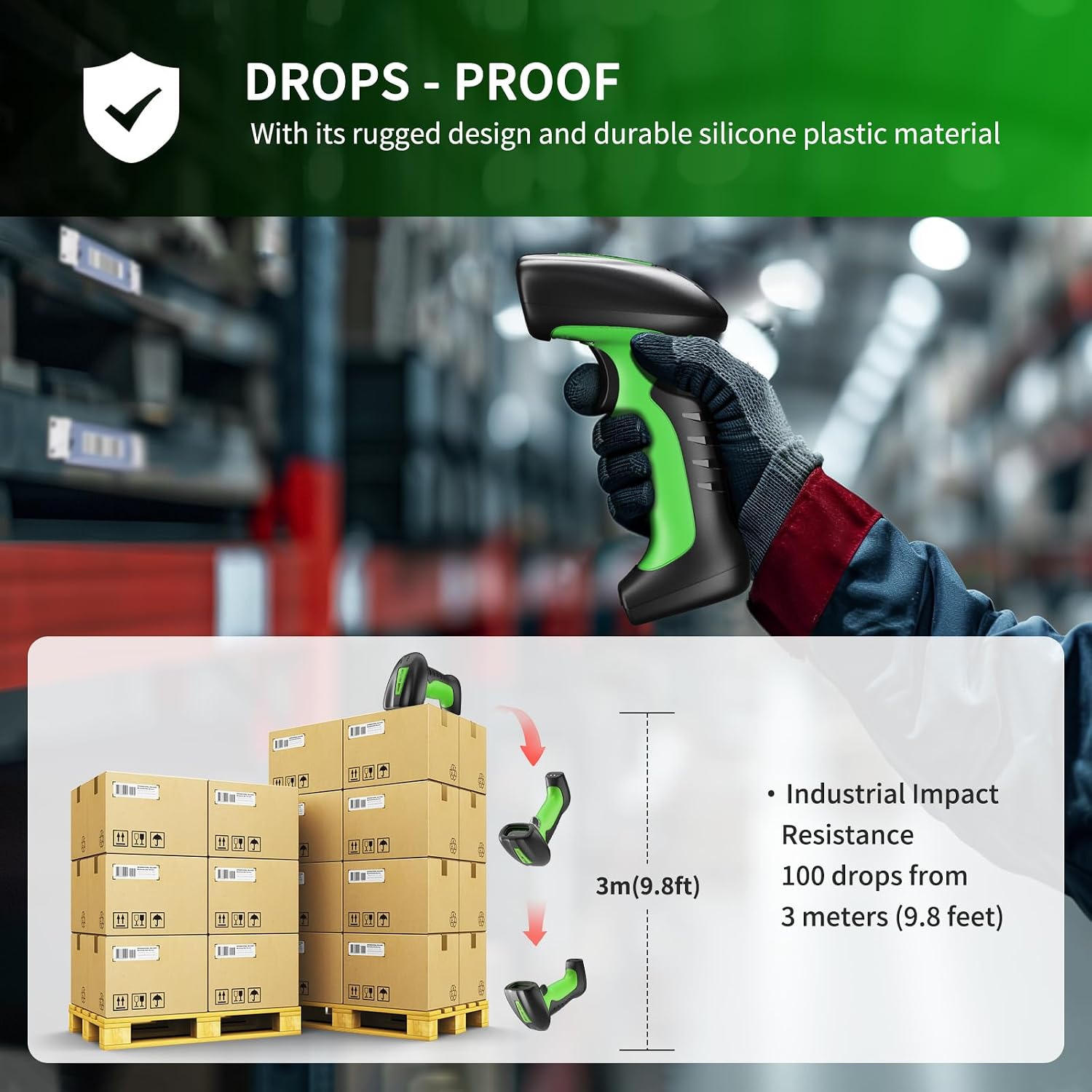
Image: Illustration demonstrating the scanner's drop resistance, showing it can withstand falls from 3 meters (9.8 feet).

Image: The scanner partially submerged in water, visually confirming its IP67 waterproof capability.
5.2 Cleaning
To clean the scanner, use a soft, damp cloth. Avoid using abrasive cleaners, solvents, or harsh chemicals that could damage the device. Ensure the scanner is powered off before cleaning.
5.3 Battery Care
To maximize battery lifespan:
- Avoid fully discharging the battery frequently.
- Store the scanner in a cool, dry place when not in use for extended periods.
- Charge the scanner regularly, especially if it has been stored for a long time.
6. Troubleshooting
6.1 Scanner Not Connecting
- Check Power: Ensure the scanner is charged and powered on.
- 2.4G Connection: Verify the cradle's USB receiver is properly inserted into the computer. Try a different USB port.
- Bluetooth Connection: Ensure Bluetooth is enabled on your device and the scanner is in pairing mode. Remove previous pairings and re-pair if necessary.
- Operating System: Confirm your device's operating system (Windows, Mac, Android, iOS) is compatible.
6.2 Scanner Not Reading Barcodes
- Barcode Quality: Ensure the barcode is clear, not smudged, torn, or excessively reflective.
- Distance and Angle: Adjust the distance and angle between the scanner and the barcode.
- Lighting: Ensure adequate lighting, but avoid direct glare on the barcode.
- Symbology Support: Verify that the barcode type is supported by the NT-1900.
- Scanning Mode: Confirm the scanner is in the correct scanning mode (e.g., manual, continuous, auto-sensing).
- Factory Reset: If issues persist, perform a factory reset by scanning the appropriate barcode in the user manual.
6.3 Battery Not Charging
- Cradle Connection: Ensure the USB cable is securely connected to the charging cradle and a power source.
- Scanner Placement: Verify the scanner is correctly seated in the cradle.
- Cable/Adapter: Try a different USB cable or power adapter.
7. Specifications
| Feature | Specification |
|---|---|
| Image Sensor | Honeywell's HS7DB 2D imager scan engine, Global Shutter |
| Illumination/Focusing | White LED (Risk Exemption Group) |
| Laser | 650nm high visibility red laser (cross target and framer) |
| Resolution | 1280 x 800 pixels |
| Typical Frame Rate | Up to 60 fps |
| Motion Tolerance | Up to 400 cm/s (157 in/s) for 13 mil UPC at optimal focus |
| Field of View | Horizontal: 44°, Vertical: 28.5° |
| Scanning Angle | Tilt: 360°, Pitch: ±55°, Skew: ±70° |
| Accuracy | 1D: ≥3 mil, 2D: ≥5 mil |
| Connectivity | 2.4G Wireless, Bluetooth (HID / SPP / BLE) |
| Battery Capacity | 2600mAh Lithium Polymer |
| Drop Protection | Withstands drops from up to 3.65 m (12 ft) |
| IP Rating | IP67 (Dust-proof, Splash-proof, Waterproof) |
| Item Weight | 1.28 pounds |
| Package Dimensions | 8.07 x 6.61 x 4.76 inches |
8. Warranty and Support
The NETUM NT-1900 barcode scanner comes with a 1-year warranty from the date of purchase. This warranty covers manufacturing defects and ensures the product meets its specified performance standards.
For technical support, warranty claims, or any inquiries regarding your NETUM product, please contact NETUM customer service. Refer to the contact information provided on the product packaging or the official NETUM website.
When contacting support, please have your product model (NT-1900) and purchase details ready to facilitate faster service.
Related documentsNT-1900


Ask a question about this manual
Ask about setup, troubleshooting, compatibility, parts, safety, or missing instructions. Manuals+ will review the question and use this page’s manual context to help answer it.