
1. Introduction
The LENSGO Smoke S is a portable, handheld fog machine designed to produce controlled smoke effects for various applications. Its compact size and remote control functionality make it suitable for indoor and outdoor events, photography, and special effects. This manual provides essential information for safe and effective operation, setup, maintenance, and troubleshooting.
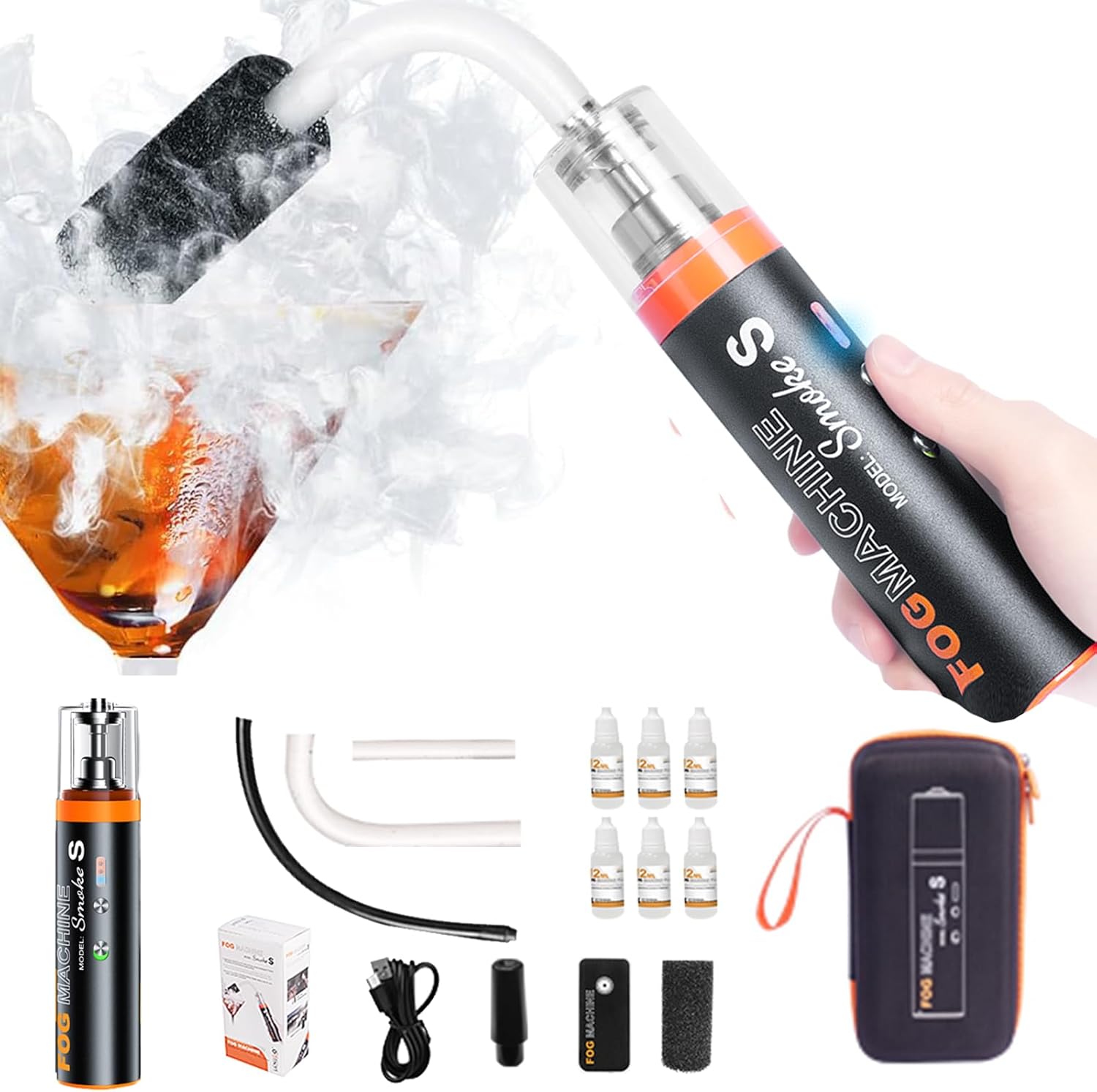
Figure 1: LENSGO Smoke S Handheld Fog Machine and included accessories.
2. Safety Information
Please read and understand all safety instructions before using the LENSGO Smoke S. Failure to follow these instructions may result in injury or damage to the device.
- Use only the specified smoke fluid (Vegetable Glycerin + Propylene Glycol). Other fluids may cause damage or create hazardous fumes.
- Ensure the oil covers the chamber bottom to prevent dry burning.
- Keep out of reach of children.
- Avoid direct sunlight and store in a cool, dry place.
- Do not operate the device if it is damaged or malfunctioning.
- The device automatically shuts down every 10 minutes to check the oil tank. Allow it to complete this cycle.
3. Package Contents
Verify that all items are present in the package:
- LENSGO Smoke S Fog Machine
- Wireless Remote Control
- Hard Straight Tube
- Hard Elbow Tube
- Silicone Hose
- High Pressure Nozzle
- Liquid Smoke Filter
- Smoke Fluid (12mL bottles)
- USB-C Charging Cable
- Carrying Case
- User Manual

Figure 2: All components included in the LENSGO Smoke S package.
4. Product Overview
The LENSGO Smoke S is a compact, handheld device with a transparent fluid chamber and intuitive controls. It features a Type-C charging port at the bottom and a power switch/button on the front for operation.

Figure 3: Overview of the LENSGO Smoke S features and design.
5. Setup
5.1 Charging the Device
Before first use, fully charge the LENSGO Smoke S using the provided USB-C cable. The charging time is approximately 3 hours.
5.2 Filling Smoke Fluid
- Remove the top cap of the fluid chamber.
- Carefully pour the LENSGO smoke fluid into the chamber. Ensure the fluid level covers the bottom of the chamber to prevent dry burning. The tank capacity is 12mL.
- Replace the top cap securely.
5.3 Attaching Accessories
Depending on the desired smoke effect, attach the appropriate tube or nozzle to the device. The liquid smoke filter can be attached to the hard angle tube for specific effects.
6. Operating Instructions
6.1 Power On/Off
Flip up the power switch on the front of the device. Wait a few seconds for the device to warm up. Double-press the main button to activate smoke output. Press the button once to stop smoke output.

Figure 4: Instructions for powering on and off the LENSGO Smoke S.
6.2 Using the Wireless Remote Control
The LENSGO Smoke S comes with a wireless remote control for convenient operation from a distance (up to 10 meters).
- Double-click the remote button to open the smoke output.
- Click the remote button once to close the smoke output.

Figure 5: Using the infrared remote control for the LENSGO Smoke S.
7. Modes of Operation
The LENSGO Smoke S can be used to create various smoke effects depending on the attached accessories and desired application.
- Incense Burning Mode: Use the high-pressure nozzle with the silicone hose for a focused stream of smoke, suitable for mimicking incense or adding smoke to food photography.
- Smoke Effects Mode: Utilize different tubes (hard straight tube, hard elbow) to control the density and spread of smoke for general atmospheric effects.
- Portrait Mode: Create a soft, diffused smoke background for portrait photography.
- Dry Ice Mode: The hard elbow tube combined with the liquid smoke filter can create dense smoke that sinks and spreads low, mimicking a dry ice effect.

Figure 6: Examples of various applications for the LENSGO Smoke S.
8. Maintenance
To ensure the longevity and optimal performance of your LENSGO Smoke S, follow these maintenance guidelines:
- Regularly check the oil level. Refill if it falls below 1/3 of the chamber capacity.
- Clean the fluid chamber and nozzles periodically to prevent clogs and ensure consistent smoke output.
- Store the device in its carrying case in a cool, dry place when not in use.
9. Troubleshooting
If you encounter issues with your LENSGO Smoke S, refer to the following common problems and solutions:
| Problem | Possible Cause | Solution |
|---|---|---|
| No smoke output | Low fluid level, clogged nozzle, low battery, dry burning. | Refill fluid, clean nozzle, charge battery, ensure fluid covers chamber bottom. |
| Weak smoke output | Low fluid level, partially clogged nozzle, low battery. | Refill fluid, clean nozzle, charge battery. |
| Device not turning on | Low battery, power switch off. | Charge battery, ensure power switch is in the ON position. |
10. Specifications
| Feature | Specification |
|---|---|
| Brand | LENSGO |
| Model Name | Smoke S |
| Power Source | Battery Powered |
| Color | Black |
| Outer Material | Plastic |
| Item Weight | 0.96 Kilograms (2.12 pounds) |
| Fuel Type | Smoke Fluid |
| Manufacturer | LENSGO |
| Form Factor | Handheld |
| Battery Capacity | 2550mAh |
| Charging Voltage | 5V 2A |
| Power | 30W |
| Continuous Use Time | 25 minutes |
| Charging Time | Approx. 3 hours |
| Tank Capacity | 12mL |
| Liquid Composition | Vegetable Glycerin + Propylene Glycol |
11. Warranty and Support
For warranty information and customer support, please refer to the warranty card included in your package or visit the official LENSGO website. Keep your purchase receipt for warranty claims.