
1. Introduction
Thank you for choosing the eLinkSmart YL-F3C Smart Cabinet Lock. This electronic lock provides enhanced security and convenience for your cabinets and drawers, featuring multiple unlocking methods including Bluetooth app, RFID cards, and NFC. Its hidden design maintains the aesthetic of your furniture while offering robust protection. This manual provides detailed instructions for installation, operation, and maintenance.
2. Product Components
Before installation, please ensure all components are present:
- eLinkSmart YL-F3C Smart Cabinet Lock Unit
- RFID Cards (typically 2-3)
- Installation Screws
- Double-sided Adhesive Tape
- User Manual (this document)

Image: Overview of the eLinkSmart YL-F3C Smart Cabinet Lock unit and various installation scenarios, including inside a drawer and behind a cabinet door.
3. Setup and Installation
3.1 Battery Installation
The lock requires two AA batteries (not included). To install:
- Locate the battery compartment on the lock unit.
- Open the compartment cover.
- Insert two AA batteries, ensuring correct polarity (+/-).
- Close the battery compartment cover securely.
The lock will emit an audible warning when the battery level is low. Upon complete discharge, the lock will automatically open to allow battery replacement.

Image: Illustration of the low battery warning (red light flash and app notification) and the automatic unlock mechanism when batteries are fully depleted.

Image: Close-up view of the battery indicator lights on the lock unit, showing current power level.
3.2 App Download and Pairing
Download the eLinkSmart app from your device's app store. Follow the in-app instructions to pair your lock via Bluetooth. The app allows for user management, unlocking period settings, and access log review.
3.3 Installation Methods
The eLinkSmart YL-F3C lock supports two installation methods: adhesive and screw mounting.
Adhesive Installation:
- Clean the desired installation surface thoroughly.
- Peel off the protective film from the high-viscosity double-sided adhesive tape.
- Firmly press the lock unit onto the clean surface inside the cabinet or drawer. Ensure proper alignment for the latch mechanism.
- Allow sufficient time for the adhesive to bond before regular use.
Screw Installation:
- Position the lock unit in the desired location inside the cabinet or drawer.
- Mark the screw holes.
- Drill pilot holes if necessary.
- Secure the lock unit with the provided screws.

Image: Visual guide demonstrating both the adhesive tape installation and the screw-based installation for the eLinkSmart cabinet lock.
3.4 Double Door Cabinet Installation
For double door cabinets, ensure the lock is positioned to secure both doors. An additional baffle or catch plate may be required for optimal security, depending on your cabinet design.

Image: Example of how to install the lock on a double door cabinet, showing the placement of the lock unit and a metal baffle for secure closure.
4. Operating the Lock
4.1 Unlocking Methods
The eLinkSmart YL-F3C offers multiple convenient ways to unlock:
- Bluetooth App: Open the eLinkSmart app on your smartphone or iOS smartwatch. Select the lock and tap the unlock button. The app also allows you to manage multiple users and view unlock records.
- RFID Card: Present a registered RFID card to the designated sensing area on the lock unit. The lock will disengage.
- NFC: For NFC-enabled devices, activate the NFC function and tap your device near the lock's NFC sensing area to unlock.
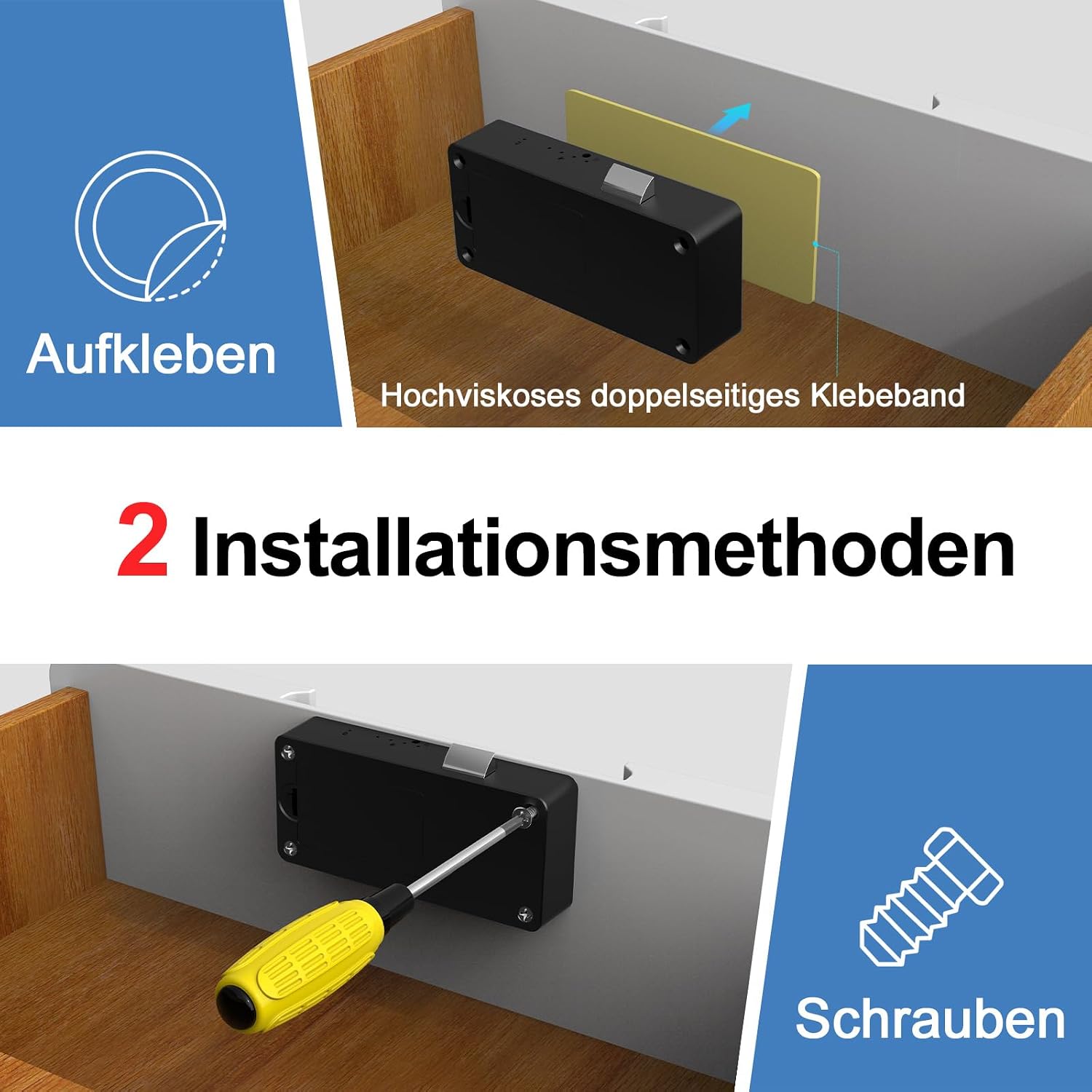
Image: Visual representation of the three primary unlocking methods: using a smartphone app, an RFID card, and an NFC-enabled device.
4.2 Locking
The eLinkSmart YL-F3C lock features automatic locking. Once the cabinet or drawer is closed, the lock will engage automatically, securing your belongings.
5. Maintenance
5.1 Battery Replacement
When the lock indicates a low battery (audible warning, app notification, or flashing indicator lights), replace the two AA batteries promptly to ensure continuous operation. Refer to section 3.1 for battery installation instructions. The lock will automatically open when batteries are fully discharged to facilitate replacement.
5.2 Cleaning
Clean the lock unit with a soft, dry cloth. Avoid using abrasive cleaners or solvents, as these can damage the finish or internal components.
6. Troubleshooting
If you encounter issues with your eLinkSmart YL-F3C Smart Cabinet Lock, please refer to the following common problems and solutions:
- Lock not responding to unlock command:
- Check battery level. Replace batteries if low.
- Ensure Bluetooth is enabled on your device and the app is connected to the lock.
- For RFID/NFC, ensure the card/device is correctly presented to the sensing area.
- Restart the app and try again.
- Lock not engaging automatically:
- Verify that the lock unit and latch mechanism are properly aligned and not obstructed.
- Check for any physical damage to the lock or the cabinet/drawer.
- App connectivity issues:
- Ensure your device is within Bluetooth range of the lock.
- Close and reopen the eLinkSmart app.
- Restart your smartphone's Bluetooth function.
- Lost RFID cards or forgotten app access:
- Use the eLinkSmart app (if accessible) to manage and add new RFID cards.
- If all access methods are lost, a factory reset might be necessary. Consult customer support for guidance on factory reset procedures.
If problems persist, please contact customer support for further assistance.
7. Specifications
| Brand | eLinkSmart |
| Model Number | YL-F3C |
| Lock Type | Electronic Lock |
| Unlocking Methods | Bluetooth App, RFID Card, NFC |
| Material | Acrylonitrile Butadiene Styrene (ABS) |
| Dimensions (L x W x H) | 5.5 x 2.4 x 11.8 cm |
| Power Source | 2 x AA Batteries (not included) |
| Connectivity Protocol | Bluetooth |
| Control Type | eSmartlock App |
| Recommended Use | Individual drawers, filing cabinets, office cabinets |
8. Warranty and Support
8.1 Warranty Information
eLinkSmart provides a 6-month warranty for the YL-F3C Smart Cabinet Lock, covering manufacturing defects and malfunctions under normal use. Please retain your proof of purchase for warranty claims.
8.2 Technical Support
Lifetime free technical support is available for all eLinkSmart products. If you have any questions, require assistance with installation, operation, or troubleshooting, please do not hesitate to contact our customer support team. For prompt service, please refer to the contact information provided by your retailer or visit the official eLinkSmart website.