
1. Introduction
This manual provides comprehensive instructions for the installation, operation, and maintenance of the Supermicro AOC-SLG4-2H8M2 RAID Controller. This low-profile PCIe 4.0 x8 card is designed to enhance storage capabilities by supporting two NVMe or SATA M.2 SSDs in RAID 0 or RAID 1 configurations, leveraging the SAS3808 RAID Controller.
It is optimized for high-performance, scalable storage solutions in enterprise and client systems, specifically compatible with Supermicro motherboards.
2. Product Overview
The AOC-SLG4-2H8M2 is a PCIe Gen 4.0 x8 M.2 SSD carrier card. It integrates the SAS3808 RAID Controller to provide robust data management for M.2 solid-state drives.
Key Features:
- Low-profile PCIe 4.0 x8 interface.
- Supports two M.2 NVMe or SATA SSDs.
- Integrated SAS3808 RAID Controller.
- RAID 0 and RAID 1 support for data striping and mirroring.
- Adjustable stand-offs for 22110, 2280, and 2242 M.2 SSD form factors.
- Designed for Supermicro motherboards.

Figure 2.1: Angled view of the Supermicro AOC-SLG4-2H8M2 RAID Controller card, showing the heatsink and M.2 slots.
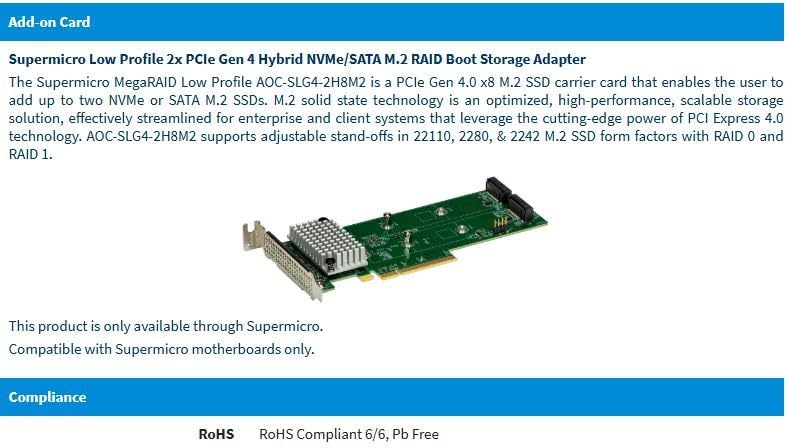
Figure 2.2: Front view of the Supermicro AOC-SLG4-2H8M2 RAID Controller card, highlighting the PCIe connector and M.2 interfaces.
3. Setup and Installation
3.1. System Requirements
- Compatible Supermicro motherboard with an available PCIe 4.0 x8 slot.
- Operating System: Windows, Linux, macOS (ensure appropriate drivers are available).
- Two M.2 NVMe or SATA SSDs (22110, 2280, or 2242 form factors).
3.2. Installation Steps
- Prepare your system: Power off your computer and disconnect all power cables. Open the computer case.
- Locate an available PCIe slot: Identify an empty PCIe 4.0 x8 slot on your Supermicro motherboard.
- Install M.2 SSDs:
- Carefully insert each M.2 SSD into the corresponding M.2 slot on the AOC-SLG4-2H8M2 card.
- Secure the M.2 SSDs using the adjustable stand-offs and screws provided with the card or your SSDs, ensuring they match the SSD's length (22110, 2280, or 2242).
- Insert the RAID Controller card: Align the AOC-SLG4-2H8M2 card with the chosen PCIe slot and press down firmly until it is securely seated.
- Secure the card: Fasten the card to the chassis using the bracket screw.
- Close the case and reconnect power: Reassemble your computer case and reconnect all power cables.
- Power on and install drivers: Boot your system. You may need to download and install the latest drivers for the SAS3808 RAID Controller from the Supermicro website (www.supermicro.com).
4. Operating Instructions
4.1. RAID Configuration
The SAS3808 RAID Controller supports RAID 0 (striping) and RAID 1 (mirroring) configurations. Configuration is typically performed via the system's BIOS/UEFI utility or a dedicated RAID management utility provided by Supermicro.
- RAID 0 (Striping): Combines two drives into a single logical unit for increased performance. Data is split across both drives. Note: Offers no data redundancy.
- RAID 1 (Mirroring): Creates an exact copy of data on two drives. If one drive fails, the data is still accessible from the other. Note: Halves usable storage capacity.
4.2. Driver Installation and Management Software
After physical installation, ensure the correct drivers are installed for your operating system. Supermicro typically provides a RAID management utility that allows you to monitor the health of your RAID array, rebuild arrays, and perform other management tasks. Refer to the Supermicro support website for the latest software and driver downloads.
5. Maintenance
The Supermicro AOC-SLG4-2H8M2 is designed for reliable operation with minimal maintenance. However, regular checks are recommended:
- Firmware Updates: Periodically check the Supermicro website for firmware updates for the AOC-SLG4-2H8M2 and SAS3808 controller. Firmware updates can improve performance, stability, and add new features.
- Driver Updates: Keep your operating system drivers for the RAID controller up-to-date.
- Physical Inspection: During routine system maintenance (e.g., cleaning dust), visually inspect the card for any loose connections or signs of damage. Ensure the heatsink is free of dust to maintain optimal cooling.
- RAID Array Health: Use the RAID management utility to regularly check the health status of your M.2 SSDs and RAID array. Address any warnings or errors promptly.
6. Troubleshooting
This section provides solutions to common issues you might encounter.
6.1. Common Issues and Solutions
- Card not detected:
- Ensure the card is fully seated in the PCIe slot.
- Verify that your motherboard is a compatible Supermicro model.
- Check BIOS/UEFI settings to ensure the PCIe slot is enabled.
- M.2 SSDs not recognized:
- Confirm M.2 SSDs are correctly installed and secured.
- Ensure M.2 SSDs are compatible (NVMe or SATA).
- Install the latest drivers for the RAID controller.
- Check the RAID configuration utility to see if drives are detected there.
- RAID array degradation/failure:
- Check the RAID management utility for specific error messages.
- If a drive has failed in a RAID 1 configuration, replace the faulty drive and initiate a rebuild process via the RAID utility.
- Ensure proper cooling to prevent overheating, which can lead to drive issues.
For more complex issues, consult the Supermicro support website or contact their technical support.
7. Specifications
| Feature | Detail |
|---|---|
| Brand | Supermicro |
| Model Number | AOC-SLG4-2H8M2 |
| Interface | PCIe 4.0 x8 |
| Controller | SAS3808 RAID Controller |
| M.2 Support | 2x NVMe/SATA M.2 SSDs |
| M.2 Form Factors | 22110, 2280, 2242 (adjustable stand-offs) |
| RAID Levels | RAID 0, RAID 1 |
| Operating System Support | Windows, Linux, macOS |
| Form Factor | Low Profile |
| ASIN | B0CN5G7P4H |
| Date First Available | January 29, 2024 |
8. Warranty and Support
For detailed warranty information, please refer to the official Supermicro website or the warranty card included with your product. Supermicro provides technical support for their products.
8.1. Technical Support
If you encounter issues that cannot be resolved using the troubleshooting guide, please contact Supermicro technical support. Before contacting support, have your product model number (AOC-SLG4-2H8M2) and serial number ready.
- Supermicro Official Website: www.supermicro.com/support
- Driver & Firmware Downloads: Available on the support section of the Supermicro website.