
1. Introduction
The LAUNCH X431 Elite 3.0 is an advanced, all-in-one diagnostic tool designed for BMW and Mini vehicles. It features an Android 8.1 operating system and a 4-inch touchscreen, providing a user-friendly interface for comprehensive vehicle diagnostics. This tool supports full bidirectional control, advanced ECU coding, and over 31 reset services, making it an essential device for vehicle maintenance and repair.
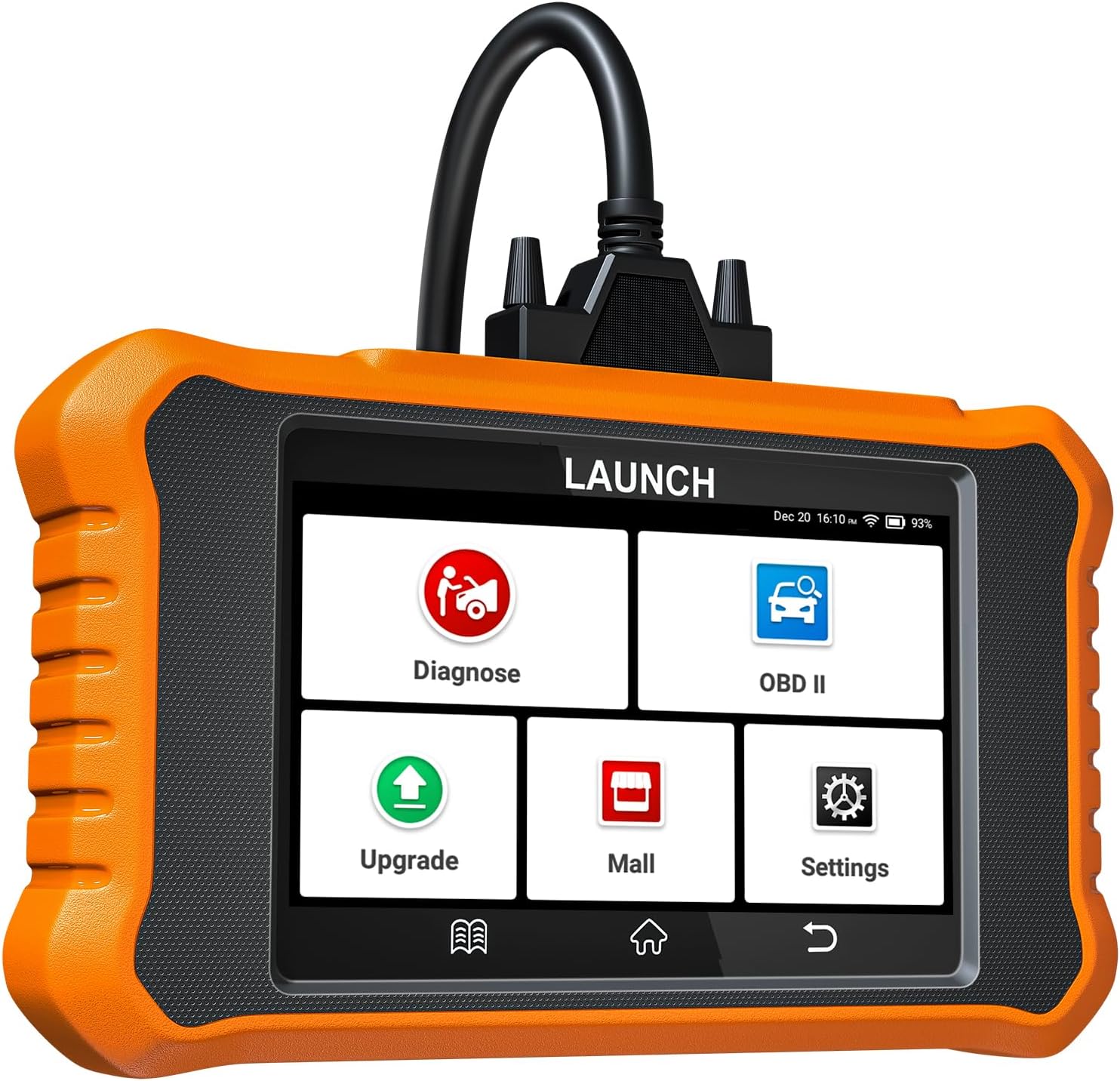
Image 1.1: The LAUNCH X431 Elite 3.0 Diagnostic Tool, showcasing its compact design and user interface.
2. Setup
2.1 Initial Power-On and Language Selection
- Ensure the device is sufficiently charged or connected to a power source.
- Press and hold the power button to turn on the device.
- Upon first use, you will be prompted to select your preferred language from 11 available options, including English, French, German, Spanish, and Italian.
- Follow the on-screen instructions to complete the initial setup.
2.2 Connecting to Vehicle
- Locate the OBD-II port in your vehicle (typically under the dashboard).
- Connect the diagnostic tool's OBD-II cable to the vehicle's OBD-II port.
- The device will automatically power on or prompt you to turn it on.
2.3 Wi-Fi Connection and Updates
- Navigate to the 'Settings' menu on the device.
- Select 'Wi-Fi' and connect to an available network.
- Access the 'Upgrade' function to download and install the latest software updates for your BMW/Mini vehicle models. Lifetime free Wi-Fi updates are provided.

Image 2.1: The LAUNCH X431 Elite 3.0 highlighting its all-in-one features, including lifetime free WiFi updates.
3. Operating Instructions
3.1 OE-Level All Systems Diagnostic
This function allows for a comprehensive and in-depth diagnostic scan of all available electronic control modules (ECUs) in your BMW or Mini vehicle. It can read/clear diagnostic trouble codes (DTCs), view live data streams, retrieve freeze frame data, and read ECU information.
- Auto VIN & Auto Scan: Automatically identifies vehicle information and scans all systems with a single touch for vehicles manufactured from 2006 onwards.
- Read/Clear Codes: Displays and clears current, pending, and permanent diagnostic trouble codes.
- Graphic Live Data: Presents real-time sensor data in graphical format for easy analysis.
- Freeze Frame: Captures a snapshot of vehicle conditions when a fault code is triggered.
- ECU Information: Provides detailed information about the vehicle's control units.

Image 3.1: Overview of OE-Level All System Diagnostics capabilities, including Auto VIN, code reading, live data, and ECU information.
3.2 Bidirectional Control (Active Test)
The bidirectional control feature allows the diagnostic tool to send commands to vehicle systems and components to perform active tests. This helps in verifying the functionality of actuators and quickly pinpointing issues.
- Component Testing: Activate components like windows, mirrors, wipers, radiator fan, sunroof, horn, fuel pump, and injectors to check their operational status.
- Recalibration/Readaptation: Perform recalibration or readaptation of certain components after repairs or replacements.

Image 3.2: Examples of bidirectional control tests, such as modulating the throttle, testing the radiator fan, sunroof, and injector buzz.
3.3 Advanced ECU Coding
ECU coding allows for customization of vehicle settings, adaptation of components, and activation of hidden functions to enhance the driving experience.
- Component Matching: Match new components to the vehicle's ECU.
- Flash Hidden Functions: Activate features that are present but not enabled by default, such as automatic mirror folding or interior light adjustments.
- Customize OE Settings: Personalize original equipment settings, including automatic door lock/unlock, light brightness changes, A/C settings memory, and disabling seat belt warnings.

Image 3.3: Visual representation of advanced ECU coding capabilities, including component matching and flashing hidden functions like automatic mirror folding and auto door lock/unlock.
3.4 31+ Reset Services
The tool provides access to over 31 common maintenance and reset functions, helping to save on workshop costs.
- Oil Reset: Resets the oil life system after an oil change.
- EPB Reset: Resets the electronic parking brake after brake pad replacement.
- ABS Bleeding: Performs ABS bleeding to restore brake sensitivity.
- DPF Regeneration: Initiates the regeneration process for the Diesel Particulate Filter.
- Key Programming: Adds new keys or disables lost keys.
- Battery Registration: Registers a new battery with the vehicle's system.
- SAS Calibration: Calibrates the Steering Angle Sensor.
- Throttle Relearn: Relearns the throttle body position.
- Suspension Reset: Resets the electronic suspension system.
- Gearbox Adaptation: Adapts the transmission control unit.
- And many more services for comprehensive vehicle maintenance.

Image 3.4: A selection of available service functions, including Brake Reset, Oil Reset, Stop/Start Reset, SAS Calibration, Suspension Reset, Seat Calibration, Battery Matching, and Key Programming.
3.5 Data Management and Reporting
The tool offers robust data management features to help analyze vehicle performance and share diagnostic results.
- 4-in-1 Live Data Graphing: Displays up to four live data streams simultaneously in a graphical format for easy comparison and analysis.
- Data Record & Playback: Records live data sessions for later review and analysis.
- Share/Print Diagnostic Report: Generate and share diagnostic reports via email or print them for record-keeping.

Image 3.5: Screenshots illustrating 4-in-1 live data graphing, data recording and playback, and the option to share or print diagnostic reports.
4. Maintenance
To ensure optimal performance and access to the latest vehicle data and functions, regular maintenance of your LAUNCH X431 Elite 3.0 diagnostic tool is recommended.
- Software Updates: Utilize the lifetime free Wi-Fi update feature to keep the diagnostic software current. This ensures compatibility with new vehicle models and access to updated diagnostic functions.
- Cleaning: Keep the device clean by wiping it with a soft, dry cloth. Avoid using harsh chemicals or abrasive materials.
- Storage: Store the device in a cool, dry place away from direct sunlight and extreme temperatures when not in use.
- Battery Care: For prolonged battery life, avoid fully discharging the device frequently. Charge it regularly, especially if it will be stored for an extended period.
5. Troubleshooting
If you encounter issues with your LAUNCH X431 Elite 3.0, refer to the following common troubleshooting steps:
- Device Not Powering On:
Check the battery level. Ensure the device is charged or connected to the vehicle's OBD-II port. If connected to the vehicle, ensure the vehicle's ignition is on. - Connection Issues with Vehicle:
Verify that the OBD-II cable is securely connected to both the diagnostic tool and the vehicle's OBD-II port. Ensure the vehicle's ignition is in the ON position (engine off or running, depending on the test). Try connecting to a different compatible vehicle if available to rule out a vehicle-specific issue. - Software Update Failures:
Ensure a stable Wi-Fi connection. Restart the device and attempt the update again. If issues persist, check for sufficient storage space on the device. - Diagnostic Function Not Working:
Confirm that the vehicle model and year are correctly selected. Ensure the software is up-to-date. Some functions may require specific vehicle conditions (e.g., engine running, specific temperature). - Screen Unresponsive:
Perform a soft reset by holding the power button until the device restarts. If the issue continues, contact customer support.
For further assistance, please refer to the support section.
6. Specifications
| Feature | Specification |
|---|---|
| Brand | LAUNCH |
| Model Number | YZB06-A |
| Operating System | Android 8.1 |
| Screen Size | 4 Inches |
| Power Source | Battery Powered |
| Battery Capacity | 3000 mAh |
| Internal Memory | 16GB |
| Processor | 4-Core 1.3GHz |
| Supported Languages | 11 (including English, French, German, Spanish, Italian) |
| Included Components | LAUNCH X431 Elite 3.0 for BMW/Mini Diagnostic Tool |
7. Warranty and Support
7.1 Product Warranty
The LAUNCH X431 Elite 3.0 diagnostic tool comes with a 2-year manufacturer's warranty, covering defects in materials and workmanship under normal use.
7.2 Return and Replacement Policy
A 60-day refund and replacement policy is offered for this product. Please contact your seller for details regarding returns or replacements.
7.3 Technical Support
For technical assistance, compatibility checks, or any operational queries, please contact the manufacturer's support team. You can reach out via email at ediag0228@hotmail.com. Please provide your product model and a detailed description of your issue for efficient support.


