
1. Product Overview
The JONSBO CR1000 EVO CPU Cooler is a high-performance air cooling solution designed for modern desktop processors. This model features significant iterative performance upgrades, a low-noise design, and an integrated top cover with aesthetic lighting effects. It is engineered to provide efficient heat dissipation while maintaining quiet operation, making it suitable for a wide range of PC builds.
The CR1000 EVO series represents a new generation of CPU coolers from JONSBO, incorporating years of market experience and user feedback. It upholds the high performance, low noise, and aesthetic attributes of the CR1000 series, while redefining value for money.

Figure 1: JONSBO CR1000 EVO CPU Cooler, showcasing its vibrant RGB fan and sleek design.

Figure 2: Official product overview graphic highlighting the cooler's design and features.
2. Key Features
- Performance Improvement: Significant upgrades to iterative performance, offering 8% efficiency improvement compared to older models.
- Low-Noise Design: Features a new fan iteration with a noise level ranging from 22-32dB(A), ensuring quiet operation.
- 4 Copper Heat Pipe Tower CPU Cooler: Equipped with 4 nickel-plated copper heat pipes to prevent oxidation, optimizing heat pipe performance with a 25% improvement in heat pipe load solving efficiency.
- New Aesthetic Design: Integrated top cover with moderate and elegant lighting effects. The crooked neck heat pipe design avoids memory modules, allowing full display of memory (light effect). The fan automatically changes color light effect when connected to the motherboard's 4-Pin interface (manual or external control is not required for this automatic effect).
- Broad Platform Support: Compatible with Intel LGA1700/1200/115X and AMD AM4/AM5 sockets.
- Compact Dimensions: L120 * W71 * H154mm, compatible with most tower cases.

Figure 3: View of the four copper heat pipes, designed for efficient heat transfer.
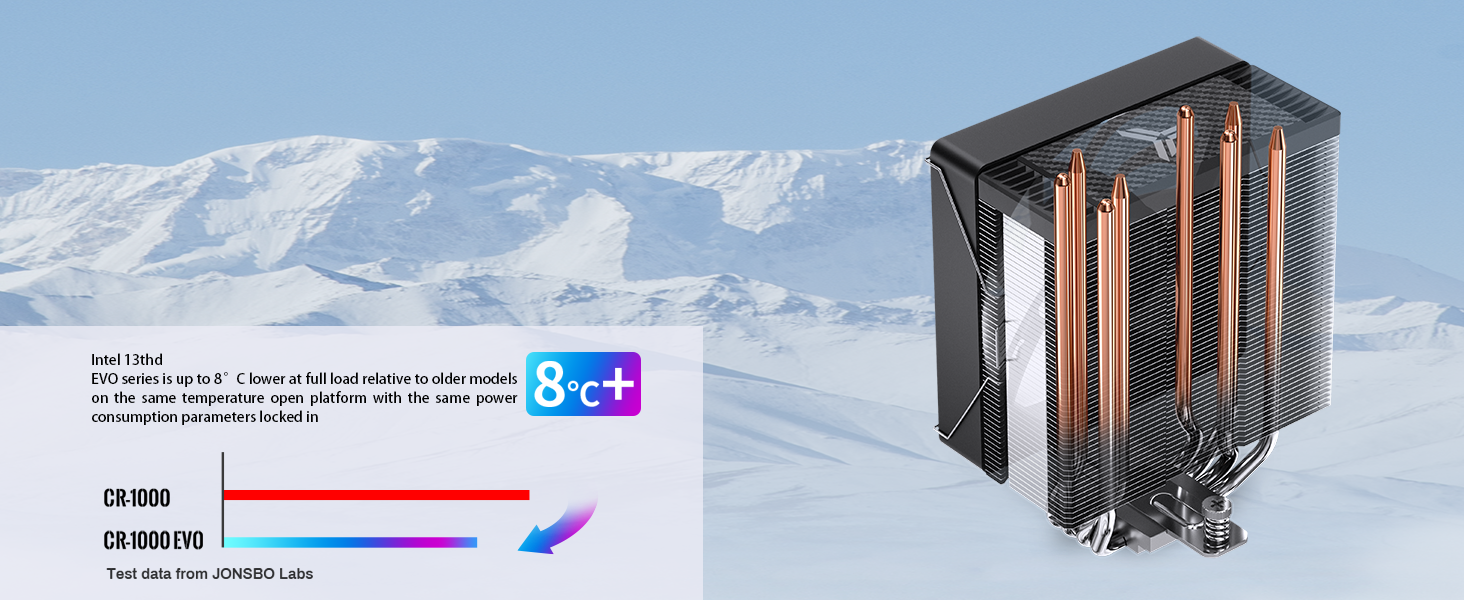
Figure 4: Performance graphic illustrating the improved cooling efficiency of the EVO model.

Figure 5: Details on fan noise levels and rotational speed range.
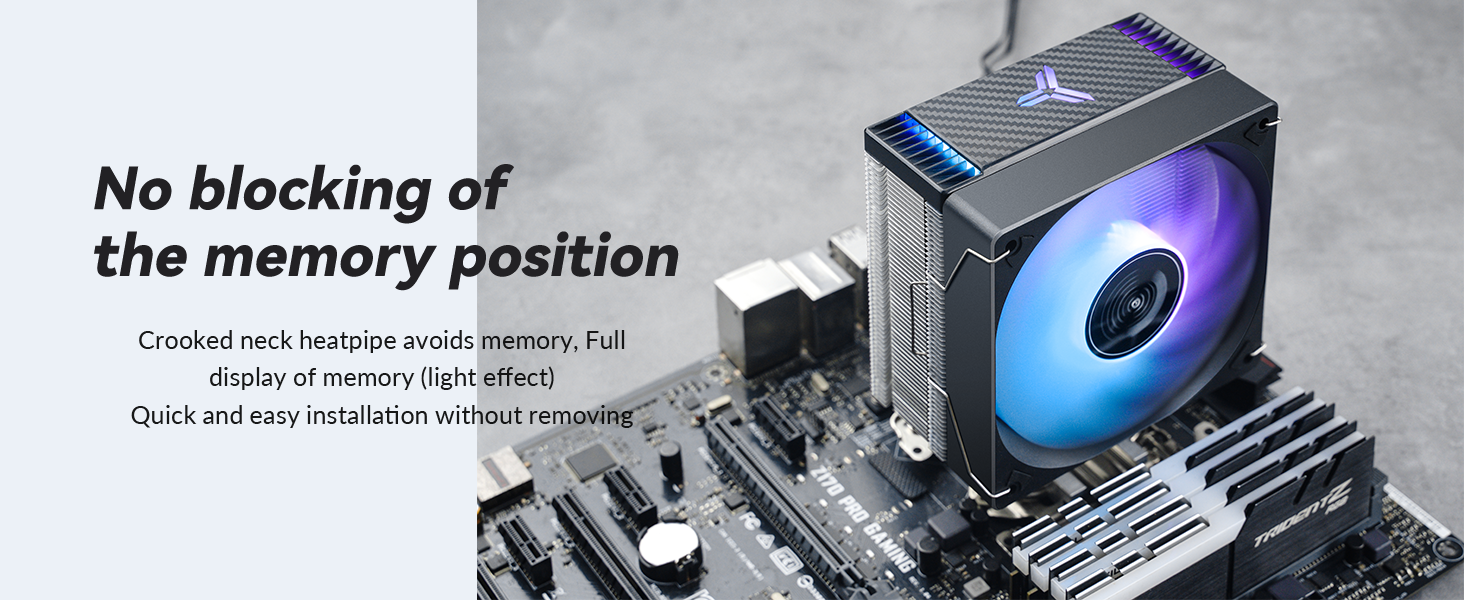
Figure 6: Illustration demonstrating the cooler's design to avoid blocking memory slots.
3. What's in the Box
Upon opening the package, please verify that all the following components are present:
- CPU fan (pre-installed on heatsink)
- Mounting screws
- Adjustable backplate
If any components are missing or damaged, please contact customer support.
4. Setup and Installation
This section provides general guidance for installing your JONSBO CR1000 EVO CPU Cooler. For detailed, step-by-step instructions specific to your motherboard and CPU socket type, please refer to the included installation guide or the official JONSBO website.
4.1 Compatibility
The JONSBO CR1000 EVO CPU Cooler supports the following CPU sockets:
- Intel: LGA1700, LGA1200, LGA115X (1150, 1151, 1155, 1156)
- AMD: AM4, AM5
Ensure your motherboard and CPU are compatible with these sockets before proceeding with installation.
4.2 Pre-Installation Steps
- Power off your computer and disconnect all cables.
- Open your computer case and locate the CPU socket on the motherboard.
- Remove any existing CPU cooler. Clean the CPU surface thoroughly to remove old thermal paste.
- Apply a small amount of thermal paste (not included, typically comes with CPU or purchased separately) to the center of the CPU's integrated heat spreader (IHS).
4.3 Mounting the Cooler
The cooler features a new crossbar fastener and heat pipe backward tilting avoidance arrangement, which means there is no need to disassemble the fan when installing the heatsink. This design completely avoids interference with vestigial memory slots, allowing for full display of memory modules.
- Install the appropriate backplate for your CPU socket type onto the rear of the motherboard.
- Secure the mounting brackets to the front of the motherboard, aligning them with the backplate.
- Carefully place the JONSBO CR1000 EVO heatsink onto the CPU, ensuring the heat pipes make full contact with the thermal paste.
- Secure the heatsink to the mounting brackets using the provided screws. Tighten screws in a diagonal pattern to ensure even pressure.
- Connect the 4-pin PWM fan cable from the cooler to the CPU_FAN header on your motherboard.
- If your model has RGB lighting, connect the 3-pin 5V ARGB cable (if applicable) to the corresponding ARGB header on your motherboard.

Figure 7: The JONSBO CR1000 EVO CPU Cooler installed within a computer case, demonstrating its fit and aesthetic.

Figure 8: The cooler mounted on a motherboard, showing its clearance over memory slots.
Video 1: Official JONSBO CR1000 EVO CPU Cooler product video, demonstrating features and installation aspects.
5. Operating Instructions
Once installed, the JONSBO CR1000 EVO CPU Cooler operates automatically based on your system's CPU temperature and motherboard settings.
5.1 Fan Operation
The 120mm PWM fan's rotational speed is automatically controlled by the motherboard based on CPU temperature, ranging from 600 to 1500 RPM (±10%). This ensures optimal cooling performance while minimizing noise. The fan's air volume is 25.12-59.48 CFM, and air pressure is 0.26-1.81mmH2O.
5.2 Lighting Effects (Color Models Only)
For models with integrated lighting (e.g., CR-1000 EVO Color Black/White), the fan automatically changes color light effects when connected to the motherboard's 4-Pin interface. This provides a dynamic visual experience without requiring manual intervention or external control. If your motherboard supports 3-pin 5V ARGB, you can connect the cooler's ARGB cable to control the lighting through your motherboard's software (e.g., MSI Mystic Light, ASUS Aura Sync, GIGABYTE RGB Fusion, ASRock Polychrome Sync).

Figure 9: Top view of the cooler, highlighting the integrated top cover design and RGB lighting.

Figure 10: A white variant of the cooler, showcasing its RGB fan and overall aesthetic.
6. Maintenance
Regular maintenance helps ensure optimal performance and longevity of your CPU cooler.
- Dust Removal: Periodically (e.g., every 3-6 months), use compressed air to blow dust out of the heatsink fins and fan blades. Ensure the fan is not spinning rapidly during this process to prevent damage to the bearings.
- Fan Cleaning: If dust buildup is significant, gently wipe the fan blades with a soft, dry cloth.
- Thermal Paste: Re-apply thermal paste if you remove the cooler for any reason, or if you notice a significant increase in CPU temperatures over time.
Caution: Always power off and unplug your computer before performing any maintenance.
7. Troubleshooting
| Problem | Possible Cause | Solution |
|---|---|---|
| Fan not spinning or spinning slowly. | Incorrect fan header connection, insufficient power, fan failure. | Ensure 4-pin PWM cable is securely connected to CPU_FAN header. Check BIOS settings for fan control. Test fan on another header if available. |
| High CPU temperatures. | Improper thermal paste application, loose cooler mounting, insufficient airflow in case, fan not spinning optimally. | Re-apply thermal paste. Ensure cooler is securely mounted with even pressure. Check case airflow and fan orientation. Verify fan is spinning at appropriate speeds. |
| RGB lighting not working or incorrect colors. | Incorrect ARGB header connection, incompatible motherboard software, faulty ARGB cable. | Ensure 3-pin 5V ARGB cable is connected to the correct header (not 12V RGB). Use motherboard's RGB software to control lighting. Check for software updates. |
| Excessive fan noise. | Dust buildup, fan bearing issue, fan hitting cables, high fan speed settings. | Clean fan and heatsink. Ensure no cables are obstructing the fan. Adjust fan curve settings in BIOS or motherboard software to reduce speed at lower temperatures. |
8. Specifications
| Attribute | Detail |
|---|---|
| Product Dimensions | L120 x W71 x H154mm (4.72"L x 2.8"W x 6.06"H) |
| Weight | 1.59 Pounds |
| Cooling Method | Air Cooling |
| Heat Pipe Material | Copper (4 heat pipes, Ø6mm each) |
| Fan Size | 120mm |
| Fan Rotational Speed | 600-1500 RPM (±10%) |
| Air Volume | 25.12-59.48 CFM |
| Air Pressure | 0.26-1.81mmH2O |
| Noise Level | 22-32 dB(A) (MAX) |
| Power Connector Type | 4-Pin PWM (Fan), 3-Pin 5V ARGB (Lighting, for color models) |
| Compatible Devices | Desktop PCs |
| Supported Sockets | Intel: LGA1700/1200/115X; AMD: AM4/AM5 |

Figure 11: Detailed dimensions of the JONSBO CR1000 EVO CPU Cooler.
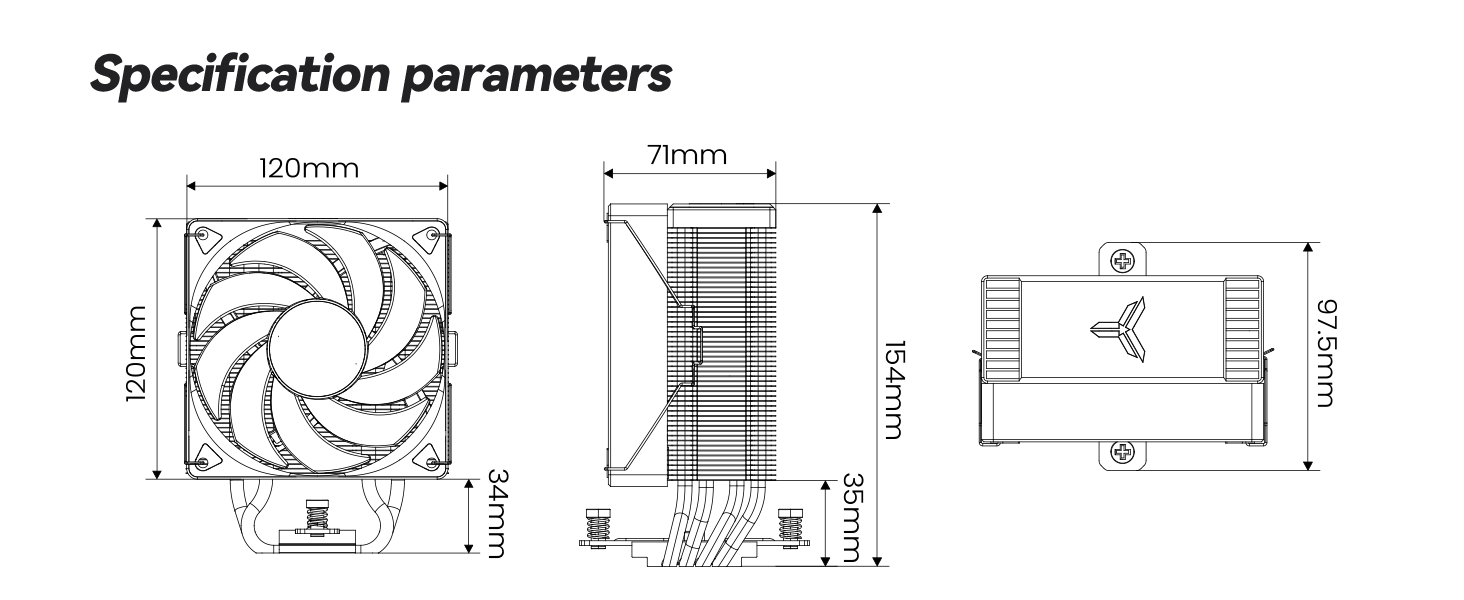
Figure 12: Official graphic detailing key specification parameters.
9. Warranty and Support
Jonsbo products are manufactured to high quality standards. For information regarding warranty coverage, technical support, or service, please refer to the warranty card included with your product or visit the official Jonsbo website. Keep your proof of purchase for warranty claims.
For further assistance, you may also contact the seller directly through the platform where the product was purchased.