
STARSCOPE 30800CIT-AMZ
Contents
Starscope 10x42 Monocular Instruction Manual
Brand: STARSCOPE | Model: 30800CIT-AMZ
Product Overview
The Starscope 10x42 Monocular is a high-powered optical instrument designed for detailed observation of distant objects. It features a fixed 10x magnification and a 42mm objective lens diameter, providing clear and bright images for various outdoor activities.

Image: The Starscope 10x42 Monocular in its vibrant orange finish, showcasing its compact design and protective lens caps.
Key Features:
- High-Powered Optics: 10x42 fixed zoom magnification with a 305 ft/1000yd field of view for detailed observation.
- BAK4 Prism & FMC Lens: Equipped with top-quality BAK4 prism lenses and Fully Multi-Coated (FMC) glass lenses for sharp, clear, and glare-free viewing, even in low light.
- Durable Design: Built with water and dust resistance (IP64 rated) to withstand tough outdoor environments.
- Compact & Portable: Lightweight and ergonomic design for easy handling and transport, fitting easily into a backpack or pocket.
- Adjustable Focus: Features a convenient focus dial for quick and precise image sharpening.
- Smartphone Compatibility: Can be used with smartphone telephoto lens holders (sold separately) for photography.
Setup and Components
Before using your Starscope Monocular, familiarize yourself with its main components and ensure all parts are present.

Image: An exploded diagram illustrating the key components of the Starscope Monocular, including the lens caps, ocular lens, focus knob, tripod mount, and optical glass lens.
What's Included:
- Starscope Mini Monocular Telescope
- Integrated Front Lens Cap
- Rear Lens Cap
Note: Additional accessories such as tripods and smartphone adapters are sold separately.

Image: The monocular shown with various accessories, such as a laser sight and mounting rails, which are not included and must be purchased separately.
Operating Instructions
1. Adjusting the Eyecup:
The eyecup can be adjusted for comfortable viewing, whether you wear eyeglasses or not.
- For Eyeglass Wearers: Keep the eyecup in the closed (down) position.
- Without Eyeglasses: Rotate or extend the eyecup to the open (up) position for optimal eye relief.

Image: A visual guide demonstrating how to adjust the monocular's eyecup for users with and without eyeglasses to achieve optimal viewing comfort.
2. Focusing the Monocular:
To achieve a clear and sharp image, use the focus dial located on the top of the monocular.
- Point the monocular towards the object you wish to observe.
- Slowly rotate the focus dial until the image appears crisp and clear.
- Adjust as needed for different distances.

Image: A demonstration of adjusting the focus dial on the monocular, illustrating how a blurry image of a bird transforms into a sharp, clear view.
3. Using with a Smartphone (Optional):
For capturing distant telephoto pictures and videos, you can attach your smartphone to the monocular using a compatible adapter (sold separately).
- Secure your smartphone into the adapter.
- Attach the adapter to the monocular's eyepiece.
- Align your phone's camera lens with the monocular's eyepiece for optimal viewing and photography.
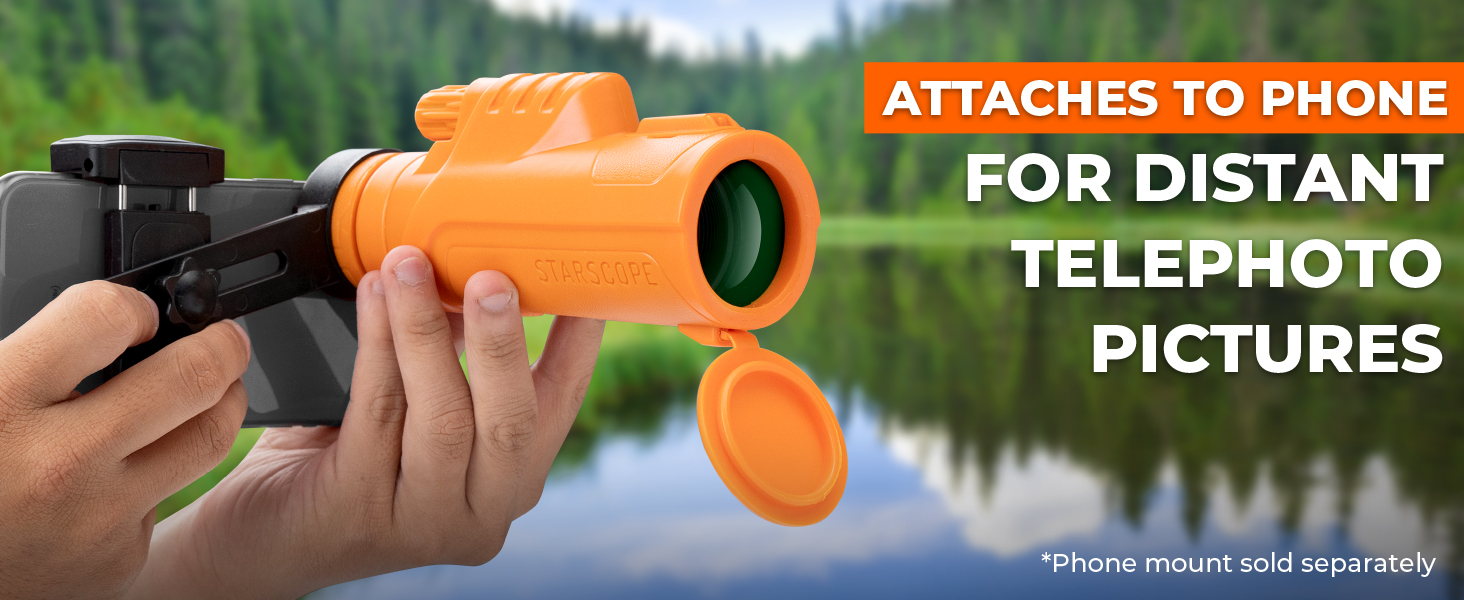
Image: The Starscope Monocular connected to a smartphone via an adapter, demonstrating its capability for capturing distant telephoto images.
Maintenance and Care
Proper maintenance ensures the longevity and optimal performance of your Starscope Monocular.
Cleaning the Lenses:
- Use a soft, lint-free cloth specifically designed for optical lenses.
- Gently wipe the lens surfaces to remove dust or smudges.
- For stubborn dirt, a small amount of lens cleaning fluid applied to the cloth can be used. Avoid applying fluid directly to the lens.
- Do not use abrasive cloths, paper towels, or household cleaners, as these can scratch the lens coatings.
Storage:
- Always replace the front and rear lens caps when the monocular is not in use to protect the lenses from dust and scratches.
- Store the monocular in a cool, dry place, away from direct sunlight and extreme temperatures.
- If storing for extended periods, consider using a protective case.
Water and Dust Resistance:
The Starscope Monocular is designed with IP64 water and dust resistance, meaning it is protected from dust ingress and splashing water from any direction. While durable, it is not designed for submersion.

Image: The monocular positioned on a tree trunk during rainfall, demonstrating its robust IP64 water-resistant construction suitable for wet environments.
Troubleshooting
If you encounter issues with your Starscope Monocular, refer to the following common problems and solutions:
| Problem | Possible Cause | Solution |
|---|---|---|
| Image is blurry or out of focus. | Improper focus adjustment. | Rotate the focus dial slowly until the image becomes sharp. Ensure the eyecup is correctly adjusted for your vision. |
| Dark spots or debris visible in the field of view. | Dust or dirt on the lenses. | Gently clean the objective and ocular lenses using a soft, lint-free optical cleaning cloth. |
| Image appears dim or lacks clarity. | Lenses are dirty or environmental conditions are poor (e.g., very low light). | Clean the lenses thoroughly. While the monocular performs well in low light, extreme darkness will limit visibility. |
| Cannot attach smartphone adapter properly. | Adapter misalignment or incompatibility. | Ensure you are using a compatible smartphone adapter. Carefully align the adapter with the monocular's eyepiece and your phone's camera lens. |
Specifications
| Feature | Detail |
|---|---|
| Model Name | Orange monocular |
| Item Model Number | 30800CIT-AMZ |
| Magnification | 10x |
| Objective Lens Diameter | 42 Millimeters |
| Field of View | 305 ft/1000yd |
| Prism Type | BAK4 |
| Lens Coating | Fully Multi-Coated (FMC) |
| Eye Piece Lens Description | Monocentric |
| Focus Type | Fixed Focus (Adjustable Dial) |
| Water Resistance Level | IP64 |
| Product Dimensions | 6.5 x 2.3 x 3 inches |
| Item Weight | 12.3 ounces (0.35 Kilograms) |
| Compatible Devices | Smartphone (with separate adapter) |
| Manufacturer | STARSCOPE |
Warranty and Support
Warranty Information:
This product is covered by the manufacturer's standard warranty. For specific details regarding warranty coverage, duration, and claims, please refer to the documentation included with your purchase or contact STARSCOPE customer support directly.
Extended protection plans are available for purchase separately through authorized retailers. These plans offer additional coverage beyond the standard manufacturer's warranty.
Customer Support:
For technical assistance, troubleshooting, or any questions regarding your Starscope Monocular, please contact STARSCOPE customer support. You can typically find contact information on the product packaging, the official STARSCOPE website, or through the retailer where the product was purchased.
When contacting support, please have your product model number (30800CIT-AMZ) and purchase details ready to expedite assistance.
Ask a question about this manual
Ask about setup, troubleshooting, compatibility, parts, safety, or missing instructions. Manuals+ will review the question and use this page’s manual context to help answer it.