
Kärcher RCV 3
Contents
Kärcher RCV 3 Robot Vacuum Cleaner with Mop Function
Model: RCV 3 (1.269-625.0)
Introduction
This instruction manual provides essential information for the safe and efficient operation, maintenance, and troubleshooting of your Kärcher RCV 3 Robot Vacuum Cleaner. The RCV 3 is designed to systematically clean hard floors and low-pile carpets, offering both vacuuming and damp mopping functionalities. Its advanced LiDAR navigation and app control ensure thorough and convenient cleaning.
Important Safety Instructions
Please read all safety warnings and instructions carefully before using this appliance. Failure to follow the warnings and instructions may result in electric shock, fire, or serious injury.
- Always ensure the appliance is switched off and unplugged before performing any maintenance or cleaning.
- Do not operate the appliance with a damaged cord or plug.
- Keep hair, loose clothing, fingers, and all parts of the body away from openings and moving parts.
- Do not use to pick up flammable or combustible liquids, such as gasoline, or use in areas where they may be present.
- Do not pick up anything that is burning or smoking, such as cigarettes, matches, or hot ashes.
- Use only as described in this manual. Use only manufacturer's recommended attachments.
- This appliance is for household use only.
- The appliance contains a Lithium Ion battery. Dispose of batteries according to local regulations.
Product Overview
The Kärcher RCV 3 is a versatile robotic vacuum cleaner designed for comprehensive floor care. Below are its key components and features:
Key Components

Figure 1: RCV 3 Key Components. This diagram highlights the main parts of the robot vacuum, including the LiDAR sensor for navigation, the power/home button, side brushes for edge cleaning, and the docking station.

Figure 2: RCV 3 with App Interface. The image shows the robot vacuum alongside a smartphone, illustrating its connectivity and control via the Kärcher Home Robots app, which displays a detailed floor map.
Features at a Glance
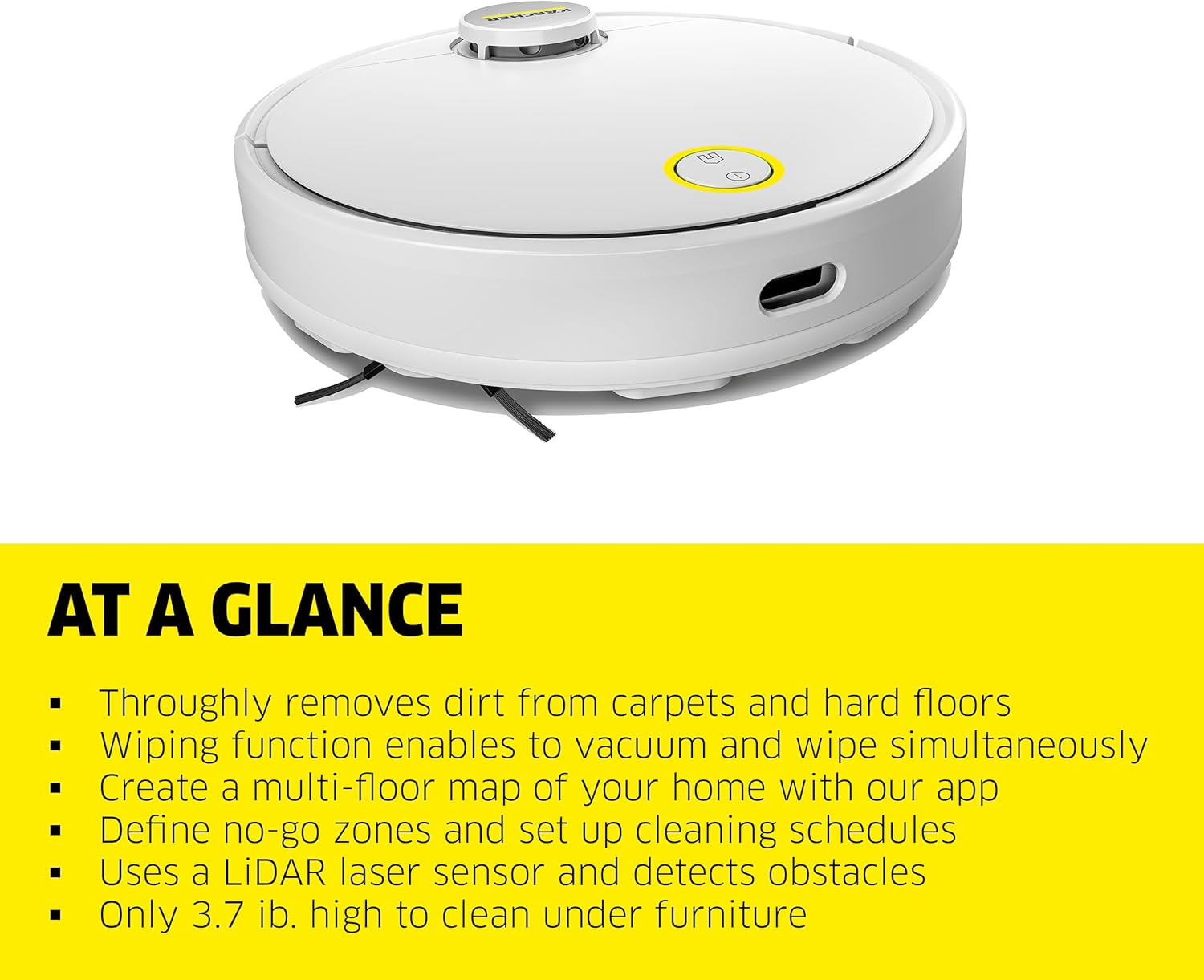
Figure 3: Key Features. This visual summary highlights the main functionalities of the RCV 3, including its 2-in-1 cleaning capability, advanced navigation, and slim design.
- 2-in-1 Function: Thoroughly removes dust and dirt from hard floors and carpets. Features a switchable wiping function for damp mopping.
- LiDAR Laser Navigation: Creates precise room maps, detects obstacles, and ensures safe navigation.
- Clever App Control: Use the Kärcher Home Robots app to save room maps, set cleaning zones, define no-go zones, and schedule cleaning tasks.
- Autonomous and Flexible: Overcomes thresholds and carpets up to 0.7 inches. Its slim 3.7-inch height allows it to clean under low furniture.
- Included Components: RCV 3 robot vacuum cleaner, charging station, 2-in-1 container for dust and fresh water, 2 side brushes, 2 filters, and 2 microfiber cleaning cloths.
Setup Guide
- Unpack the Appliance: Carefully remove all components from the packaging. Retain packaging for future storage or transport.
- Choose a Location for the Charging Station: Place the charging station against a wall in an open area, ensuring at least 1.5 feet (0.5 meters) of clear space on either side and 5 feet (1.5 meters) in front. Ensure it is near a power outlet.
- Connect the Charging Station: Plug the power adapter into the charging station and then into a wall outlet.
- Initial Charge: Place the RCV 3 onto the charging station. Ensure the charging contacts on the robot align with those on the station. The robot will begin charging automatically. Allow for a full charge before first use (approximately 4-5 hours).
- Install Side Brushes: Attach the two side brushes to the designated posts on the underside of the robot until they click into place.
- Fill Water Tank (for Mopping): Open the 2-in-1 container, fill the water compartment with clean tap water. Do not use cleaning solutions unless specifically designed for robot vacuums and approved by Kärcher.
- Attach Microfiber Cloths: Secure the microfiber cleaning cloths to the bottom of the 2-in-1 container.
- Download the Kärcher Home Robots App: Scan the QR code in the quick start guide or search for "Kärcher Home Robots" in your device's app store. Follow the in-app instructions to connect your RCV 3 to your Wi-Fi network and complete the initial mapping process.
Operating Instructions
First Use and Mapping
For the first cleaning cycle, allow the RCV 3 to complete a full mapping run of your home. This will enable the LiDAR sensor to create an accurate floor plan for efficient future cleaning.

Figure 4: LiDAR Navigation. The RCV 3 uses LiDAR laser sensors to map your home and detect obstacles, ensuring safe and efficient navigation.
Cleaning Modes
- Auto Clean: The robot will systematically clean all accessible areas.
- Spot Clean: Use the app to define a specific area for intensive cleaning. The robot will focus on this designated spot.
- Zone Clean: Select specific rooms or zones from the mapped floor plan in the app for targeted cleaning.
- Vacuum Only: For dry cleaning of hard floors and carpets.
- Vacuum & Mop: For simultaneous vacuuming and damp mopping of hard floors. Ensure the water tank is filled and mop pads are attached.

Figure 5: Thorough Cleaning. The RCV 3 effectively vacuums both hard floors and carpets, picking up dirt and debris.

Figure 6: Cleaning Under Furniture. With a height of only 3.7 inches, the RCV 3 can easily clean under most low-lying furniture.
App Control (Kärcher Home Robots App)
The Kärcher Home Robots app provides comprehensive control over your RCV 3:
- Floor Mapping: View and manage the generated floor map.
- No-Go Zones: Define areas the robot should avoid (e.g., pet bowls, delicate items).
- Cleaning Schedules: Set specific times and days for automated cleaning.
- Cleaning Parameters: Adjust suction power and water flow for different surfaces.
- Voice Output: Receive status updates and important information from the robot.

Figure 7: Setting No-Go Zones. The Kärcher Home Robots App allows users to define specific areas the robot should avoid, such as play areas or delicate zones.
Official Product Video
Video 1: RCV3 Product Overview. This official video provides a visual demonstration of the Kärcher RCV 3's features, including its navigation, cleaning capabilities, and app integration.
Maintenance
Regular maintenance ensures optimal performance and extends the lifespan of your RCV 3. Always power off the robot before performing maintenance.
Cleaning the 2-in-1 Container (Dust and Water)
- Press the release button to remove the 2-in-1 container from the robot.
- Empty the dust compartment into a trash bin.
- Rinse the dust compartment and water tank with clean water. Allow to air dry completely before reinserting.
Cleaning the Filters
- Remove the filters from the dust compartment.
- Tap the filters gently to remove loose dirt. Do not wash the pleated filters with water.
- Replace filters every 3-6 months, or as needed, depending on usage.
Cleaning Side Brushes and Main Brush
- Regularly check side brushes for tangled hair or debris. Pull them off to clean and reattach.
- Remove the main brush cover and lift out the main brush. Use the cleaning tool provided to remove hair and debris.
Cleaning Sensors and Charging Contacts
- Wipe the LiDAR sensor window, cliff sensors, and charging contacts on both the robot and the charging station with a clean, dry cloth.
Troubleshooting
| Problem | Possible Cause | Solution |
|---|---|---|
| Robot does not start or respond. | Low battery; Power switch off; Robot stuck. | Charge the robot; Ensure power switch is ON; Clear obstacles. |
| Poor cleaning performance. | Dustbin full; Filters clogged; Brushes tangled. | Empty dustbin; Clean/replace filters; Clean brushes. |
| Robot cannot find charging station. | Charging station obstructed; Robot too far from station. | Ensure clear path to station; Place robot closer to station. |
| App connectivity issues. | Wi-Fi signal weak; Incorrect Wi-Fi password. | Check Wi-Fi signal strength; Re-enter Wi-Fi password in app. |
| Robot falls down stairs. | Cliff sensors dirty or obstructed. | Clean cliff sensors thoroughly. |
Specifications
| Feature | Detail |
|---|---|
| Model Name | RCV 3 |
| Model Number | 1.269-625.0 |
| Brand | Kärcher |
| Maximum Suction | 2500 Picometer (Pa) |
| Runtime | Up to 120 minutes |
| Battery Type | Lithium Ion (included) |
| Navigation Type | LiDAR Laser Navigation |
| Control Type | App Control, Push Button |
| Product Dimensions | 13.7"L x 13.7"W x 3.7"H |
| Item Weight | 8.1 pounds |
| Color | White |
| UPC | 886622051701 |
Warranty and Support
For warranty information, technical support, or to purchase replacement parts and accessories, please visit the official Kärcher website or contact Kärcher customer service directly.
- Kärcher Official Website: www.kaercher.com
- Kärcher Store on Amazon: Visit the Kärcher Store
- Refer to your product's packaging or the Kärcher website for specific warranty terms and conditions applicable to your region.
Ask a question about this manual
Ask about setup, troubleshooting, compatibility, parts, safety, or missing instructions. Manuals+ will review the question and use this page’s manual context to help answer it.