1. Introduction
Thank you for choosing the MUNEFE FC-6S Fiber Cleaver. This precision tool is designed for accurate and reliable cleaving of optical fibers, essential for fiber optic splicing and termination. Its robust metal construction ensures durability and consistent performance. Please read this manual thoroughly before operating the device to ensure safe and efficient use.
2. Package Contents
Upon unpacking, please verify that all items listed below are present and in good condition:
- 1 x MUNEFE FC-6S Fiber Cleaver
- 1 x Cleaver Stripping Guide
- 2 x L-Shape Adjusting Tools
- 1 x Carrying Bag
Note: The design of the product may vary slightly between new and old types. This does not affect functionality.
3. Safety Information
Always observe the following safety precautions to prevent injury and damage to the equipment:
- Sharp Blade: The fiber cleaver contains an extremely sharp blade. Handle with extreme care to avoid cuts.
- Fiber Shards: Optical fiber shards are very sharp and can cause serious injury if they penetrate the skin or eyes. Always wear safety glasses and dispose of fiber shards properly in a designated container.
- Keep Out of Reach: Store the cleaver and its accessories out of reach of children.
- Proper Use: Use the cleaver only for its intended purpose of cleaving optical fibers.
- Cleanliness: Keep the cleaver clean and free from dust and debris to ensure optimal performance.
4. Setup
Before using the MUNEFE FC-6S Fiber Cleaver, ensure your workspace is clean and well-lit. Prepare the fiber to be cleaved according to standard fiber optic preparation procedures.
- Unpack the Cleaver: Remove the fiber cleaver from its carrying bag.
- Inspect the Blade: Visually inspect the cleaver blade for any visible damage or debris. A clean, sharp blade is crucial for a good cleave.
- Prepare Fiber: Strip the fiber's protective coating to the required length using a fiber stripping tool (not included). Clean the bare fiber with an approved fiber cleaning wipe and isopropyl alcohol.
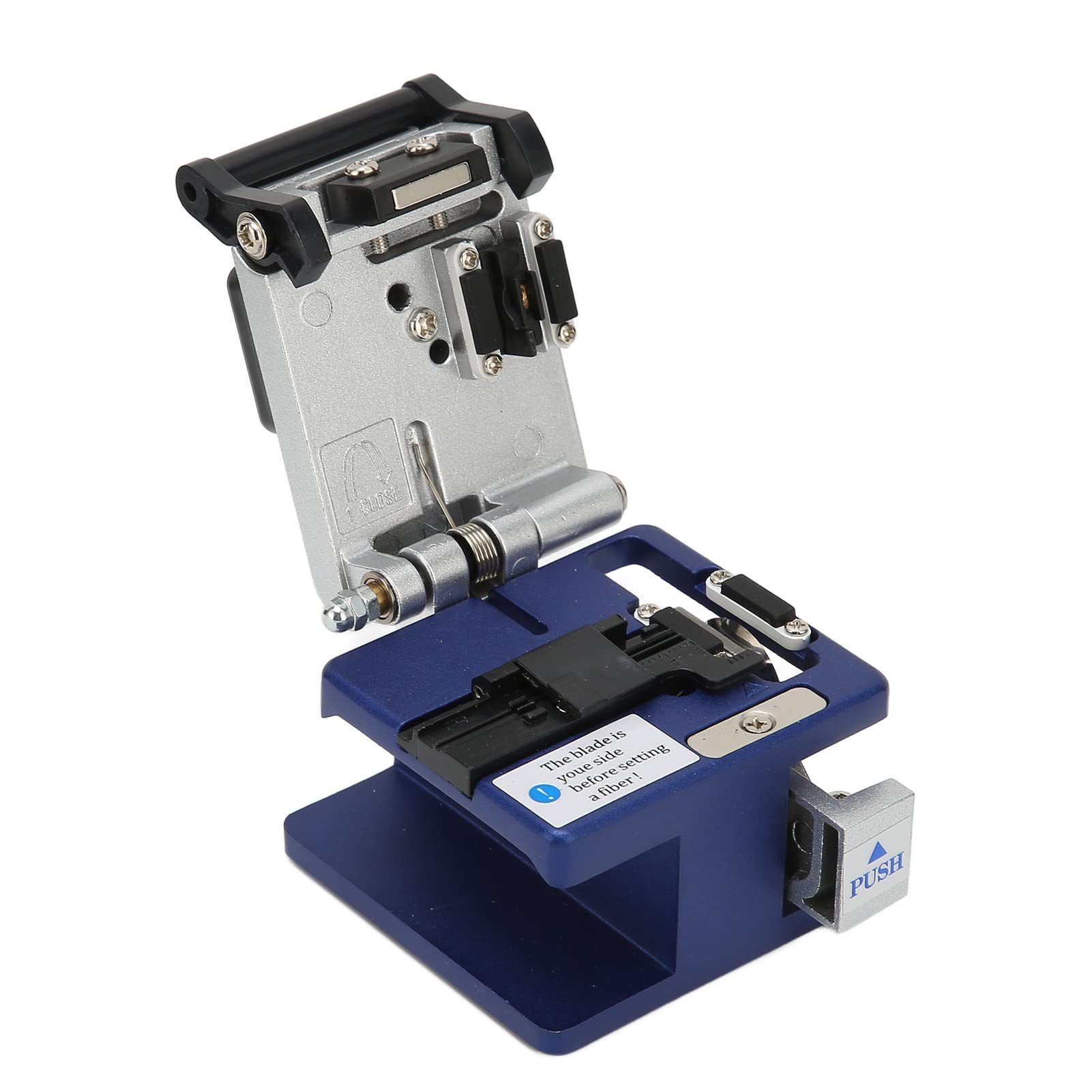
Figure 1: MUNEFE FC-6S Fiber Cleaver and included tools. This image shows the main unit, L-shape adjusting tools, and the stripping guide.
5. Operating Instructions
Follow these steps for precise fiber cleaving:
- Open the Cleaver: Lift the top cover and open the fiber clamp.
- Position the Fiber: Place the stripped optical fiber into the fiber holder or guide. Ensure the bare fiber extends to the desired cleave length, typically indicated by markings on the cleaver or using the stripping guide. The fiber should be straight and centered.
- Secure the Fiber: Gently close the fiber clamp to hold the fiber securely in place without overtightening.
- Initiate Cleave: Close the top cover of the cleaver. This action will engage the blade and score the fiber.
- Complete Cleave: Apply gentle, even pressure to the cleaver mechanism (often a sliding or pressing motion, depending on the cleaver type) to complete the cleave. The blade will move across the fiber, creating a clean, flat end face.
- Remove Fiber: Open the top cover and fiber clamp. Carefully remove the cleaved fiber.
- Dispose of Shard: Immediately dispose of the cleaved fiber shard in a designated waste container.
- Inspect Cleave: Inspect the cleaved end face using a fiber inspection microscope to ensure it is clean, flat, and free of defects.
6. Maintenance
Regular maintenance ensures the longevity and accuracy of your MUNEFE FC-6S Fiber Cleaver.
- Cleaning: After each use, clean the fiber cleaver, especially the blade and fiber clamping areas, with a lint-free cloth and isopropyl alcohol to remove any fiber debris or dust.
- Blade Rotation/Replacement: The cleaver blade has multiple cleaving positions to maximize its lifespan (approximately 36,000 cleaves). If cleave quality deteriorates, rotate the blade to a fresh position using the L-shape adjusting tools. Refer to the specific instructions for blade rotation if provided with your unit. Eventually, the blade will need replacement.
- Storage: Store the cleaver in its protective carrying bag when not in use to prevent damage and contamination.
7. Troubleshooting
If you encounter issues with your fiber cleaver, consider the following common problems and solutions:
| Problem | Possible Cause | Solution |
|---|---|---|
| Poor cleave quality (angled, chipped, or rough end face) |
|
|
| Fiber not cleaving |
|
|
| Fiber slipping during cleave |
|
|
8. Specifications
Key technical specifications for the MUNEFE FC-6S Fiber Cleaver:
- Model: FC-6S
- Applicable Fiber Diameter: 125µm (Micrometers)
- Cleave Angle: Approximately 0.5 degrees (typical for mechanical cleavers)
- Blade Usage Life: Approximately 36,000 cleaves (multiple positions)
- Dimensions: Approximately 62 x 76 x 66 mm (2.4 x 3.0 x 2.6 inches)
- Weight: Approximately 346 grams (12.3 ounces)
- Construction Material: High-quality metal
9. Warranty and Support
For warranty information and technical support, please refer to the documentation provided at the time of purchase or contact your retailer. MUNEFE is committed to providing quality products and customer satisfaction.
For further assistance, please contact MUNEFE customer service through the official channels provided on their website or by your product vendor.


