
1. Introduction
Thank you for choosing the BOBLOV A26 Small Body Camera. This compact and versatile device is designed for reliable video recording, photo capture, and audio recording in various scenarios, from personal security to professional monitoring. With its 1080P HD resolution, 180-degree rotatable lens, and long battery life, the A26 is an ideal tool for collecting evidence and documenting daily activities.
2. What's in the Box
Please check the package contents to ensure all items are present:
- 1x BOBLOV A26 Video Camera
- 1x Tripod
- 1x Lanyard
- 1x USB-C Cable
- 1x Back Clip
- 1x User Manual
- 1x 64GB Micro SD Card (pre-installed or included separately)
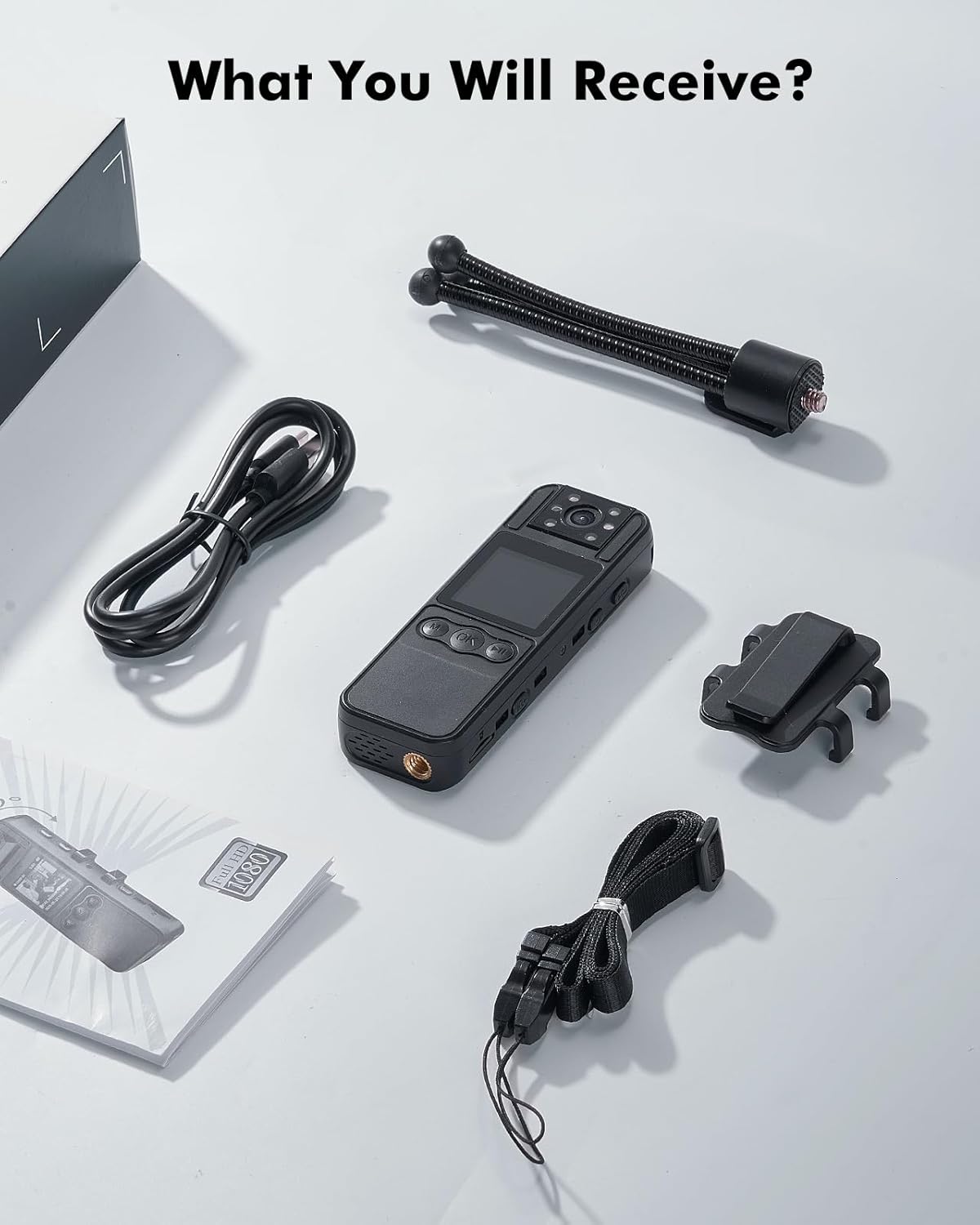
Image: All components included with the BOBLOV A26 Body Camera.
3. Product Overview
The BOBLOV A26 features a compact design with intuitive controls and a clear display for ease of use.

Image: Front and back views of the BOBLOV A26 Body Camera.
Key Features:
- 180° Rotatable Lens: Adjust the camera angle for optimal field of view.
- 1.3-inch IPS Display: For live view, playback, and menu navigation.
- 1080P HD Video Recording: Capture clear and detailed footage.
- Night Vision: Equipped with 6 invisible IR lights for recording in low-light conditions.
- Built-in 1700mAh Battery: Provides up to 6 hours of continuous video recording.
- 64GB Internal Storage: Ample space for extended use.
- Universal 1/4" Screw Hole: For mounting on tripods or other accessories.

Image: The 180-degree rotatable lens allows for flexible recording angles.

Image: Night vision capability with 6 invisible IR lights.
4. Setup
4.1. Charging the Battery
Before first use, fully charge the camera. Connect the supplied USB-C cable to the camera's charging port and the other end to a USB power adapter (not included) or a computer USB port. The charging indicator light will show charging status. A full charge takes approximately 3 hours.

Image: The camera features a 1700mAh battery, providing 6 hours of recording time and requiring 3 hours for a full charge via USB-C.
4.2. Micro SD Card Installation
The BOBLOV A26 comes with a 64GB Micro SD card. Ensure it is properly inserted into the Micro SD card slot before use. The camera supports up to 256GB Micro SD cards for expanded storage.

Image: The camera supports external memory expansion via a Micro SD card slot, up to 256GB.
5. Operating Instructions
5.1. Power On/Off
To power on the camera, press and hold the Power button until the screen lights up. To power off, press and hold the Power button again until the screen turns off.
5.2. Video Recording
From the main interface, press the Video Record button to start recording. The recording indicator will flash. Press the button again to stop recording. Videos are saved as 1080P HD MOV files.
Video: Demonstration of the BOBLOV A26 1080P Body Camera in action, capturing daily recordings with its rotatable lens and various features.
5.3. Photo Capture
While in standby mode, press the Photo button to take a still image. Photos are saved as high-resolution files.
5.4. Night Vision
To activate night vision, long press the designated button (refer to the camera's physical buttons for exact location, often indicated by an IR symbol). The camera will switch to infrared mode for clear recording in dark environments.
5.5. Playback
Navigate through the menu using the M (Menu) and OK buttons to access the playback mode. Select your desired video or photo to view it on the 1.3-inch IPS display.

Image: The 1.3-inch IPS display allows for easy playback and menu settings directly on the device.
5.6. Loop Recording
The camera supports loop recording, which automatically overwrites the oldest files when the memory card is full. You can set video segment lengths (e.g., 5, 10, 15, or 20 minutes) through the camera's settings menu.

Image: Loop recording feature with adjustable video segment lengths.
6. Maintenance
- Keep the camera clean and free from dust and debris. Use a soft, dry cloth for cleaning.
- Avoid exposing the camera to extreme temperatures, direct sunlight for prolonged periods, or high humidity.
- Do not attempt to disassemble or repair the camera yourself, as this will void the warranty.
- Regularly back up your recorded data to a computer or external storage device.
7. Troubleshooting
7.1. Camera Not Turning On
- Ensure the battery is sufficiently charged. Connect to a power source and try again.
- Press and hold the Power button for at least 5 seconds.
7.2. Recording Issues (No Recording/Poor Quality)
- Check if the Micro SD card is properly inserted and has sufficient free space.
- Format the Micro SD card through the camera's settings menu (this will erase all data).
- Ensure the lens is clean and free from smudges.
7.3. Short Battery Life
- Ensure the camera is fully charged before use.
- Reduce screen brightness or set the screen auto-off time to a shorter duration.
- Frequent use of night vision or continuous recording will consume battery faster.
8. Specifications
| Feature | Detail |
|---|---|
| Model Number | BOBLOV A26-64GB |
| Video Resolution | 1080p HD |
| Photo Sensor Technology | CMOS |
| Flash Memory Type | Micro SD (64GB included, supports up to 256GB) |
| Video Capture Format | MOV |
| Supported Audio Format | WAV |
| Screen Size | 1.3 Inches |
| Connectivity Technology | USB |
| Special Features | Night Vision, Lightweight, 180° Rotatable Lens |
| Item Weight | 60 Grams |
| Product Dimensions | 10.5 x 3.4 x 1.6 centimetres |
| Battery Type | 1 Lithium Polymer battery (included) |
| Battery Life (Video Recording) | Up to 6 hours (1080P, IR & Screen Off) |
| Charging Time | Approx. 3 hours |
| Water Resistance Level | Not Water Resistant |
9. Warranty & Support
The BOBLOV A26 Body Camera comes with a 2-year limited warranty service from BOBLOV. For any technical support, warranty claims, or inquiries, please refer to the contact information provided on the product packaging or visit the official BOBLOV website.
For more information and accessories, you can visit the BOBLOV Store on Amazon.