1. Introduction
This manual provides detailed instructions for the installation, operation, and maintenance of your Jensen J1CA8FL 8-inch Touchscreen Car Stereo. The J1CA8FL is designed to enhance your in-car audio and connectivity experience with features such as Apple CarPlay, Android Auto, Bluetooth, and various media playback options. Please read this manual thoroughly before using the product to ensure proper operation and to prevent damage.
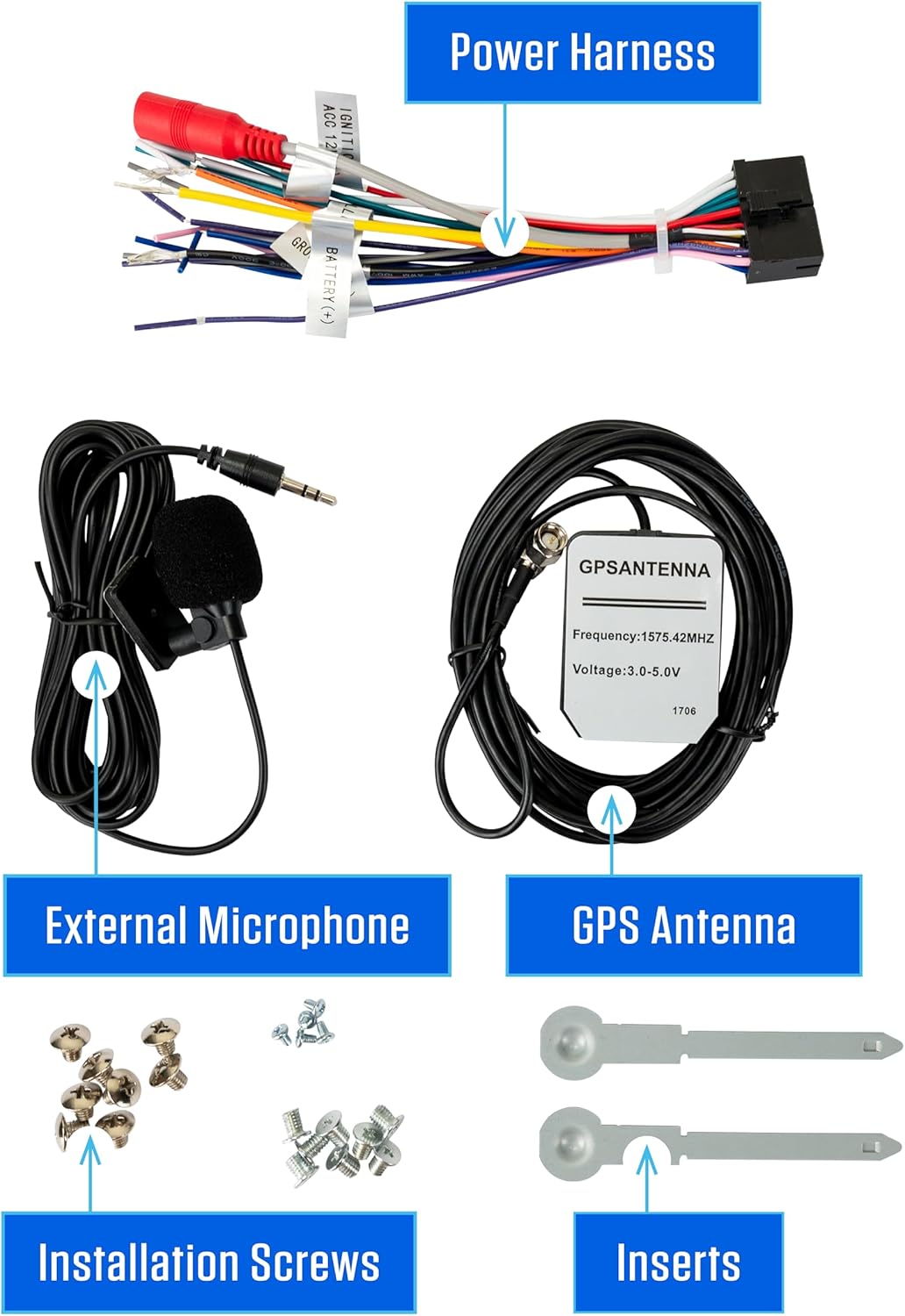
2. What's in the Box
Verify that all components are present before beginning installation.
- Jensen J1CA8FL 8-inch Touchscreen Car Stereo
- Power Harness
- External Microphone
- GPS Antenna
- Installation Screws
- Mounting Inserts
- Dash Mount Adapter (for Single DIN and Double DIN installation)

3. Installation
Professional installation is recommended. Ensure the vehicle's battery is disconnected before starting any wiring procedures.
3.1. Mounting Options
The J1CA8FL is designed for flexible installation in both single DIN and double DIN openings using the provided dash mount adapter.

3.2. Screen Adjustability
The 8-inch touchscreen offers multiple adjustment options to optimize viewing angles and fit within your vehicle's dashboard:
- Screen Angle: Can pivot side-to-side.
- Screen Height: Adjusts up to 1.5 inches down.
- Screen Depth: Can be adjusted from 0 to 1 inch forward.
- Screen Tilt: Tilts left or right.

3.3. Wiring Connections
Connect the power harness, GPS antenna, external microphone, and any optional camera inputs to the rear of the unit. Refer to the wiring diagram provided with your unit for specific connections.

3.4. Installation Overview Video
4. Initial Setup
After successful installation, power on the unit. The initial setup may guide you through basic language and time settings. Ensure the screen brightness is adjusted for comfortable viewing.
4.1. Dimmable Screen
The J1CA8FL features a dimmable screen to adjust brightness for day and night driving conditions. Access screen settings through the main menu to modify this feature.
5. Operating Instructions
5.1. Apple CarPlay
Connect your iPhone via USB or wirelessly to access Apple CarPlay. This feature integrates your iPhone's functions, including navigation, music, messages, and calls, directly onto the stereo's display. Use Siri for voice commands to maintain focus on the road.

5.2. Android Auto
Connect your Android phone via USB or wirelessly to use Android Auto. This feature provides a simplified interface for navigation, communication, and music, optimized for driving. Utilize Google Assistant for voice control.

5.3. Bluetooth Connectivity
Pair your Bluetooth-enabled device with the J1CA8FL for hands-free calling and wireless audio streaming. Access the Bluetooth menu to pair new devices or manage existing connections.
5.4. Radio Operation
Select the FM or AM tuner from the main menu. Use the touchscreen controls to scan for stations, manually tune, and save your favorite presets.
5.5. USB Playback & Charging
The unit features USB inputs for media playback from compatible USB devices and for charging your smartphone (2.1A fast charging).
5.6. Camera Inputs
The J1CA8FL supports both front and rear camera inputs. When a camera is connected and activated (e.g., shifting into reverse for the rear camera), the video feed will automatically display on the screen.
5.7. Voice Assistant
Utilize the dedicated 'Push to Talk' button on the unit's control panel to activate your smartphone's voice assistant (Siri or Google Assistant) for hands-free commands.

5.8. Audio Equalizer (EQ)
Adjust the audio output to your preference using the built-in equalizer. The unit offers 7 EQ presets (e.g., R&B, Pop, Classic, Jazz) and custom adjustment options.
6. Maintenance
To ensure the longevity and optimal performance of your J1CA8FL car stereo, follow these maintenance guidelines:
- Screen Cleaning: Use a soft, lint-free cloth to gently wipe the touchscreen. For stubborn smudges, slightly dampen the cloth with water or a screen-safe cleaner. Avoid abrasive materials or harsh chemicals.
- General Cleaning: Keep the unit's control panel and surrounding areas free of dust and debris. Use a soft brush or compressed air for hard-to-reach spots.
- Avoid Extreme Temperatures: Do not expose the unit to prolonged direct sunlight or extreme cold, as this can affect performance and lifespan.
- Cable Management: Ensure all cables are securely connected and not pinched or damaged.
7. Troubleshooting
If you encounter issues with your J1CA8FL, refer to the following common troubleshooting steps. For persistent problems, contact Jensen customer support.
| Problem | Possible Cause | Solution |
|---|---|---|
| Unit does not power on | Incorrect wiring; Blown fuse; Vehicle battery issue | Check power and ground connections. Verify vehicle fuse and unit fuse. Ensure vehicle battery is charged. |
| No audio output | Speaker wires disconnected; Volume too low; Mute activated | Check speaker connections. Increase volume. Deactivate mute function. |
| Bluetooth not connecting | Device not in pairing mode; Unit not discoverable; Interference | Ensure Bluetooth is enabled on both devices and in pairing mode. Move closer to the unit. Restart both devices. |
| Apple CarPlay/Android Auto not launching | Incorrect USB cable; Phone software issue; Wireless connection problem | Use a high-quality USB data cable. Ensure phone software is updated. For wireless, check Wi-Fi and Bluetooth connections. |
| Touchscreen unresponsive | Temporary software glitch; Screen calibration needed | Restart the unit. If issue persists, perform a factory reset (refer to settings menu). |
8. Specifications
| Feature | Detail |
|---|---|
| Model Number | J1CA8FL |
| Product Dimensions | 6.89"D x 10.04"W x 11.02"H |
| Item Weight | 5.08 pounds |
| Screen Size | 8-inch LCD (1024 x 600 resolution) |
| Connectivity Technology | Bluetooth, Wireless Android Auto, Wireless Apple CarPlay |
| Controller Type | Android, iOS |
| Special Features | Android Auto, Apple CarPlay, Built-In Bluetooth, Dash Mount Adapter (1 DIN & 2 DIN), Touchscreen |
| Compatible Devices | Smartphone |
| Connector Type | USB Type A |
| Audio Output Mode | Stereo |
| Surround Sound Channel Configuration | 4.0 |
| Video Encoding | H.264, H.265/HEVC |
| Manufacturer | Jensen |
9. Warranty and Support
The Jensen J1CA8FL comes with a 2-year standard warranty. You can extend this to a 3-year warranty by registering your product on Jensenmobile.com.
For technical support, troubleshooting assistance, or warranty claims, please visit the official Jensen website or contact their customer service department. Keep your purchase receipt and product serial number readily available.