
Product Overview
The LoopTone TR-18CDBB is a versatile 10-in-1 audio system designed to play various media formats. It combines vintage aesthetics with modern functionality, offering a comprehensive solution for your audio needs.

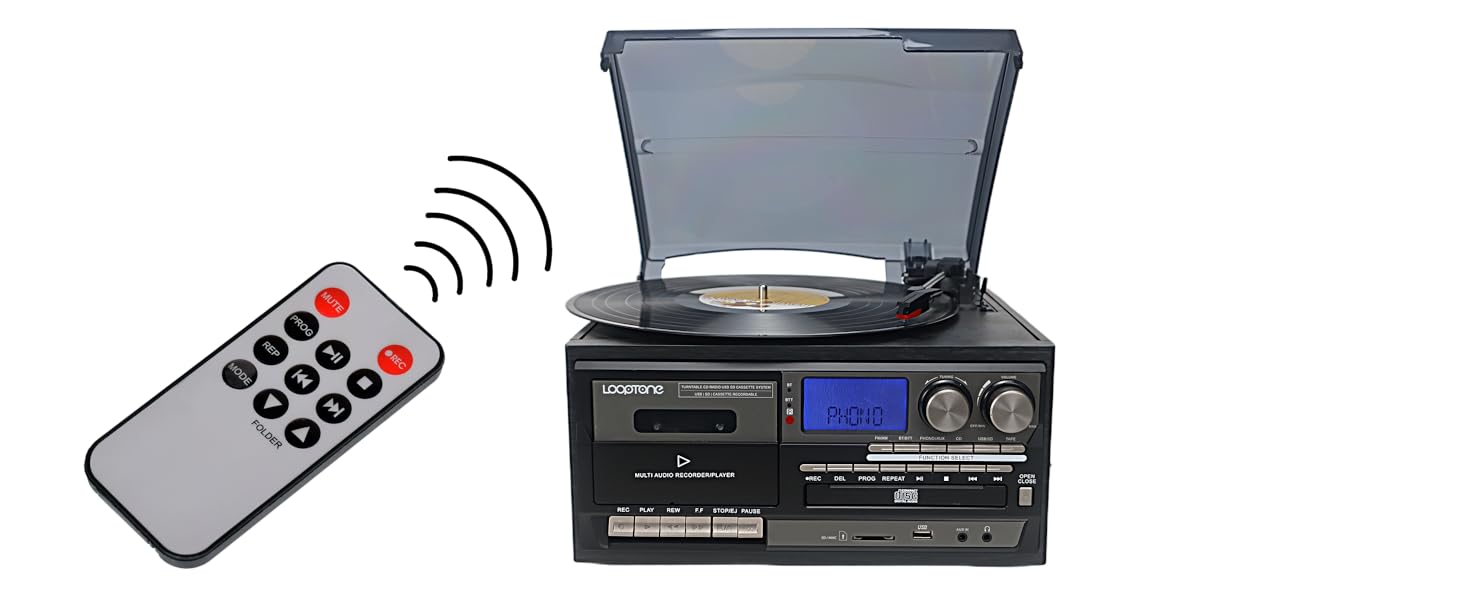
Front view of the LoopTone 10-in-1 Vinyl Record Player, highlighting its multi-functional design.

Visual representation of the diverse playback and connectivity options available on the unit.
Key Features
- 3-Speed Vinyl Record Player: Supports 33-1/3, 45, and 78 RPM records.
- Bluetooth Connectivity: Built-in Bluetooth for streaming audio from devices and connecting to Bluetooth headphones/speakers.
- CD Player: Compatible with audio CDs.
- Cassette Player: For playing your favorite cassette tapes.
- AM/FM Radio: Features a digital LCD display for tuning into radio stations.
- USB Recorder: Record vinyl, CD, or cassette audio directly to USB in MP3 or WMA format.
- Aux-in and RCA Line-out: Connect non-Bluetooth devices via Aux-in or external audio systems via RCA line-out.
- Built-in Speakers: Integrated stereo speakers for immediate playback.
- Remote Control: For convenient operation from a distance.
- Blue LED Display: Provides clear indication of current mode and settings.

The turntable supports various record sizes and playback speeds.
Setup Guide
Unboxing
Carefully remove all components from the packaging. Ensure all items listed in the "What's in the Box" section are present. Retain packaging for future transport or storage.
Official unboxing video demonstrating the contents and initial setup of the LoopTone record player.
Power Connection
Connect the power cord to the DC IN port on the unit's rear panel, then plug the other end into a standard electrical outlet (AC 100-240V, 50/60Hz).
Antenna Setup
For optimal FM/AM radio reception, extend the FM antenna located at the back of the unit. For AM reception, you may need to rotate the unit for the best signal.

Rear panel connections including RCA Line Out and FM antenna.
Operating Instructions
General Operation
- Power On/Off: Rotate the VOLUME knob clockwise to turn the unit on. Rotate counter-clockwise until it clicks to turn off.
- Function Selection: Press the "FUNCTION SELECT" button to cycle through available modes: FM/AM, BT/BTT, PHONO/AUX, CD, USB/SD, TAPE.
- Volume Control: Adjust the VOLUME knob to increase or decrease the sound level.
Playing Vinyl Records
- Open the dust cover.
- Place a vinyl record on the turntable platter.
- Select "PHONO/AUX" mode using the Function Select button.
- Adjust the speed selector (33-1/3, 45, or 78 RPM) to match your record.
- Lift the tone arm using the cueing lever.
- Manually move the tone arm to the desired position over the record.
- Gently lower the tone arm onto the record using the cueing lever. The record will begin playing.
- To stop playback, lift the tone arm using the cueing lever and return it to the tone arm rest.
The turntable allows for playback of various vinyl record speeds.
Playing CDs
- Press the "OPEN/CLOSE" button to open the CD tray.
- Place a CD with the label side facing up.
- Press "OPEN/CLOSE" again to close the tray.
- Select "CD" mode. The unit will read the disc and begin playback.
- Use the PLAY/PAUSE, NEXT, and PREVIOUS buttons for control.

The integrated CD player supports standard audio discs.
Playing Cassette Tapes
- Insert a cassette tape into the cassette deck.
- Select "TAPE" mode.
- Use the PLAY, REW, F.F, STOP/EJ, and PAUSE buttons for control.

The cassette deck allows playback of your tape collection.
AM/FM Radio
- Select "FM/AM" mode.
- Use the TUNING knob to find your desired station.
- For FM, extend the FM antenna. For AM, rotate the unit for best reception.

Tune into your favorite AM or FM radio stations.
Bluetooth Connectivity
- Select "BT/BTT" mode. The display will show "BT" and flash, indicating pairing mode.
- On your Bluetooth device (smartphone, tablet, headphones), enable Bluetooth and search for "LoopTone".
- Select "LoopTone" to pair. Once connected, the "BT" indicator will stop flashing.
- Play audio from your device, and it will stream through the record player's speakers or connected Bluetooth headphones.

Easily connect your Bluetooth devices for wireless audio streaming.
USB/SD Playback and Recording
- Insert a USB drive or SD card into the respective slot.
- Select "USB/SD" mode. The unit will read the media.
- Use the playback controls (PLAY/PAUSE, NEXT, PREVIOUS) to navigate tracks.
- Recording: To record from Vinyl, CD, or Cassette to USB/SD, select the desired source mode (PHONO/AUX, CD, TAPE). Press the "REC" button. The unit will begin recording the audio to the inserted USB drive or SD card.
The unit features USB and SD card slots for playback and recording.

Record your favorite audio from vinyl, CD, or cassette to digital formats or another tape.
Aux-in and RCA Line-Out
- Aux-in: Connect external audio devices (MP3 player, PC, laptop) to the "AUX IN" port using a 3.5mm audio cable. Select "PHONO/AUX" mode.
- RCA Line-Out: Connect the "RCA LINE OUT" ports to an external amplifier or home audio system using RCA cables for enhanced sound.
Connect external devices or output audio to a larger sound system.
Maintenance
Cleaning
- Unit Exterior: Wipe the unit with a soft, dry cloth. Do not use abrasive cleaners or solvents.
- Dust Cover: Clean with a soft, damp cloth.
- Turntable Stylus: Gently clean the stylus with a soft brush, moving from back to front.
- CD Lens: Use a specialized CD lens cleaner disc.
- Cassette Head: Use a cassette head cleaner.
Storage
- When not in use, keep the dust cover closed to protect the turntable.
- Store the unit in a cool, dry place away from direct sunlight and extreme temperatures.
Troubleshooting
| Problem | Solution |
|---|---|
| No Power | Ensure the power cord is securely plugged into the unit and a working electrical outlet. Check the VOLUME knob is turned clockwise. |
| No Sound | Check volume level. Ensure correct function mode is selected. If using external speakers, check connections. |
| Turntable Not Spinning | Ensure the unit is powered on and in PHONO/AUX mode. Check if the tone arm is lifted from its rest. |
| Poor Radio Reception | Extend the FM antenna fully. For AM, rotate the unit for better signal. |
| Bluetooth Not Connecting | Ensure the unit is in BT/BTT mode and flashing. Make sure your device's Bluetooth is on and searching. Move devices closer. |
| Recording Issues | Ensure USB drive/SD card is properly inserted and has sufficient free space. Check the source mode is correctly selected before pressing REC. |
For further assistance, please contact LoopTone customer support.
Specifications
| Feature | Detail |
|---|---|
| Product Dimensions | 12.6 x 11.81 x 7.87 inches |
| Item Weight | 9.9 pounds |
| Item Model Number | TR-18CDBB |
| Brand | LoopTone |
| Connectivity Technology | Bluetooth, USB |
| Maximum Rotational Speed | 78 RPM |
| Included Components | Record Player, built-in speaker x 2, 45 rpm adapter, remote control, manual |
| Special Feature | Adjustable Speed, Built In Speaker, AUX Input, Dust Cover |
| Material | Wood, Plastic, Metal |
| Color | Black |
| On-mode power consumption | 22 watts |
Detailed dimensions of the LoopTone 10-in-1 Vinyl Record Player.
Warranty and Support
LoopTone products are backed by a one-year product quality problem solution. For customer consultation service, please contact our support team 7 days a week, 24 hours a day.
For detailed warranty information or technical support, please visit the official LoopTone website or refer to the product packaging for contact information.


