
Dreo Solaris 317, 4L Smart Humidifier
Contents
Dreo Space Heater and Smart Humidifier User Manual
Models: Solaris 317 Space Heater, 4L Smart Humidifier
Important Safety Instructions
Please read all instructions carefully before using this appliance and retain for future reference. Failure to follow these instructions may result in electric shock, fire, or serious injury.
- Always place the appliance on a firm, flat, and level surface.
- Do not cover the heater or humidifier. Ensure proper ventilation.
- Keep flammable materials at least 3 feet (0.9 meters) away from the heater.
- Do not operate any appliance with a damaged cord or plug, or after the appliance malfunctions or has been dropped or damaged in any manner.
- Unplug the appliance when not in use or before cleaning.
- This appliance is equipped with a child-lock feature. Activate it to prevent accidental operation by children.
- The heater includes tip-over protection and overheat protection for enhanced safety. If the heater tips over or overheats, it will automatically shut off.
- The humidifier will automatically shut off when the water tank is empty.
- Only use the appliance indoors.
Product Overview
This bundle includes the Dreo Solaris 317 Space Heater and the Dreo 4L Smart Humidifier, designed to provide both warmth and optimal humidity for your indoor environment.
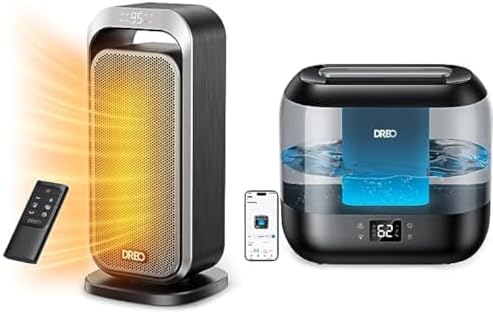
This image displays the Dreo Solaris 317 Space Heater on the left, emitting warm air, alongside its remote control. On the right is the Dreo 4L Smart Humidifier, showing its water tank and digital display. A smartphone screen is also visible, indicating app control for both devices.
Setup
Dreo Solaris 317 Space Heater Setup
- Unpack the heater and remove all packaging materials.
- Place the heater on a stable, level surface, ensuring it is at least 3 feet (0.9 meters) away from walls, furniture, and other objects.
- Ensure the power cord is not obstructed or pinched.
- Plug the heater into a grounded 120V AC electrical outlet.
Dreo 4L Smart Humidifier Setup
- Unpack the humidifier and remove all packaging materials.
- Place the humidifier on a flat, waterproof surface at least 6 inches (15 cm) away from walls and furniture.
- Remove the water tank from the base.
- Fill the water tank with clean, cool tap water. Do not exceed the MAX fill line.
- Place the water tank back onto the base securely.
- Plug the humidifier into a grounded 120V AC electrical outlet.
- For smart features, download the Dreo app and follow the in-app instructions to connect your humidifier to your Wi-Fi network.
Operation
Dreo Solaris 317 Space Heater Operation
- Power On/Off: Press the power button on the control panel or remote control to turn the heater on or off.
- Temperature Setting: Use the '+' and '-' buttons to set your desired temperature between 41°F and 95°F (5°C and 35°C) in 1°F increments. The heater will maintain this temperature.
- Modes: Cycle through different heating modes (e.g., High, Low, ECO) using the Mode button.
- Oscillation: Press the oscillation button to activate or deactivate the 70-degree oscillation function, distributing heat evenly across the room.
- Timer: Set a timer for automatic shut-off using the Timer button.
- Child Lock: Activate the child lock feature to prevent accidental changes to settings.
Dreo 4L Smart Humidifier Operation
- Power On/Off: Press the power button on the control panel or use the Dreo app to turn the humidifier on or off.
- Mist Levels: Select from three different mist levels (Low, Medium, High) to adjust the output.
- Auto Mode: Engage Auto Mode via the app or control panel. The humidifier will automatically adjust mist output based on the detected humidity levels.
- Nightlight: Activate or deactivate the built-in nightlight feature.
- Timer: Set a timer for automatic shut-off.
- App Control: Use the Dreo app for full control, including setting mist levels, timers, ambient lighting, and monitoring humidity.
- Voice Control: Integrate with Alexa or Google Assistant for hands-free operation.
- Nozzle Adjustment: The nozzle can be tilted 30 degrees to direct mist where desired.
Maintenance
Dreo Solaris 317 Space Heater Maintenance
- Cleaning: Before cleaning, always unplug the heater and allow it to cool completely. Use a soft, damp cloth to wipe the exterior surfaces. Do not use abrasive cleaners or solvents.
- Storage: When not in use, store the heater in a cool, dry place.
Dreo 4L Smart Humidifier Maintenance
- Daily Cleaning: Unplug the humidifier. Empty any remaining water from the tank and base. Rinse the tank and base with clean water. Wipe dry with a clean cloth.
- Weekly Cleaning: To remove mineral buildup, fill the tank with a mixture of equal parts white vinegar and water. Let it soak for 30 minutes, then rinse thoroughly. Use a soft brush to clean the nebulizer and water basin.
- Refilling: Refill the water tank with clean, cool tap water as needed. The humidifier has a 4L capacity for up to 32 hours of continuous operation.
- Storage: Ensure the humidifier is completely dry before storing. Store in a cool, dry place.
Troubleshooting
| Problem | Possible Cause | Solution |
|---|---|---|
| Heater not turning on | No power; Tip-over switch activated; Overheat protection activated | Check power connection; Ensure heater is upright on a flat surface; Unplug and let cool for 30 minutes before restarting. |
| Humidifier not producing mist | No water in tank; Tank not properly seated; Mineral buildup on nebulizer | Refill water tank; Re-seat tank correctly; Clean nebulizer as per maintenance instructions. |
| Heater not heating effectively | Room too large; Air intake/outlet blocked; Temperature setting too low | Ensure heater is suitable for room size; Clear any obstructions; Increase temperature setting. |
| Humidifier leaking water | Tank not sealed; Overfilled tank; Damage to tank/base | Ensure tank cap is tight; Do not overfill; Inspect for cracks or damage. |
| App/Voice control not working | Humidifier not connected to Wi-Fi; Incorrect app settings; Router issues | Ensure humidifier is connected to Wi-Fi; Check app settings and permissions; Restart router if necessary. |
Specifications
Dreo Solaris 317 Space Heater
| Feature | Specification |
|---|---|
| Brand | Dreo |
| Model | Solaris 317 |
| Power | 1500W |
| Voltage | 120V AC |
| Oscillation | 70° |
| Thermostat Range | 41-95°F (5-35°C) |
| Safety Features | Child-lock, Tip-over Protection, Overheat Protection, V0 Flame Retardant Material, ETL Certified |
Dreo 4L Smart Humidifier
| Feature | Specification |
|---|---|
| Brand | Dreo |
| Capacity | 4 Liters |
| Runtime | Up to 32 hours |
| Noise Level | As low as 28dB |
| Mist Levels | 3 (Low, Medium, High) |
| Nozzle Tilt | 30° |
| Control | Touch, APP, Voice (Alexa, Google Assistant) |
| Safety Features | Automatic shut-off when tank empty |
Warranty and Support
Dreo products are designed and manufactured to the highest quality standards. For information regarding warranty coverage, please refer to the warranty card included with your product or visit the official Dreo website.
For technical support, troubleshooting assistance, or any questions regarding your Dreo Space Heater or Smart Humidifier, please contact Dreo Customer Service. Contact details can typically be found on the official Dreo website or within your product packaging.
Please retain your proof of purchase for warranty claims.
Ask a question about this manual
Ask about setup, troubleshooting, compatibility, parts, safety, or missing instructions. Manuals+ will review the question and use this page’s manual context to help answer it.