Introduction
This manual provides essential instructions for the safe and effective use of your ALLC BM60 replacement battery. Please read this manual carefully before installation and use to ensure optimal performance and safety. This battery is designed for specific Xiaomi tablet models.
Important Safety Information
Failure to follow these safety instructions may result in fire, electric shock, injury, or damage to the product or property.
- Do not attempt to disassemble, open, or service the battery pack.
- Replace only with the battery pack designated for this product.
- Do not crush, puncture, short external contacts, or dispose of in fire or water.
- Do not store above 60°C (140°F).
- A new battery pack must be fully charged before initial use.
- To reduce the risk of fire or burns, read all instructions in the operating guide before using the battery.
- This battery features built-in protection against over-charge, over-discharge, over-heat, over-current, and short-circuit.
Compatible Models
This ALLC BM60 replacement battery is compatible with the following Xiaomi tablet models:
- Xiaomi A0101
- Xiaomi A0101 16GB
- Xiaomi A0101 64GB
- Xiaomi Mi Pad 1
- Xiaomi MiPad 7.9
- Xiaomi MiPad 7.9 WiFi
Please verify your device's model number before purchasing and installing the battery.
Product Features
- Model: BM60
- Capacity: 6500mAh
- Voltage: 3.8V
- No memory effect.
- Integrated protection against over-charge, over-discharge, over-heat, over-current, and short-circuit.
- High capacity circulatory function for extended battery life.
- Manufactured with A+ cells for longer battery life.
- Certified by ISO9001, RoHS, and CE standards.
Setup and Installation
Replacing a tablet battery requires technical skill and specialized tools. It is highly recommended that battery replacement be performed by a qualified technician to avoid damage to your device or personal injury.
General Installation Guidelines (Professional Installation Recommended):
- Power Off Device: Ensure your tablet is completely powered off before beginning any disassembly.
- Discharge Static Electricity: Use an anti-static wrist strap or take other precautions to discharge static electricity.
- Disassemble Tablet: Carefully open the tablet casing using appropriate tools. Refer to device-specific repair guides for your Xiaomi model.
- Disconnect Old Battery: Gently disconnect the old battery's connector from the motherboard. Do not pull on the wires.
- Remove Old Battery: Carefully pry out the old battery. It may be adhered with adhesive.
- Install New Battery: Place the new ALLC BM60 battery into the battery compartment. Ensure proper alignment.
- Connect New Battery: Connect the new battery's connector securely to the motherboard.
- Reassemble Tablet: Carefully reassemble the tablet casing.
- Initial Charge: Fully charge the new battery before its first use.
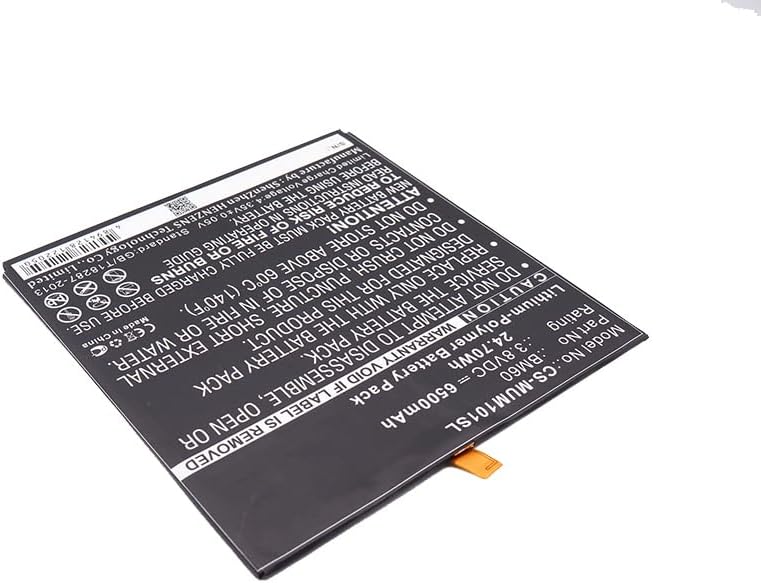
Image 1: ALLC BM60 Replacement Battery. This image shows the overall appearance of the battery with its full label, including model number, capacity, and safety warnings.

Image 2: Close-up of ALLC BM60 Battery Label. This image provides a detailed view of the battery's specifications, part number (BM60), rating (3.8VDC, 6500mAh), and critical safety warnings.
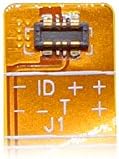
Image 3: ALLC BM60 Battery Connector. This image displays the specific connector type for the BM60 battery, showing the pin configuration (ID, T, J1, +, -) for proper connection to the device's motherboard.
Operating Instructions
- First Use: After installation, fully charge the battery before using your device.
- Charging: Use only the original or certified compatible charger for your Xiaomi tablet. Avoid using damaged chargers or cables.
- Temperature: Operate your device within recommended temperature ranges. Extreme cold or heat can affect battery performance and lifespan.
- Regular Use: For optimal battery health, avoid frequently discharging the battery completely to 0%. It is generally better to keep the charge between 20% and 80%.
Battery Maintenance
- Storage: If storing the device for an extended period, charge the battery to about 50% before storage. Store in a cool, dry place.
- Cleaning: Keep the battery and device free from dust and debris. Do not use liquid cleaners directly on the battery.
- Disposal: Do not dispose of batteries in household waste. Follow local regulations for proper disposal of lithium-polymer batteries.
Troubleshooting
- Battery Not Charging:
- Ensure the charger and cable are functional and correctly connected.
- Verify the charging port on your tablet is clean and undamaged.
- If the issue persists, the battery or charging circuit may require professional inspection.
- Short Battery Life:
- Check for background applications consuming excessive power.
- Reduce screen brightness or disable unnecessary features (Wi-Fi, Bluetooth) when not in use.
- Ensure the battery has been fully charged and calibrated (if applicable for your device).
- Device Not Powering On:
- Ensure the battery is properly installed and connected.
- Attempt to charge the device for at least 30 minutes before trying to power it on.
- If the issue persists, consult a professional technician.
Product Specifications
| Attribute | Detail |
|---|---|
| Model Number | BM60 (CS-MUM101SL) |
| Battery Type | Lithium Polymer |
| Capacity | 6500mAh |
| Nominal Voltage | 3.8VDC |
| Energy | 24.70Wh |
| Limited Charge Voltage | 4.35V ± 0.05V |
| Manufacturer | cameronsino (for ALLC) |
| Certifications | ISO9001, RoHS, CE |
Warranty and Support
ALLC provides a quality guarantee for this product. For any questions, concerns, or technical assistance, please contact ALLC customer support. Please refer to your purchase documentation for specific warranty terms and contact information.
Email support is available 24-hours. Please check the compatible Voltage, Cell Size, and Connector Type for best fit before contacting support regarding compatibility issues.


