
1. Introduction
The TP-Link TL-SG105S-M2 is a 5-port multi-gigabit unmanaged desktop switch designed to provide high-speed network connectivity. It offers 2.5 Gigabit Ethernet ports, enabling enhanced performance for devices requiring higher bandwidth, such as 2.5G WiFi 6 Access Points, 2.5G NAS, 2.5G PCIe Adapters, and gaming computers. This switch features a plug-and-play design, silent operation due to its fanless metal casing, and flexible desktop or wall-mounting options.

Image: The TP-Link TL-SG105S-M2 switch, highlighting its 5-port 2.5G Multi-Gigabit capabilities.
2. Package Contents
Verify that your package contains the following items:
- TL-SG105S-M2 5-Port Multi-Gigabit 2.5G Ethernet Switch
- Power Adapter
- Installation Guide
- Rubber Feet
3. Product Overview
The TL-SG105S-M2 features a durable metal casing and a compact design suitable for various environments. It includes five 2.5 Gigabit Ethernet ports and a power indicator LED.
3.1 Front Panel

Image: Front view of the TL-SG105S-M2 switch, showing the five RJ45 ports and the power LED.
- RJ45 Ports (1-5): Connect to network devices such as computers, servers, or other switches. These ports support auto-negotiation for 100Mbps, 1Gbps, and 2.5Gbps speeds.
- LED Indicators: Each port has two LEDs. The left LED (Green) indicates a 2.5Gbps link/activity. The right LED (Green/Yellow) indicates 1Gbps (Green) or 100Mbps (Yellow) link/activity. A blinking LED indicates data transmission.
- Power LED: Indicates the power status of the switch. On when powered, off when not.
3.2 Dimensions

Image: Diagram showing the compact dimensions of the TL-SG105S-M2 switch: 3.93 inches (width) x 3.86 inches (depth) x 0.98 inches (height).
4. Setup
The TL-SG105S-M2 is a plug-and-play device, requiring no software configuration. Follow these steps for basic setup:
- Connect to Power: Connect the provided power adapter to the switch's power port and then plug the adapter into a power outlet. Ensure the Power LED on the switch illuminates.
- Connect Devices: Use Ethernet cables to connect your network devices (e.g., computers, NAS, gaming consoles, routers) to any of the 2.5 Gigabit RJ45 ports on the switch.
- Verify Connection: Check the LED indicators on the switch for each connected port. A solid green or yellow LED indicates a successful link, and a blinking LED indicates network activity.
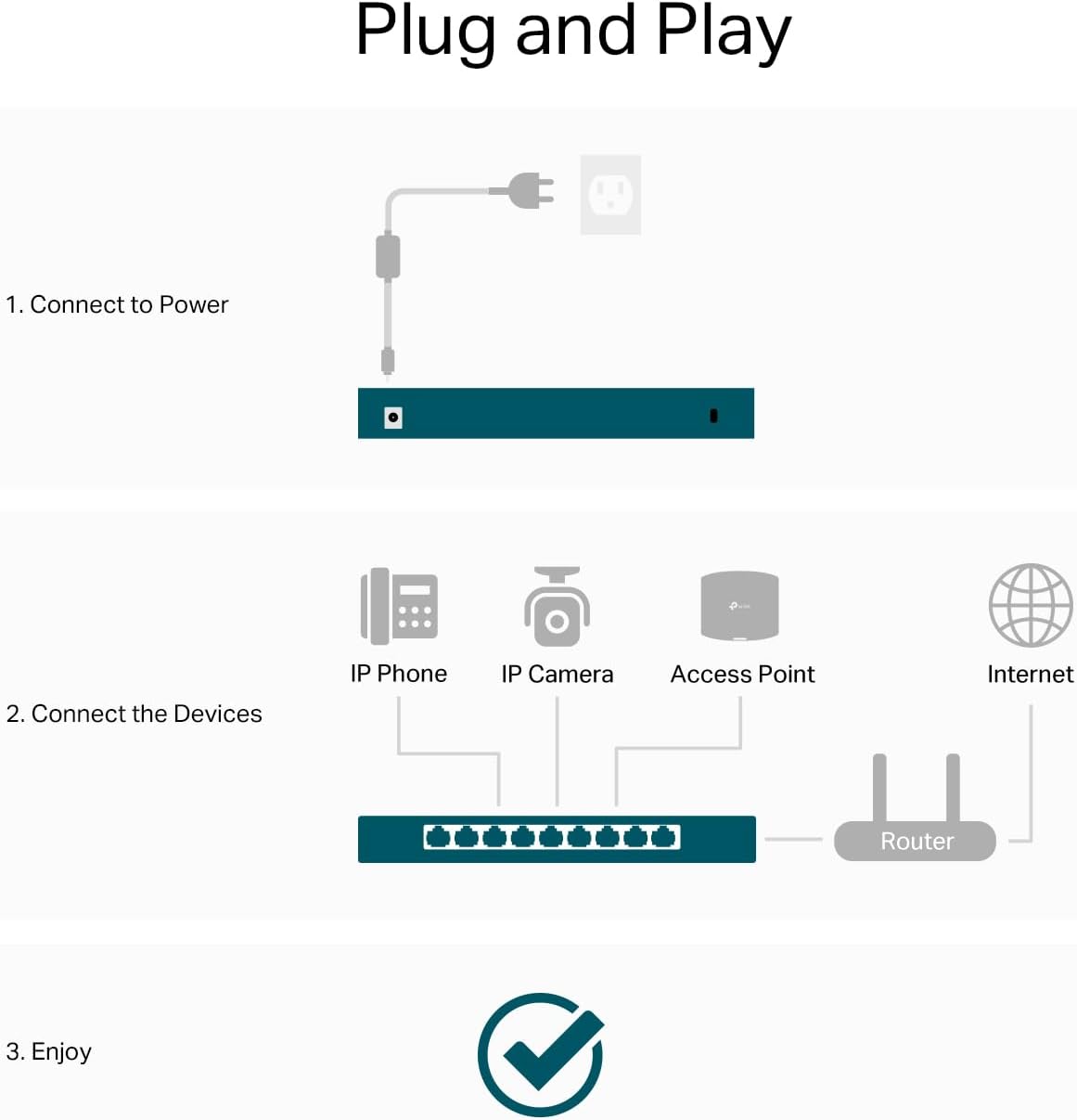
Image: Visual guide for the plug-and-play setup process, showing power connection and device connections to a router.
5. Operating
The TL-SG105S-M2 operates as an unmanaged switch, automatically handling network traffic without user intervention. It supports auto-negotiation, which intelligently senses the link speeds of connected devices and adjusts between 100Mbps, 1Gbps, and 2.5Gbps for optimal performance.
5.1 Multi-Gigabit Performance
The 2.5G ports are designed to maximize the performance of your multi-gig devices, providing up to 25 Gbps of switching capacity. This is ideal for:
- 2.5G WiFi 6 Access Points
- 2.5G Network Attached Storage (NAS) devices
- 2.5G PCIe Adapters and Servers
- Gaming computers and 4K video streaming setups

Image: The switch connected to various high-bandwidth devices, illustrating its role in a 2.5G network.
5.2 Cable Compatibility
You can achieve 2.5Gbps speeds using existing Cat5e or Cat6 Ethernet cables, eliminating the need for costly wiring upgrades. Cat6A cables also support 2.5Gbps.

Image: Chart indicating that Cat5e, Cat6, and Cat6A cables are compatible with both 1G and 2.5G speeds.
5.3 Application Scenarios
The switch is suitable for various networking needs:
- LAN parties and home entertainment systems
- Small and home offices requiring fast data transfer
- Workstations needing instant, high-speed data transfers

Image: Examples of environments where the 2.5G switch enhances network performance.
6. Maintenance
To ensure optimal performance and longevity of your TL-SG105S-M2 switch, consider the following maintenance guidelines:
- Placement: Place the switch on a stable, flat surface or mount it securely on a wall. Ensure adequate ventilation around the device.
- Cleaning: Keep the switch clean and free from dust. Use a soft, dry cloth for cleaning. Avoid liquid cleaners.
- Environment: Operate the switch within its specified temperature and humidity ranges (refer to Specifications).
- Silent Operation: The fanless design ensures silent operation and efficient thermal management, making it suitable for quiet environments.

Image: Features of the switch including silent operation, thermal management, mounting options, and metal casing.
7. Troubleshooting
If you encounter issues with your switch, try the following troubleshooting steps:
- No Power: Ensure the power adapter is securely connected to the switch and a working power outlet. Check if the Power LED is illuminated.
- No Link/Activity LED: Verify that the Ethernet cables are properly connected to both the switch and the network device. Try a different cable or port. Ensure the connected device is powered on and functioning correctly.
- Slow Speed: Confirm that your connected devices and network adapters support 2.5G speeds. While the switch supports Cat5e/Cat6 for 2.5G, cable quality and length can affect performance. Ensure your cables are not damaged.
- Network Loop: Although this is an unmanaged switch, ensure there are no accidental network loops (connecting two ports on the same switch, or connecting two switches in a way that creates a circular path) as this can cause network instability.
8. Specifications
| Feature | Detail |
|---|---|
| Model Number | TL-SG105S-M2 |
| Number of Ports | 5 |
| Interface Type | RJ45 |
| Data Transfer Rate | 25 Gigabits Per Second (Total Switching Capacity) |
| Voltage | 9 Volts (DC) |
| Case Material | Metal |
| Product Dimensions | 5.45 x 4.96 x 3.98 inches |
| Item Weight | 1.04 pounds |
| Operating Temperature | 0°C to 40°C (32°F to 104°F) |
| Storage Temperature | -40°C to 70°C (-40°F to 158°F) |
| Operating Humidity | 10% to 90% non-condensing |
| Storage Humidity | 5% to 90% non-condensing |
9. Warranty and Support
TP-Link products come with a limited warranty. For detailed warranty information, technical support, and product registration, please visit the official TP-Link website. You can find support resources, FAQs, and contact information for your region.
TP-Link Official Website: www.tp-link.com


