
1. Introduction
This manual provides essential information for the safe and efficient use of your Maclean MCE456 External Stand for EV and PHEV Car Chargers. Please read these instructions carefully before assembly and operation to ensure proper installation and longevity of the product.
The Maclean MCE456 stand is designed to be compatible with most Electric Vehicle (EV) and Plug-in Hybrid Electric Vehicle (PHEV) charging models, offering broad applicability. It boasts a maximum load capacity of 15 kg, allowing it to securely hold your EV charging cable and potentially additional accessories. Its robust construction is suitable for both indoor and outdoor environments, featuring corrosion and weather-resistant properties for reliable use in various conditions. The stand is finished with a high-quality powder coating, contributing to its durability and aesthetic appeal.
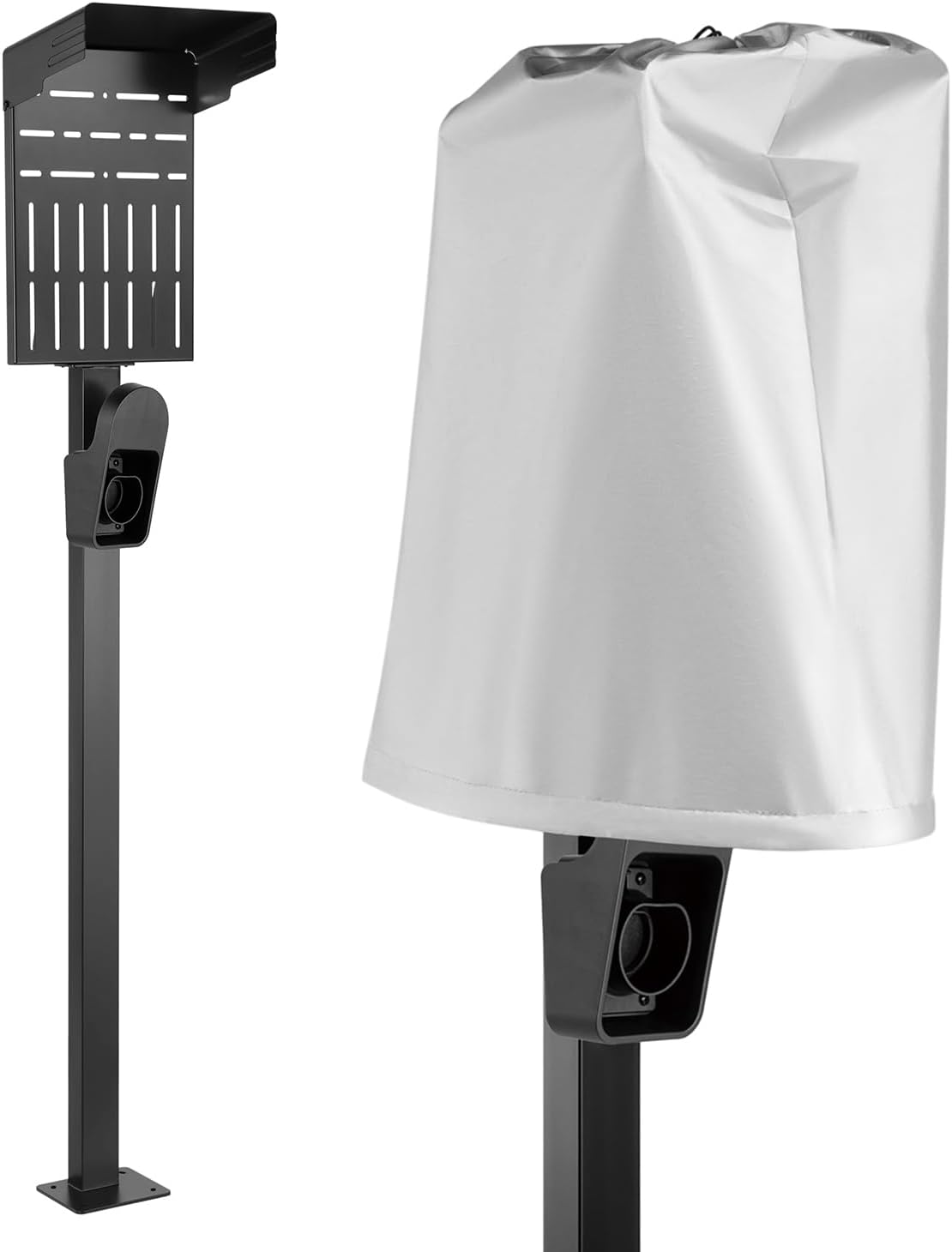
Image 1.1: Maclean MCE456 External Stand with its protective weather cover.
2. Package Contents
Upon unpacking, please verify that all the following components are present and undamaged:
- Main stand column
- Base plate
- Charger mounting plate with integrated cable holder
- Protective weather cover (if included with your model)
- Mounting accessories (screws, nuts, washers, anchors)

Image 2.1: The Maclean MCE456 stand without the weather cover, showing the main column and charger mounting plate.
3. Setup and Installation
Follow these steps for proper installation of your Maclean MCE456 stand. Ensure you have the necessary tools (e.g., drill, wrench, level) before beginning.
- Site Selection: Choose a flat, stable surface for installation, suitable for the stand's dimensions and weight capacity. Consider proximity to your EV charging point and power source.
- Base Plate Installation: Position the base plate on the chosen surface. Mark the drilling points through the holes in the base plate. Drill appropriate holes and secure the base plate using the provided mounting hardware (screws, anchors). Ensure the base is firmly attached and level.
- Attach Main Column: Align the main stand column with the secured base plate. Fasten the column to the base using the designated screws and nuts.
- Mount Charger Plate: Attach the charger mounting plate to the upper section of the main column. The plate features multiple slots for compatibility with various charger models. Select the appropriate slots for your charger and secure it using the provided hardware.
- Cable Holder Attachment: The integrated cable holder is designed to manage your charging cable. Ensure it is securely attached and positioned for easy access.
- Optional Weather Cover: If using the protective weather cover, place it over your charger once installed to shield it from environmental elements.

Image 3.1: Illustration of various installation options, including base mounting and the protective top baffle.

Image 3.2: A detailed view of the charger holder, designed for secure placement of your EV/PHEV charging connector.
4. Operating Instructions
Using your Maclean MCE456 stand is straightforward once installed:
- Placing the Charger: Securely mount your EV/PHEV charger onto the designated mounting plate using the appropriate fasteners. Ensure it is stable and does not wobble.
- Cable Management: Utilize the integrated cable holder to neatly coil and store your charging cable when not in use. This prevents tripping hazards and protects the cable from damage.
- Using the Weather Cover: When the charger is not in use, place the provided weather cover over it. This cover offers protection against snow, rain, and sun, extending the life of your charging unit.

Image 4.1: The Maclean MCE456 stand in an outdoor setting, demonstrating its use with a charger and protective cover.
5. Maintenance
Regular maintenance ensures the longevity and optimal performance of your stand:
- Cleaning: Wipe the stand periodically with a damp cloth to remove dust and dirt. Avoid abrasive cleaners that could damage the powder coating.
- Inspection: Regularly check all fasteners (screws, nuts) to ensure they remain tight. Re-tighten if necessary. Inspect the stand for any signs of damage or wear, especially after severe weather conditions.
- Corrosion Protection: The stand is designed to be corrosion and weather-resistant. However, promptly address any scratches or chips in the powder coating to prevent rust formation.

Image 5.1: A close-up view highlighting the weather cover, which is essential for protecting the charger from environmental elements.
6. Troubleshooting
This section addresses common issues you might encounter:
- Stand is unstable:
- Ensure the base plate is securely fastened to a flat, level surface.
- Check all connections between the main column and the base, and the charger plate, for tightness.
- Charger does not fit the mounting plate:
- Verify that your charger model is compatible with the stand's mounting hole patterns. The plate has multiple slots to accommodate various designs.
- Consult your charger's manual for its specific mounting requirements.
- Cable management issues:
- Ensure the cable is coiled neatly and not excessively long, which could cause it to sag or tangle.
- Adjust the position of the cable holder if necessary for optimal storage.
7. Specifications
| Feature | Detail |
|---|---|
| Brand | Maclean |
| Model | MCE456 |
| Item Weight | 8.62 Kilograms |
| Product Dimensions | 28.05 x 20.01 x 156.7 cm |
| Maximum Load Capacity | 15 kg |
| Material Finish | Powder-coated, corrosion and weather-resistant |
| Compatibility | Most EV and PHEV charging models |

Image 7.1: Technical drawing illustrating the dimensions of the Maclean MCE456 stand for planning installation.
8. Warranty and Support
For warranty information or technical support, please refer to the documentation provided with your purchase or contact Maclean customer service directly. Keep your proof of purchase for any warranty claims.
Maclean Customer Service: Please visit the official Maclean website or contact your retailer for support contact details.