
FEELWORLD F5 Pro V4-ANP75-OF-US
FEELWORLD F5 Pro V4 6 Inch Touch Screen DSLR Camera Field Monitor User Manual
Brand: FEELWORLD | Model: F5 Pro V4-ANP75-OF-US
1. Introduction
The FEELWORLD F5 Pro V4 is a 6-inch touchscreen field monitor designed to enhance your DSLR or mirrorless camera workflow. It features a 1920x1080 native resolution display with professional color calibration (REC-709) and 500 nits brightness, providing a clear and accurate view of your footage. With its intuitive touchscreen interface, 4K HDMI input/output, and a suite of professional monitoring tools, the F5 Pro V4 is an essential accessory for filmmakers and videographers seeking precise exposure and focus control.

Image: The FEELWORLD F5 Pro V4 monitor, shown with an included F750 battery and a protective carrying case.
2. What's in the Box
Verify that all the following items are included in your package:
- 1x FEELWORLD F5 Pro V4 Monitor
- 1x F750 Battery (4400mAh)
- 1x Micro HDMI Cable
- 1x Sunshade
- 1x Tilt Arm
- 1x Disassemble Wrench
- 1x USB-C Charging Cable
- 1x User Manual

Image: A visual representation of the FEELWORLD F5 Pro V4 package contents, including the monitor, battery, cables, sunshade, tilt arm, wrench, and manual.
3. Product Features
3.1 Easy Touchscreen and Professional Color Calibration
The F5 Pro V4 features an intuitive touchscreen interface, allowing for easy navigation and control. Utilize pinch-to-zoom gestures to quickly inspect your shot for focus and detail. The 1920x1080 native resolution display is professionally calibrated to REC-709 standard, ensuring accurate color reproduction for critical monitoring.

Image: The monitor displaying various touchscreen gestures for controlling functions, zoom, backlight, and volume.
3.2 Accurate Exposure and Focus Tools
The monitor integrates a comprehensive suite of monitoring tools to assist with precise exposure and focus. These include Histogram, False Color, Focus Assist (Peaking), Embedded Audio meters, Pixel to Pixel, Frame Guides, and Nine Grid. These features enable confident shot composition and technical accuracy.

Image: The monitor screen showcasing multiple professional assist features simultaneously, such as focus peaking and grid lines, to aid in accurate framing and focus.
3.3 F970 External Install and Power Kit
The F970 external install and power kit allows for the convenient mounting and powering of external equipment such as wireless transmitters, LED lights, or video converters. This design helps to consolidate your camera rig, saving space and reducing overall weight.
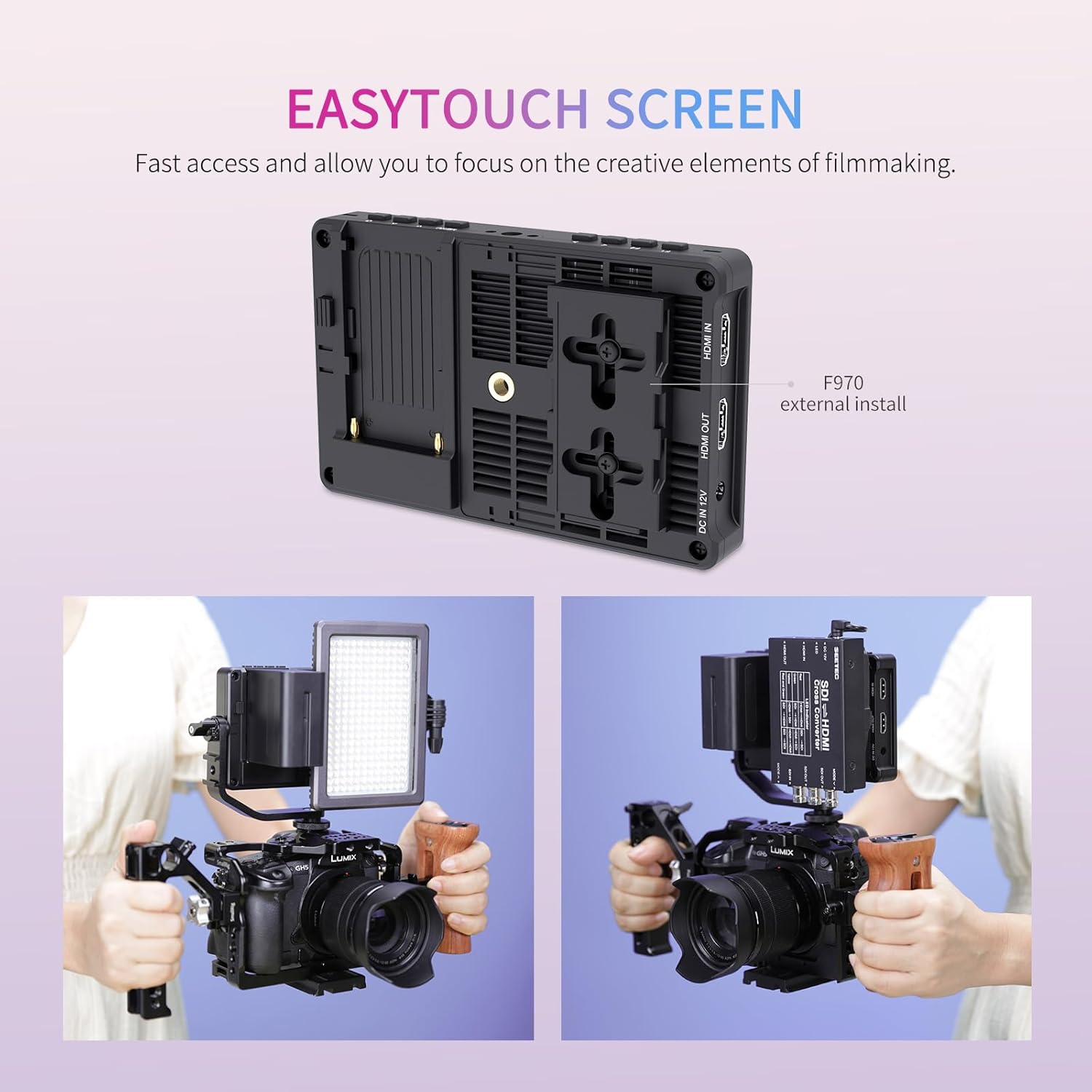
Image: The F970 external install and power kit attached to the monitor, illustrating its capability to integrate and power additional camera accessories.
3.4 4K HDMI Input and Output
The monitor supports 4K HDMI input and loop-out, allowing you to display live signals from your camera and simultaneously send them to other monitors or recording devices without loss of quality. Supported formats include 4096x2160p 24Hz and 3840x2160p (30/29.97/25/24/23.98Hz).

Image: A detailed view of the monitor's side, highlighting the 4K HDMI input and output ports.
3.5 Flexible Power Supply
The F5 Pro V4 offers multiple power options for versatility on set. It can be powered via an NP-F series battery (F970, F960, F950, F930, F770, F750, F730, F570, F550, F530), an 8.4V DC input, or a 5V Type-C input. This flexibility ensures continuous operation in various shooting environments.

Image: An illustration detailing the various power input methods for the monitor, including DC, Type-C, and battery plate.
4. Setup
4.1 Mounting the Monitor
- Attach the included tilt arm to your camera's hot shoe or a compatible mounting point.
- Secure the F5 Pro V4 monitor to the tilt arm using the 1/4-inch screw. Ensure it is tightened securely with the disassemble wrench.
4.2 Powering the Monitor
Choose one of the following methods to power your monitor:
- NP-F Battery: Insert a charged NP-F series battery (e.g., F750) into the battery plate on the back of the monitor.
- DC Adapter: Connect a compatible 8.4V DC power adapter (not included) to the DC IN 12V port.
- Type-C Input: Connect a 5V Type-C power source to the DC IN 5V (Type-C) port.
4.3 Connecting to Your Camera
- Ensure both your camera and the monitor are powered off.
- Connect one end of the Micro HDMI cable to your camera's HDMI output port.
- Connect the other end of the Micro HDMI cable to the HDMI IN port on the F5 Pro V4 monitor.
- Power on your camera, then power on the monitor. The camera's video feed should appear on the monitor screen.
5. Operating Instructions
5.1 Basic Touchscreen Operation
- Tap: Select menu items or activate functions.
- Swipe: Navigate through menus or adjust settings.
- Pinch-to-Zoom: Magnify or reduce the image on screen for detailed focus checks.
- Double Tap: Quickly access specific functions or open menus.
5.2 Menu Navigation
Access the main menu by swiping from the edge of the screen or pressing a designated menu button (refer to the physical buttons on the top of the monitor). From the menu, you can adjust display settings, activate assist features, manage LUTs, and configure system preferences.
5.3 Using Professional Assist Features
Activate features like Waveform, Histogram, False Color, and Focus Assist from the menu to aid in achieving optimal exposure and sharp focus. Each tool provides visual feedback on your video signal.
5.4 Custom LUTs
The F5 Pro V4 supports uploading up to 32 custom 3D LUTs (Look Up Tables) via the Type-C port using a USB adapter (not included). This allows you to preview your desired color grade directly on set.

Image: The monitor interface demonstrating the application of custom 3D LUTs, with a visual comparison of the footage before and after the LUT is applied.
5.5 Language Settings
The monitor supports multiple languages, including English, Chinese, Traditional Chinese, Japanese, German, French, Portuguese, Spanish, Korean, Russian, and Dutch. You can change the language setting through the system menu to suit your preference.
6. Maintenance
- Cleaning the Screen: Use a soft, lint-free cloth specifically designed for electronics screens. Do not use harsh chemicals or abrasive materials.
- General Cleaning: Wipe the monitor body with a dry, soft cloth. Avoid moisture entering ports.
- Battery Care: Store batteries in a cool, dry place. Do not expose to extreme temperatures. For long-term storage, charge batteries to approximately 50%.
- Storage: When not in use, store the monitor in its protective carrying case to prevent dust and damage.
7. Troubleshooting
- Monitor gets hot during operation: The monitor may generate heat during extended use, especially at high brightness settings. Try reducing the screen brightness to approximately 25% to mitigate heat generation. This can also help extend battery life.
- Headphone or USB-C ports are blocked by the mount: The design of the tilt arm may obstruct the headphone and USB-C ports located at the bottom of the unit. Consider using right-angle adapters for these ports if you need to use them while the monitor is mounted, or use a different mounting solution that attaches to the bottom thread without obstruction.
- Battery drains even when the monitor is powered off: If the battery remains connected to the monitor, it may draw a small amount of power even when the device is off. For prolonged storage or to prevent unexpected battery drain, disconnect the battery from the monitor when not in active use.
- No signal on screen: Ensure the HDMI cable is securely connected to both the camera and the monitor. Verify that the camera's HDMI output is active and configured correctly. Check that the monitor's input source is set to HDMI.
- Touchscreen unresponsive: Power cycle the monitor. If the issue persists, ensure the screen is clean and free of debris.
8. Specifications
| Feature | Specification |
|---|---|
| Model Number | F5 Pro V4-ANP75-OF-US |
| Screen Size | 6 Inch |
| Resolution | 1920x1080 |
| Brightness | 500 nits |
| Video Input | 4K HDMI (4096x2160p 24Hz / 3840x2160p 30/29.97/25/24/23.98Hz) |
| Video Output | 4K HDMI Loop-out |
| Power Input | DC 12V, DC 5V (Type-C) |
| Battery Type | NP-F series (F970, F750, etc.) |
| Item Weight | 2.44 pounds |
| Package Dimensions | 8.23 x 6.1 x 4.17 inches |
| Date First Available | November 8, 2023 |
9. Warranty and Support
The FEELWORLD F5 Pro V4 monitor comes with a 1-year official warranty. FEELWORLD provides US local after-sales support for product assistance and service inquiries.
For further information, support, or to explore other FEELWORLD products, please visit the official FEELWORLD store: FEELWORLD Official Store
Ask a question about this manual
Ask about setup, troubleshooting, compatibility, parts, safety, or missing instructions. Manuals+ will review the question and use this page’s manual context to help answer it.