
1. Introduction
Thank you for choosing the DykbRadio 65W PD Fast Charge Type-C USB Adapter Module. This module is designed for efficient power conversion, supporting various fast charging protocols including PD3.1 (PPS), QC3.0, and SCP. It provides a versatile solution for powering and charging compatible devices with its wide input voltage range and multiple output options. This manual provides essential information for the safe and effective use of your adapter module.
2. Safety Information and Protection Features
To ensure safe operation and prevent damage, please read and follow all instructions carefully. The module incorporates several protection functions:
- Input Over-voltage and Under-voltage Protection: Safeguards against unstable input power.
- Input Over-current Protection: Prevents excessive current draw from the input source.
- Output Over-current Short-circuit Protection: Protects connected devices from short circuits.
- Over-temperature Protection: Automatically shuts down the module if it overheats.
Always ensure proper ventilation around the module during operation.
3. Product Overview
The DykbRadio 65W PD Fast Charge Type-C USB Adapter Module is a compact power conversion solution. It features a Type-C output port and supports various DC input options, including 5521 and 5525 DC jacks, depending on the model variant. The module is designed to step down input voltage to provide regulated output for fast charging compatible devices.

Figure 3.1: Different variants of the adapter module, including those with DC input jacks.
Key features include:
- Supports PD3.1 (PPS), QC3.0, SCP fast charging protocols.
- Maximum output of 20V 3.25A (65W).
- Input voltage range: DC 8~30V (step-down operation only).
- Available with 5521 (outer diameter 5.5mm, inner diameter 2.1mm) or 5525 (outer diameter 5.5mm, inner diameter 2.5mm) DC input jacks.

Figure 3.2: Rear view of the adapter module highlighting power specifications.
4. Specifications
| Parameter | Value |
|---|---|
| Input Voltage | DC 8~30V (Step-down only) |
| Output Voltage | Automatically adjusts between 3.3V~21V (Input voltage must be higher than desired output) |
| Maximum Output Power | 65W (e.g., 5V3A, 9V3A, 12V3A, 15V3A, 20V3.25A, 3.3~16V3.25A, 3.3~21V3A) |
| Maximum Output Current | 3.25A (at 20V) |
| Conversion Efficiency | 92%~97% |
| Output Voltage Ripple | <200mV |
| No-load Current | <3mA |
| Supported Charging Protocols | PD3.1 (PPS), QC3.0, SCP, BC1.2, FCP, AFC, MTK PE+1.1/PE+2.0, PD2.0 |
| Product Size (Standard Model) | 32mm × 20mm × 10mm (excluding 1mm protruding C-mount female seat) |
| Product Size (With DC Seat) | 44mm × 20mm × 10mm (excluding 1mm protruding C-mount female seat) |
| ASIN | B0CMXGJ7SJ |
| Item Model Number | Standard version |
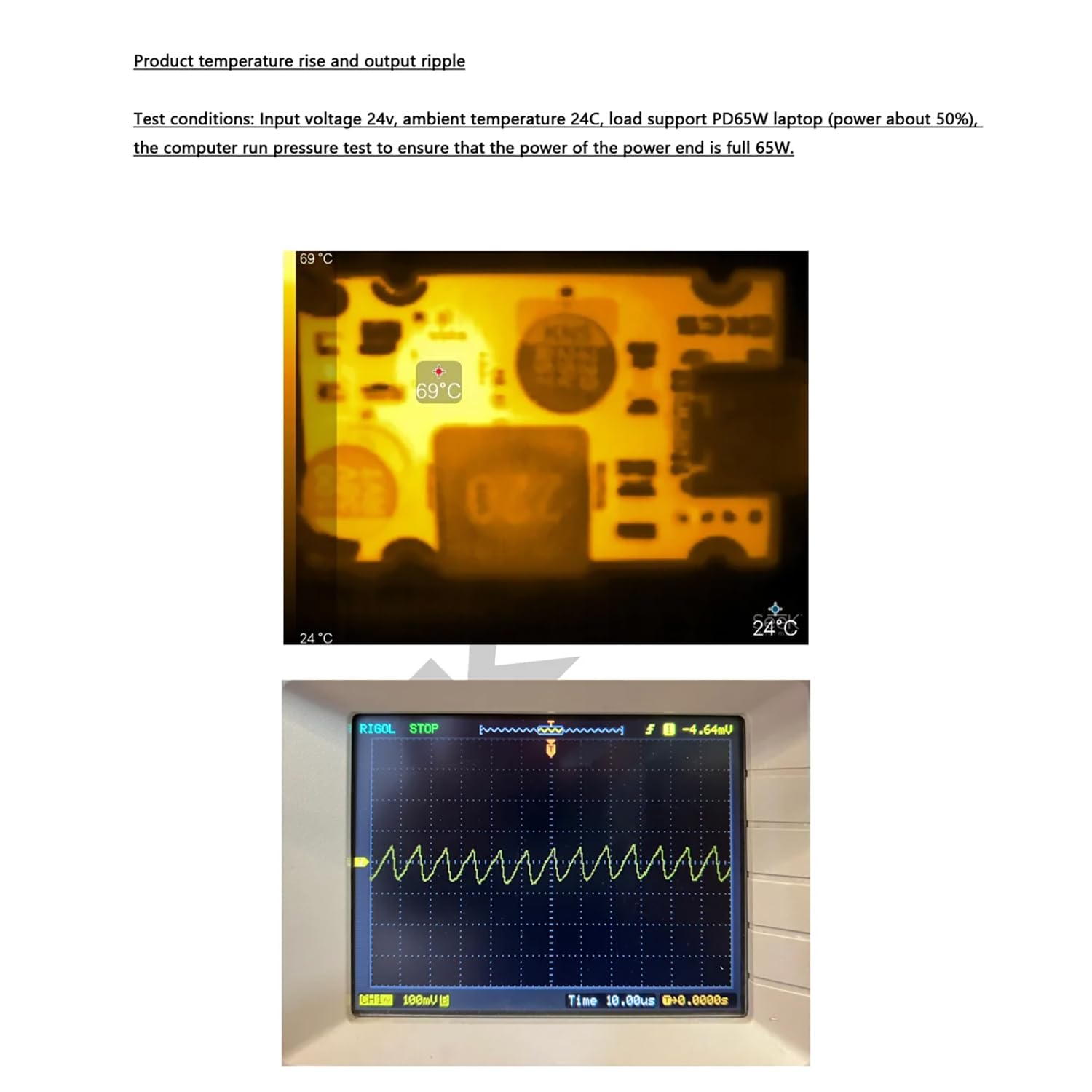
Figure 4.1: Performance test data showing temperature rise and output ripple under load.
5. Setup
This section guides you through the initial setup of your adapter module.
5.1 Input Power Connection
- Select a Compatible Power Adapter: Ensure your input power adapter provides a DC voltage between 8V and 30V. For 20V fast charging, the input voltage must be higher than 20V.
- Power-on Sequence: When using a 20V~24V power adapter as the input, it is recommended to power on the input power supply first, then connect it to the module. This prevents potential errors in power matching due to slow power-on of the supply, which could hinder achieving the full 65W output.
- DC Connector Types: If your module has a DC input jack, identify the correct type:
- 5521: Outer diameter 5.5mm, inner diameter 2.1mm.
- 5525: Outer diameter 5.5mm, inner diameter 2.5mm.
Note: Model 5521 is compatible with 5525 plugs that have tuning fork shrapnel.
- Connect Input: Connect the appropriate DC plug from your power adapter to the module's DC input jack, or use the Type-C input if available on your specific module variant.
5.2 Output Device Connection
Once the input power is connected, the module is ready to provide power. Connect your compatible device (e.g., laptop, smartphone, tablet) to the module's Type-C output port using a suitable Type-C to Type-C cable.

Figure 5.1: Adapter module connected to a laptop for charging.
6. Operating Instructions
The DykbRadio adapter module operates automatically once connected correctly.
- Power On: Ensure your input power source is active and connected to the module.
- Connect Device: Plug your device into the Type-C output port. The module will automatically negotiate the optimal charging voltage and current with the connected device based on supported PD protocols.
- Monitor Charging: Observe your device's charging indicator to confirm that it is receiving power. If using a power meter, you can verify the voltage and current output.

Figure 6.1: Adapter module in operation, demonstrating power output via a USB meter.
The module's output voltage will automatically adjust between 3.3V and 21V to match the requirements of the connected Type-C compatible power receiving device.
7. Maintenance
The DykbRadio adapter module requires minimal maintenance.
- Cleaning: Use a dry, soft cloth to clean the module. Do not use liquid cleaners or solvents.
- Storage: Store the module in a cool, dry place away from direct sunlight and extreme temperatures when not in use.
- Handling: Avoid dropping or subjecting the module to strong impacts.
8. Troubleshooting
If you encounter issues with your adapter module, refer to the following common problems and solutions:
- Device not charging or charging slowly:
- Ensure the input power supply is providing sufficient voltage (8-30V DC) and current.
- Verify that the input voltage is higher than the desired output voltage for fast charging (e.g., >20V for 20V output).
- Check if the Type-C cable is fully inserted and not damaged.
- Confirm that your device supports the fast charging protocols (PD, QC, SCP) provided by the module.
- If using a 20-24V input, ensure the input power supply was turned on before connecting to the module.
- Module feels hot:
- Some heat generation is normal during operation, especially under high load.
- Ensure adequate ventilation around the module.
- If the module becomes excessively hot and stops working, the over-temperature protection may have activated. Disconnect, allow to cool, and check for obstructions or excessive load.
- No output voltage:
- Verify the input power supply is working and connected correctly.
- Check for any short circuits on the output side.
- Ensure the input voltage is within the 8-30V DC range.
9. Warranty and Support
DykbRadio products are manufactured to high-quality standards. For warranty information or technical support, please contact your retailer or visit the official DykbRadio website. Please have your product model number (Standard version) and ASIN (B0CMXGJ7SJ) available when contacting support.
For further assistance, please refer to the contact information provided with your purchase or on the product packaging.