
1. Product Overview
The Aoeeki EAS RF 8.2MHz Anti-Theft Security System is designed to protect merchandise in retail environments by detecting unauthorized removal of tagged items. This system utilizes 8.2MHz radio frequency technology to trigger an alarm when a security tag passes through the detection zone.
The system consists of two sensor gates (one transmitting, one receiving) that create an electromagnetic field. When an active 8.2MHz RF tag enters this field, the receiving gate detects the signal and activates an audible and visual alarm.
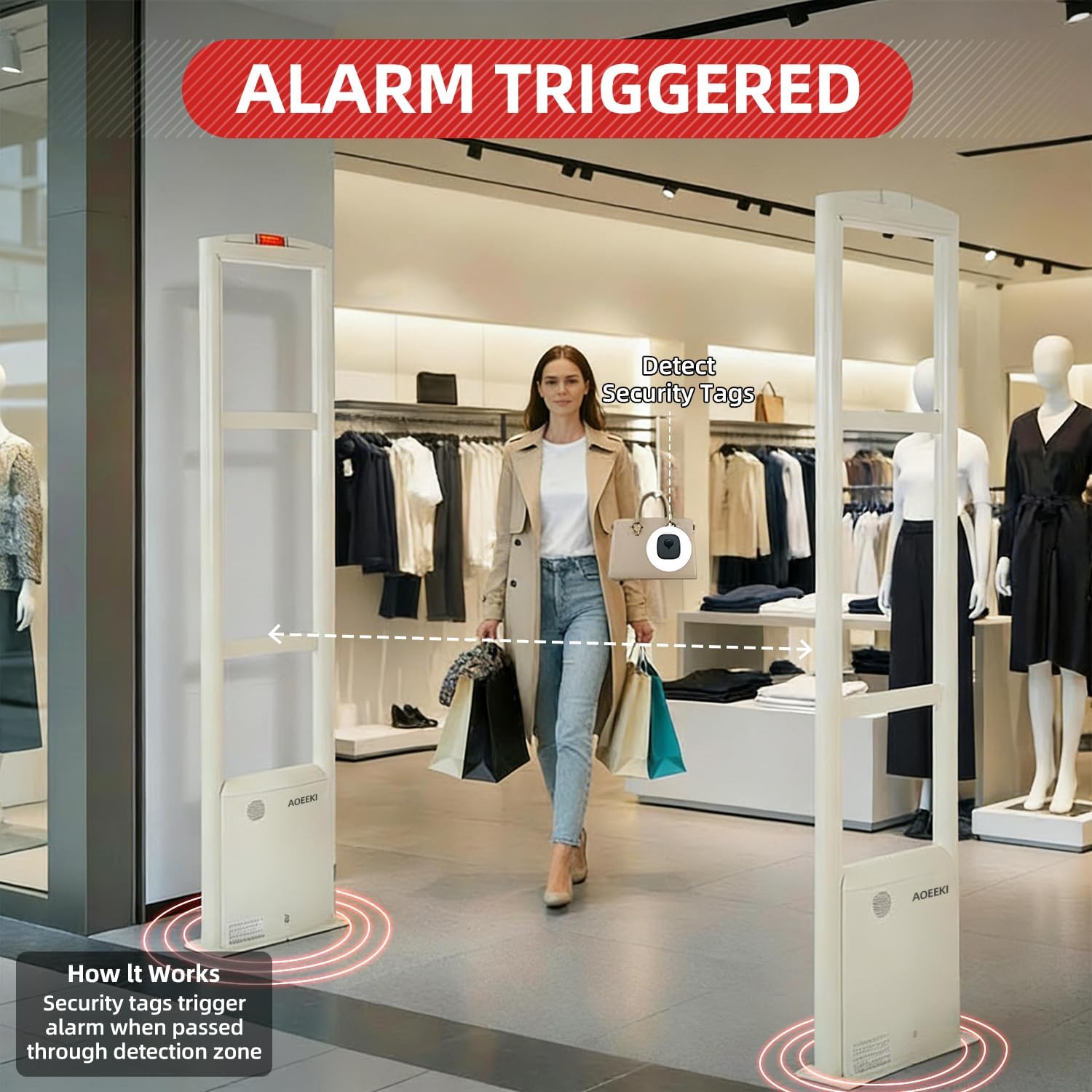
Figure 1.1: The Aoeeki EAS RF 8.2MHz Anti-Theft Security System in operation, demonstrating an alarm being triggered by a security tag.
Key Features:
- Operating Principle: Utilizes electromagnetic induction with 8.2MHz radio frequency signals for reliable detection.
- Adjustable Detection Range: Configurable from 2.9 to 4.5 feet, depending on the type of anti-theft tag used.
- Alarm Type: Triggers both audible and visual alerts upon detection of an unremoved RF tag.
- Anti-Interference Capability: Engineered for high resistance to external signal disruptions, ensuring stable operation.
- Durable Construction: Made from premium aluminum alloy and acrylic for longevity.
2. Package Contents
Verify that all components listed below are included in your package before proceeding with installation.

Figure 2.1: Complete package contents of the Aoeeki EAS RF 8.2MHz Anti-Theft Security System.
- 1 x Master Gate (Main control unit)
- 1 x Slave Gate (Secondary unit)
- 1 x Power Supply (Input: 110V-220V AC)
- 1 x Sync Cable (Master-Slave connection)
- Set of Screws (For securing the gates)
- 1 x Wireway (Aluminum alloy cable tray)
- 100 x RF Anti-theft Security Tags
- 1 x Instruction Manual
3. Installation Guide
Proper installation is crucial for optimal performance of the anti-theft system. It is recommended that installation be performed by a qualified professional.
3.1 Site Preparation and Placement
- Choose a suitable location at the entrance/exit of your retail space.
- Ensure the area is clear of obstructions and potential sources of electromagnetic interference.
- Maintain a recommended spacing of 90-120 cm (35-47 inches) between the two gates for effective detection.
- Avoid placing the anti-theft gates too close to walls or metal structures, as this can affect performance.

Figure 3.1: Gate dimensions and a visual guide for installation steps.
3.2 Wiring and Connection
The system requires a wired connection between the Master and Slave gates, and a power connection to the Master gate.
- Open the Master Gate: Use the provided key to unlock and open the base panel of the Master Gate to access the motherboard.
- Connect Power Supply: Plug the power supply unit into the designated port on the motherboard of the Master Gate.
- Connect Sync Cable: Connect one end of the Sync Cable to the Master Gate's motherboard and the other end to the Slave Gate's motherboard. Ensure the cable is routed neatly, preferably using the provided wireway for protection and aesthetics.
- Secure Gates: Use the fixing screws to securely mount both the Master and Slave gates to the floor.
- Close and Lock: Close the base panel of the Master Gate and lock it with the key.
- Power On: Plug the power supply into a 110V-220V AC power outlet and turn on the power switch on the power supply unit. The indicator light on the Master Gate should illuminate, indicating power is on.
Video 3.2: Detailed installation process for the Aoeeki EAS RF 8.2MHz Anti-Theft Security System, demonstrating component connection and power-up.
4. Operating Principles and Tag Compatibility
The Aoeeki security system operates on the principle of Radio Frequency (RF) identification. Merchandise is equipped with specialized RF tags or hard tags that contain an 8.2MHz radio frequency signal. When an item with an active tag passes between the transmitting and receiving gates, the system detects the signal and triggers an alarm.
4.1 Detection Range
The system's detection range is adjustable and can span between 70 cm (27 inches) and 150 cm (59 inches). The actual effective detection distance is influenced by the specific type and size of the anti-theft tag used.
- Soft Labels: Standard detection up to 70 cm (27 inches), maximum 90 cm (35 inches).
- Small Tags: Standard detection up to 100 cm (39 inches), maximum 120 cm (47 inches).
- Large Tags: Standard detection up to 130 cm (51 inches), maximum 150 cm (59 inches).
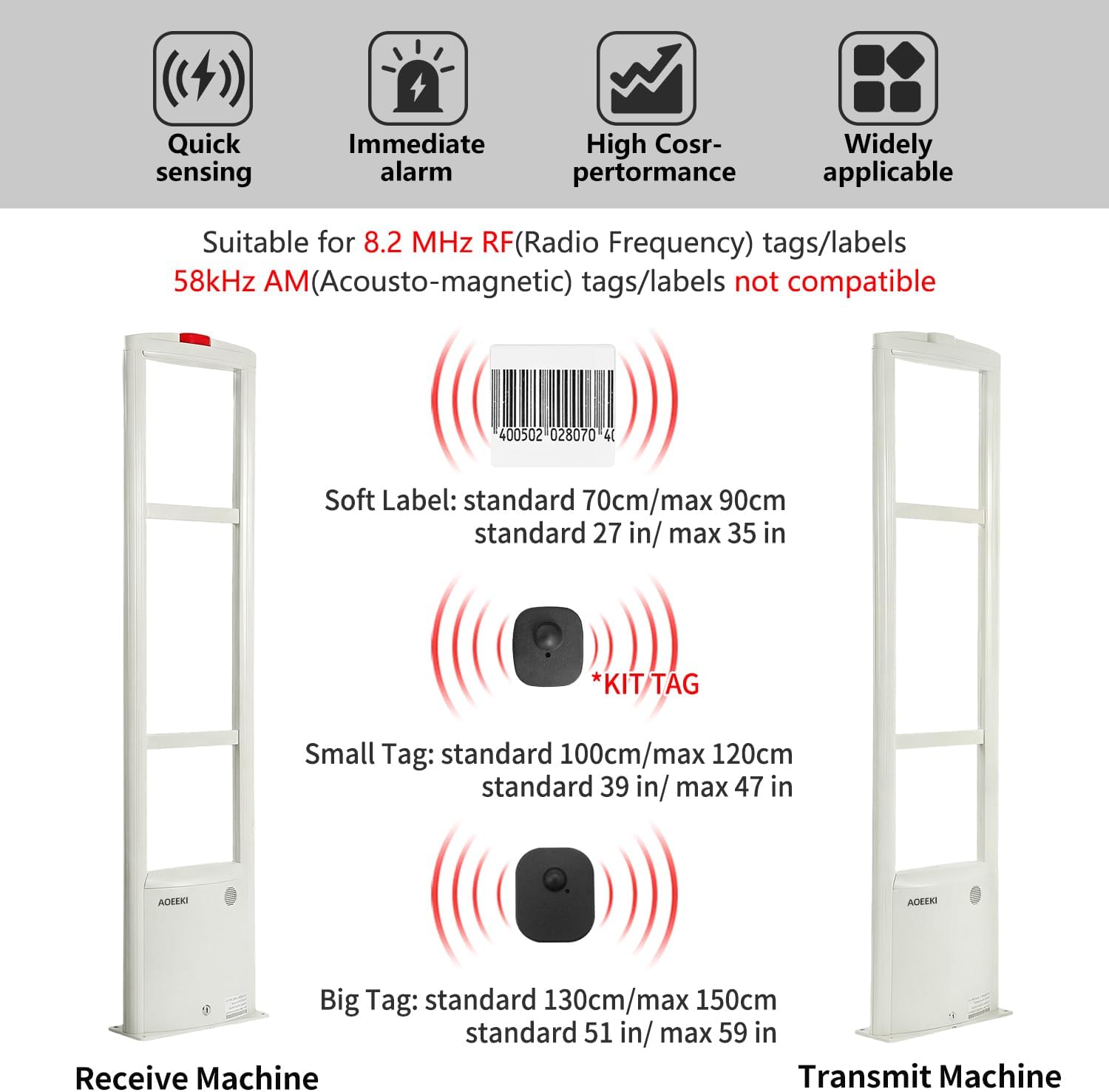
Figure 4.1: Detection ranges based on tag type.
4.2 Compatible Tags
This system is compatible with 8.2MHz RF (Radio Frequency) tags and labels. It is not compatible with 58kHz AM (Acousto-Magnetic) tags/labels.

Figure 4.2: Examples of 8.2MHz compatible security tags.
5. Specifications
Technical specifications for the Aoeeki EAS RF 8.2MHz Anti-Theft Security System.
| Parameter | Specification |
|---|---|
| Brand | Aoeeki |
| Model Number | JBC-RF003-01 |
| Frequency | 8.2MHz |
| Detection Width | 70-150 cm (27-59 inches) |
| Power Supply | 110V-220V AC |
| Gate Dimensions (H x W x D) | 157 x 37 x 9 cm (61.8 x 14.5 x 3.5 inches) |
| Weight (2 pcs) | 11.3 kg (24.9 lbs) |
| Material | Premium Aluminum Alloy & Acrylic |
| Alert Type | Audible and Visual (RF Tag Detection) |
| Included Tags | 100 pcs Anti-theft Security Tags |

Figure 5.1: Internal components and material quality of the security system.
6. Maintenance
Regular maintenance ensures the longevity and optimal performance of your Aoeeki Anti-Theft Security System.
- Cleaning: Periodically wipe down the exterior of the gates with a soft, damp cloth. Avoid abrasive cleaners or solvents that could damage the finish.
- Cable Inspection: Regularly check all cables for any signs of wear, fraying, or damage. Replace damaged cables immediately to prevent system malfunction.
- Environmental Conditions: Ensure the installation area remains within recommended environmental conditions (temperature, humidity) to prevent damage to electronic components.
- Tag Management: Ensure all merchandise is correctly tagged and that deactivators (if used) are functioning properly to avoid false alarms.
7. Troubleshooting
This section provides solutions to common issues you might encounter with your Aoeeki Anti-Theft Security System.
| Problem | Possible Cause | Solution |
|---|---|---|
| No Power/System Not Turning On | Power cable disconnected; Power supply switch off; Faulty power supply. | Check all power connections; Ensure power switch is ON; Test power supply with another device if possible. |
| False Alarms | Interference from nearby electronics; Incorrect tag deactivation; Tags too close to the gates; Non-compatible tags. | Relocate interfering devices; Ensure tags are fully deactivated; Increase distance between tagged items and gates; Verify tags are 8.2MHz RF compatible. |
| No Detection/Tags Not Triggering Alarm | Incorrect gate spacing; Damaged tags; System not powered on; Faulty connection cable. | Adjust gate spacing to 90-120 cm; Inspect tags for damage; Confirm system is powered on; Check sync cable connection. |
| Weak Detection Range | Environmental interference; Incorrect sensitivity settings (if adjustable); Tag type. | Minimize interference; Consult professional for sensitivity adjustment; Ensure appropriate tags are used for desired range. |
If you continue to experience issues after attempting these troubleshooting steps, please contact Aoeeki customer support for assistance.
8. Warranty and Customer Support
Aoeeki anti-theft systems are manufactured to high standards and undergo rigorous testing to ensure stable performance and reliable protection.
- Technical Installation Guidance: Aoeeki provides free technical installation guidance to assist with setup.
- Professional Solutions: We offer professional commercial anti-theft system solutions tailored to your needs.
- Product Maintenance: Enjoy free product maintenance for life.
- Contact Support: If you encounter any problems or require assistance, please contact the seller via email. We are committed to providing a satisfactory solution promptly.
