
1. Introduction
This manual provides essential information for the safe and effective use of your Interstate Batteries MTX-65 Automotive AGM Battery. Please read this manual thoroughly before installation and operation. Proper handling and maintenance will ensure optimal performance and longevity of your battery.

Image 1.1: Front view of the Interstate Batteries MTX-65 Automotive AGM Battery.
2. Safety Information
WARNING: Batteries contain sulfuric acid and produce explosive gases. Improper handling can cause severe injury or death. Always wear appropriate personal protective equipment (PPE).
- Always wear safety glasses, gloves, and protective clothing when handling batteries.
- Keep sparks, flames, and smoking materials away from batteries.
- Ensure adequate ventilation when working with batteries.
- Avoid contact with battery acid. If contact occurs, flush immediately with water and seek medical attention.
- Do not short-circuit battery terminals.
- Keep batteries out of reach of children.
- Always disconnect the negative (-) terminal first and connect it last during installation or removal.
3. Product Features
The Interstate Batteries MTX-65 is an Absorbent Glass Mat (AGM) battery designed for automotive applications, including vehicles with start-stop technology. Key features include:
- Pure Lead AGM Design: Incorporates more lead for extended service life, particularly beneficial for start-stop vehicles.
- Premium Performance: Engineered to meet or exceed starting requirements and power vehicle accessories.
- Enhanced Life Cycle: Offers 2-3 times longer service life compared to conventional lead-alloy AGM and flooded batteries.
- Maintenance-Free and Spill-Proof: Utilizes AGM and Valve Regulated Lead-Acid (VRLA) technology, eliminating the need for maintenance and preventing acid spills.
- Vibration Resistant: The absorbed electrolyte design provides increased resistance to vibration.

Image 3.1: Diagram showing the internal structure and technology of an Absorbent Glass Mat (AGM) battery.

Image 3.2: Visual summary of MTX-65 battery benefits.
4. Specifications
| Specification | Value |
|---|---|
| Model Number | MTX-65 |
| Group Size | 65 |
| Voltage | 12V |
| Capacity (Ah) | 68Ah |
| Cold Cranking Amps (CCA) | 750CCA |
| Technology | SLI AGM (Absorbent Glass Mat) |
| Item Weight | 45 pounds |
| Product Dimensions (L x W x H) | 12.06 x 7.56 x 7.44 inches |
| UPC | 656489344038 |

Image 4.1: Dimensions of the MTX-65 battery.
5. Setup and Installation
Battery installation should ideally be performed by a qualified professional. If you choose to install the battery yourself, follow these general guidelines carefully. Refer to your vehicle's owner's manual for specific instructions.
5.1 Pre-Installation Checks
- Verify that the MTX-65 battery is the correct group size and specification for your vehicle.
- Ensure the battery is fully charged before installation.
- Gather necessary tools: wrench, battery terminal cleaner, battery terminal puller (if needed), and safety gear.
5.2 Removal of Old Battery
- Turn off the vehicle and remove the ignition key.
- Locate the battery.
- Disconnect the negative (-) terminal first (usually black cable). Loosen the nut with a wrench and remove the cable.
- Disconnect the positive (+) terminal next (usually red cable). Loosen the nut and remove the cable.
- Remove any battery hold-down clamps or straps.
- Carefully lift and remove the old battery. Batteries are heavy; use proper lifting techniques or assistance.
5.3 Installation of New Battery
- Clean the battery tray and terminal clamps thoroughly with a wire brush and battery terminal cleaner.
- Place the new MTX-65 battery into the battery tray, ensuring it is seated securely.
- Secure the battery with the hold-down clamps or straps.
- Connect the positive (+) terminal first (red cable). Tighten the nut securely.
- Connect the negative (-) terminal next (black cable). Tighten the nut securely.
- Ensure all connections are tight and free of corrosion.
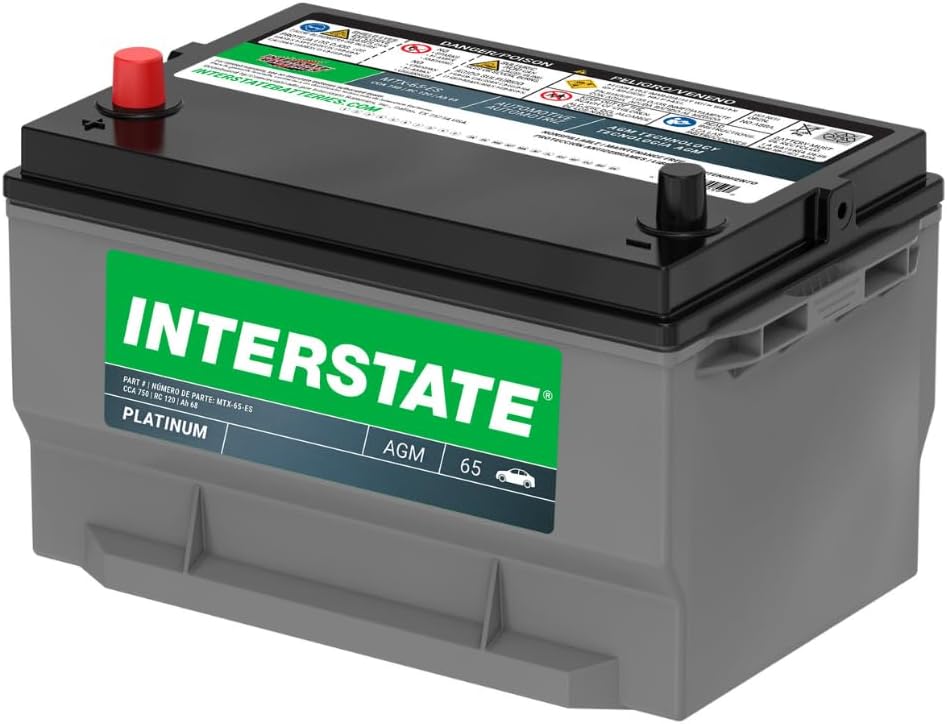
Image 5.1: Front view with terminals.

Image 5.2: Side view of the battery.

Image 5.3: Back view of the battery.
6. Operation
Once properly installed, the Interstate Batteries MTX-65 AGM battery operates automatically as part of your vehicle's electrical system. It provides the necessary power for starting the engine and supporting the vehicle's electrical components and accessories.
- Ensure your vehicle's charging system is functioning correctly to maintain the battery's charge.
- Avoid excessive discharge of the battery, as this can reduce its lifespan.
7. Maintenance
The Interstate Batteries MTX-65 is a maintenance-free AGM battery, meaning it does not require water additions. However, periodic checks are recommended to ensure optimal performance and longevity.
- Terminal Inspection: Periodically inspect battery terminals for corrosion. If corrosion is present, clean it with a battery terminal brush and a mixture of baking soda and water. Rinse with clean water and dry thoroughly.
- Cable Connections: Ensure battery cables are securely fastened to the terminals. Loose connections can lead to poor performance and potential damage.
- Battery Case: Keep the battery case clean and dry. Check for any signs of damage or cracks.
- Charging: If the vehicle is stored for extended periods or experiences frequent short trips, consider using a compatible AGM battery charger/maintainer to keep the battery fully charged. Consult your vehicle's manual for charging recommendations.
8. Troubleshooting
If you experience issues with your vehicle's starting or electrical system, the battery may be a contributing factor. Here are some common troubleshooting steps:
- Vehicle Not Starting (Clicking Sound): This often indicates a low battery charge or loose/corroded terminals. Check terminal connections and charge the battery.
- Dim Headlights or Interior Lights: A sign of a weak or discharged battery. Check the battery's charge level and the vehicle's charging system.
- Slow Engine Crank: Suggests insufficient power from the battery. Ensure the battery is fully charged and connections are secure.
- Corrosion on Terminals: Clean terminals as described in the Maintenance section.
If these steps do not resolve the issue, it is recommended to have the battery and vehicle's electrical system tested by a qualified automotive technician.
9. Warranty Information
The Interstate Batteries MTX-65 AGM battery typically comes with a 36-month free replacement warranty. This warranty covers manufacturing defects and premature failure under normal operating conditions.
- Keep your proof of purchase (receipt or invoice) as it is required for warranty claims.
- Warranty terms and conditions may vary. Refer to the specific warranty documentation provided at the time of purchase or contact Interstate Batteries directly for detailed information.
- Improper installation, abuse, neglect, or use in applications for which the battery was not designed may void the warranty.
10. Support and Contact
For further assistance, technical support, or warranty inquiries regarding your Interstate Batteries MTX-65 AGM battery, please contact Interstate Batteries customer service or visit their official website.
Interstate Batteries Official Website: www.interstatebatteries.com
Always refer to the manufacturer's official resources for the most accurate and up-to-date information.