
Important Safety Instructions
Please read and follow all safety instructions carefully before operating this product. Failure to do so may result in damage to the product, injury, or electric shock.
- DANGER: To avoid possible electric shock, special care should be taken when handling aquarium equipment. For each of the following situations, do not attempt to repair yourself; return the appliance to an authorized service facility for service or discard the appliance.
- If the appliance falls into the water, DO NOT reach for it. First, unplug it and then retrieve it. If electrical components get wet, unplug the appliance immediately.
- Carefully examine the appliance after installation. It should not be plugged in if there is water on parts not intended to be wet.
- Do not operate any appliance if it has a damaged cord or plug, or if it is malfunctioning or has been dropped or damaged in any manner.
- To avoid the possibility of the appliance plug or receptacle getting wet, position the aquarium stand and tank to one side of a wall-mounted receptacle to prevent water from dripping onto the receptacle or plug. A "drip loop" should be arranged by the user for each cord connecting an aquarium appliance to a receptacle. The "drip loop" is the part of the cord below the level of the receptacle, or the connector if an extension cord is used, to prevent water from traveling along the cord and coming into contact with the receptacle. If the plug or receptacle does get wet, DO NOT unplug the cord. Disconnect the fuse or circuit breaker that supplies power to the appliance. Then, unplug and examine for the presence of water in the receptacle.
- Close supervision is necessary when any appliance is used by or near children.
- To avoid injury, do not contact moving parts or hot parts such as heaters, reflector, lamp bulbs, and so on.
- Always unplug an appliance from an outlet when not in use, before putting on or taking off parts, and before cleaning. Never yank cord to pull plug from outlet. Grasp the plug and pull to disconnect.
- Do not use an appliance for anything other than its intended use. The use of attachments not recommended or sold by the appliance manufacturer may cause an unsafe condition.
- Do not install or store the appliance where it will be exposed to the weather or to temperatures below freezing.
- Ensure the appliance is securely installed before operating it.
- Read and observe all important notices on the appliance.
- If an extension cord is necessary, a cord with a proper rating should be used. A cord rated for less amperes or watts than the appliance rating may overheat. Care should be taken to arrange the cord so that it will not be tripped over or pulled.
- This appliance has a polarized plug (one blade is wider than the other). As a safety feature, this plug will fit in a polarized outlet only one way. If the plug does not fit fully in the outlet, reverse the plug. If it still does not fit, contact a qualified electrician. Never use with an extension cord unless plug can be fully inserted. Do not attempt to defeat this safety feature.
- WARNING: Do not allow water to splash onto the light fixture.
Package Contents
Verify that all components are present and in good condition upon opening the package.
- NICREW SlimLED Aquarium Light Fixture
- Adjustable Mounting Brackets (2x)
- Power Adapter
- Instruction Manual
Setup and Installation
Follow these steps to properly install your NICREW SlimLED Aquarium Light.
1. Attaching Adjustable Brackets
The light features extendable mounting brackets, allowing easy installation on a variety of aquarium widths. Slide the brackets into the channels on each end of the light fixture.
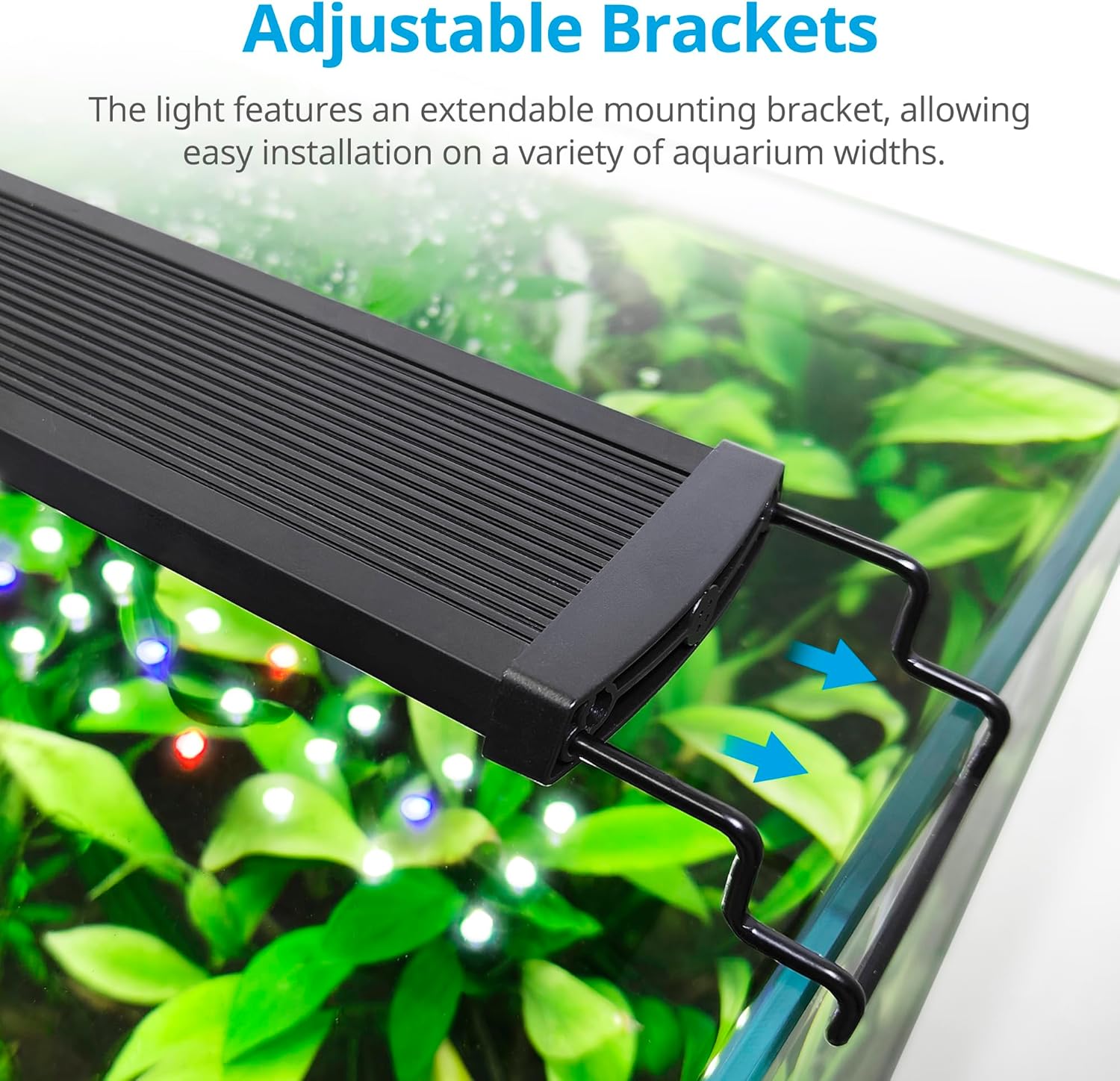
Image: Adjustable brackets are designed to slide onto the light fixture and extend to fit various aquarium sizes. Arrows indicate the direction of adjustment.
2. Positioning the Light
Place the light fixture with the attached brackets securely on the rim of your aquarium. Adjust the brackets to ensure a stable fit. Ensure the light is centered over the aquarium for even illumination.
3. Connecting Power
Connect the power adapter to the light fixture's input port. Then, plug the power adapter into a suitable electrical outlet, ensuring a drip loop is formed with the power cord to prevent water from reaching the outlet.
Operating Instructions
The NICREW SlimLED light features an integrated controller for easy management of lighting modes, brightness, and timer functions.
Controller Overview
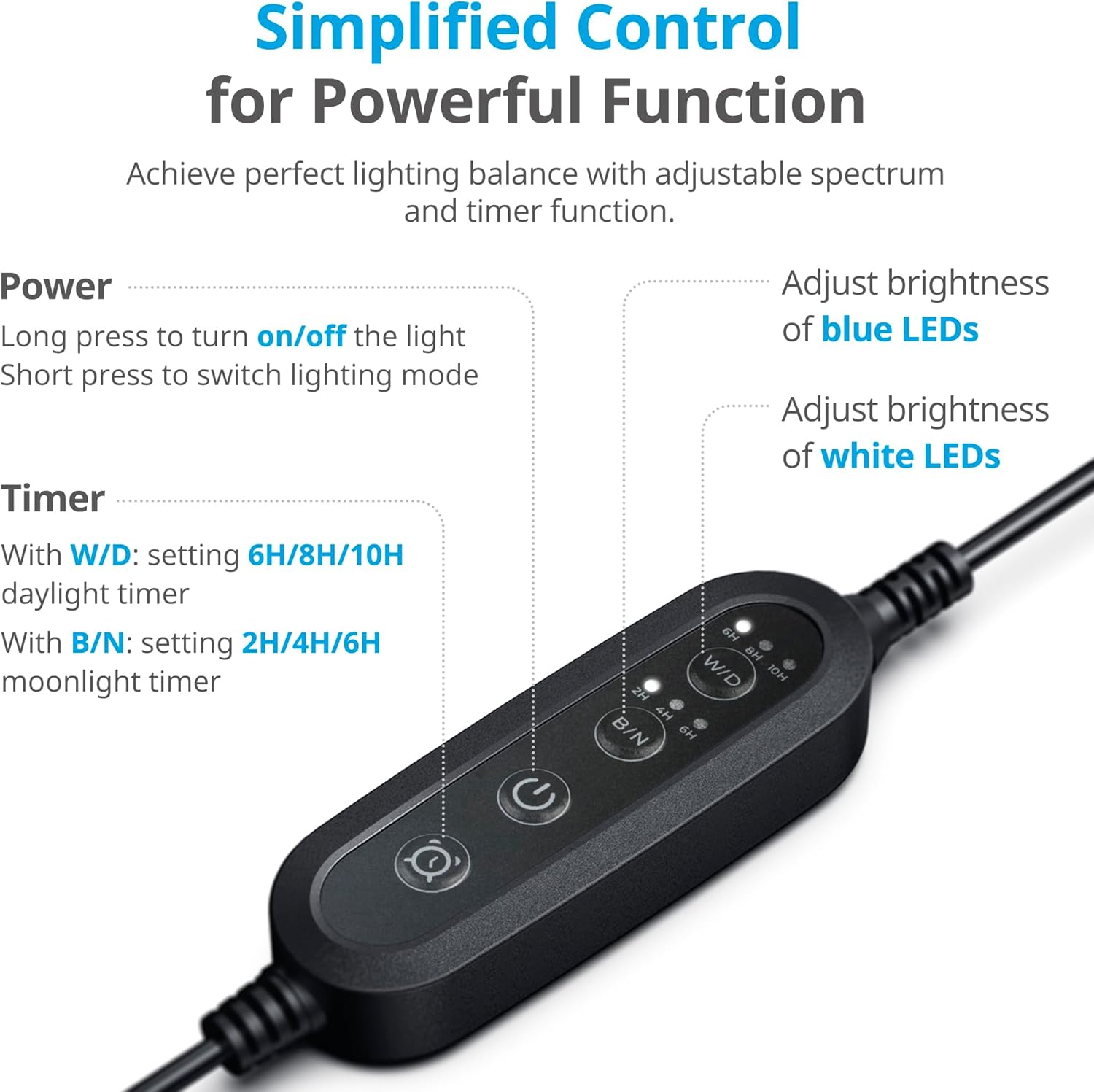
Image: The inline controller features buttons for Power, White/Daylight (W/D) timer, and Blue/Night (B/N) timer, allowing simplified control over the light's functions.
- Power Button:
- Long press: Turns the light ON/OFF.
- Short press: Switches between lighting modes (e.g., full spectrum, blue only).
- W/D Button (White/Daylight Timer): Sets the timer for daylight mode.
- Available settings: 6H, 8H, 10H.
- Adjusts brightness of white LEDs.
- B/N Button (Blue/Night Timer): Sets the timer for moonlight mode.
- Available settings: 2H, 4H, 6H.
- Adjusts brightness of blue LEDs.
Brightness Adjustment
The light offers 6 adjustable brightness levels for both white/red LEDs and blue LEDs, allowing customization for your aquarium's needs.
- White and Red LEDs: Brightness can be adjusted to 5%, 20%, 40%, 60%, 80%, 100%.
- Blue LEDs: Brightness can be adjusted to 0%, 5%, 20%, 40%, 60%, 80%, 100%.
- Use the W/D button to cycle through white LED brightness levels and the B/N button to cycle through blue LED brightness levels.
Timer Function
The integrated timer allows for automated lighting cycles, simulating natural sunrise and sunset effects.

Image: The light simulates a natural gradient effect, mimicking sunrise and sunset to create a realistic and beneficial environment for aquarium inhabitants.
- Daylight Mode (W/D): Choose between 6, 8, or 10 hours of full-spectrum illumination.
- Moonlight Mode (B/N): Choose between 2, 4, or 6 hours of blue-only illumination.
- Once set, the light will automatically turn on and off at the programmed times each day.
- The recommended illumination time for aquatic plants is 8 to 10 hours per day.
Maintenance
Proper maintenance ensures the longevity and optimal performance of your aquarium light.
- Cleaning: Always unplug the light before cleaning. Use a soft, damp cloth to wipe the light fixture. Do not use harsh chemicals or abrasive cleaners. Ensure no water enters the electrical components.
- Inspection: Regularly inspect the power cord and plug for any signs of damage. Check the light fixture for any cracks or wear.
- Water Exposure: The light is designed for use over an aquarium. However, avoid direct water splashes onto the fixture. If water does get on the light, unplug it immediately and dry it thoroughly before re-use.

Image: The aluminum alloy shell provides excellent corrosion resistance and efficient heat dissipation, contributing to the light's durability and lifespan.
Troubleshooting
If you encounter issues with your NICREW SlimLED light, refer to the following common problems and solutions.
| Problem | Possible Cause | Solution |
|---|---|---|
| Light does not turn on. |
|
|
| Timer function not working correctly. |
|
|
| Light output is dim or inconsistent. |
|
|
Specifications
Detailed technical specifications for the NICREW SlimLED Aquarium Light (Model N18921).
| Feature | Detail |
|---|---|
| Model Number | N18921 |
| Brand | NICREW |
| Dimensions (L x W x H) | 26 x 5.6 x 1.2 cm (Light fixture only) |
| Weight | 350 g |
| Power Consumption | 9 Watts |
| Luminous Flux | 600 LM (as per product title) |
| LED Type | Diode Electroluminescent (LED) |
| Number of LEDs | 48 (36 White, 8 Blue, 4 Red) |
| Color Temperature | 6500K (White LEDs) |
| Blue LED Wavelength | 460 nm |
| Red LED Wavelength | 660 nm |
| Voltage | 230 Volts (AC) |
| Material | Aluminum Alloy |
| Special Features | Memory Function, Adjustable Brightness, Integrated Timer, Extendable Brackets |
| Aquarium Compatibility | 28-42 cm (for this specific model) |

Image: Technical data for the 28-42 cm SlimLED model, including 36x 6500K White LEDs, 8x 460nm Blue LEDs, 4x 660nm Red LEDs, 50 PAR@30cm in air, 3100 LUX@30cm in air, 90 CRI, 9 Watt total power consumption, and 65 lm/W efficacy. Spectral graphs illustrate blue and red spectrum for plant growth and chlorophyll absorption.

Image: This table provides a comparison of various SlimLED models, detailing the aquarium sizes they fit, their physical dimensions, and wattage. The current model (28-42 cm) is 9W.
Energy Efficiency

Image: EU Energy Label for NICREW model N18921, indicating an energy efficiency class G and an energy consumption of 9 kWh per 1000 hours. For more details, visit the EPREL database.
Warranty and Support
NICREW products are manufactured with quality and reliability in mind. For warranty information or technical support, please refer to the contact details provided with your purchase or visit the official NICREW website.
Please retain your proof of purchase for any warranty claims.


