
Introduction
This manual provides essential instructions for the safe and effective use of your Nikon MH-34 Battery Charger. Please read this manual thoroughly before use and retain it for future reference. The MH-34 is designed to charge specific Nikon Lithium-ion batteries.
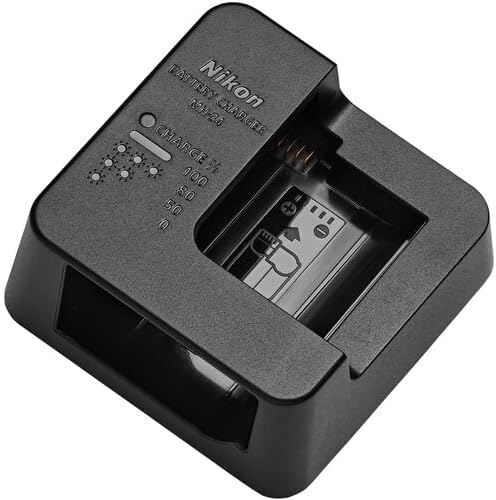
Image: The Nikon MH-34 Battery Charger, a compact black device with a slot for a battery and LED indicators for charge status.
Compatibility
The Nikon MH-34 Battery Charger is specifically designed for use with the following Nikon Lithium-ion batteries:
- EN-EL15b Lithium-ion batteries
- EN-EL15c Lithium-ion batteries
Important Note:
The MH-34 battery charger cannot be used to charge EN-EL15a or EN-EL15 Lithium-ion batteries. Attempting to charge incompatible batteries may result in damage to the battery or charger, or pose a safety risk.
Setup
To power the MH-34 Battery Charger, it requires connection to a compatible AC adapter. Please ensure you have one of the following:
- An EH-8P AC adapter (requires a UC-E25 USB cable, available separately)
- An EH-7P charging AC adapter
- A third-party AC adapter that supports USB Power Delivery
- Connect the appropriate USB cable (e.g., UC-E25 for EH-8P) to the MH-34 charger.
- Connect the other end of the USB cable to your chosen compatible AC adapter.
- Plug the AC adapter into a standard electrical outlet.
The charger is now ready to accept a battery for charging.
Operating Instructions
Charging a Battery
- Ensure the MH-34 charger is properly connected to a power source as described in the "Setup" section.
- Insert a compatible EN-EL15b or EN-EL15c battery into the charging slot of the MH-34. Ensure the battery is inserted correctly, aligning the contacts.
- The charge indicator lights on the MH-34 will illuminate to show the charging status.
Charge Indicator Lights
The MH-34 features indicator lights to display the battery's charge percentage. While specific behavior (flashing vs. steady) is not detailed in the product information, generally:
- Illuminated segments: Indicate the current charge level. More segments lit mean a higher charge.
- Flashing segments: Typically indicate that charging is in progress.
- All segments steady: Usually indicates that the battery is fully charged.
Refer to the markings on the charger itself for percentage indications (e.g., 50%, 80%, 100%).
Maintenance
- Keep the charger clean and dry. Use a soft, dry cloth to wipe off any dust or dirt.
- Do not use abrasive cleaners or solvents.
- Avoid exposing the charger to extreme temperatures, humidity, or direct sunlight.
- Store the charger in a cool, dry place when not in use.
- Do not attempt to disassemble or repair the charger yourself. Contact Nikon service for assistance.
Troubleshooting
Battery Not Charging
- Check Compatibility: Ensure you are using an EN-EL15b or EN-EL15c battery. The MH-34 is not compatible with EN-EL15a or EN-EL15 batteries.
- Power Source: Verify that the MH-34 is correctly connected to a compatible AC adapter (EH-8P, EH-7P, or USB Power Delivery compatible third-party adapter) and that the adapter is plugged into a working electrical outlet.
- USB Cable: If using an EH-8P AC adapter, confirm that a UC-E25 USB cable (sold separately) is securely connected between the charger and the adapter.
- Battery Insertion: Re-insert the battery into the charger, ensuring it is seated correctly and contacts are aligned.
- Damaged Components: Inspect the charger, battery, and cables for any visible signs of damage. Do not use damaged components.
Indicator Lights Not Functioning
- Ensure the charger is receiving power.
- If the issue persists, the charger may require service.
Specifications
| Feature | Detail |
|---|---|
| Model Number | MH-34 |
| Compatible Batteries | Nikon EN-EL15b, EN-EL15c Lithium-ion |
| Power Input Requirement | EH-8P AC adapter (with UC-E25 USB cable), EH-7P charging AC adapter, or third-party USB Power Delivery compatible AC adapters |
| Item Weight | 3.84 ounces |
| Manufacturer | Nikon |
Warranty and Support
For information regarding warranty coverage, service, or technical support for your Nikon MH-34 Battery Charger, please refer to the warranty card included with your product or visit the official Nikon website. You can also contact Nikon customer service directly for assistance.
Official Nikon Website: www.nikonusa.com


