
1. Introduction
This manual provides essential information for the safe and efficient operation of your KONKA 60-inch UHD 4K Smart LED TV. Please read this manual thoroughly before using the product and retain it for future reference. This television features a 60-inch 4K UHD display, Android TV operating system, Google Assistant, and Bluetooth connectivity.
2. Safety Information
Always follow basic safety precautions when using this television to reduce the risk of fire, electric shock, and injury.
- Do not expose the TV to rain or moisture.
- Do not open the TV casing; refer all servicing to qualified personnel.
- Ensure proper ventilation around the TV.
- Use only the power cord supplied with the TV.
- Keep the TV away from direct sunlight and heat sources.
- Clean the TV with a soft, dry cloth only.
3. Package Contents
Verify that all items are present in the package:
- KONKA 60-inch UHD 4K Smart LED TV Unit
- Remote Control
- Power Cable
- TV Stands (2x)
- Screws for TV Stands
- User Manual (this document)
4. Setup
4.1 Unpacking
Carefully remove the TV from its packaging. It is recommended to have two people for this process due to the size and weight of the unit. Retain the packaging materials for future transport or servicing.
4.2 Stand Installation or Wall Mounting
Stand Installation:
- Place the TV face down on a soft, flat surface to prevent screen damage.
- Align each stand with the corresponding slots on the bottom of the TV.
- Secure each stand with the provided screws.
Wall Mounting:
This TV supports wall mounting. A VESA-compatible wall mount kit (not included) is required. Refer to the wall mount kit's instructions for proper installation. Ensure the wall can support the weight of the TV.
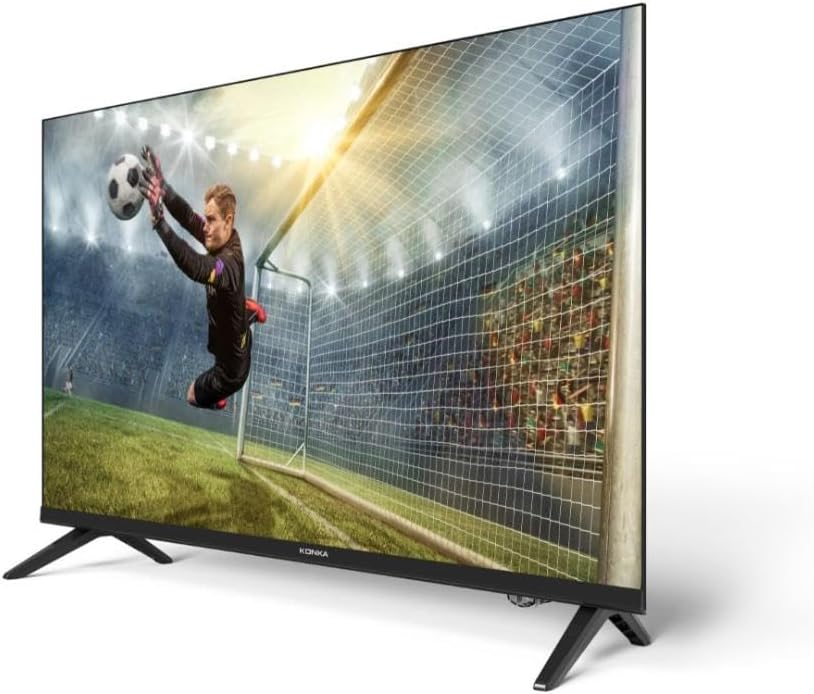
Side view of the KONKA 60-inch 4K UHD Smart LED TV, highlighting its sleek, thin design and the stand.
4.3 Connecting Peripherals
Connect your external devices such as set-top boxes, gaming consoles, or sound systems to the TV's input ports. The TV includes HDMI, USB, VGA, and SPDIF ports.

Rear view of the KONKA 60-inch Smart TV, displaying various connectivity ports (HDMI, USB, VGA, RJ45, SPDIF) and technical specifications.
4.4 Initial Power On and First-Time Setup
- Connect the power cable to the TV and then to a power outlet.
- Press the power button on the remote control or on the TV.
- Follow the on-screen instructions to complete the initial setup, including language selection, network connection (Wi-Fi), and Google account login.
5. Operating the TV
5.1 Remote Control Overview
The remote control allows you to navigate the TV's features. It includes dedicated buttons for power, volume, channel, input selection, and quick access to streaming services like Netflix and YouTube.

An image featuring the KONKA Smart TV's remote control alongside a display of the Android TV user interface, highlighting the Google Assistant functionality and various streaming app icons.
5.2 Basic Functions
- Power: Press the power button to turn the TV on or off.
- Volume: Use the VOL +/- buttons to adjust the sound level.
- Channels: Use the CH +/- buttons to change channels.
- Input: Press the INPUT button to select different input sources (HDMI, AV, etc.).
5.3 Smart TV Features (Android TV & Google Assistant)
Your KONKA Smart TV runs on Android TV, providing access to a wide range of apps and services via the Google Play Store. The integrated Google Assistant allows for voice control of your TV and smart home devices.
- Google Assistant: Press the Google Assistant button on your remote and speak your commands.
- Apps: Access pre-installed apps like Netflix, YouTube, and Amazon Prime Video, or download more from the Google Play Store.
- Chromecast Built-in: Cast content from your smartphone or tablet directly to the TV.

An image detailing the key features of the KONKA Series 680 Smart TV, including Android 11 operating system, stereo audio, Bluetooth connectivity, Google Assistant integration, built-in Chromecast, Google Play Store access, and pre-installed apps like YouTube, Netflix, and Amazon Prime Video.
5.4 Connectivity
- Wi-Fi: Connect to your home wireless network for internet access.
- Bluetooth: Pair Bluetooth-enabled devices such as headphones or smartphones.
- HDMI: Connect high-definition devices like Blu-ray players or gaming consoles.
- USB: Play media files from USB storage devices.
- RJ45 (Ethernet): For a wired internet connection.
6. Maintenance
6.1 Cleaning
To clean the TV screen, gently wipe it with a soft, lint-free cloth. For stubborn marks, slightly dampen the cloth with water or a screen-specific cleaning solution. Do not spray liquid directly onto the screen. For the TV casing, use a soft, dry cloth.
6.2 Software Updates
Your Android TV may receive software updates periodically. It is recommended to keep your TV connected to the internet to receive these updates, which can improve performance and add new features. You can check for updates in the TV's settings menu.
7. Troubleshooting
If you encounter issues with your TV, refer to the following common solutions:
| Problem | Possible Solution |
|---|---|
| No power | Ensure the power cable is securely connected and the power outlet is working. Try a different outlet. |
| No picture, but sound is present | Check the input source. Ensure all video cables are properly connected. |
| No sound, but picture is present | Check the volume level and mute settings. Verify audio cable connections. |
| Remote control not working | Replace the batteries. Ensure there are no obstructions between the remote and the TV. |
| Wi-Fi connection issues | Restart your router. Check Wi-Fi settings on the TV. Ensure the TV is within range of the router. |
| Apps not loading or crashing | Clear the app's cache and data in the TV settings. Restart the TV. Ensure sufficient storage space. |
If the problem persists after trying these solutions, please contact customer support.
8. Specifications
| Feature | Specification |
|---|---|
| Brand | KONKA |
| Model | UDg60qr680ln |
| Screen Size | 60 Inches |
| Display Technology | LED |
| Resolution | 4K UHD (3840 x 2160) |
| Operating System | Android TV |
| Processor | CA55 Quad Core |
| Audio Output | 2x 10W Stereo |
| Brightness | 250 cd/m² |
| Contrast Ratio | 5000:1 |
| Connectivity | 3x HDMI, 2x USB, 1x RJ45 (Ethernet), 1x VGA Input, 1x SPDIF (Optical Audio), Wi-Fi, Bluetooth |
| Special Features | Borderless Design, Google Assistant, Chromecast Built-in, Pre-installed Streaming Services (Netflix, Hulu, Amazon Prime Video, YouTube) |
| Mounting Type | Wall Mount Compatible |
| Color | Black |
9. Warranty Information
KONKA products are manufactured to high-quality standards. This product is covered by a limited warranty against defects in materials and workmanship. Please refer to the warranty card included with your purchase for specific terms, conditions, and duration of coverage. Keep your proof of purchase for warranty claims.
10. Support
For technical assistance, troubleshooting beyond this manual, or warranty inquiries, please contact KONKA customer support. Contact information can typically be found on the manufacturer's official website or on the warranty card provided with your product.
Please have your model number (UDg60qr680ln) and purchase date ready when contacting support.


