
Introduction
Welcome to the user manual for your new HubiCare Eye Massager. This device is designed to provide relief from eye fatigue, migraines, and dry eyes through a combination of hot and cold therapy, air compression, and vibration. It features a comfortable design, multiple massage modes, and Bluetooth connectivity for an enhanced relaxation experience. Please read this manual thoroughly to ensure safe and optimal use of this eye massager.

The HubiCare Eye Massager, featuring its sleek design and the visual representation of its hot and cold therapy capabilities.
Safety Information
For your safety and to ensure proper operation, please adhere to the following guidelines:
- Use the massager strictly according to the instructions provided in this manual.
- Do not use the device while it is charging.
- Avoid using the massager near water or in excessively humid environments.
- Exercise caution when switching between hot and cold compresses to prevent potential burns or discomfort. Allow the device to adjust temperature gradually.
- If you experience any pain, discomfort, or unusual reactions during use, discontinue use immediately.
- Keep the device out of reach of children and pets.
- Do not disassemble, repair, or modify the device yourself. Contact customer support for assistance.
- Consult a healthcare professional before use if you have pre-existing eye conditions, skin sensitivities, or are pregnant.
Product Features
The HubiCare Eye Massager is equipped with advanced features designed for comprehensive eye relaxation and relief:
- Premium Hot & Cold Therapy: Features both heating (34℃/93.2°F low, 38℃/100.4°F high) and cooling (20℃/68°F) modes, including an alternating function. Hot compresses aid circulation and reduce dark circles, while cold compresses soothe dry eyes and pain.
- Air Compression & Vibration: Utilizes soft double pads and 3D airbags for excellent adhesion and pressure, combined with vibration kneading for maximum comfort and effective massage.
- 7 Massage Modes: Offers a variety of modes including Auto, Relax, Relieve, Soothing, Energy, Sleep, and Cold, catering to different needs and preferences.
- 180° Adjustable & Portable Design: The foldable design makes it easy to carry for travel or office use. The adjustable headband ensures a comfortable fit for various head sizes.
- Bluetooth Music & Auto-Off: Connect your smartphone via Bluetooth to play your favorite music. The device also includes built-in natural music. It automatically turns off after 10 minutes to prevent over-operation.
Detailed Feature Overview
Hot and Cold Constant Therapy

The eye massager provides both cooling (20°C/68°F) and heating (34°C/93.2°F and 38°C/100.4°F) therapy to effectively reduce eye strain and provide relief for tired eyes.
3D Airbag Compression and Vibration Kneading

Experience deep relaxation with the integrated 3D airbag compression and gentle vibration kneading, designed to provide optimal pressure and comfort around the eyes.
7 Relax Modes
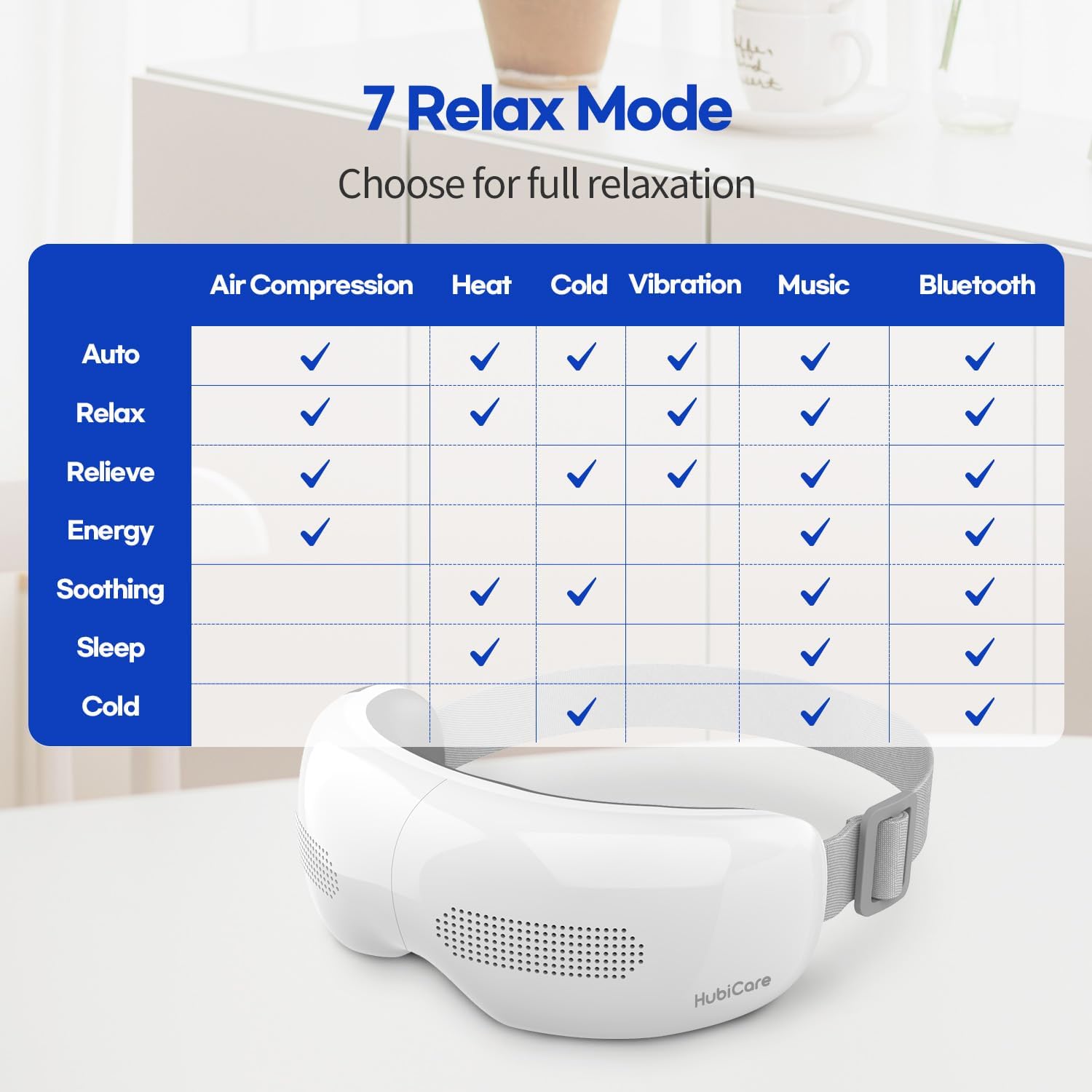
Choose from seven distinct massage modes, each combining different functions like air compression, heat, cold, and vibration, to achieve your desired level of relaxation.
Compact Foldable Design

The eye massager's 180° foldable design ensures easy storage and portability, making it convenient to carry wherever you go.
Bluetooth Music Integration

Enhance your massage experience by connecting your smartphone via Bluetooth to play your preferred music or enjoy the built-in natural melodies.
Setup
- Unboxing: Carefully remove the eye massager and all accessories from the packaging.
- Initial Charge: Before first use, fully charge the device using the provided charging cable. The charging indicator light will typically change color or turn off when fully charged.
- Adjust Headband: Adjust the elastic headband to ensure a comfortable and secure fit around your head. It should be snug but not too tight.
- Positioning: Place the massager over your eyes, ensuring the massage pads align correctly with your eye area.
Operating Instructions
The HubiCare Eye Massager is operated primarily with two buttons.
- Power On/Off: Press and hold the power button (usually marked with a power symbol) to turn the device on or off.
- Select Mode: Briefly press the mode selection button (often labeled "C/S" or similar, or the same power button for cycling) to cycle through the available massage modes. The modes include:
- Auto Mode: Activates all functions: Air Compression + Heat + Cold + Vibration + Music.
- Relax Mode: Focuses on Air Compression + Heat + Cold + Music.
- Relieve Mode: Combines Air Compression + Vibration + Music.
- Soothing Mode: Utilizes only Heat + Cold + Music.
- Energy Mode: Primarily Air Compression + Music.
- Sleep Mode: Gentle Heat + Music.
- Cold Mode: Only Cold + Music.
- Adjust Temperature (if applicable): Some modes allow for specific temperature adjustments. Refer to the mode table for details.
- Bluetooth Pairing: To connect to your smartphone, ensure Bluetooth is enabled on your phone. Turn on the eye massager. Search for "HubiCare" or a similar device name in your phone's Bluetooth settings and pair. Once connected, you can play music through the massager's speakers.
- Mute Speakers: To mute the built-in music or Bluetooth audio, press and hold the sleep button (often located below the power button).
- Automatic Shut-off: The device is programmed to automatically turn off after 10 minutes of continuous operation to prevent overuse and conserve battery.
Maintenance
- Cleaning: Wipe the surface of the eye massager with a soft, damp cloth. Do not use abrasive cleaners or immerse the device in water. Ensure the device is completely dry before storing or recharging.
- Storage: Store the eye massager in a cool, dry place, away from direct sunlight and extreme temperatures. When not in use for extended periods, ensure it is fully charged before storing.
- Battery Care: To prolong battery life, avoid fully discharging the battery frequently. Charge the device regularly, even if not in constant use.
Troubleshooting
| Problem | Possible Cause | Solution |
|---|---|---|
| Device does not turn on. | Low battery; Device not charged. | Charge the device fully. Ensure the charging cable is securely connected. |
| No heat or cold sensation. | Incorrect mode selected; Device malfunction. | Ensure you are in a mode that includes heat/cold therapy (e.g., Auto, Relax, Soothing, Sleep, Cold). Allow a few moments for temperature to adjust. If issue persists, contact support. |
| Bluetooth connection issues. | Device not in pairing mode; Phone's Bluetooth off; Interference. | Ensure the massager is on. Turn off and on your phone's Bluetooth. Move closer to the device. Try re-pairing. |
| Device is too loud. | Normal operating noise for air compression/vibration; Loose components. | Some noise from air compression is normal. If the noise is excessive or unusual, contact customer support. |
| Massage feels weak or ineffective. | Incorrect mode; Improper fit. | Ensure the headband is adjusted for a snug fit. Try different massage modes to find one that suits your preference. |
Specifications
| Feature | Detail |
|---|---|
| Product Dimensions | 4.72 x 6.3 x 3.15 inches |
| Item Model Number | FE-4601 |
| Batteries | 1 Lithium Ion battery (included) |
| Item Weight | 15.17 ounces (430 Grams) |
| Brand | HuBDIC |
| Color | White |
| Power Source | Battery Powered |
| Hot Compress Temperature | Low: 34℃/93.2°F, High: 38℃/100.4°F |
| Cool Compress Temperature | 20℃/68°F |
| Automatic Shut-off | 10 minutes |
Warranty
Specific warranty details for the HubiCare Eye Massager are typically provided with your product packaging or on the manufacturer's official website. Please refer to these sources for comprehensive information regarding warranty coverage, terms, and conditions. Protection plans may also be available for extended coverage.
Support
For further assistance, technical support, or to access additional resources, please visit the official HuBDIC website or contact their customer service.
- Official Website: HuBDIC Amazon Store
- Online Manual: For a translated user manual and additional information, you may visit: HubiCare Eye Massager Online Manual

Scan the QR code to access the online user manual and select your preferred language.

