
1. Important Safety Instructions
Please read this instruction manual carefully before operating the appliance and keep it for future reference. Always observe the safety instructions when using electrical appliances.
- This appliance is intended for indoor use only, specifically for well-insulated rooms or occasional use.
- Ensure the voltage indicated on the rating label matches your mains voltage.
- Do not operate the appliance with a damaged cord or plug. Contact qualified personnel for repairs.
- Do not immerse the appliance in water or other liquids.
- Keep the appliance away from children and pets.
- Do not cover the heater. Overheating can occur. Maintain a minimum distance of 1 meter from flammable materials.
- Do not use the heater in bathrooms, laundries, or similar damp locations.
- Always unplug the appliance when not in use or before cleaning.
- The glass facade can become hot during operation. Avoid direct contact.
- This appliance is not intended for use by persons (including children) with reduced physical, sensory or mental capabilities, or lack of experience and knowledge, unless they have been given supervision or instruction concerning use of the appliance by a person responsible for their safety.
2. Product Overview
The ProfiCare PC-GKH 3119 is an electric convection heater designed for efficient and silent supplementary heating. It features a high-quality safety glass facade and an X-shape heating element for rapid heat distribution. The heater offers versatile installation options, functioning as both a freestanding unit and a wall-mounted appliance.
Key Features:
- Heating Levels: Two adjustable heating levels (1000W / 2000W).
- Temperature Control: Digital ambient temperature setting from 5°C to 50°C.
- Silent Operation: Operates at 0 dB, ensuring a quiet environment.
- Window Open Detection: Automatic shut-off when an open window is detected to save energy.
- Anti-Frost Function: Prevents temperatures from dropping below a set minimum.
- Timer: 24-hour timer for scheduled operation.
- Programs: 7 pre-set time programs.
- Safety: Overheat protection and child lock function.
- Control: Digital display and multifunction remote control.

Figure 2.1: Front view of the ProfiCare PC-GKH 3119 Electric Heater with its digital display.

Figure 2.2: The heater with its remote control, highlighting various operational features.
3. Setup
3.1 Unpacking
Carefully remove the heater from its packaging. Retain the packaging for future storage or transport. Check for any damage during transit. Ensure all components, including the remote control and mounting material, are present.
3.2 Installation Options
The PC-GKH 3119 heater can be used as a freestanding unit or mounted on a wall.
3.2.1 Freestanding Installation
- Attach the included feet to the base of the heater using the provided screws.
- Place the heater on a stable, level surface, ensuring adequate clearance from walls and furniture (minimum 1 meter from flammable objects).
3.2.2 Wall-Mounted Installation
- Select a suitable wall location, ensuring it is structurally sound and free from electrical wiring or plumbing.
- Use the included mounting material (brackets, screws, wall plugs) to securely attach the heater to the wall. Follow the detailed instructions provided in the separate mounting guide (if applicable) or the diagrams.
- Ensure the heater is level and securely fastened before connecting to power.
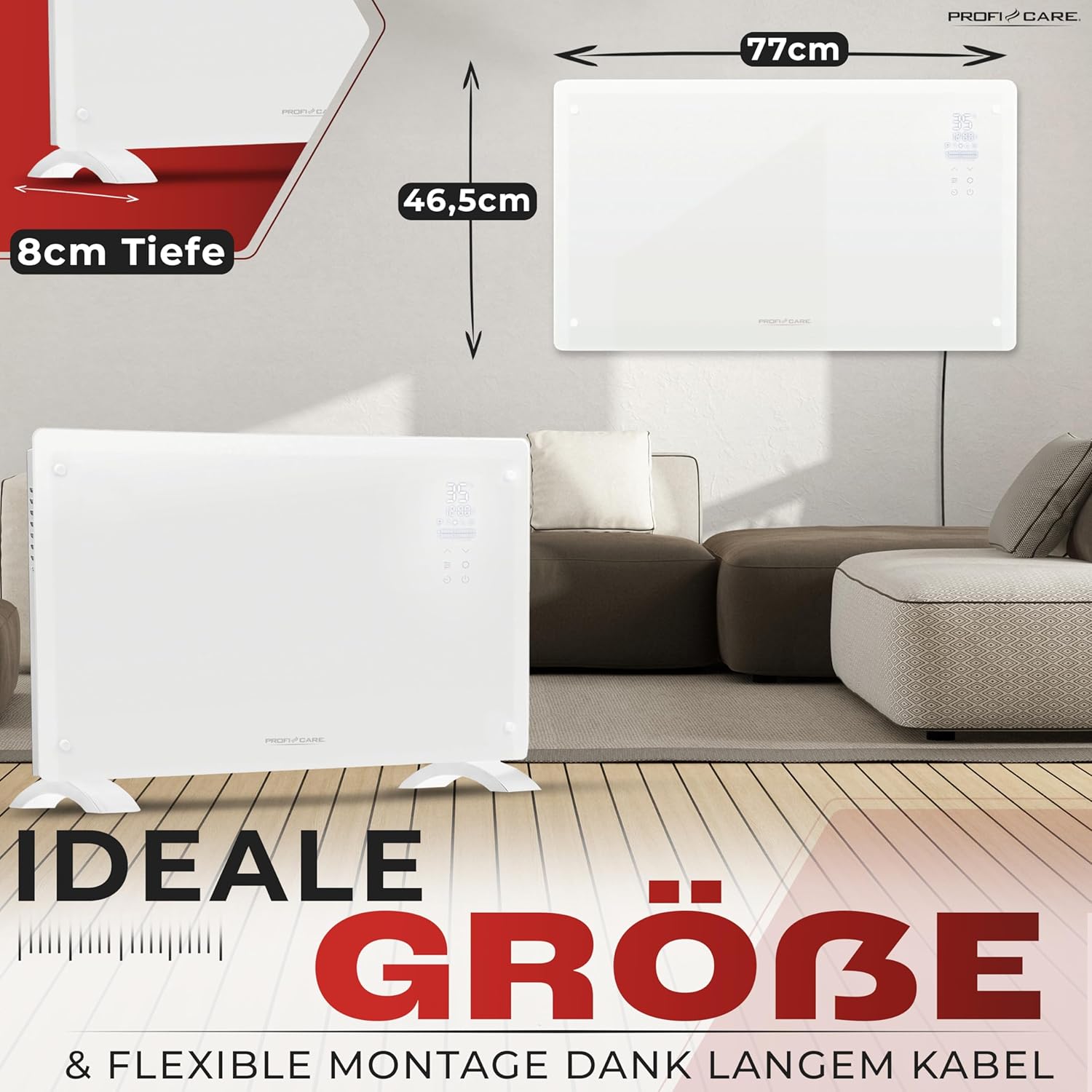
Figure 3.1: Visual representation of freestanding and wall-mounted installation options.
3.3 Power Connection
Once installed, plug the power cord into a grounded electrical outlet (230V, 50Hz). Ensure the outlet is easily accessible.
4. Operating Instructions
The heater can be controlled via the touch panel on the device or the multifunction remote control.
4.1 Power On/Off
- Press the Power button on the control panel or remote control to turn the heater on or off.
4.2 Setting Temperature
- Use the Temperature Up (+) and Temperature Down (-) buttons to adjust the desired room temperature between 5°C and 50°C. The digital display will show the set temperature.
4.3 Heating Levels
- Press the Mode button to cycle between the two heating levels: 1000W (low) and 2000W (high). The display will indicate the active heating level.
4.4 Timer Function
- Press the Timer button to activate the 24-hour timer. Use the Temperature Up/Down buttons to set the desired operating duration. The heater will automatically turn off after the set time.
4.5 Programming (7 Time Programs)
- Refer to the detailed programming section in the full manual for setting the 7 time programs. This allows for automated heating schedules throughout the week.
4.6 Anti-Frost Function
- When activated, the anti-frost function maintains a minimum room temperature (typically 5°C) to prevent freezing. Activate this function via the Anti-Frost button on the remote or control panel.
4.7 Window Open Detection
- The heater is equipped with a sensor that detects a sudden drop in room temperature, indicating an open window. When detected, the heater will automatically switch off to conserve energy. It will resume operation once the window is closed and the temperature stabilizes, or can be manually restarted.

Figure 4.1: The heater's window open detection feature in action.
4.8 Child Lock
- Activate the child lock by pressing the Child Lock button on the remote control or holding the designated button on the control panel. This prevents accidental changes to settings.
5. Maintenance
5.1 Cleaning
- Always unplug the heater from the power outlet before cleaning.
- Allow the heater to cool down completely.
- Wipe the exterior surfaces with a soft, damp cloth. Do not use abrasive cleaners, solvents, or harsh chemicals, as these can damage the finish.
- Ensure no water enters the interior of the appliance.
5.2 Storage
- If storing the heater for an extended period, clean it thoroughly.
- Store the heater in its original packaging in a cool, dry place, protected from dust.
6. Troubleshooting
Before contacting customer support, please check the following common issues:
| Problem | Possible Cause | Solution |
|---|---|---|
| Heater does not turn on. | No power supply. | Check if the power cord is securely plugged in. Verify the wall outlet is functional. Check the circuit breaker. |
| No heat output. | Temperature setting too low. | Increase the desired temperature setting above the current room temperature. |
| Heating level not selected. | Ensure a heating level (1000W or 2000W) is selected. | |
| Heater turns off unexpectedly. | Overheat protection activated. | Unplug the heater, allow it to cool down for 30 minutes. Check for obstructions around the air inlets/outlets. Restart. |
| Window open detection triggered. | Close any open windows or doors. The heater should resume or can be manually restarted. | |
| Remote control not working. | Dead batteries. | Replace the batteries in the remote control. |
| Obstruction between remote and heater. | Ensure a clear line of sight between the remote control and the heater's receiver. |
If the problem persists after checking these points, please contact ProfiCare customer support.
7. Specifications
- Model: PC-GKH 3119
- Power Supply: 230 V, 50 Hz
- Heat Output: 2000 W (with 2 heating levels: 1000 W / 2000 W)
- Temperature Range: 5°C - 50°C
- Dimensions (D x W x H): 8 x 77 x 46.5 cm
- Weight: 7.5 kg
- Heating Element: X-Shape
- Noise Level: 0 dB
- Mounting Options: Freestanding or Wall-mounted
- Special Features: Window open detection, Child lock, Remote control, Anti-frost function, 24-hour timer, 7 time programs, Overheat protection.
- Recommended Use: Indoor, well-insulated rooms, occasional use.
- Country of Origin: Germany
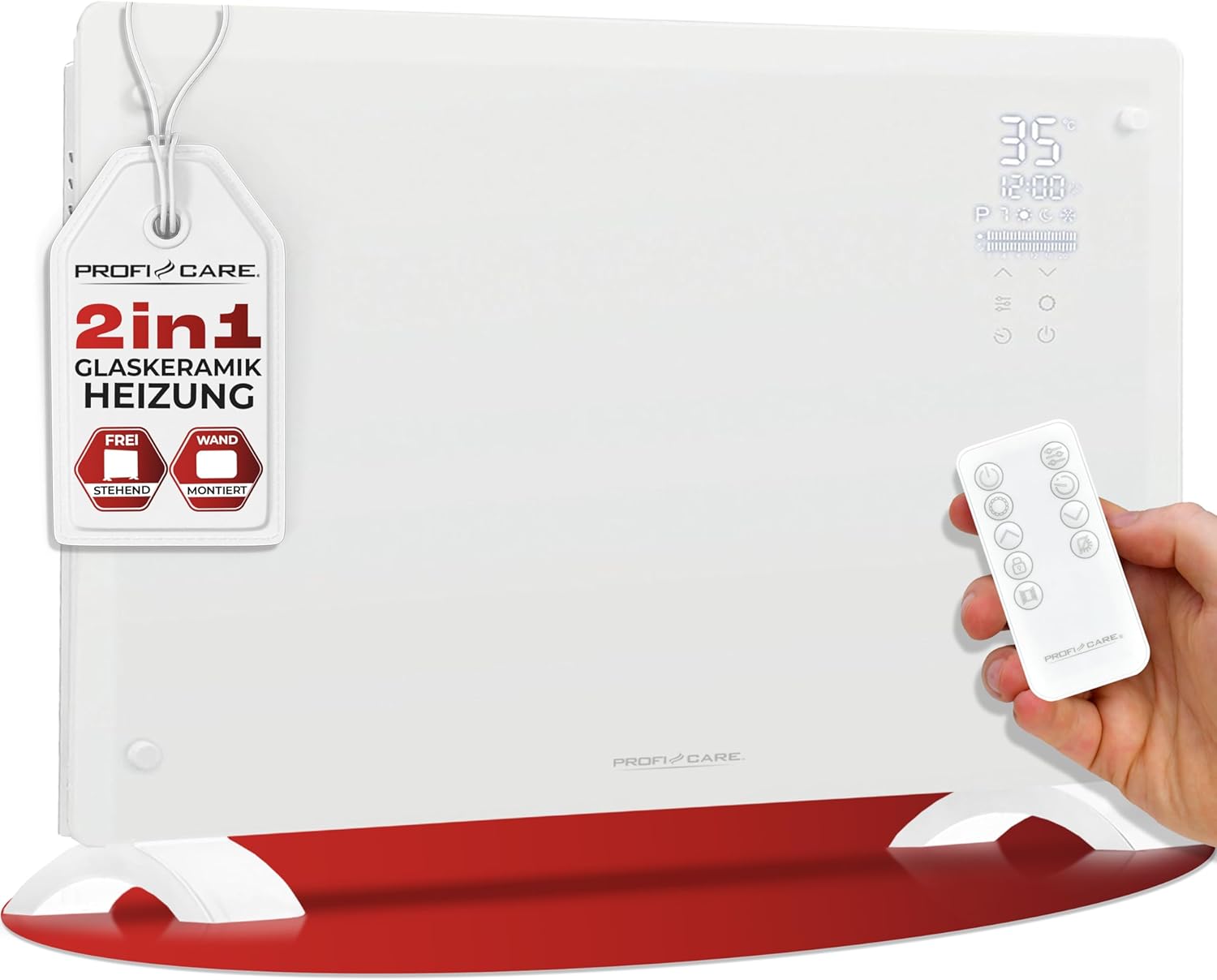
Figure 7.1: Product dimensions of the ProfiCare PC-GKH 3119 heater.
8. Warranty and Support
This product is designed for reliability and performance. In the unlikely event of an issue, please refer to the troubleshooting section first.
- Spare Parts Availability: Spare parts for this model are available for 2 years from the date of purchase.
For further assistance, technical support, or warranty claims, please contact your retailer or the official ProfiCare customer service. Please have your model number (PC-GKH 3119) and proof of purchase ready.


