
1. Important Safety Instructions
Please read these instructions carefully before using the appliance and keep them for future reference. Failure to follow these instructions may result in electric shock, fire, or serious injury.
- This appliance is intended for household use only.
- Ensure the voltage indicated on the rating label matches your mains voltage.
- Do not operate the appliance with a damaged cord or plug.
- Do not use the heater in the immediate vicinity of a bath, shower, or swimming pool.
- Keep flammable materials (curtains, furniture, etc.) at least 1 meter away from the heater.
- Do not cover the heater. Overheating protection will activate if covered.
- Supervise children to ensure they do not play with the appliance.
- This product is only suitable for well-insulated rooms or for occasional use.
- The heater features an automatic shut-off function when a window is detected open.
- Utilize the child lock feature to prevent unintended operation.
2. Product Overview and Features
The ProfiCare PC-GKH 3118 is an electric convector heater designed for efficient and silent heating. It features a high-quality glass facade and an X-shape heating element for rapid heat distribution.

Image: ProfiCare PC-GKH 3118 heater showcasing its features and remote control.

Image: The heater operating silently and efficiently in a living room setting.
Key Features:
- Silent Operation: Operates at 0 dB, ensuring a quiet environment.
- Glass Facade: High-quality safety glass front panel.
- X-Shape Heating Element: Provides rapid and efficient heating.
- Temperature Control: Digital ambient temperature setting from 5°C to 50°C.
- Heating Levels: Two adjustable heating levels (750W / 1500W).
- Timer Function: 24-hour timer and 7 programmable time schedules.
- Anti-Frost Function: Prevents temperatures from dropping below freezing.
- Window Open Detection: Automatic shut-off when an open window is detected.
- Remote Control: Multifunction remote control included (batteries included).
- Safety Features: Overheating protection and child lock.
- Flexible Installation: Suitable for freestanding use (with included feet) or wall mounting (with included hardware).
3. Setup and Installation
Unpacking:
- Carefully remove the heater and all accessories from the packaging.
- Check for any damage during transit. Do not use if damaged.
- Keep packaging materials out of reach of children.
Placement Considerations:
- Place the heater on a stable, level surface or mount it securely to a wall.
- Ensure adequate clearance around the heater (at least 1 meter from walls, furniture, curtains, etc.).
- Do not place the heater directly below a wall socket.
- This heater is designed for indoor use in well-insulated rooms. It is also suitable for occasional use in areas like winter gardens, garages, or garden houses.

Image: The heater is suitable for various indoor spaces including winter gardens, garages, and garden houses.

Image: The heater offers flexible installation options: freestanding with feet or wall-mounted.
Freestanding Installation:
- Attach the two included stand feet to the bottom of the heater using the provided screws.
- Ensure the feet are securely fastened before placing the heater upright.
Wall Mounting:
- Identify a suitable wall location, ensuring it is structurally sound and clear of obstructions.
- Use the included mounting hardware (screws and wall plugs) to secure the wall bracket to the wall.
- Carefully hang the heater onto the wall bracket, ensuring it is firmly seated.
4. Operating Instructions
The heater can be operated via the control panel on the unit or using the multifunction remote control.
Power On/Off:
- Plug the power cord into a suitable 230V, 50Hz electrical outlet.
- Press the power button on the control panel or remote control to turn the heater on or off.
Setting Temperature:
- Use the '+' and '-' buttons on the control panel or remote to adjust the desired room temperature between 5°C and 50°C.
- The heater will automatically maintain the set temperature.
Selecting Heating Levels:
- Press the mode button to cycle through the two heating levels: 750W (low) and 1500W (high).
- Select the appropriate level based on your heating needs.
Timer and Program Functions:
- 24-Hour Timer: Activate the 24-hour timer to set a specific duration for the heater to operate.
- 7 Time Programs: Configure up to 7 different time programs for automated heating schedules throughout the week. Refer to the detailed instructions in the full manual for programming steps.
Anti-Frost Function:
- Activate the anti-frost function to ensure the room temperature does not fall below a certain threshold (typically 5°C), preventing freezing.
Window Open Detection:
- The heater is equipped with a sensor that detects a sudden drop in temperature, indicating an open window.
- Upon detection, the heater will automatically switch off to conserve energy. It will resume operation once the window is closed and the temperature stabilizes, or can be manually restarted.

Image: Illustration of the automatic shut-off feature when an open window is detected.
Child Lock:
- Activate the child lock feature to prevent accidental changes to settings by pressing and holding the designated button on the control panel or remote control.
- Repeat the action to deactivate the child lock.
5. Maintenance
Cleaning:
- Always unplug the heater from the power outlet and allow it to cool completely before cleaning.
- Wipe the exterior surfaces with a soft, damp cloth. Do not use abrasive cleaners or solvents.
- Ensure no water enters the interior of the appliance.
- Do not immerse the heater in water or any other liquid.
Storage:
- If not in use for an extended period, store the heater in a cool, dry place.
- It is recommended to store the heater in its original packaging to protect it from dust and damage.
6. Troubleshooting
If you experience issues with your ProfiCare PC-GKH 3118 heater, please consult the following common problems and solutions:
| Problem | Possible Cause | Solution |
|---|---|---|
| Heater does not turn on. | No power supply; Power button not pressed; Overheating protection activated. | Check power cord connection and wall outlet; Press power button; Unplug, let cool, then restart. |
| Heater turns off unexpectedly. | Overheating protection activated; Window open detection activated; Timer/program ended. | Ensure heater is not covered and has adequate ventilation; Close windows/doors; Check timer/program settings. |
| Heater is not heating effectively. | Low heating level selected; Temperature setting too low; Room too large or poorly insulated. | Increase heating level to 1500W; Increase target temperature; Ensure room is well-insulated. |
| Remote control not working. | Batteries depleted; Obstruction between remote and heater. | Replace remote control batteries; Ensure clear line of sight to heater's receiver. |
If the problem persists after attempting these solutions, please contact customer support.
7. Specifications
Detailed technical specifications for the ProfiCare PC-GKH 3118 Electric Convector Heater:
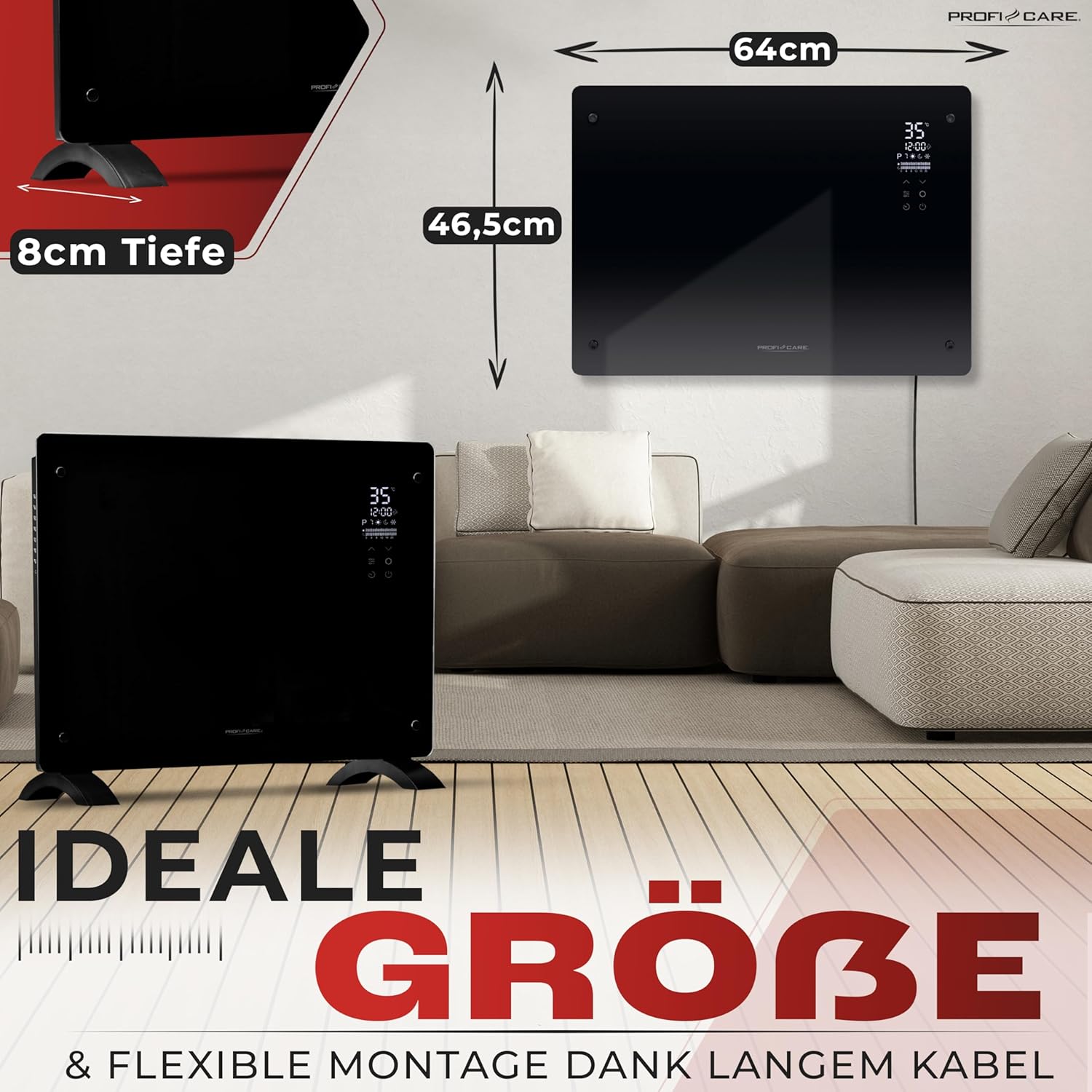
Image: Dimensions of the ProfiCare PC-GKH 3118 heater.
| Specification | Value |
|---|---|
| Brand | ProfiCare |
| Model Number | PC-GKH 3118 |
| Color | Black |
| Dimensions (L x W x H) | 8 x 64 x 46.5 cm |
| Weight | 6.7 Kilograms |
| Voltage | 230 Volts |
| Power Output | 1500W (Max), 2 heating levels (750W/1500W) |
| Number of Speeds | 2 |
| Energy Class | B |
| Temperature Range | 5 - 50 °C |
| Noise Level | 0 dB |
| Heating Method | Convection |
| Special Features | Window open detection, Silent, Child lock, Adjustable temperature, Remote control, Overheating protection, Anti-frost function |
| Form Factor | Wall mount or freestanding appliance |
| Recommended Uses | Office, Garage, Winter garden, Home, Bedroom |
| Country of Origin | China |
8. Warranty and Support
ProfiCare provides support for its products. For any questions or issues not covered in this manual, please contact customer service.
- Spare Parts Availability: Spare parts for this product are available for 2 years from the date of purchase.
- Please retain your proof of purchase for warranty claims.

