Introduction
This manual provides instructions for the Vinabty AKB37026853 replacement remote control, designed for various LG Home Cinema Systems. This remote functions as a direct replacement for your original unit, requiring no complex programming or setup. Simply install batteries, and it is ready for use.

Setup
To begin using your Vinabty AKB37026853 remote control, follow these simple steps:
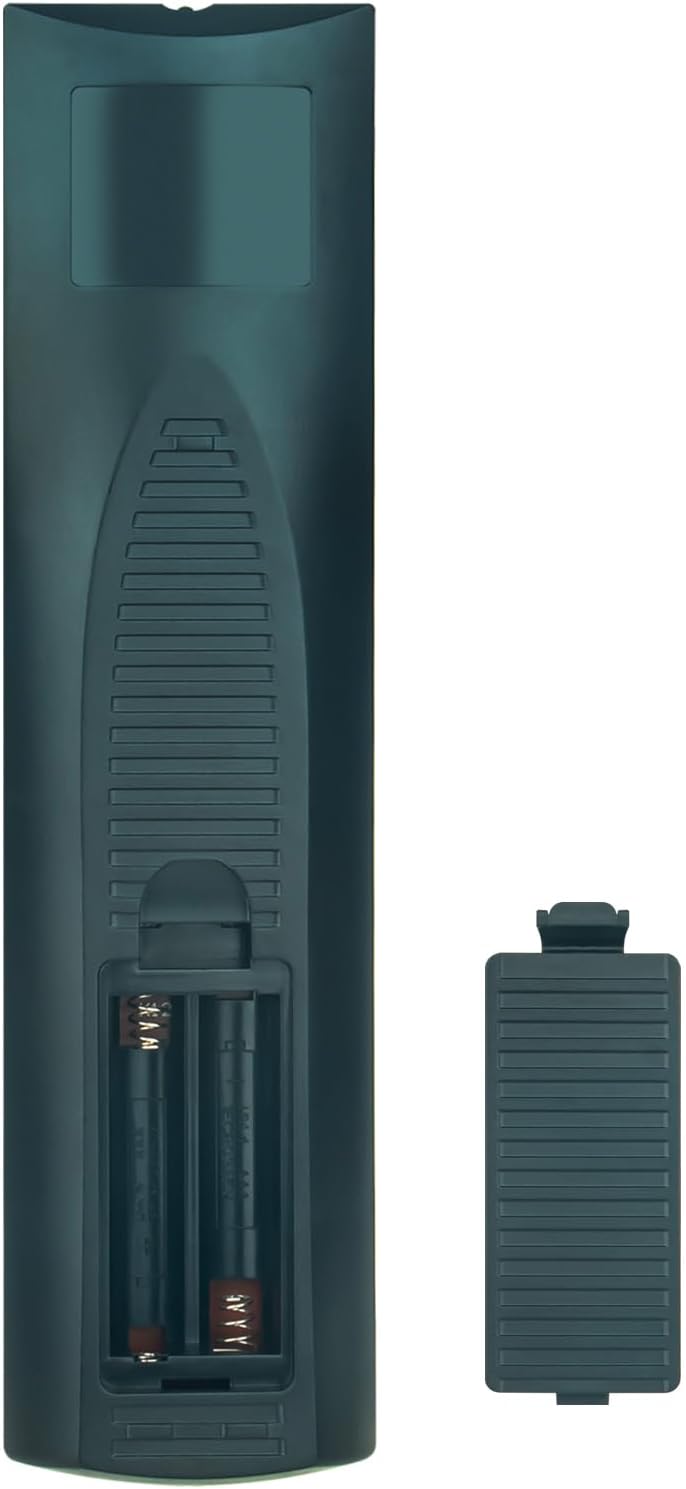
- Open the Battery Compartment: Locate the battery compartment cover on the back of the remote control. Slide the cover downwards or press the latch to open it.
- Insert Batteries: Insert two (2) AAA 1.5V batteries into the compartment. Ensure the positive (+) and negative (-) terminals of the batteries match the polarity indicators inside the compartment.
- Close the Battery Compartment: Replace the battery compartment cover by sliding it back into position until it clicks securely.
- Initial Use: The remote control is pre-programmed and does not require any additional setup. It is ready for immediate use with compatible LG Home Cinema Systems.
Operating Instructions
The Vinabty AKB37026853 remote control provides full functionality for your compatible LG Home Cinema System. Point the remote directly at your LG device for optimal performance.

Key Functions:
- POWER (Red Button): Turns the LG Home Cinema System on or off.
- OPEN/CLOSE: Opens or closes the disc tray.
- Number Buttons (0-9): Selects tracks, chapters, or input numerical values.
- RADIO/INPUT: Switches between radio and other input sources.
- MARKER / SLEEP: Accesses marker functions or sets the sleep timer.
- REPEAT / CLEAR / TITLE: Controls repeat playback, clears entries, or accesses disc title menu.
- SCAN / SKIP: Scans forward/backward or skips tracks/chapters.
- PAUSE/STEP / PLAY / STOP: Controls media playback (pause, play, stop, step-by-step).
- INFO/DISPLAY / MONO/STEREO / DISC MENU: Displays information, switches audio modes, or accesses disc menu.
- Navigation Buttons (Up, Down, Left, Right, ENTER): Navigates menus and confirms selections.
- TUNING +/-: Adjusts radio tuning.
- HOME / RETURN: Accesses the home menu or returns to the previous screen.
- SPEAKER LEVEL / PRESET +/- / OPTICAL: Adjusts speaker levels, navigates radio presets, or selects optical input.
- SOUND EFFECT / VOL +/- / MUTE / REC: Controls sound effects, adjusts volume, mutes audio, or initiates recording.
- AV/INPUT / PR/CH +/- / TV: Selects AV input, changes program/channel, or controls TV functions (if programmed).
- RDS / PTY: Accesses Radio Data System functions or Program Type.
Compatible Models:
This remote control is compatible with the following LG Home Cinema System models:
- DH6420P, DH6520T, HT805PH, HT805SH, HT44S, HT805TH, HT44M, HT906TA, HT806TH, DH6220S, DH6430P, DH6530D, DH6530T, DH6630T, DH7620T, HT44C, HT806PH, HT805DM, DH6230S, HT304, HT532, HT805, HT805HT, HT805ST, HT805THW, HT806, HT806ST, HT906, AKB37026853
Maintenance
Proper maintenance ensures the longevity and reliable performance of your remote control.
- Battery Replacement: Replace batteries when the remote's response becomes sluggish or stops working. Always replace both batteries simultaneously with new AAA 1.5V batteries. Do not mix old and new batteries or different types of batteries.
- Cleaning: Clean the remote control periodically with a soft, dry cloth. For stubborn dirt, lightly dampen the cloth with water or a mild, non-abrasive cleaner. Avoid using harsh chemicals or abrasive materials.
- Storage: Store the remote control in a cool, dry place away from direct sunlight, extreme temperatures, and high humidity. If the remote will not be used for an extended period, remove the batteries to prevent leakage.
- Avoid Drops and Impacts: Protect the remote from physical damage by avoiding drops and impacts.
Troubleshooting
If you encounter issues with your remote control, refer to the following troubleshooting tips:
- Remote Not Responding:
- Check if the batteries are inserted correctly with the correct polarity.
- Replace the batteries with new AAA 1.5V batteries.
- Ensure there are no obstructions between the remote control and the LG Home Cinema System.
- Make sure you are pointing the remote directly at the infrared receiver on your LG device.
- Limited Range:
- Ensure batteries are fresh. Weak batteries can reduce the remote's effective range.
- Verify that there are no strong light sources (like direct sunlight or fluorescent lights) interfering with the infrared signal.
- Specific Buttons Not Working:
- Clean the remote control, especially around the buttons, to ensure no dirt or debris is preventing contact.
- If only certain buttons fail, and others work, it might indicate a fault with the remote. Consider replacing it.
Specifications
| Brand | VINABTY |
| Model Number | AKB37026853 (SYJ-AKB37026853-SYJ) |
| Color | Black |
| Connectivity Technology | Infrared |
| Compatible Devices | Home Cinema Systems |
| Maximum Range | 10 Meters |
| Battery Type | 2 x AAA 1.5V (not included) |
| Controller Type | Button Control |
Warranty
Warranty information for this replacement remote control is typically provided by the seller at the time of purchase. Please refer to your purchase documentation or contact the seller directly for details regarding warranty coverage and terms.
Support
For further assistance or if you have questions not covered in this manual, please contact the seller or manufacturer through the platform where the product was purchased. Provide your order details and a clear description of the issue for efficient support.