
1. Product Overview
The Supertooth Roamee is a state-of-the-art Bluetooth hands-free kit designed specifically for bikers, enabling seamless communication and audio enjoyment while riding. Its open-ear design ensures situational awareness, enhancing safety on the road.

Image: Supertooth Roamee Bluetooth Hands-Free Kit units.
Key Features:
- Effortless Communication: 2-way intercom function for up to 2 users within a 300-meter range.
- Extended Usage: Up to 8 hours of talk and music time on a single charge.
- Crystal Clear Audio: Dual microphone "beam forming," full duplex technology, and noise cancellation.
- Enhanced Comfort and Safety: Open-ear design for better comfort and situational awareness.
- Quick and Easy Installation: "5 seconds" installation with universal fit for any bicycle helmet, using self-adhesive holders and powerful magnets.
2. What's in the Box
Your Supertooth Roamee package includes the following components:
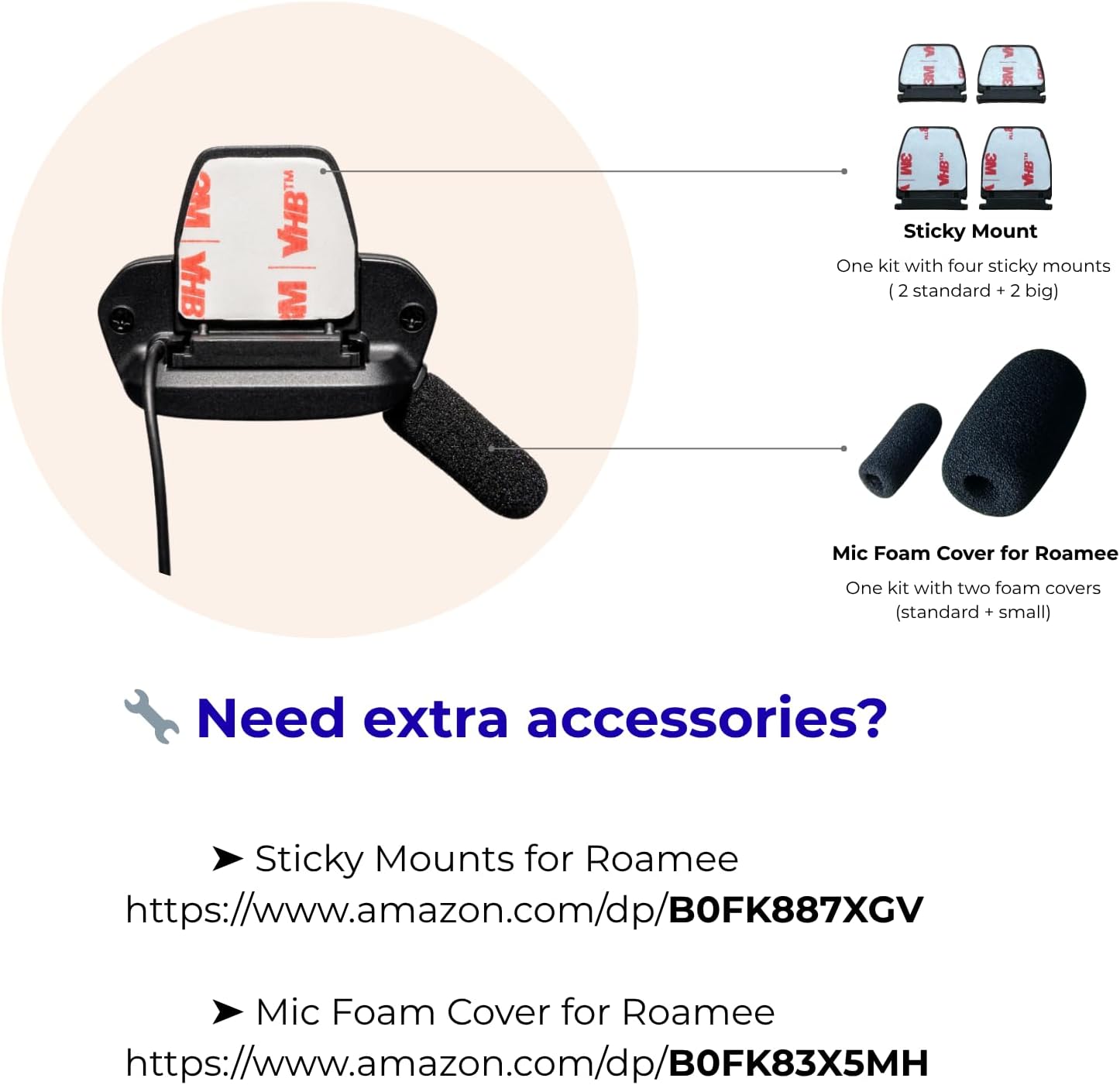
Image: Package contents of the Supertooth Roamee.
- Supertooth Roamee Main Unit (with attached speakers)
- USB Charging Cable
- Self-adhesive Holders (various sizes for universal fit)
- Microphone Foam Covers (small and big)
- User Manual
3. Installation Guide
The Supertooth Roamee is designed for quick and easy installation on most bicycle helmets. Follow these steps for optimal placement and performance:

Image: Detailed installation diagram for the Supertooth Roamee on a helmet.
- Select Appropriate Holders: Choose the correct size of self-adhesive holders based on the shape and surface area of your helmet. If the helmet's surface is too small or not flat enough, opt for the larger holders to ensure a secure fit.
- Attach Roamee Holders: Position the Roamee holders on your helmet near your ears. Ensure the directive beam-forming microphone points towards your mouth for clear voice pickup. The strong adhesive will secure the holders in place.
- Secure the Wire: Route and secure the wire connecting the two earpieces under the helmet foam. This keeps the wire tidy and prevents it from interfering with your ride.
- Optional Foam Installation: For better wind noise reduction, especially at high speeds or in strong wind conditions, insert the optional foam cover over the standard foam cover on the microphone.


Images: Supertooth Roamee mounted on a helmet.
4. Operating Instructions
4.1 Power On/Off
- Power On: Press and hold the main button until you hear an audible prompt or see an indicator light.
- Power Off: Press and hold the main button again until the device powers down.
4.2 Bluetooth Pairing
- Ensure the Roamee is powered off.
- Press and hold the main button until the indicator light flashes rapidly, indicating pairing mode.
- On your smartphone or Bluetooth-enabled device, search for "Supertooth Roamee" in the Bluetooth settings.
- Select the device to connect. Once paired, the indicator light will change, and you will hear a confirmation sound.
4.3 Intercom Function
The Roamee supports 2-way intercom communication with another Roamee unit, with a range of up to 300 meters.

Image: Intercom communication between two Roamee users.
- To initiate intercom: Briefly press the intercom button on both units.
- To end intercom: Briefly press the intercom button again.
4.4 Music Playback
Once paired with your smartphone, you can stream music directly to your Roamee unit.
- Play/Pause: Press the main button once.
- Next Track: Press the '+' button.
- Previous Track: Press the '-' button.
- Volume Up: Press and hold the '+' button.
- Volume Down: Press and hold the '-' button.
4.5 Call Management
Manage your phone calls hands-free while riding.
- Answer Call: Press the main button once.
- End Call: Press the main button once during a call.
- Reject Call: Press and hold the main button when a call comes in.
- Voice Assistant: Double-press the main button to activate your phone's voice assistant (Siri, Google Assistant).
4.6 Charging
The Roamee features a long-lasting battery. When the battery is low, connect the included USB charging cable to the charging port on the unit and to a power source. A full charge takes approximately 3 hours.
5. Product Specifications
| Feature | Specification |
|---|---|
| Model Name | ROAMEE |
| Connectivity Technology | Wireless (Bluetooth 5.2) |
| Noise Control | Adaptive Noise Cancellation, Echo Cancellation |
| Battery Life | Up to 8 Hours |
| Charging Time | 3 Hours |
| Intercom Range | Up to 300 meters |
| Frequency Range | 20 Hz - 20,000 Hz |
| Impedance | 32 Ohm |
| Water Resistance Level | Water Resistant |
| Material | Plastic, Rubber, Silicone |
| Item Weight | 6.4 ounces |
| Compatible Devices | Cellphones, Tablets |
| Special Features | Lightweight, Microphone Included, Rechargeable Battery, Sweatproof |
6. Troubleshooting
If you encounter any issues with your Supertooth Roamee, please refer to the following common problems and solutions:
- Device not powering on:
Ensure the battery is charged. Connect the Roamee to a power source using the USB cable and allow it to charge for at least 30 minutes before attempting to power on again. - Cannot pair with smartphone:
Make sure the Roamee is in pairing mode (flashing indicator light). Turn off and on your phone's Bluetooth. Move the devices closer to each other. If the issue persists, try restarting both the Roamee and your smartphone. - Poor audio quality or static:
Check the connection to your helmet speakers. Ensure the microphone is positioned correctly towards your mouth. Move away from sources of strong electromagnetic interference. If using intercom, ensure both units are within the 300-meter range. - Intercom not connecting:
Ensure both Roamee units are powered on and within range. Both units should be in intercom mode. Try powering both units off and on, then re-attempting the intercom connection. - Magnets not holding securely:
Ensure the helmet surface where the adhesive holders are applied is clean and dry. Apply firm pressure when attaching the holders. If the issue persists, consider replacing the adhesive pads or ensuring the unit is properly seated on the magnetic mount.
7. Care and Maintenance
To ensure the longevity and optimal performance of your Supertooth Roamee, follow these care and maintenance guidelines:
- Cleaning: Wipe the device with a soft, damp cloth. Do not use harsh chemicals or abrasive cleaners.
- Storage: Store the Roamee in a cool, dry place away from direct sunlight and extreme temperatures.
- Water Resistance: The device is water-resistant, but it is not designed for submersion. Avoid exposing it to heavy rain for extended periods or direct water jets.
- Battery Care: For long-term storage, charge the battery to approximately 50% every few months to maintain battery health.
8. Warranty and Support
The Supertooth Roamee comes with a manufacturer's warranty. For specific warranty terms and conditions, please refer to the warranty card included in your product packaging or visit the official Supertooth website.
For technical support, troubleshooting assistance beyond this manual, or warranty claims, please contact Supertooth customer service:
- Manufacturer: Supertooth
- Website: Visit the Supertooth Store on Amazon
- Refer to your product packaging for direct contact information or support channels.


