
SOVMIKU SFWTD403
SOVMIKU Solar Wireless Security Camera User Manual
Model: SFWTD403
1. Product Overview
The SOVMIKU SFWTD403 is a 400MP wireless security camera designed for both outdoor and indoor use. It features a solar panel for continuous power, two-way audio communication, advanced motion detection, and versatile night vision modes. This camera offers comprehensive surveillance with easy installation and remote monitoring capabilities.
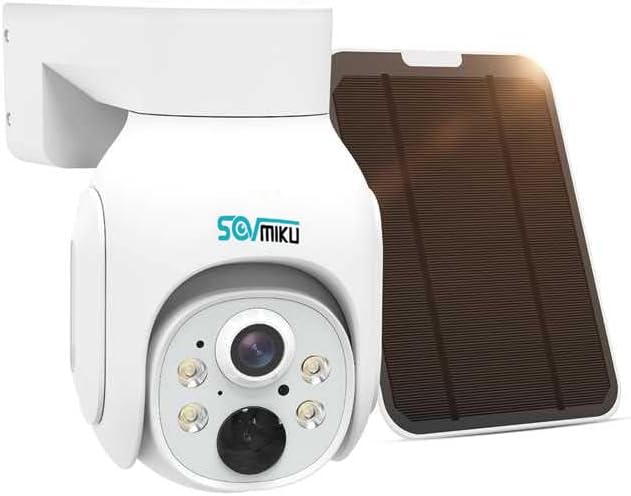
Image: SOVMIKU Solar Wireless Security Camera with an integrated solar panel for power.
2. Key Features
- 400MP High-Resolution Video: Provides clear and detailed images.
- 360-Degree Coverage: Offers a wide field of view with 355° horizontal and 90° vertical rotation.
- Solar Powered & Battery Operated: Equipped with a solar panel and a 9000mAh large-capacity battery, reducing the need for frequent charging. USB charging is also supported.
- Two-Way Audio: Built-in microphone and speaker for real-time communication.
- Advanced Night Vision: Supports full-color night vision and infrared night vision modes.
- Motion Detection & Alerts: Features AI detection for humans, vehicles, and pets, sending instant alerts to your smartphone.
- IP65 Waterproof & Dustproof: Designed to withstand various weather conditions, operating reliably from -10°C to 50°C.
- Easy Installation: Wireless design eliminates the need for complex wiring.
- Multi-Device & Share Functionality: Monitor from smartphones, tablets, and PCs, and easily share access with family and friends.
3. Setup and Installation
The SOVMIKU camera is designed for simple and quick installation without the need for complex wiring. Ensure the camera is placed in an area with adequate sunlight for optimal solar charging.
3.1 Unboxing and Components
Verify that all components are present in the package:
- SOVMIKU Wireless Security Camera
- Solar Panel (integrated or separate, depending on model variant)
- Mounting Bracket and Screws
- USB Charging Cable
- User Manual
3.2 Mounting the Camera
Choose a suitable location for installation, ensuring a clear view of the area you wish to monitor and sufficient sunlight exposure for the solar panel.
- Mark the drilling points using the mounting bracket as a template.
- Drill holes and insert wall plugs if necessary.
- Secure the mounting bracket to the wall or desired surface using the provided screws.
- Attach the camera to the mounting bracket.
- Adjust the solar panel angle to maximize sunlight exposure.

Image: The camera and solar panel are shown mounted on a wall, highlighting the simple, wire-free installation process.
3.3 Initial Power-Up and App Connection
The camera is powered by its internal battery, which can be charged via the solar panel or a USB cable. For initial setup, ensure the battery has sufficient charge.
- Download the dedicated mobile application (e.g., ESEECLOUD) from your smartphone's app store (iOS/Android).
- Register an account and log in.
- Follow the in-app instructions to add your new camera. This typically involves scanning a QR code on the camera or connecting to its temporary Wi-Fi hotspot.
- Connect the camera to your home's 2.4GHz Wi-Fi network.
4. Operating the Camera
4.1 Remote Monitoring and PTZ Control
Once connected, you can view live footage and control the camera remotely via the mobile app or PC software.
- Open the app to access the live view.
- Use the on-screen controls to pan (355° horizontal) and tilt (90° vertical) the camera to cover a full 360-degree area without blind spots.

Image: The camera's 360-degree coverage capability is illustrated, showing its ability to pan 355 degrees horizontally and tilt 90 degrees vertically, providing a comprehensive view of an outdoor area.
4.2 Two-Way Audio Communication
The camera supports two-way audio, allowing you to speak and listen through the camera.
- Tap the microphone icon in the app to speak. Your voice will be broadcast through the camera's speaker.
- The camera's built-in microphone captures audio from the monitored area.

Image: A delivery person at the door communicates with a resident inside via the camera's two-way audio feature, demonstrating its use for package delivery instructions.
4.3 Night Vision Modes
The camera offers enhanced night vision capabilities for clear monitoring in low-light or no-light conditions.
- Full-Color Mode: Utilizes built-in spotlights to provide color images at night.
- Infrared Mode: Uses infrared LEDs for black and white night vision, ideal for discreet monitoring.
- You can switch between modes or set the camera to automatically select based on light conditions.

Image: Comparison of full-color night vision and infrared night vision, showing the camera's ability to capture clear images in darkness.
4.4 Motion Detection and Alerts
The camera's intelligent motion detection system can identify human, vehicle, and pet movements, reducing false alarms.
- When motion is detected, the camera automatically records and sends an alert to your smartphone.
- You can customize detection zones and sensitivity settings within the app.
- The camera can also activate a sensor light and sound an alarm upon detection.

Image: An illustration of the motion detection alarm feature, showing a smartphone receiving an alert and the camera's light activating upon detecting movement at night.
4.5 Multi-Device Support and Sharing
Monitor your property from anywhere using various devices and share access with trusted individuals.
- The camera supports monitoring via smartphones (iOS/Android), tablets, and PCs (Mac OS/Windows).
- Easily share device permissions with family members or friends through the app, allowing them to view and manage the camera remotely.

Image: This image illustrates the camera's multi-device support and sharing capabilities, showing users monitoring from various locations across Japan using different devices.
5. Power Supply and Battery Management
The SOVMIKU camera is designed for energy efficiency, utilizing both solar power and a large-capacity internal battery.
- Solar Charging: The adjustable solar panel continuously charges the internal 9000mAh battery, providing uninterrupted power.
- USB Charging: For initial setup or in periods of low sunlight, the camera can be charged via a standard USB cable.
- The camera is designed to operate stably even on rainy or cloudy days due to its efficient power management.

Image: This image illustrates the dual power options: continuous charging via the adjustable solar panel and alternative charging via USB.
6. Maintenance and Care
To ensure the longevity and optimal performance of your SOVMIKU camera, follow these maintenance guidelines:
- Weather Resistance: The camera has an IP65 waterproof and dustproof rating, allowing it to operate reliably in various weather conditions, including rain and snow. It is designed to function in extreme temperatures from -10°C to 50°C.
- Cleaning: Periodically wipe the camera lens and solar panel with a soft, damp cloth to remove dust and debris. Do not use harsh chemicals or abrasive materials.
- Firmware Updates: Check the mobile application regularly for firmware updates to ensure your camera has the latest features and security enhancements.
- Battery Health: While solar-powered, occasional USB charging in prolonged low-light conditions can help maintain battery health.

Image: The camera is shown enduring rain, emphasizing its IP65 waterproof and dustproof capabilities and its ability to operate in temperatures ranging from -10°C to 50°C.
7. Troubleshooting
If you encounter issues with your SOVMIKU camera, please refer to the following common troubleshooting steps:
| Problem | Possible Cause | Solution |
|---|---|---|
| Camera offline/Cannot connect | Weak Wi-Fi signal, incorrect Wi-Fi password, camera battery low. | Check Wi-Fi signal strength, ensure correct password, fully charge the camera via USB. Relocate camera closer to router if signal is weak. |
| Motion alerts not received | App notifications disabled, motion detection sensitivity too low, detection zone not set correctly. | Enable app notifications in your phone settings. Adjust motion detection sensitivity and detection zones in the camera app. |
| Poor image quality at night | Lens dirty, incorrect night vision mode selected, insufficient ambient light for color mode. | Clean the camera lens. Switch between full-color and infrared night vision modes to see which provides better clarity for your environment. |
| Battery not charging via solar | Insufficient sunlight, solar panel dirty or obstructed, faulty connection. | Ensure solar panel is in direct sunlight and free from obstructions. Clean the solar panel surface. Check the connection cable between the panel and camera. |
If the problem persists, please contact SOVMIKU customer support for further assistance.
8. Specifications
| Feature | Detail |
|---|---|
| Product Dimensions (LxWxH) | 12 x 3 x 3 cm |
| Product Model Number | SFWTD403 |
| Product Weight | 940 g |
| Recommended Use | Night Vision, Home Security |
| Brand | SOVMIKU |
| Connectivity Technology | Wireless (Wi-Fi 2.4G) |
| Special Features | Night Vision, Motion Sensor |
| Compatible Devices | Smartphone (iOS/Android) |
| Power Source | Solar Powered |
| Color | Dome Add-on Camera (White) |
| Included Components | 1/8-Inch Collet |
| Battery Included | Yes |
| Battery Type | Alkaline |
9. Warranty and Support
SOVMIKU is committed to providing excellent customer service and support for our products.
9.1 12-Month Warranty
We offer a 12-month warranty from the date of product delivery. Our professional staff is dedicated to providing thorough and friendly support. If you encounter any issues with your product, please do not hesitate to contact us.
9.2 Contact Information
- Email Support: sovmiku_JP@163.com
- LINE Service: Scan the QR code below or visit the link to access SOVMIKU's official LINE account for product usage tips, troubleshooting, expansion, and installation consultations. Our expert staff will provide polite support.

Image: QR code for quick access to SOVMIKU's official LINE service.
Direct Link: https://line.me/ti/p/wsh_rWFDVy
Related documentsSFWTD403


Ask a question about this manual
Ask about setup, troubleshooting, compatibility, parts, safety, or missing instructions. Manuals+ will review the question and use this page’s manual context to help answer it.