
1. Introduction
This manual provides detailed instructions for the installation, operation, and maintenance of your VIOFO A229 Pro 4K HDR Dash Cam and HK4 Hardwire Kit. The A229 Pro is a dual-channel dash cam system featuring pioneering Sony STARVIS 2 image sensors (IMX678 and IMX675) for superior 4K front and 2K rear recording, enhanced by HDR technology for optimal clarity day and night. It also includes advanced features such as 5GHz Wi-Fi, GPS, and voice control for a comprehensive driving security solution.

Image: The VIOFO A229 Pro dash camera, rear camera, and HK4 hardwire kit components.
2. Product Components
The VIOFO A229 Pro bundle includes the following items:
- VIOFO A229 Pro Dash Camera (Front)
- Rear Camera
- HK4 Hardwire Kit
- Rear Camera Cable (6 meters / 19.7 feet)
- Car Charger (Dual Port)
- Type-C Data Cable
- Trim Removal Tool
- Windshield Static Stickers (x2)
- Circular Polarizing Lens (CPL)
- User Manual
- Spare Mount Sticky Pads

Image: A visual representation of all components included in the VIOFO A229 Pro package.

Image: Detailed view of the HK4 Hardwire Kit, including the main unit and fuse taps.
3. Setup and Installation
3.1 Dash Cam Installation
- Clean the windshield area where the dash cam will be mounted.
- Apply the static windshield sticker to the desired location on the windshield.
- Attach the dash cam mount with the pre-applied 3M adhesive to the static sticker. Ensure the lens has a clear view of the road.
- Connect the rear camera to the main dash cam unit using the provided rear camera cable.
- Route the cables neatly along the windshield and interior trim, using the trim removal tool if necessary.
- Connect the car charger to the dash cam and plug it into your vehicle's 12V power outlet.

Image: Illustration of the front and rear dash camera placement in a vehicle.

Image: Diagram showing how to connect the rear camera cable and car charger to the dash cam.
3.2 HK4 Hardwire Kit Installation (for Parking Modes)
The HK4 Hardwire Kit is required to enable the dash cam's parking surveillance modes. It provides continuous power to the dash cam even when the vehicle is turned off, while protecting against battery discharge.
- Identify your vehicle's fuse box location (refer to your vehicle's owner's manual).
- Connect the red wire of the HK4 kit to a constant fuse slot (always on).
- Connect the yellow wire of the HK4 kit to an ACC fuse slot (powers on with ignition).
- Connect the black wire of the HK4 kit to a metal ground wire or bolt on the vehicle chassis.
- Connect the Type-C end of the HK4 kit to the dash cam's power input.

Image: Detailed wiring diagram for the HK4 Hardwire Kit, showing connections to battery, ACC, and ground, along with battery discharge prevention information.
4. Operation
4.1 Basic Recording
Once powered on, the A229 Pro will automatically begin recording. The front camera records in 4K (2160P) and the rear camera in 2K (1440P) simultaneously. The dash cam supports continuous loop recording, overwriting the oldest files when the memory card is full.
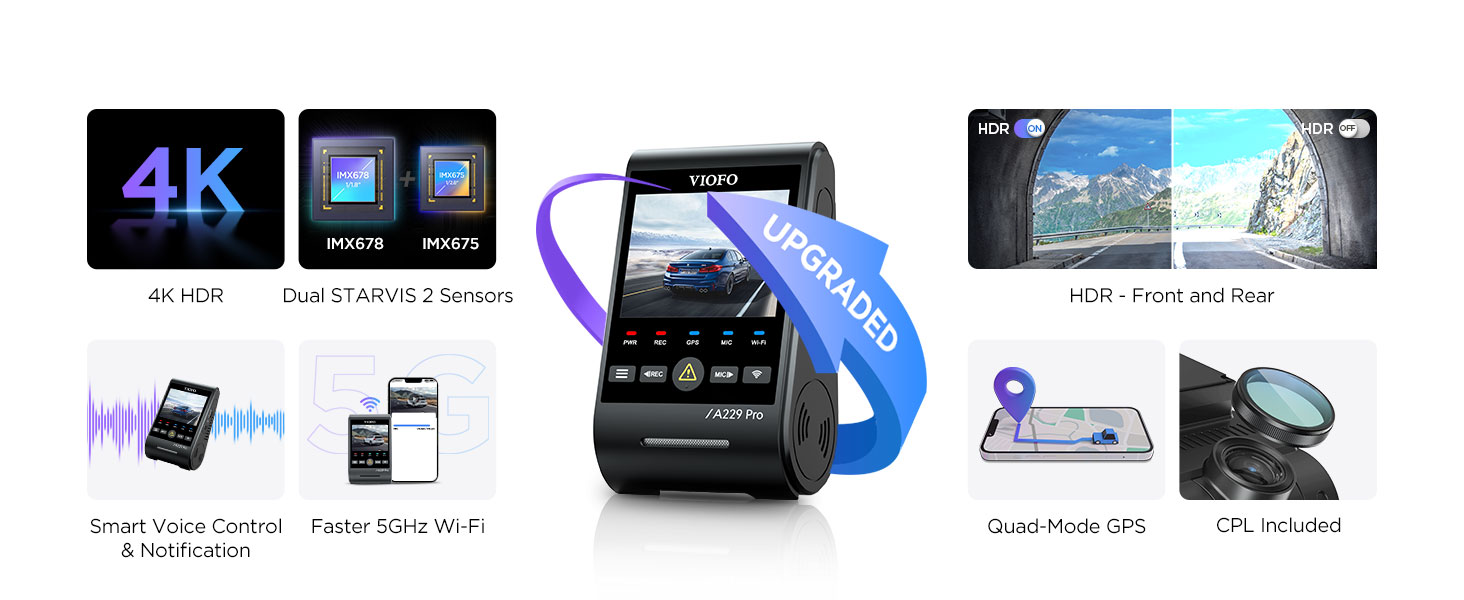
Image: Visual comparison of 4K front and 2K rear recording quality, highlighting clarity.
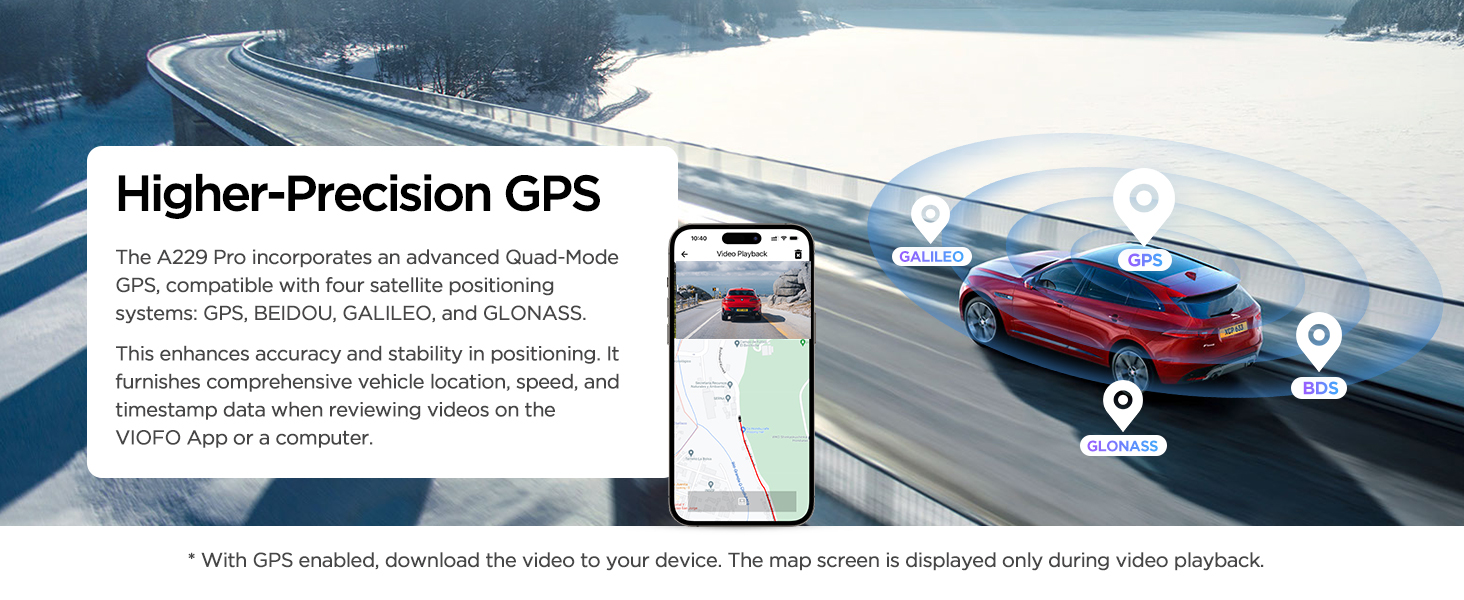
Image: Illustration of loop recording functionality and how the G-sensor automatically locks important video segments during incidents.
4.2 Smart Voice Control
The A229 Pro supports hands-free voice commands for convenient operation. You can issue commands such as:
- "Take photo"
- "Lock the video"
- "Turn on Wi-Fi" / "Turn off Wi-Fi"
- "Turn on audio" / "Turn off audio"
- "Show front camera" / "Show rear camera"
The dash cam also provides clear voice notifications for settings adjustments and memory card issues.

Image: Depiction of a driver using voice commands to control the dash cam, such as taking a photo or locking video.
4.3 5GHz Wi-Fi & App Control
Connect your A229 Pro to the VIOFO app on your mobile device via the faster 5GHz Wi-Fi connection. This allows for:
- Effortless configuration and settings adjustments.
- Live preview of recordings.
- Convenient video downloading and sharing.

Image: Illustration showing the dash cam connecting to a smartphone via 5GHz Wi-Fi for app control and video management.
4.4 Parking Modes
With the HK4 Hardwire Kit installed, the A229 Pro offers three parking surveillance modes:
- Auto Event Detection (Buffered): The camera records 15 seconds before and 30 seconds after detecting a moving object or impact.
- Low Bitrate Recording: Records continuously at a lower bitrate to save storage space while maintaining video quality.
- Time Lapse Recording: Records continuously at a low frame rate (e.g., 1/2/3/5/10/15 fps) to compress long periods into short videos.

Image: Visual explanation of the three parking modes: Auto Event Detection, Low Bitrate Recording, and Time Lapse Recording.
5. Key Features and Technologies
5.1 Dual STARVIS 2 Sensors & HDR
The A229 Pro is equipped with dual Sony STARVIS 2 image sensors (IMX678 for the front and IMX675 for the rear). These sensors, combined with cutting-edge HDR (High Dynamic Range) technology, provide:
- Exceptional 4K front and 2K rear video quality.
- Wider dynamic range and higher light sensitivity.
- Reduced noise and motion blur, especially in low-light conditions.
- Accurate license plate recognition even in challenging lighting or high-speed scenarios.

Image: Diagram illustrating the dual STARVIS 2 sensors (IMX678 and IMX675) and their benefits for image quality.

Image: Side-by-side comparison demonstrating the improved clarity and detail with HDR enabled versus disabled, especially for license plates at night.
5.2 Higher-Precision GPS
The A229 Pro incorporates an advanced Quad-Mode GPS, compatible with four satellite positioning systems: GPS, BEIDOU, GALILEO, and GLONASS. This enhances accuracy and stability in positioning, providing detailed vehicle location, speed, and timestamp data to the video files. When reviewing videos on the VIOFO App or a computer, the map screen is displayed during video playback.

Image: Illustration of the dash cam's multi-satellite GPS system providing accurate location and speed data.
5.3 Circular Polarizing Lens (CPL)
A CPL filter is included to reduce reflections and glare off glass and road surfaces, significantly improving image clarity and contrast, especially in bright conditions.

Image: Comparison showing the effect of the CPL filter on reducing reflections, alongside an illustration of the optional Bluetooth remote control.
5.4 Optional Bluetooth Remote Control
An optional Bluetooth remote control can be positioned in a convenient location for safe and easy use while driving. Pressing the button will instantly protect the current video clip and image. Control distance is up to 5 meters.
6. Maintenance
6.1 MicroSD Card Requirements
The dash cam does not include a microSD card. A high-speed U1/U3 microSD card is required for operation. The A229 Pro supports up to 512GB microSD cards. It is recommended to use VIOFO industrial high endurance microSD cards for optimal performance and longevity.

Image: Information on supported microSD card capacities and types, highlighting VIOFO's recommended high endurance cards.
6.2 Formatting the Memory Card
Regularly format the microSD card within the dash cam's settings menu to ensure stable recording performance and prevent data corruption. This can be done through the dash cam's user interface.

Image: Screenshots of the dash cam's user interface, including options for video settings, loop recording, and memory card formatting.
6.3 Firmware Updates
Firmware updates can improve performance and add new features. Check the official VIOFO website for the latest firmware versions and instructions on how to update your dash cam.
6.4 Cleaning
Gently clean the dash cam lens with a soft, lint-free cloth to ensure clear recordings. Avoid using abrasive cleaners or solvents.
7. Troubleshooting
If you encounter issues with your VIOFO A229 Pro, consider the following common solutions:
- Dash cam not powering on: Ensure the power cable is securely connected to both the dash cam and the power source (car charger or hardwire kit). Verify the vehicle's 12V outlet or fuse box connection. Use only the original car charger or hardwire kit.
- Recording issues (e.g., freezing, errors): Format the microSD card regularly. Ensure you are using a high-speed (U1/U3) and high-endurance microSD card from a reputable brand. Try a different microSD card to rule out card issues.
- Poor night vision clarity: While the A229 Pro features advanced night vision, extreme low-light conditions can still affect clarity. Ensure the windshield is clean and the lens is free of smudges.
- GPS signal loss: Ensure the dash cam has a clear view of the sky. Avoid mounting it in areas obstructed by metallic tints or other electronic devices that might interfere with the signal.
- Wi-Fi connection issues: Ensure the dash cam's Wi-Fi is enabled. Try restarting both the dash cam and your mobile device.
For further usage guidance and detailed troubleshooting, check the FAQ section on the official VIOFO website.

Image: Important tips covering charging instructions, microSD card requirements, rear camera cable usage, screen saver settings, and GPS logger information.
8. Specifications
| Feature | Specification |
|---|---|
| Model Name | A229 Pro |
| Video Capture Resolution | Front: 4K 2160P; Rear: 2K 1440P |
| Image Sensors | Dual Sony STARVIS 2 (IMX678 & IMX675) |
| Special Feature | Voice Control, HDR, Parking Modes |
| Connectivity Technology | 5GHz Wi-Fi, GPS |
| Field Of View | 135 Degrees |
| Mounting Type | 3M Sticker & Static Windshield Stickers |
| Included Components | Dash Cam, Rear Cam, HK4 Hardwire Kit, Cables, CPL, User Manual |
| Color | Black |
| Manufacturer | VIOFO |

Image: Visual representation of the dash cam's 2.4-inch HD screen, rotatable lens, and overall product dimensions.
9. Warranty and Support
VIOFO is committed to providing reliable customer service for its products:
- 30-Day Return Policy: Refer to your purchase platform's return policy for details.
- 24/7 Dedicated Customer Support: Assistance is available around the clock for any inquiries or issues.
- 24-Month Free Repair Coverage: The product is covered by a 24-month warranty for free repairs.
For support, please visit the official VIOFO website or contact their customer service team directly.

Image: Overview of VIOFO's customer service commitments, including return policy, support availability, and repair coverage.


